Snap! Mobile
- 25.00
- 3.4
- Installs
- 100.00K
- Price
- Free

Screenshots
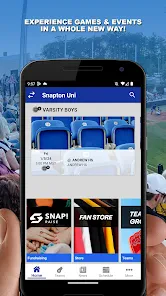
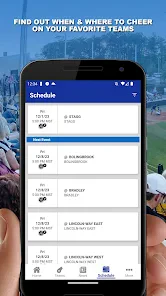
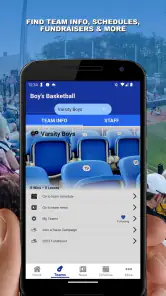
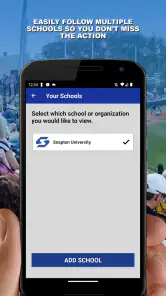
Analysis by Reviewed
I’d approach Snap! Mobile as a tool for the people who keep a school, club, or community sports program moving, rather than as a personal photo editor. It is a free sports app from Snap! Mobile Inc, and its role is to bring athletics and activities into a software platform. That makes it most relevant when you are following a team or helping coordinate one; if you simply want to edit photos, this is the wrong app for that job.
The name can make the app sound like a camera or social-photo product, so it is worth setting expectations before you install it. I would judge it by whether it makes sports-related communication and participation easier in your situation, not by filters, image exports, or an in-app photo community. A useful first question is whether the organization you care about uses it. Without that connection, a sports platform may have little to offer you day to day.
Getting oriented before you rely on it
Where people can get stuck
For a parent, athlete, or supporter, the first friction point is often not learning a complicated tool; it is figuring out whether the right team or activity is represented in the app and how to connect with it. I would start with the school, club, or organizer and confirm that they use Snap! Mobile for the program you want to follow. A general search or install by itself does not necessarily put the relevant team information in front of you.
For a coach or volunteer, the challenge is different. A platform only helps when the people who need it know where to go and what they are expected to check. If schedules or notices continue to arrive through a mixture of texts, email, and paper, families can reasonably wonder which source is current. Before moving a group’s routine into the app, I’d agree on one clear habit: where an update will appear and how members should check for it.
That small conversation can prevent a familiar problem: someone installs the app, sees little that is immediately useful, and assumes it is broken. In a team setting, the organizer’s setup and the user’s connection to the correct activity matter as much as the app itself. I would ask the organizer for the exact instructions they want members to follow instead of guessing at a team name or trying unrelated areas.
Setup checks that save time
Snap! Mobile is rated for Everyone and is available at no charge, which makes trying it a low-cost decision. It has a 3.4 average from 62 ratings, so I would treat the experience as mixed rather than assume every user will find setup effortless. The app was released on Dec 20, 2023, and its current version is 172.20.4; on Android, the listed minimum operating-system requirement is 10. Those details are useful when an older device is involved, since an installation problem can come from compatibility rather than from a team account.
My practical setup order would be simple. First, check that the device can run the app and that its software is reasonably up to date. Next, use the organization’s own instructions, including the name of the program or team they expect you to find. Then verify that you are using the account or contact details the organizer associates with your participation. If the app opens but the expected activity does not appear, I would check those basics before repeatedly reinstalling it.
More From Our News Desk

Clash of Clans Is Won Between the Battles

Android Auto Makes the Case for Quieter Car Software

MobiOffice: Transforming Mobile Productivity with Seamless Integration

EA SPORTS FC™ Mobile Soccer: Redefining Mobile Sports Gaming

How Microsoft OneDrive Became a Mobile Productivity Giant

How Google Translate Breaks Language Barriers Effortlessly
It also helps to choose a sensible notification routine. If the app offers notification controls on your device, decide whether you need immediate alerts or would rather check at set times; the right choice depends on your role and how time-sensitive team messages are. I would avoid switching off every alert before understanding how the group communicates, but I would also avoid letting every phone notification interrupt school, work, or practice. A deliberate setting is more useful than an all-or-nothing approach.
Recovering a routine when something goes wrong
Imagine a parent checking the evening before a game and not seeing the expected information. The fastest response is usually to confirm the team’s plan with the coach or organizer through the channel the group already trusts. That establishes whether the detail was posted, changed, or never intended to be shared through this app. Once the organizer confirms the intended destination, the parent can return to the app and check the relevant area rather than searching at random.
If the app seems unresponsive, I would close and reopen it, check the internet connection, and try again when the connection is stable. If a screen is missing information, I would make a note of what I expected to see and when I last checked, then ask the organizer whether the information has been added. These are basic troubleshooting steps, not a guarantee that every issue is local, but they help separate a temporary device or connection problem from a setup question.
For a volunteer coordinating a group, recovery also means keeping a fallback communication path. If a family cannot access the app, a short direct message about an urgent change is kinder and more reliable than assuming everyone has seen it. That does not make the app redundant; it prevents one access problem from turning into a missed pickup or a wasted trip. Once things settle, the organizer can help the person return to the usual routine.
When the app may not be the cause
It is tempting to blame the software when a schedule looks incomplete, but sports information depends on people entering and maintaining it. A late change may not appear until an organizer updates the relevant information, and one family’s view may differ simply because they are connected to a different activity or using different account details. I would check with the person responsible for the program before treating a missing item as an app failure.
The same caution applies to alerts. A quiet phone does not automatically mean a message was never sent: device notification settings, a weak connection, or the way the organization distributes updates can all affect what a user notices. If the information matters, open the app and check directly rather than relying entirely on a notification preview. For an urgent event change, confirm with the organizer through an established backup channel.
As a general sports platform, it also sits in a different lane from a team’s own website, a group chat, or a calendar app. A website can be easier for someone who only needs a public schedule; a chat may feel faster for informal conversation; a calendar is often better for personal reminders. The advantage of a purpose-built platform is the possibility of keeping sports participation connected to the organization’s chosen workflow. The trade-off is that it is only as useful as that organization’s adoption and consistency.
Who will get the most from it
I can see the strongest fit for families with children in organized athletics, athletes who need to stay connected to a program, and coaches or volunteers who want a shared place for activity-related coordination. It makes particular sense when several people in a household need the same team context. One parent can check the details while another handles transportation, rather than passing along every update manually.
A realistic use case is a busy weekday when a parent is leaving work and needs to check whether the evening’s plan is still the one they expected. The app can be part of that check if the team uses it consistently. I would still verify an unusual or last-minute change with the organizer, especially if acting on the wrong information would mean a missed practice. The practical benefit is less about a flashy feature and more about having a predictable place to look.
Coaches and volunteers may also benefit when they are trying to reduce repeated questions. If families know where the organization places updates, the organizer can point everyone to a common routine instead of answering the same logistical question individually. But this only works if the organizer keeps the routine clear and maintains the information. The app cannot compensate for a group that has not decided how it wants to communicate.
Where I would choose something else
I would skip it if the team or activity you care about does not use Snap! Mobile, or if you only want a personal sports calendar, live scores, training plans, or photo editing. Those are different needs, and a calendar, sports-news app, or dedicated editing tool would be a more direct choice. Installing a platform without an organization to connect it to is unlikely to create value by itself.
It may also be a poor fit for a group that already has a dependable system everyone understands and has no reason to move. Adding another app can increase confusion if members are unsure whether to check email, a chat, a website, or this platform. Before asking a team to adopt it, I would compare the inconvenience of the current routine with the effort of teaching a new one. A switch is worthwhile only if it makes the group’s actual coordination clearer.
Snap! Mobile has 100K+ installs, but that does not tell me whether a particular school or club uses it well. The developer, Snap! Mobile Inc, positions it for athletics and activities; in practice, the value for an individual depends on the organization’s setup and habits. I would treat the app as a shared tool, not a standalone source of sports content that will be equally useful to every user.
My practical verdict
My recommendation is conditional but straightforward: install it when a school, team, or activity organizer has asked you to use it, then follow their setup instructions and make it part of a clear checking routine. For that audience, a shared sports platform can be more convenient than scattered messages, provided the group actually uses it. If you are browsing for an all-purpose sports app without a specific organization in mind, I would look for a product built around the particular task you want.
The average rating of 3.4 suggests that people’s experiences are not uniformly smooth, so I would keep expectations practical. Think of it as a coordination aid whose usefulness rests partly on how the program is run, rather than a tool that can solve every communication gap on its own. When details are missing, check the organization’s process; when access fails, verify your device, connection, and account path before assuming the team has not shared anything.
Overall, I would recommend giving it a try when it connects you to a real sports or activities group. It is free, intended for Everyone, and focused on the kind of shared participation where a consistent routine matters. Just make sure you know which team you are joining, where the organizer expects updates to appear, and what backup channel to use for urgent changes. That is the difference between an app sitting unused on your phone and one that genuinely helps you keep up.
Features That Make You Go Wow
So, what's the big deal about Snap! Mobile? Well, for starters, the app offers a plethora of filters that can transform your photos from "meh" to "wow" in just a few taps. We're talking about everything from vintage vibes to futuristic feels. The range is pretty impressive, and each filter is designed to enhance your photos without making them look overdone.
Easy Peasy Editing
One of the standout features of this app is just how easy it is to use. Seriously, even if you’re not the most tech-savvy person around, you’ll find it a breeze. The interface is super intuitive, with all the tools you need right at your fingertips. Cropping, adjusting brightness, contrast, and even adding text is as simple as pie. You don’t need to be a pro to make your photos look professional.
Sharing is Caring
Once you’ve perfected your masterpiece, sharing it with the world is just a tap away. The app seamlessly integrates with all major social media platforms, so you can flaunt your creations on Instagram, Facebook, or wherever else you like to hang out online. Plus, it supports high-resolution exports, which means your photos will always look crisp and clear.
Oh, and did I mention that there’s a built-in community where you can share your photos and get inspired by others? It’s like having a mini Instagram right inside the app!
Performance and Reliability
Now, let’s talk about performance. I’ve tried a fair share of photo apps, and I have to say, it is pretty solid. It runs smoothly, doesn’t crash, and loads quickly. Whether you’re working on a quick edit or diving into more detailed adjustments, the app handles it all like a champ.
However, like any app, it has its quirks. Occasionally, the app might take a few extra seconds to apply a filter if you’re working with a high-resolution image, but it’s nothing too bothersome.
Final Thoughts
All in all, it is a fantastic tool for anyone who loves photography and wants to up their game without breaking a sweat. It’s packed with features that are both fun and functional, making it a great companion for casual snappers and serious photographers alike. So go ahead, give it a whirl, and watch your photos come to life!
Snap! Mobile Frequently Asked Questions
Who is Snap! Mobile designed for?
Snap! Mobile is a sports app from Snap! Mobile Inc, described as an essential software platform for athletics and activities. It is aimed at people who take part in or support those programs, rather than serving as a general photo-editing or social media tool. Its Everyone content rating makes it suitable for a broad audience, though the usefulness of the app will depend on whether the athletics or activities you follow use Snap! Mobile.
What is Snap! Mobile and how does it work?
Snap! Mobile is a versatile app designed for both Android and iOS users, offering a seamless way to capture, edit, and share photos and videos. The app provides a user-friendly interface with various tools for enhancing media content. Users can easily apply filters, adjust settings, and share their creations directly on social media platforms, making it a perfect choice for content creators and social media enthusiasts.
Is Snap! Mobile free to use or does it have any hidden costs?
Snap! Mobile is free to download and use, providing essential features at no cost. However, it offers in-app purchases and subscription options for advanced features and additional content. Users can choose to upgrade for a more comprehensive experience, including exclusive filters and editing tools. Ensure to review the app's pricing details in the app store to avoid unexpected charges.
What devices and operating systems are compatible with Snap! Mobile?
Snap! Mobile is available for Android and iOS. On Android, it requires version 10 or later, so check your device’s operating system before downloading. Confirm compatibility on the relevant app store for your specific device, and keep the app updated to use its current release. This can help avoid installation issues and ensure you have the latest version available for your platform.
How secure is my data on Snap! Mobile?
Snap! Mobile prioritizes user privacy and data security. It employs robust encryption methods to protect user information and media content. The app also provides options for two-factor authentication, ensuring an additional layer of security for your account. Users are encouraged to review the app's privacy policy to understand how their data is handled and protected.
Pros
- User-friendly interface
- easy to navigate.
- Offers robust collaboration tools.
- Cross-platform compatibility.
- Fast and responsive performance.
- Secure data encryption.
Cons
- Limited offline functionality.
- Occasional sync issues.
- High storage usage.
- Subscription required for premium features.
- Limited customization options.
- Category
- Sports
- Version
- 172.20.4