Skechers
- 1.10K
- 3.9
- Installs
- 500.00K
- Price
- Free

Screenshots
Analysis by Reviewed
I find a brand-shopping app most useful when it solves a practical problem, not just when it puts product photos on a phone. Skechers Plus is aimed at people who already shop for Skechers footwear and want a direct way to browse the brand, keep an eye on offers, and place an order. It is free, and Skechers USA is the developer. The app has an average rating of 3.9 from around 2,800 ratings, which suggests a generally useful experience with enough room for individual preferences to show through.
When one phone serves several shoppers
For a household, the useful role here is helping people discuss a possible purchase before anyone checks out. A parent can browse options with a child, or two adults can compare pairs they need for different routines, without making the app a substitute for the conversation. I’d treat a shared device as a place to research together, not as proof that everyone’s preferences, sizes, and purchase decisions belong to one person.
That distinction matters when the same phone is passed around. Before handing it to another shopper, I’d say whose pair we are looking at and what still needs deciding. It sounds simple, but it prevents a selected size or a product left in the basket from being mistaken for a household-wide choice. If several people are shopping at once, taking turns to make a short list is clearer than switching quickly between unrelated needs.
Shopping together without sharing everything
In a household where several people wear Skechers, the app can make comparing options easier. One person might be looking for everyday walking shoes while another needs a different style; browsing in one place can help narrow the choices before anyone commits to buying. The practical benefit is less about turning the phone into a family account and more about having the brand’s shopping experience close at hand when a need comes up.
Getting Started with the App
First things first, installing the Skechers app was a breeze. Available on both Android and iOS, you can find it easily in your app store. Once downloaded, the user interface greets you with a clean and intuitive design. It's like walking into a well-organized store where you can instantly spot what you're looking for.
The current version is 9.10.1 and it requires iOS 11 or later. I’d treat it as a focused shopping app rather than a general footwear marketplace: its strength is keeping Skechers products and brand offers together, while a multi-brand retailer is the better choice if you want to compare several labels in the same session. With over 500,000 installs, it has found an audience among shoppers who want that direct route.
Exploring Features
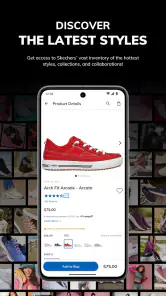
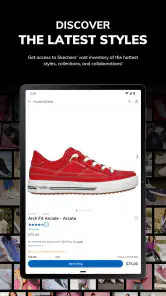
The app is packed with features that make shopping for shoes a delightful experience. There's a smart search function that lets you filter by size, color, style, or even by collection. Whether you're eyeing those trendy sneakers or need something more formal, the app's got you covered.
More From Our News Desk

Clash of Clans Is Won Between the Battles

Android Auto Makes the Case for Quieter Car Software

MobiOffice: Transforming Mobile Productivity with Seamless Integration

EA SPORTS FC™ Mobile Soccer: Redefining Mobile Sports Gaming

How Microsoft OneDrive Became a Mobile Productivity Giant

How Google Translate Breaks Language Barriers Effortlessly
For practical browsing, I’d decide what matters before opening the search: intended wearer, size, and the sort of use the shoes need to handle. That way, a long list of results becomes a comparison of plausible options rather than a scroll through every style. When size is uncertain, I’d keep more than one candidate in the shortlist and avoid treating a filter as a guarantee that a shoe will feel right.
When I’m shopping for more than one person, I’d use those filters as a shortlist rather than assume one person’s preferences will suit everyone. Pick a size and style for each intended wearer, then pause to compare the candidates together before checkout. That simple handoff helps avoid the common shared-device mistake of treating the currently selected size as if it applied to the whole household.
One of the coolest features is the 'Try Before You Buy' option. Using augmented reality, you can see how a pair of shoes will look on your feet before making a purchase. It's like having a virtual mirror right in your pocket! This feature alone has saved me countless trips to the store.
Keeping household choices clear
A shared phone can be convenient, but I’d keep the distinction between browsing and buying clear. Let each person say which pair they want and confirm the selected size and style before an order is placed. That’s especially useful when someone is shopping on behalf of another family member: a saved preference or an attractive image is not a substitute for checking the actual item details in the basket.
For a realistic everyday example, imagine noticing that a child’s current shoes are no longer comfortable while planning the week’s errands. You can browse together, compare a few options, and decide whether to order from home or visit a shop to assess fit in person. The app is useful for the research and selection part; the final choice still benefits from the wearer’s input, particularly when fit or comfort is uncertain.
There is also a useful trade-off between shopping on the phone and going straight to a store. App browsing is handy when you want to narrow down colors or styles at home, but a screen cannot replace wearing a pair and judging comfort. If the wearer is particular about fit, or needs to know how the shoes feel during movement, I’d use the app to identify possibilities and then choose an in-person try-on rather than forcing a decision online.
Staying in the Loop
If you're a fan of staying updated with the latest trends, the app offers push notifications that alert you to new arrivals and exclusive deals. I love how these notifications aren't overwhelming; they come at just the right time to keep you informed without being intrusive.
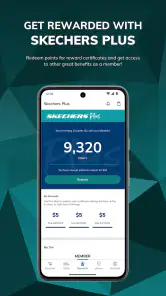
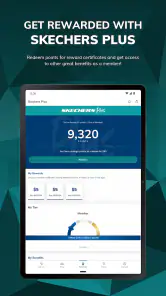
For a household, I’d be selective about notifications rather than letting every shopper respond to the same alert. A deal is only helpful if it matches a real need, and a quick check of the product and size is wiser than buying simply because an offer appeared. Skechers Plus presents VIP access to exclusive offers, alongside free shipping and returns, which can make it worth checking when you already intend to shop; it is less compelling if you rarely buy from the brand.
There's also a community aspect where you can read reviews from other users and even share your own experiences. It's like having a virtual group of friends who are just as shoe-obsessed as you are!
I’d read customer comments as clues rather than as a final verdict. A review may help flag a detail worth checking, but another shopper’s experience cannot settle whether a pair suits a different foot or use. When comparing options, I’d look for comments that address the same concern I have, then make the decision based on the product details and the wearer’s needs instead of relying on a single enthusiastic or negative reaction.
Accounts and household coordination
For a shared device, it helps to settle a few boundaries before browsing: who is using the phone, whose needs are being considered, and who is responsible for any order. I would not assume that a shared shopping session means a shared account is appropriate for every household. Keeping those roles clear can make the app convenient without blurring personal choices or spending responsibilities.
If one adult is collecting options for another person, I’d send or show the shortlist and ask for a direct confirmation before moving to checkout. That small pause is more dependable than trying to reconstruct later which color or size someone preferred. It is especially worthwhile when an offer creates a sense of urgency: deciding who actually wants the item first is more useful than reacting to the timing of a notification.
Checkout, accounts, and age context
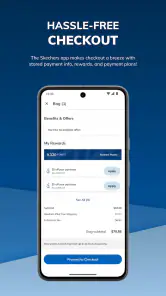
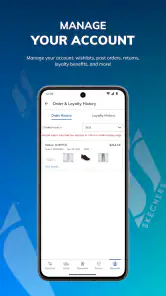
When it comes to purchasing, the checkout process is straightforward and secure. You can save your payment details for faster checkouts in the future, and there's even an option to track your order once it's shipped. Trust me, the excitement of knowing exactly when your new kicks will arrive is real!
On a shared device, I’d avoid treating saved payment details as a convenience for everyone. The person responsible for the purchase should review the basket and handle the final payment step, especially if other household members have been browsing. That keeps a casual browse from becoming an accidental order and makes it easier to keep shopping decisions and spending responsibilities clear.
The app is rated for Everyone, so its age classification is broad, but that does not mean every child should make purchases independently. I’d involve younger shoppers in choosing and checking options while leaving account and payment decisions with the responsible adult. That’s a sensible boundary for any shopping app, without assuming the app provides family controls.
For adults deciding whether it is worth installing, the main question is how often they shop this brand. Someone who expects to buy Skechers can use a dedicated brand app to keep browsing and offers in one place; an occasional buyer may get more value from a general footwear retailer that makes cross-brand comparison easier. I’d also consider the household’s shopping habits: if everyone wants different labels, one brand-focused destination may add an extra step rather than save time.
Plus, for those who love a good deal, the app frequently features exclusive discounts that you won't find in stores. It's like having a VIP pass to all things Skechers. The trade-off is that a brand-specific offer may not be the best value if your priority is comparing prices and styles across different shoe makers, so I’d check other retailers when flexibility matters more than loyalty to one brand.
Final Thoughts
In a world where convenience is king, the Skechers app certainly delivers. From its user-friendly interface to its innovative features, it transforms the way we shop for shoes. Whether you're a long-time fan of the brand or new to the game, this app offers something for everyone. So, if you haven't yet, give it a whirl and step into a world where style meets technology.
My household verdict is that it makes the most sense for people who regularly consider Skechers and want a brand-focused place to browse and use member offers. The app is free, and it was released on September 2, 2016, so it has been around long enough to become an established shopping option. If you mainly want a broad comparison across brands, prefer to shop in person for fit, or don’t expect to buy Skechers, a general retailer or a store visit may suit you better. For everyone else, I’d use it as a convenient way to research and coordinate a purchase, while keeping the final size and checkout decisions deliberate.
Skechers Frequently Asked Questions
Does Skechers Plus offer perks for members?
Skechers Plus gives you VIP access to exclusive offers, free shipping, and free returns. The app is free to download, so it can be useful for shoppers who want to browse Skechers products and check out member-focused benefits in one place. Your purchase itself may still cost money, since the free price applies to downloading the app, not to the products.
What is Skechers, and what can users expect from the app?
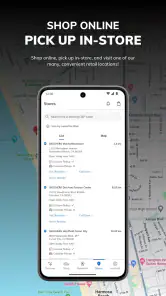
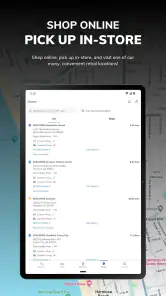
Skechers is a lifestyle and shopping app designed for fans of the popular footwear brand. Users can explore the latest Skechers collections, find exclusive offers, and shop directly through the app. Additionally, it offers features such as store locators, virtual try-ons, and updates on upcoming sales. The app aims to provide a seamless shopping experience for Skechers enthusiasts.
Is the Skechers app free to download and use?
Yes, the Skechers app is free to download on both Android and iOS platforms. While the app itself does not charge for usage, users should be aware that purchasing products through the app will involve costs. The app may also offer premium features or exclusive deals that require in-app purchases, enhancing the shopping experience.
How can I ensure the Skechers app is compatible with my device?
To ensure compatibility, check the app's requirements on the Google Play Store or Apple App Store before downloading. Generally, the app supports devices running Android 6.0 or later and iOS 11.0 or later. Make sure your device meets these specifications to enjoy a smooth and functional experience without any technical issues.
What are the benefits of using the Skechers app compared to shopping in-store?
The Skechers app offers numerous benefits over traditional in-store shopping. Users can enjoy the convenience of browsing and purchasing products anytime, anywhere. The app often provides exclusive online discounts and early access to new collections. It also features a virtual try-on tool, helping users visualize how a pair of shoes will look before making a purchase, thus enhancing the overall shopping experience.
Pros
- Comfortable and stylish design.
- Wide range of sizes available.
- Durable materials for long-lasting wear.
- Affordable pricing for quality shoes.
- Good arch support for daily use.
Cons
- Limited color options.
- Not all models are waterproof.
- Some styles lack ankle support.
- Sole can wear out with heavy use.
- Sizing may vary between models.
- Category
- Shopping
- Version
- 9.10.1











