Shell: Fuel, Charge & More
- 7.17K
- 3.2
- Installs
- 1.00M
- Price
- Free

Screenshots


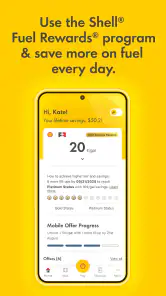

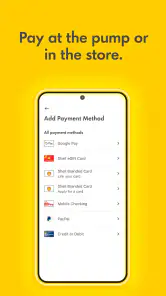
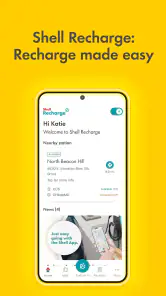
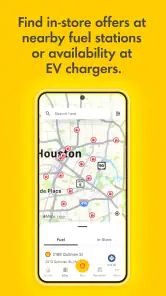
Analysis by Reviewed
I judge a driving app partly by what happens when I need it quickly: can I find the information I need without wrestling with a small screen or losing track of the road? Shell: Fuel, Charge & More is intended to bring station-finding and fuel-related tasks together, which can be useful for drivers who already plan stops around Shell. Its usefulness, though, depends on whether the information and interaction suit your route, vehicle, and the conditions in which you use your phone.
Readability and finding your way around
The app’s main appeal is having Shell locations and driving-related options in one place rather than searching separately for each stop. In a calm setting, that can make it easier to check where a station is and decide whether it fits your route. The developer is Shell Information Technology International B.V.; the app is free, has an Everyone content rating, and is in the Auto & Vehicles category. Those details make it straightforward to try, but they do not guarantee that every screen will feel equally clear to every driver.
In practical use, I would treat the app as a planning aid before setting off, not as something to study while moving. Looking at a map and comparing choices takes attention, and even a familiar interface can be distracting when a car is in motion. If small text or dense map details are difficult for you to read, check the route while parked and use your vehicle’s usual navigation setup once you start driving.
Different senses and different driving contexts
For drivers who prefer visual information, a station map can be easier to scan than a long list of addresses. But map-based browsing is not automatically accessible: it can involve small labels, moving or crowded imagery, and several details competing for attention. I would not assume it will work equally well for someone using a screen reader, relying on larger text, or avoiding prolonged screen use. Try the tasks you actually need, such as locating a stop or reviewing a purchase, before depending on them on a longer trip.
The app’s fuel and electric-vehicle focus may also matter to people whose journeys require different stops. A driver who needs a charging point can use Shell’s charging information as part of planning, while someone driving a petrol or diesel car can focus on fuel stops. In either case, I would check that a location suits the vehicle and route before setting out. A station finder is most helpful when it reduces uncertainty in advance, rather than prompting last-second changes.
Latest News
Your Driving Companion
First things first, the Shell: Fuel, Charge & More app is like having a personal assistant for your car. It’s designed to make your driving experience as smooth as possible. You can easily locate Shell stations near you, whether you’re looking for petrol, diesel, or a charging point for your electric vehicle. No more driving around aimlessly hoping to stumble upon a station – this app’s got you covered.
Easy Navigation
One of my favorite features of this app is its user-friendly interface. Even for those who aren’t tech-savvy, navigating through the app is a breeze. It provides detailed maps and directions, so you’ll never have to worry about getting lost on your way to the nearest station. Plus, the app updates in real-time, ensuring you have the latest information on station availability and pricing.
More Than Just Fuel
What sets the Shell app apart is that it’s not just about filling up your tank. It’s packed with features that cater to all your driving needs. You can pay for your fuel directly through the app, which is perfect for those who prefer contactless transactions. Moreover, it offers exclusive promotions and discounts, helping you save a bit of cash every time you refuel or charge up.
And if you’re someone who loves keeping track of expenses, the app’s got a nifty feature that logs your purchases. It’s perfect for monitoring how much you’re spending on fuel each month. It’s like having a mini accountant right in your pocket!
Eco-Friendly Features
In today’s world, being eco-conscious is more important than ever. The Shell app recognizes this and provides information on carbon offset programs and eco-friendly initiatives. It’s a great way for drivers to contribute positively to the environment while going about their daily commutes.
Additionally, for electric vehicle owners, finding a charging station is often a daunting task. The app simplifies this by providing a comprehensive list of Shell Recharge stations, complete with availability and pricing. It’s a game-changer for EV drivers who want to plan their journeys efficiently.
Planning a stop without adding stress
The best time to use a station app is before the need becomes urgent. If I know a commute will take me through an unfamiliar area, I can check for a Shell stop while parked at home, decide whether it is near enough to be practical, and then leave the driving directions to my usual navigation tool. That division of labor matters: a station finder helps me choose a destination, while a navigation app is generally better suited to guiding each turn and adjusting a route.
There is a useful small habit for anyone relying on charging details: check a likely stop and a backup before departure, rather than searching only when the battery is low. A listing can help narrow the choices, but a live journey still has variables, including other drivers arriving first. For a petrol or diesel run, the same planning approach can help avoid a rushed detour, particularly if you are unfamiliar with the area.
Where it helps, and where I’d keep a backup
A realistic use case is a commute that includes an unfamiliar detour: before leaving, I would check whether a Shell stop fits the revised route, then keep my normal navigation system in charge of turn-by-turn driving. For an EV trip, I would use the charging information to shortlist a stop, but still allow for a backup plan rather than build a tight schedule around one listing. For routine fill-ups, purchase records can also help me review spending later without trying to remember each visit.
That workflow is a useful distinction from general map or navigation apps. Those are often better when I need to compare many brands or plan a route around several kinds of stops; Shell is more relevant when I specifically want Shell locations and its fuel-related tools. I would not choose it as my only travel-planning app if brand-neutral coverage is important, or if I need a single source for every charging network. Promotions may be worthwhile, but I would compare the offer with the convenience of the stop rather than detour just to chase a discount.
Small frictions that matter
For anyone asking whether the app replaces a physical payment method, I would keep a backup available. App payment is convenient when the process works for the stop you are using, but depending on a phone alone can become awkward if the device is low on battery, connectivity is poor, or you simply prefer not to handle a screen at the pump. Checking the relevant steps while parked can make a first try less stressful.
EV drivers may also wonder whether a listed charger will be free when they arrive. Availability information can help with planning, but I would treat it as a snapshot rather than a promise and avoid assuming a charger will remain open during the journey. The same caution applies to prices and other changing station details: check close to departure, and keep enough flexibility for an alternative.
When a different tool makes more sense
This is not the app I would reach for when I want an impartial comparison of fuel stops from multiple brands, or when my main task is to plan a route around charging networks beyond Shell. A general map can be more useful for that broader search. Conversely, someone who already stops at Shell may prefer keeping station information, payment, offers, and purchase history together rather than switching among separate tools. The choice comes down to whether Shell-specific convenience is worth having alongside, rather than instead of, a general navigation app.
It is also a better fit for drivers who can comfortably check their phone while parked and who have a predictable way to pay if an app-based transaction is inconvenient. If you share a vehicle, use a phone with limited battery life, or dislike managing accounts and screens during errands, the extra steps may outweigh the convenience. I would install it for a specific recurring need—such as finding Shell stops or reviewing purchases—rather than expecting it to replace every driving tool.
A practical fit for different drivers
The app has a 3.2 average from around 26,000 ratings, with roughly 7,200 written reviews and over 1 million installs. That suggests it has a sizeable audience, but the rating is a reminder that convenience is not universal. I would give it a try if Shell is already part of my regular routes, I want fuel-related payment or purchase tracking, or I drive an EV and want another way to plan Shell charging stops. If I rarely visit Shell, need broad brand comparisons, or find map-heavy phone use uncomfortable, a general navigation option or another approach may suit me better.
For accessibility, the most sensible test is task-based: can you read the station information, move through the steps you need, and complete them without rushing? A passenger can help with planning on the move, but I would not rely on that as a substitute for checking the app’s fit in advance. The app runs on Android 7.0 or later, and its current version is 8.10.2; those details are useful when deciding whether an existing device can run it, though the day-to-day experience still depends on the phone and the individual.
Making it work for different abilities
If you have low vision, limited dexterity, or difficulty concentrating on a busy screen, try the precise task you expect to use most before a trip: finding a station, checking its details, or reviewing a purchase. Do it in a quiet place and at a comfortable pace. That gives you a better sense of whether the text, controls, and map are manageable on your own device than a quick glance at the interface would. If a step feels fiddly, a passenger can help with planning while the car is parked, or you can use a familiar alternative.
Drivers who are sensitive to visual motion or who find prolonged screen use tiring may prefer a simple routine: choose a destination in advance, then put the phone away before driving. People with hearing differences may also prefer visual checks, but I would not treat that preference as proof that every important update or step is conveyed visually. The practical question is whether the information you need is available in a form you can use comfortably. If not, a conventional map or another payment method can keep the stop manageable.
What to check before relying on it
Before a longer drive, I would confirm that the app opens and that the main task I need works on my phone, rather than discovering a problem at the station. If I plan to use app payment, I would understand the steps while parked and carry a backup payment option. If I plan to charge, I would identify an alternate stop and avoid building a schedule that depends on a single charger being free. These are simple precautions, but they make the app more useful without asking it to guarantee conditions that can change.
For everyday fuel spending, purchase records are most helpful when you check them regularly, not months later when you are trying to reconstruct a budget from memory. I would treat them as a convenient reference and keep any separate records I need for work or reimbursement. Likewise, a promotion is only a saving if the location and timing already suit the journey; an out-of-the-way stop can cost more in time and effort than the offer is worth.
An inclusive verdict
I see Shell’s app as a useful companion for a particular kind of driver, not a universal answer to every trip. It can bring Shell station searches and fuel-related tasks into one place, and that focus may make routine stops easier for people who already use the brand. Its strongest role is advance planning and practical account tasks, rather than constant interaction behind the wheel.
The limits are worth taking seriously: map-heavy browsing may not suit every person, changing station information should not be treated as a guarantee, and app payment is not a reason to leave a backup behind. My recommendation is to test the few tasks that matter to you while parked. If they are comfortable and Shell fits your routes, it is a sensible free option to try; if you need broad network coverage, a brand-neutral search, or an interface that you already know works better for you, choose that tool instead.
In conclusion, the Shell: Fuel, Charge & More app is more than just a tool for finding fuel. It’s a comprehensive resource for the modern driver, offering convenience, savings, and eco-friendly options all in one place. Whether you’re a seasoned driver or someone who’s just starting out, this app is a valuable addition to your daily routine. So why not give it a try and see how it can enhance your driving experience?
Shell: Fuel, Charge & More Frequently Asked Questions
Who develops Shell: Fuel, Charge & More, and what is the app mainly for?
Shell: Fuel, Charge & More is developed by Shell Information Technology International B.V. and is intended for drivers looking to use Shell-related services through an app. Its focus includes fuel, charging, and Fuel Rewards®, bringing these topics together in one place. Whether its services suit your routine depends on the Shell options available where you drive.
Can I use Shell: Fuel, Charge & More outside my usual area?
The app is built around Shell services, so its usefulness while traveling depends on the Shell services offered in the places you visit. Its features may vary by location, which is worth considering if you expect to rely on it away from home. You can explore the app to see how its available services fit your driving plans.
Is Shell: Fuel, Charge & More appropriate for all ages?
Shell: Fuel, Charge & More has an Everyone content rating, and downloading it does not require a purchase. It is an Auto & Vehicles app intended for people interested in Shell-related fueling, charging, and rewards services. As with any app, you should consider whether those services are useful for your needs before installing it.
What is Shell: Fuel, Charge & More, and is it free to download?
Shell: Fuel, Charge & More is an Auto & Vehicles app from Shell Information Technology International B.V., built around Shell-related fueling, charging, and rewards services. It is free to download and is rated for Everyone. The app is intended for drivers who want Shell services and Fuel Rewards® in one place, though the features available to you can depend on your location and the Shell services offered there.
Will Shell: Fuel, Charge & More work on my Android device?
The app requires Android 7.0 or later, so check your device’s operating system before downloading. Its current version is 8.10.2, and it has passed one million installs. If your phone meets the minimum requirement, you can try the app without paying for the download. As with any app, your experience may also depend on your device and the Shell services available in your area.
Pros
- User-friendly interface for easy navigation.
- Comprehensive fuel station locator feature.
- Integration with smart home charging solutions.
- Real-time fuel price updates.
- Rewards and loyalty program for frequent users.
Cons
- Limited availability in some regions.
- Occasional app crashes reported.
- Requires stable internet connection.
- Limited charging station data.
- Privacy concerns with location tracking.

- Category
- Auto & Vehicles
- Version
- 8.10.2











