

ScoreCat
- 31.00
- 3.4
- Installs
- 10.00K
- Price
- Free

Screenshots
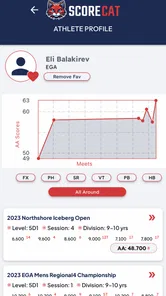
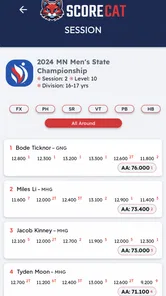
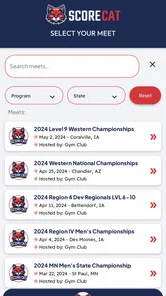
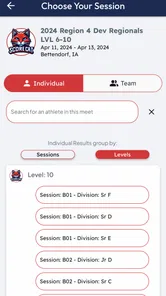
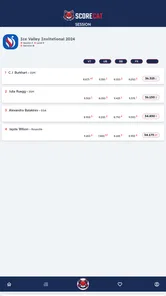
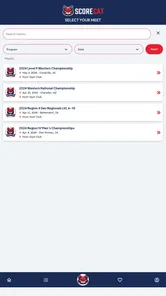
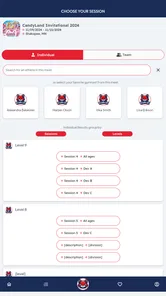
Analysis by Reviewed
When I first opened ScoreCat, I approached it with a simple question: would it actually make following a gymnastics meet easier, or would it become another app I check once and forget? Its purpose is clear. This is a sports app from ScoreCat built around live scores for an athlete and a team, so its value depends less on entertainment and more on timing, clarity, and whether the information reaches the right people when they need it.
That makes it a very specific tool. It is not trying to replace video coverage, coaching software, a training journal, or a general sports news app. I see it as a meet-day companion for people who want to follow results while an event is taking place. Parents, relatives, teammates, and supporters are the obvious audience, but the experience also depends on how well the person using it understands the event flow and how quickly scores become available.
The app is free to install, with optional in-app purchases listed from $3.99 to $39.99 per item. It is rated for Everyone, which fits the family-oriented setting around youth and recreational sports. Its current version is 17.11.62, and it runs on Android devices using version 7.0 or later. Those details matter because a meet-day app is only useful if the people in the gym can install and open it without turning setup into another task.
From finding a meet to following the result
I start this section with the practical question that matters before a meet: can I find the event and the athlete or team I want to follow? I’ll focus on how I’d prepare for that check, so the next section can turn to what following scores looks like once the competition is underway.
The starting condition: you want information while the meet is moving
The most realistic starting point is not sitting at home with plenty of time. It is arriving at a gym, waiting for an athlete to compete, or trying to keep up with a team while family members are spread across different places. In that situation, asking someone to send every update by text is inconvenient. Messages arrive late, names can be mistyped, and a person who is busy watching the floor may not have time to report each score.
ScoreCat makes sense when the user wants a more direct route to live information. I would install it before the event rather than in the middle of a rotation. That small change in timing is important: downloading an app, opening it, and learning where to look is manageable at home, but much more annoying when the venue is noisy and the next routine is about to begin.
The first practical question is whether the meet or athlete you care about is represented in the app at that moment. Because the app is focused on live gymnastics scoring rather than being a broad results service for every sport, its usefulness is tied to the coverage connected with ScoreCat. I would therefore treat the app as a companion to a particular event, not as a universal gymnastics directory that guarantees every competition will appear.
More From Our News Desk

 Gmail
GmailGmail in a Busy Inbox: Who Benefits Most?
From first account to crowded workday, Gmail earns its place through dependable search and flexible sorting—but its best fit depends on how much inbox maintenance you can tolerate.

 Prime Video
Switching to Prime Video: What Changes in Your Viewing Routine
Prime Video can make a compelling second home for streaming, but switching means learning a different catalog, rental layer, and route from browsing to playback.

 Universal TV Remote Control
Universal TV Remote Control Works Best as a Reliable Backup
A phone remote earns its place through quick setup and reliable habits. Here is how to get more from Universal TV Remote Control—and where its limits show.

 Weather - By Xiaomi
Weather by Xiaomi Review: Clear at a Glance, Less Clear Up Close
Xiaomi’s weather app makes everyday forecasts quick to scan, but its calm surface can leave useful details and recovery paths harder to find than they should be.

 X
XX Under Pressure: Can It Recover When Posting Goes Wrong?
A resilience-focused review of X, examining setup, mistaken posts, interruptions, weak connections, and the gaps that matter when recovery needs to be dependable.

 Clash of Clans
Clash of Clans Is Won Between the Battles
Its raids are quick; its community is a long-term project of coordination, teaching, rivalry, and shared responsibility—with all the friction that entails.
Latest News



That distinction helps set expectations. If you are following a covered event, the focused design can be more useful than a general sports app filled with unrelated leagues and headlines. If you are looking for historical training analysis, detailed judging explanations, or a complete archive of every meet, this is probably not the first tool I would choose.
Step one: prepare before the first routine
My preferred workflow begins with installing the app while I still have a stable connection and enough time to look around. I would check the event information, identify the athlete or team I need to follow, and make sure I know where live scores are displayed. This is not glamorous advice, but it prevents the most common failure in live-score apps: spending the important part of the event navigating instead of watching.
A useful habit is to decide exactly what outcome you want. Are you checking one athlete after each apparatus, keeping an eye on a whole team, or checking the final result after the competition? Those are different patterns of use. A parent may need athlete-level updates, while a coach or team supporter may care more about the wider team position. Starting with that distinction makes the app less confusing and reduces unnecessary checking.
I also recommend keeping a second source of context in mind. A live score can tell you what has been recorded, but it does not replace watching the routine or speaking with the people at the venue. If a number seems delayed or surprising, I would not immediately assume the athlete performed poorly. The score may simply not have been entered yet, or the event may still be processing results.
Step two: follow an individual athlete
For a family member, the most natural use is athlete-first. Instead of trying to understand the entire competition at once, I would use the app to check the athlete’s progress as the meet develops. This is especially helpful when relatives are not seated together or when someone cannot attend in person.
The advantage is attention. Rather than asking a coach or another parent to send updates, a supporter can look for the relevant live result directly. That makes the handoff from the gym to people outside the venue simpler. One person can concentrate on the routine, while others can follow the score without interrupting them.
There is also a psychological benefit to using it selectively. Constantly refreshing a score during a meet can make the experience more stressful, particularly for a young athlete’s family. I would check at natural points, such as after an apparatus or when an event update is expected, rather than treating the app as a second-by-second scoreboard. The tool works best when it supports attention instead of replacing it.
Step three: follow the team without losing the individual story
Team tracking introduces a different kind of usefulness. A gymnastics meet can involve several athletes, rotations, and changing team totals. If I were supporting a team, I would use the team view to understand the broader result, then return to the individual athlete when I needed personal context.
This two-level workflow is one of the more important ways to use the app well. Looking only at the team can hide the performance that matters most to a family. Looking only at one athlete can make it difficult to understand how the group is progressing. Moving between those perspectives gives the live information more meaning without requiring a separate general sports platform.
The trade-off is that team-level information can feel less immediate than an individual update. A team result may depend on several routines being entered, while an athlete’s score may appear as soon as one performance is recorded. I would not interpret a temporary team position as the final story while the competition is still underway.
The handoff: from the venue to everyone else
The strongest everyday scenario is a family divided between the gym and home. Imagine one parent watching from the stands, a relative at work, and another family member caring for a younger child. The person at the venue does not need to type a full report after every routine. The people elsewhere can use ScoreCat to follow the available live result, while the parent remains focused on the athlete.
That handoff is where a focused score app earns its place. It reduces the amount of manual communication needed, but it does not eliminate communication altogether. A score does not explain whether the routine felt confident, whether the athlete recovered from a mistake, or how the performance looked to the coach. I would use the app for the factual update and personal messages for the human part of the story.
For a team supporter, the handoff can work in the opposite direction. Someone following the event remotely can share a result with relatives or teammates, but I would avoid presenting an early score as a settled outcome. The most responsible way to pass along live information is to include its stage: a routine score, a current team position, or a result that may still change as more performances are entered.
This is also where a clear screen matters more than decorative features. During a meet, users often glance at the phone for only a few seconds. If the relevant athlete or team is easy to identify, the app feels practical. If the user must repeatedly search through unrelated information, the benefit of live scoring becomes much smaller.
What the result means after the event
The immediate result is convenience. I can check the progress of an athlete or team without depending entirely on a chain of text messages. That is valuable for families who cannot attend and for supporters who want a direct connection to the meet.
The longer-term result is a more organized way to remember what happened. Even without treating the app as a full performance journal, live scores give a competition a clearer outline: the athlete competed, the team moved through the event, and the result became available as the meet developed. That can make post-meet conversations more precise than simply saying that the competition went well or badly.
Still, I would be careful not to turn the score into a complete evaluation of the athlete. Gymnastics involves execution, difficulty, consistency, confidence, and context. A live-score app is strongest at reporting the competition outcome, not at explaining every reason behind it. Parents who want detailed technical feedback should rely on coaches and training tools rather than expecting this app to provide that layer.
The app’s public reception also suggests that expectations should be realistic. It has an average rating of 3.4 from around 47 ratings, with roughly 31 written reviews. I read that as a sign to approach it as a useful but still developing tool, not as a flawless replacement for every other way of following a meet. A focused app can be valuable even when its experience depends heavily on event coverage and timely score entry.
Where the workflow breaks
The first weak point is coverage. If the event you care about is not available through the app’s scoring system, the live-score promise does not help you. This is the most important limitation because it appears before any interface question. I would confirm that the relevant meet, athlete, or team can be followed before relying on the app as my only source of updates.
The second weak point is timing. Live results are only as current as the scoring process behind them. A delay can happen between the end of a routine and the appearance of its score. That means I would not refresh repeatedly or make an emotional judgment based on a blank or unchanged screen. At a busy competition, waiting a little may be more sensible than assuming the app has failed.
The third issue is the difference between following and analyzing. ScoreCat is appealing when the goal is to see live scores, but it is less suitable if you want a detailed breakdown of deductions, training progress, video review, or a personal record book. A coach, serious athlete, or data-focused parent may prefer a specialized tracking system for those tasks.
There is also a cost consideration. The app itself is free, but optional purchases range from $3.99 to $39.99 per item. I would begin with the free experience and only consider spending if the paid option clearly improves the way I follow the events I care about. For an occasional relative checking one competition, paying may not be necessary. For a committed supporter who uses the service repeatedly, the decision depends on how much convenience the additional options provide.
Another practical limitation is device age. Support for Android 7.0 or later covers many older phones, which is helpful for families sharing devices, but anyone using an older system should check compatibility before planning around it. A live-score app that cannot be installed on the available phone is no use at the venue, so this is worth handling before competition day.
Who will get the most from it
I would recommend ScoreCat to parents and relatives who want a straightforward way to follow gymnastics results while an event is unfolding. It is also a sensible choice for team supporters who need a view of both the individual athlete and the wider team. The app’s Everyone rating reinforces that broad, family-friendly role, although the actual usefulness still depends on the competition being represented and the scores being entered promptly.
It is particularly helpful when people are separated. Someone at work, traveling, or caring for another child can stay connected without asking the person in the gym to become a live reporter. That is a concrete improvement over relying only on group chats, where updates may be incomplete or arrive long after the routine.
I would be more hesitant to recommend it as the main tool for coaches, advanced athletes, or users who need deep performance analysis. Those users may be better served by a dedicated training log, video review workflow, or official competition source with the exact details they require. ScoreCat can sit beside those tools, but I would not assume it replaces them.
A practical routine I would use
Before the meet, I would install the app, open it on the phone I plan to carry, and identify the event or athlete I intend to follow. I would then tell relatives what kind of update they can expect: live scoring information rather than a full commentary of each routine.
During the meet, I would check at sensible intervals instead of continuously refreshing. If I were in the venue, I would watch the athlete first and use the app to confirm the recorded score afterward. If I were away from the venue, I would treat the displayed result as a live snapshot and wait for the competition to progress before drawing conclusions.
Afterward, I would use the final available result as a starting point for conversation, not as the entire assessment. Asking how the routine felt, what the coach noticed, and what the athlete wants to improve adds the context that a score alone cannot provide. This workflow keeps the app in its strongest role: connecting people to the result without pretending to explain everything about the performance.
My recommendation
ScoreCat is a focused sports app with a clear reason to exist. In my experience, its best use is not casual browsing but a specific handoff: a meet is happening, one person is close to the action, and others need a convenient way to follow the athlete or team. When those conditions are met, live scoring can remove a lot of unnecessary messaging and help families stay involved.
I would approach it with two expectations. First, check the event and follow the information at natural moments rather than demanding instant updates every second. Second, treat the score as a useful result, not a complete technical review. Those habits address the main friction points and make the app feel more dependable.
With over 10 thousand installs, ScoreCat has found an audience, though its average rating shows that the experience may not satisfy everyone equally. I see it as worth trying for families and supporters who regularly follow gymnastics events, especially because the initial download is free. I would skip it if my priority were detailed athlete development, universal competition coverage, or a replacement for direct coaching feedback.
My bottom line is simple: use ScoreCat when your main problem is staying connected to live gymnastics scoring, and choose another tool when your real need is analysis, training history, or guaranteed coverage. For the right meet-day workflow, that narrow focus is a strength rather than a weakness.
ScoreCat Frequently Asked Questions
What is ScoreCat and what can I use it for?
ScoreCat is a mobile app designed to help users record, organize, and follow scores, results, or performance data in a convenient place. Depending on how you use it, it can be useful for tracking sports matches, games, competitions, practice sessions, or personal progress. Before downloading, check the current app description to confirm that its features match the type of scoring you want to manage.
Is ScoreCat free to download and use?
ScoreCat may be available as a free download, but some features can depend on in-app purchases, subscriptions, advertising, or platform-specific limitations. I recommend checking the Google Play Store or Apple App Store listing before installing it, especially the pricing section and subscription terms. This will help you understand whether advanced tools, cloud features, or an ad-free experience require payment.
Does ScoreCat require an internet connection?
The basic score-entry functions may work without a permanent internet connection, which is useful when you are at a venue with weak reception. However, features such as account synchronization, backups, sharing, online statistics, advertisements, or updates may require mobile data or Wi-Fi. Availability can vary by device and app version, so test offline access before relying on ScoreCat during an important event.
Can I save, share, or synchronize my scores in ScoreCat?
ScoreCat is intended to make score information easier to manage, and users should review whether their version supports saved history, exports, sharing, or synchronization across devices. These options may depend on signing in, granting storage permissions, or using a connected account. If your records are important, create regular backups and confirm that saved results remain available after changing phones or reinstalling the app.
Is ScoreCat suitable for beginners, and what permissions does it request?
ScoreCat should be approachable for users who want a simpler way to track results, although the learning experience can depend on the scoring format and available settings. During installation, review permissions carefully and allow only those needed for the features you intend to use. If the app requests access that seems unrelated to score tracking, check its privacy policy and store information before continuing.
Pros
- Clean
- intuitive interface makes match tracking easy for beginners.
- Useful statistics help users analyze team and player performance.
- Fast score updates keep fans informed during live matches.
- Supports multiple sports and competitions in one application.
- Personalized notifications can highlight important match events.]
- contras:[
- Some advanced statistics may require a premium subscription.
- Live coverage can vary depending on the sport and competition.
- Notifications may arrive late when connection quality is poor.
- The amount of available data differs between leagues and events.
- Frequent alerts can become distracting unless carefully customized.
Cons
- Some advanced statistics may require a premium subscription.
- Live coverage can vary depending on the sport and competition.
- Notifications may arrive late when connection quality is poor.
- The amount of available data differs between leagues and events.
- Frequent alerts can become distracting unless carefully customized.





