

SCHN+
- 122.00
- 4.5
- Installs
- 10.00K
- Price
- Free

Screenshots

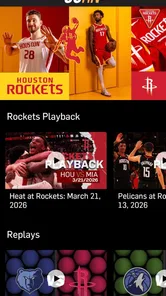





Analysis by Reviewed
Watching local sports usually sounds simple until the game starts at the worst possible time, the television is occupied, or I am away from home. SCHN+ is built for that specific situation: it gives Space City Home Network subscribers a way to stream their favorite local teams through a sports app rather than relying only on a traditional television setup. After spending time with it, I see it as a focused companion for fans who already have access through the network, not as a broad replacement for every sports service.
The app is free to install, carries an Everyone content rating, and comes from Space City Home Network. Its straightforward purpose is also its biggest strength. There is no need to dig through a huge catalog of unrelated leagues or entertainment channels before getting to the local coverage that matters. If your viewing habits center on the teams available through SCHN, that narrow focus can make the experience feel more practical than a general streaming platform.
How SCHN+ fits into a normal game-day routine
My preferred starting point is to treat SCHN+ as part of a repeatable game-day routine rather than something I open only after the opening play. Before the event, I make sure the app is installed, my subscriber access is ready, and the device I plan to use is connected to the network I expect to watch from. That small amount of preparation matters more with live sports than it does with on-demand video, because a few minutes of troubleshooting can mean missing the beginning.
The most useful everyday scenario is easy to imagine. I might be cooking dinner while a local team is playing, with the television already being used by someone else. Instead of abandoning the game or searching through unrelated services, I can use SCHN+ on a compatible mobile device and keep up from the kitchen. The value is not just portability; it is the ability to fit local coverage into the gaps of an ordinary evening.
I also find the app more appealing for short viewing sessions than a full television replacement. If I only have time to check the first part of a game, follow a close finish, or watch while traveling around the house, a dedicated local sports app is less cumbersome than switching between multiple general-purpose services. That said, the experience depends on having subscriber access. Installing a free app does not turn it into an unrestricted sports channel.
That distinction is important for anyone deciding whether to download it. SCHN+ is best understood as an access point for Space City Home Network subscribers. People who already receive the network have a clear reason to try it. Someone looking for a standalone service that automatically unlocks every local team should look carefully at their existing subscription arrangement before making this the center of their viewing setup.
What I check before the first live stream
I begin by confirming that I am using the account associated with my SCHN access. This is a more useful first step than repeatedly reinstalling the app or blaming the phone. When a sports stream is tied to subscriber eligibility, account recognition is part of the viewing experience. Keeping the login details available and using the same account consistently reduces avoidable friction when moving between devices.
More From Our News Desk

 Gmail
GmailGmail in a Busy Inbox: Who Benefits Most?
From first account to crowded workday, Gmail earns its place through dependable search and flexible sorting—but its best fit depends on how much inbox maintenance you can tolerate.

 Prime Video
Switching to Prime Video: What Changes in Your Viewing Routine
Prime Video can make a compelling second home for streaming, but switching means learning a different catalog, rental layer, and route from browsing to playback.

 Universal TV Remote Control
Universal TV Remote Control Works Best as a Reliable Backup
A phone remote earns its place through quick setup and reliable habits. Here is how to get more from Universal TV Remote Control—and where its limits show.

 Weather - By Xiaomi
Weather by Xiaomi Review: Clear at a Glance, Less Clear Up Close
Xiaomi’s weather app makes everyday forecasts quick to scan, but its calm surface can leave useful details and recovery paths harder to find than they should be.

 X
XX Under Pressure: Can It Recover When Posting Goes Wrong?
A resilience-focused review of X, examining setup, mistaken posts, interruptions, weak connections, and the gaps that matter when recovery needs to be dependable.

 Clash of Clans
Clash of Clans Is Won Between the Battles
Its raids are quick; its community is a long-term project of coordination, teaching, rivalry, and shared responsibility—with all the friction that entails.
Latest News



I also check the practical side of the setup. A stable connection is more important than having a large screen if the stream is going to be watched while moving around the house. For a long game, I prefer a reliable home connection and a device with enough battery to last through the session. For a brief check-in, cellular data may be convenient, but I would be cautious about using it for an entire event unless my plan comfortably allows extended video viewing.
Another useful habit is opening the app before the scheduled start instead of waiting until the exact moment the game begins. This gives me time to handle account prompts, update-related interruptions, or a device that has quietly switched networks. It also makes it easier to decide whether I want to watch on the phone, tablet, or another supported screen without turning the opening minutes into a setup exercise.
The app has a 4.5 average from around 358 ratings, with roughly 122 written reviews. That gives me a generally positive impression from other users, but I would not treat the rating as a guarantee that every setup will feel identical. Live streaming quality can be affected by the device, connection, account status, and viewing environment. The rating is encouraging; it is not a substitute for checking whether SCHN access fits your own situation.
Settings and device habits worth checking
Experienced users tend to spend a little time on the phone or tablet settings around the app, even when SCHN+ itself is intentionally simple. I check notification permissions so the app is not unnecessarily interrupting me, but I also avoid blocking every alert if I want timely reminders about available coverage. The right choice depends on whether I use the app as an occasional viewer or as my main way to follow local teams.
Battery settings deserve attention too. Some phones restrict background activity aggressively, which can make an app behave differently after it has been left idle or moved in and out of the foreground. I do not disable every battery-saving feature automatically. Instead, I make sure the app is allowed to function normally during a live session and keep the screen, brightness, and connection choices sensible for the length of the game.
Screen orientation is another small but useful consideration. A phone is convenient for checking action while standing or moving between rooms, while a tablet is more comfortable for a longer session. I keep rotation behavior predictable and avoid changing orientation repeatedly during a live stream. That simple habit reduces distractions and makes the viewing experience feel more deliberate.
For sound, I check the device volume before the event and use headphones when I am watching in a shared space. This is especially helpful when the game is on in the background and I need commentary to remain clear without raising the volume for everyone else. The app’s usefulness is partly about fitting into real homes, offices, and travel situations, so these surrounding settings can matter as much as the download itself.
Privacy-conscious users may also want to review the phone’s general app permissions and account settings before settling into regular use. I prefer knowing which notifications are enabled and which account is active, particularly when a household shares devices. That is not a special SCHN+ feature; it is simply a sensible way to prevent confusion when several people use the same phone or tablet for different services.
Faster patterns for repeat viewers
My fastest routine is based on preparation, not on trying to make the app do more than it actually does. I keep SCHN+ in an easy-to-reach place on the device I use most, open it before the event, and confirm the account while there is still time to react. This is more dependable than searching the app store during a game or trying to remember which credentials were used months earlier.
On mobile, I use the operating system’s normal shortcuts to reach the app quickly. A home-screen position, app-library favorite, or device search shortcut can remove several unnecessary steps. These are not hidden SCHN+ functions, but they make a real difference for viewers who check local coverage frequently. The goal is to build a consistent path from “I want to see the game” to “the stream is ready.”
I also separate short checks from full sessions. For a quick score or a few minutes of action, I use the smallest comfortable device and avoid setting up a more elaborate viewing arrangement. For a complete game, I choose the larger screen available, connect to the most dependable network, and plug in if the battery is not strong enough. Matching the setup to the length of the session keeps the service from feeling inconvenient.
Another good habit is keeping the app updated through the normal Android or iOS process. I do not update immediately before every game if I can avoid it, because any app change can introduce a new sign-in step or require a restart at an awkward time. Checking for updates earlier in the day is a calmer approach. It also helps ensure that the app is not being opened after a long period without maintenance.
When moving from one device to another, I use the same account deliberately rather than creating a second path through the service. A phone may be best for travel, while a tablet may be better at home, but consistency makes access easier to understand. If another household member uses the app, agreeing on which account belongs to the subscription can prevent the common mistake of troubleshooting the wrong login.
Where the focused approach works best
Compared with a broad sports bundle, SCHN+ has a narrower job. A large sports platform may be better for someone who follows teams across many regions, watches several leagues, or wants one place for a wide range of live events. SCHN+ makes more sense when local team coverage is the priority and the viewer already has the relevant Space City Home Network subscription.
That focus can also reduce the clutter that often comes with general streaming services. I would rather open a service designed around the local coverage I care about than browse a long list of competitions that I will never watch. The trade-off is obvious: the narrower the service, the less useful it becomes when my interests move outside that local network relationship.
Compared with watching through a traditional television provider, the app adds flexibility. I can use a personal device and watch in places where a television is not practical. The trade-off is that the app experience is tied to internet streaming, so a weak connection or a device with poor battery life can make the television route more comfortable. For fans who value mobility, SCHN+ earns its place; for viewers who always watch from one reliable television, the benefit may be smaller.
It is also different from relying on general news or score apps. Those tools are useful for quick updates, but they do not serve the same purpose as live local team streaming. If I only need a score, opening a full video service may be unnecessary. If I want the actual event and the surrounding live viewing experience, a dedicated network app is the more relevant option.
Limits that experienced users should understand
The main limitation is eligibility. The app’s free installation should not be confused with universal free access to live local sports. Its intended audience is Space City Home Network subscribers, so the value depends on whether the viewer already has the necessary subscription relationship. This makes SCHN+ a poor choice for someone who wants to download one app and immediately watch any local team without checking access requirements.
There is also a financial detail worth keeping in mind: in-app purchase items are listed from $19.99 to $199.99 each. I would not assume that installing the app or seeing a purchase option automatically explains which choice is right for a particular household. Anyone considering an in-app purchase should first understand what it provides, how it relates to existing SCHN access, and whether it duplicates something already included through another provider.
That range makes the app less straightforward for people who dislike subscription decisions inside mobile applications. A viewer who already knows how their network access works may find the process reasonable. Someone comparing several sports services should calculate the total cost alongside their current television or streaming bill rather than judging the app by its free download alone.
Live viewing also rewards realistic expectations. A mobile stream is convenient, but it is not always the best choice for a long, relaxed session. Notifications, incoming calls, limited battery, heat, and a small screen can all become distractions. My practical solution is to use SCHN+ for mobility and convenience, then choose a larger, more stable setup when I want the most comfortable full-game experience.
People who travel frequently should think about their connectivity before depending on it for every event. A reliable home connection is one thing; a crowded public network or inconsistent cellular signal is another. I would use the app confidently as a flexible option, but I would not plan an important viewing occasion around an untested connection. Opening it ahead of time in the location where I expect to watch is a simple way to avoid surprises.
Who should use it, and who should choose something else
I would recommend SCHN+ to a local sports fan who already subscribes to Space City Home Network and wants an easier way to watch away from the main television. It is particularly suitable for households where the television is shared, commuters who sometimes watch from a personal device, and viewers who prefer a focused local sports experience instead of a giant catalog.
I would be more cautious recommending it to someone who follows teams from many markets. That viewer may get better value from a broader sports service, even if it includes more content than they need. I would also hesitate for a person who only wants occasional scores, since a live-streaming app may be more than necessary for that limited use.
The app is available for Android and iOS audiences, which makes it easier to fit into mixed-device households. Still, I would choose the device based on the viewing situation rather than assuming the phone is always best. A tablet can be a comfortable middle ground, while a television-based setup remains preferable for a group watching together.
Its Everyone rating makes it suitable from a content-rating perspective for a broad audience, but the practical question is still access. Families should make sure the correct subscriber account is being used and that the person watching understands how the household handles in-app purchases. Clear account habits are more useful than downloading the app on every device without a plan.
My verdict after settling into a repeatable workflow
SCHN+ is strongest when it stays in its lane: convenient local team streaming for Space City Home Network subscribers. I like that its purpose is easy to understand, and I appreciate the way it can turn a spare phone or tablet into a practical game-day screen. The best experience comes from combining the app with simple habits: confirm access early, keep the preferred device easy to reach, review notifications and battery behavior, and choose the connection based on the length of the session.
The app is not a universal answer for sports viewing. Its subscriber focus, internet dependence, and purchase range mean that some people will be better served by their existing television provider or a broader sports platform. I would not install it expecting an all-in-one sports library. I would install it because local SCHN coverage is already part of my viewing needs and I want more flexibility around where I watch.
Space City Home Network released the app on October 18, 2025, and it has reached over ten thousand installs. Those figures suggest a growing but still focused service rather than a general-purpose streaming giant. That matches my impression: SCHN+ feels designed for a particular community of fans, and its usefulness rises sharply when your teams and subscription line up with that purpose.
For me, the deciding question is simple: do I want a dependable mobile route to the local teams connected with SCHN, or am I searching for a much wider sports package? If the first answer is yes, this free app is worth trying and building into a prepared viewing routine. If the second answer is yes, I would compare alternatives before committing, because the focused design that makes SCHN+ convenient for local fans also defines its limits.
SCHN+ Frequently Asked Questions
Is SCHN+ available in my region, and who is it for?
SCHN+ is a sports app from Space City Home Network for subscribers who want to stream their favorite local teams. Its focus makes it most relevant to viewers looking for that local-team coverage. Availability and access can depend on your region and subscription, so check that the service is offered where you live before downloading.
What is SCHN+ and what can I watch on it?
SCHN+ is a streaming application designed to give viewers access to SCHN-related entertainment and programming on compatible mobile devices. Depending on your location and the current content catalog, it may include live channels, on-demand shows, special events, sports, news, or other exclusive video material. The available selection can change over time, so users should check the app description and regional availability before downloading.
Is SCHN+ free to download and use?
Downloading SCHN+ may be free, but access to all of its content is not necessarily included at no cost. Some programs or live streams may require a subscription, an eligible television or service-provider account, or an additional purchase. Before signing up, review the pricing details, trial conditions, renewal terms, and any in-app purchase information shown for your country to avoid unexpected charges.
Does SCHN+ work on Android and iPhone devices?
SCHN+ is intended for supported smartphones and tablets, but compatibility depends on the operating system version, device model, and the app’s current technical requirements. Install it through the official Google Play Store or Apple App Store whenever possible. If the application does not appear in your store, it may not be available in your region or your device may not meet the minimum requirements.
Can I watch SCHN+ without an internet connection?
SCHN+ primarily requires an active internet connection for streaming, and the quality of playback depends on your Wi-Fi or mobile-data speed. Offline viewing may not be available for every title, channel, or event. If the app offers downloads, look for a download button on supported content and remember that saved videos can expire, use considerable storage, and may only play inside the application.
Pros
- Simple interface makes browsing and finding content quick.
- Offers convenient access to SCHN+ content from a mobile device.
- Useful for keeping up with new releases and featured programming.
- Streaming is convenient for watching content away from a television.
- The app provides an official way to access the SCHN+ service.
Cons
- Content availability may vary depending on your location or subscription.
- Some videos may require a stable
- high-speed internet connection.
- Streaming can use significant mobile data when Wi-Fi is unavailable.
- The catalog may feel limited compared with larger streaming platforms.
- Playback quality and performance can depend on your device and network.





