

S2 Pass
- 30.00
- 4.8
- Installs
- 50.00K
- Price
- Free

Screenshots
Analysis by Reviewed
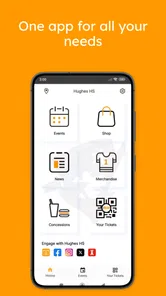
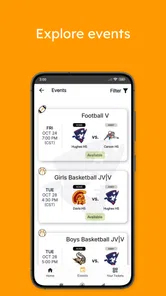
I approached S2 Pass as a practical school-community app rather than a general sports platform. Its purpose is focused: it brings ticket purchases, school-fee payments, and school communication into one mobile experience. That narrow focus is important, because the app makes the most sense when your school already uses it as part of its daily routine. If your school is connected to S2 Pass, it can reduce the need to jump between paper notices, separate payment steps, and scattered messages.
The app is developed by S2 Pass and is available free of charge in the Sports category. It is rated for Everyone, which fits its role as a tool used by students, parents, families, and members of a school community. I would not describe it as a sports game or a training app. The sports connection is more practical, centered on access and participation around school activities, especially where tickets and fees are involved.
How S2 Pass feels during everyday use
I find the app easiest to assess when I separate its school tasks from the logistics around them: it can be the place I check for an event or fee, while a family calendar can hold transport plans and reminders. That distinction helps me decide what information belongs where and sets up a closer look at the controls and choices users should consider before acting.
Speed expectations when you need to complete a simple task
The strongest performance impression comes from the app’s focused purpose. You are not opening it to browse a huge entertainment catalog or manage a complicated fitness program. You are usually trying to reach a school-related action: buying entry, handling a fee, or checking what is happening in your school community. That kind of focused workflow should feel more manageable than searching through email threads or trying to remember which external page handles a particular payment.
In my view, the app’s value is less about flashy speed and more about reducing decision time. When a parent receives a reminder about an event, the useful question is not whether the interface has elaborate animations. It is whether the route from opening the app to finding the relevant school item is clear. S2 Pass is best judged by that practical standard.
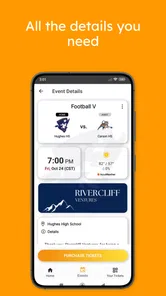
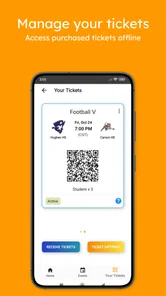
A useful habit is to open the app before an event day rather than waiting until you are standing at a venue entrance. Ticket-related tasks are easier to handle when you have time to read the event details, check the payment step, and make sure the result is available on your device. This is not a criticism unique to S2 Pass; it is simply a sensible way to use any app connected to admission or school payments.
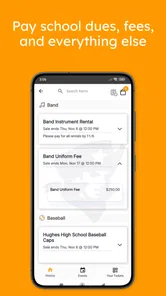
For school fees, the same principle applies. A mobile payment tool is most convenient when you use it as part of a routine instead of treating it as an emergency shortcut. I would check the school area first, confirm that I am acting on the correct item, and keep the completion screen available until I know the transaction has gone through. That small workflow can prevent confusion later, especially in a busy household where more than one school activity may be happening at once.
More From Our News Desk

 Gmail
GmailGmail in a Busy Inbox: Who Benefits Most?
From first account to crowded workday, Gmail earns its place through dependable search and flexible sorting—but its best fit depends on how much inbox maintenance you can tolerate.

 Prime Video
Switching to Prime Video: What Changes in Your Viewing Routine
Prime Video can make a compelling second home for streaming, but switching means learning a different catalog, rental layer, and route from browsing to playback.

 Universal TV Remote Control
Universal TV Remote Control Works Best as a Reliable Backup
A phone remote earns its place through quick setup and reliable habits. Here is how to get more from Universal TV Remote Control—and where its limits show.

 Weather - By Xiaomi
Weather by Xiaomi Review: Clear at a Glance, Less Clear Up Close
Xiaomi’s weather app makes everyday forecasts quick to scan, but its calm surface can leave useful details and recovery paths harder to find than they should be.

 X
XX Under Pressure: Can It Recover When Posting Goes Wrong?
A resilience-focused review of X, examining setup, mistaken posts, interruptions, weak connections, and the gaps that matter when recovery needs to be dependable.

 Clash of Clans
Clash of Clans Is Won Between the Battles
Its raids are quick; its community is a long-term project of coordination, teaching, rivalry, and shared responsibility—with all the friction that entails.
Latest News



What happens during heavier moments
The demanding moments for S2 Pass are likely to be practical rather than visual. A popular school event can lead many people to open the app around the same time, while a payment task may require extra attention from the user. Since the app combines tickets, fees, and school communication, the experience can feel more important during deadlines than during casual browsing.
I would avoid making a last-minute purchase while also dealing with weak reception, a crowded entrance, or a nearly empty battery. The app may be the place where the task is completed, but the surrounding conditions still matter. A stable connection, enough battery, and a few spare minutes are sensible preparation for anything involving a ticket or payment confirmation.
There is also a human form of “heavy use” here. Parents may need to manage several children, different activities, and multiple school notices. In that situation, the advantage of one school-centered app is that it gives you a consistent place to start. The trade-off is that you must stay organized inside that one place. I would review each item carefully rather than tapping quickly through a list, particularly when two events have similar names or occur close together.
For a student, the pressure may be different. The student may mainly need access to an event or a timely school update, while the parent may be the person handling fees. That makes S2 Pass useful for a shared community, but it also means the app’s convenience depends on everyone understanding who is responsible for each action. It is not a replacement for clear family communication.
Reliability and recovering from an interrupted task
Reliability matters more here than it would in a casual content app. If I am reading a general article and the session ends, I can return later without much trouble. If I am buying a ticket or paying a school fee, I need to know where the process stopped. My practical advice is to avoid repeating a payment immediately after an interruption. First check whether the app shows a completed result, a pending state, or the original item still waiting for action.
This is one of the most important habits for using S2 Pass responsibly: confirm the outcome before trying the same payment again. A slow screen or interrupted connection does not automatically mean that nothing happened. Waiting briefly, reopening the relevant area, and checking the visible status is safer than assuming failure.
The same approach helps with ticket purchases. If an event entry has been completed, keep the resulting information easy to find before leaving home. If the app is being used for school communication, returning to the relevant school section after reopening can help you distinguish a genuinely new notice from one you have already read.
I see this as a limitation of the app’s role rather than a flaw I can simply dismiss. S2 Pass sits close to real-world commitments. Users need to pay attention to confirmation and timing, because a mobile interface cannot remove the consequences of missing an event deadline or misunderstanding a fee. The app can centralize the process, but it cannot replace the user’s final check.
Device constraints and the right audience
S2 Pass supports devices running Android 6.0 or later, so it is not restricted to only the newest phones. That is helpful for families who keep an older Android device in regular use. Still, operating-system compatibility is only one part of the experience. Older hardware, limited storage, an outdated browser component, or an unstable connection can make any payment-oriented app feel less comfortable.
I would be especially careful about using an old phone as the only place to keep event access information. If the device is slow to wake, frequently closes apps, or has a battery that drains quickly, the problem may show up at the worst possible moment. In that case, preparing earlier is more useful than expecting the app to compensate for the hardware.
The app is a good fit for parents who want a single school-related starting point, students whose schools actively use the service, and families that attend school events often enough to benefit from a repeatable process. It can also suit someone who dislikes keeping payment reminders in several places.
I would skip it as a primary tool if your school does not use S2 Pass for the activities you care about. Installing a school-community app without an active connection to your school’s workflow will not create much value by itself. I would also look elsewhere if what you actually want is a personal workout tracker, live sports scores, coaching plans, or a broad event marketplace. S2 Pass is not designed around those needs.
How it compares with the usual alternatives
The most obvious alternative is a mixture of school emails, paper notices, separate payment pages, and event-specific ticket systems. That approach can work, but it spreads information across places. S2 Pass has a clear advantage when the school community uses it consistently: you have one app to check for the school-related actions it supports.
The trade-off is dependence on that school’s adoption and organization. A separate ticket provider may be better for a large public event that is not connected to school life. A bank or payment service may offer a more familiar payment history for general household bills. Email may remain better for long messages or documents that need to be searched later. In other words, S2 Pass is strongest as the school-specific layer, not as a universal replacement for every digital service.
Compared with a general school communication app, its practical appeal is the combination of communication with tickets and fees. That combination may save time when the same event generates both an announcement and an admission task. However, if your school only uses it for occasional notices, the benefit may be modest. The more consistently the school community places relevant actions there, the more useful the centralization becomes.
Three workflows that make the app more useful
First, I would separate “reading” from “acting.” When a school notice appears, read the details before opening the payment or ticket step. This reduces the chance of paying for the wrong activity or overlooking an important instruction. It also makes the app easier to use when several family members are discussing the same event.
Second, I would prepare for events in two stages. Complete the purchase or fee task when you have a reliable connection, then revisit the app later to confirm that the information you need is still easy to reach. This creates a recovery path if the phone loses service on the day itself. It is a small but meaningful improvement over treating the entrance line as the moment to begin.
Third, I would use the app as a shared reference point, not as the only reminder system. A short family calendar note can record the event time, while S2 Pass remains the place for the official school-related action. This division is useful because the app handles the school workflow, whereas a calendar is often better for coordinating transport, meals, and other household plans.
These workflows reveal a broader trade-off. Centralization is convenient, but it can also make users overconfident. One app does not mean one tap solves everything. You still need to identify the right child, event, or fee, check the final state, and plan for the real-world timing around the activity.
What the adoption signals suggest
S2 Pass has reached over fifty thousand installs and holds a 4.8 average from around two hundred ratings. Those figures suggest a positive reception among the people who have chosen to use it, while the install count indicates that it has found an audience beyond a very small pilot. I would treat that as encouraging, but not as proof that every school or device setup will feel identical.
The app has thirty written reviews, which gives prospective users some community feedback to consider, though I would still place the greatest weight on whether their own school supports it effectively. A school-community app can be technically sound and still feel unnecessary if notices, tickets, or fees are handled elsewhere by the school.
Its current version is 1.4.6, and the app was released on July 30, 2020. That history makes it feel like an established tool rather than something appearing for the first time. Even so, I would keep the application updated through the normal app-store process, particularly before relying on it for a time-sensitive event or payment.
My performance verdict after using it as intended
My overall impression is that S2 Pass works best when I judge it as a focused utility for a connected school community. Its perceived speed should come from a direct route to school tasks, not from expecting a feature-heavy sports experience. Its stability matters most during payments, ticket access, and important notices, so careful confirmation and early preparation are part of getting good results.
The app’s free price lowers the barrier for families who need the school’s chosen system, and its Everyone age rating makes the intended audience broad. The Android requirement also leaves room for older compatible devices, although very old or poorly maintained hardware may still make the experience frustrating.
I would recommend trying S2 Pass if your school actively uses it for tickets, fees, and community updates. In that setting, the app can replace a messy collection of school-related steps with a more consistent routine. I would not recommend installing it solely because it belongs to the Sports category, since it is not a training, scores, or competition app. Its usefulness is specific and practical.
For me, the deciding question is simple: does your school already depend on S2 Pass for the tasks you need? If the answer is yes, the app deserves a place on your phone, especially if you prepare purchases ahead of time and verify interrupted transactions instead of repeating them. If the answer is no, a normal calendar, email system, payment service, or event-ticketing option may be more appropriate until the school adopts it. That focused role is both its main strength and its clearest limitation.
S2 Pass Frequently Asked Questions
Can S2 Pass help me stay connected with my school community?
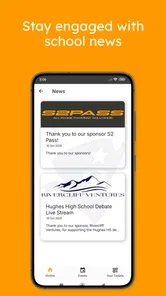
Yes. S2 Pass is designed for school-related services, including staying connected with your school community. What you can see and do depends on how your school uses the app and which services it makes available. Once you have access, check the app for relevant updates and features, and contact your school if you need help connecting your account or finding a particular service.
Can I use S2 Pass to buy tickets or pay school fees?
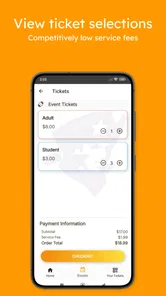
S2 Pass is intended to support ticket purchases and school fee payments, alongside other school community services. The exact options available depend on the school or organization using it, so check the app after setting up your access to see which transactions are supported. Be sure to review the details of any purchase or payment before confirming it.
What is S2 Pass and what can I use it for?
S2 Pass is a mobile application designed to provide users with access to digital services, passes, or account-related features through a smartphone. For school communities, its services include buying tickets, paying school fees, and staying connected. Available features can vary depending on how an organization uses the app.
Is S2 Pass free to download and use?
S2 Pass is free to download. However, some services connected to it can involve purchases or payments, such as buying tickets or paying school fees. Access may also depend on registration or an account set up through the associated school or organization. Downloading the app itself does not necessarily provide access to every feature or service.
What information or permissions does S2 Pass require?
During setup, S2 Pass may request basic account details and permissions needed to deliver its functionality, such as notifications, camera access for scanning codes, or storage and network access for displaying digital passes. Permission requirements can differ between Android and iOS versions. Review each request carefully and allow only permissions that are relevant to how you intend to use the app.
Pros
- Quick access to supported services with a simple login flow.
- Adds an extra security layer beyond a standard password.
- Useful for managing authentication across compatible S2 services.
- Can reduce the need to remember multiple account passwords.
- Convenient for users who frequently access S2 platforms.
Cons
- Works only with services and accounts that support S2 Pass.
- A lost or replaced phone may complicate account recovery.
- Requires reliable internet access for some authentication actions.
- Setup can be confusing if your organization has custom login rules.
- Availability and features may vary depending on the S2 service used.





