Reverb: Buy & Sell Music Gear
- 6.46K
- 4.8
- Installs
- 1.00M
- Price
- Free

Screenshots

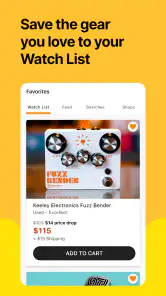
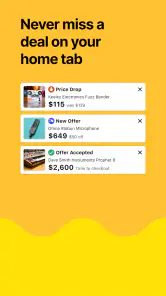
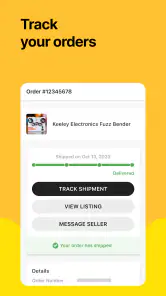
Analysis by Reviewed
In a shared home, music gear often becomes a group project: one person spots a used keyboard, another wants to compare it with a new model, and someone else is trying to clear space by selling an amp. Reverb: Buy & Sell Music Gear is built around that specialist market, so I find it more useful for those conversations than a general shopping app. It helps you browse instruments and related equipment in one place, but it works best when everyone is clear about whose account, budget, and purchase decision are involved.
Making a shared search work
A practical way to use the app together is to agree on the exact need before browsing: a particular type of instrument, a sensible spending limit, and any must-have condition details. That prevents a casual search for a guitar from turning into a stream of tempting, unrelated gear. I’d also compare listings by looking closely at the description and photos rather than treating a familiar brand name as a guarantee. For used equipment, the item’s stated condition and what is visibly included matter as much as the headline.
Reverb is a shopping app from Reverb.com, and its focus is narrower than the broad listings you get from general resale marketplaces. That focus is its advantage if you already know you want music gear; a musician can spend less time filtering out unrelated household items. The trade-off is that someone looking for a wider range of everyday purchases will probably find a general marketplace more convenient. The app is free, has an Everyone content rating, and is on its current 5.54.0 version for devices running OS 9 or later.
That specialist focus is especially useful when several people are trying to answer different questions about one instrument. The player may care about feel and sound, while the person paying is comparing condition and total cost. I find it helps to make a shared shortlist outside the browsing session: record the model, condition, what is included, and the reason it made the cut. This keeps a household discussion focused on comparable options instead of relying on memory or a stream of screenshots.
Keep accounts and decisions clear
For household use, I’d treat each account as belonging to the person responsible for its purchases and messages, rather than passing one login around. Before placing an order, the buyer should check the final item, seller details, delivery terms, and total cost shown at checkout, then share those details with anyone contributing money. This is especially useful when a family is buying a first instrument: the player can explain what they need, while the person paying can make the final call without relying on a screenshot of a listing.
That separation is also practical after a purchase. If a question comes up about the listing or delivery, the account holder is the person who can keep track of the conversation and the order details. I would avoid having multiple household members make promises or negotiate separately about the same item. A single point person prevents crossed messages, while everyone else can still contribute opinions before the buyer commits.
The same care helps when selling shared equipment. Agree first on who owns the item, who will write the description, and who will handle buyer questions. Take clear photos of the actual gear and describe wear honestly; doing that gives potential buyers a better basis for deciding and reduces misunderstandings. I wouldn’t list an instrument until the household has settled on a minimum acceptable price and confirmed that nobody still needs it for lessons, rehearsals, or recording.
More From Our News Desk

Clash of Clans Is Won Between the Battles

Android Auto Makes the Case for Quieter Car Software

MobiOffice: Transforming Mobile Productivity with Seamless Integration

EA SPORTS FC™ Mobile Soccer: Redefining Mobile Sports Gaming

How Microsoft OneDrive Became a Mobile Productivity Giant

How Google Translate Breaks Language Barriers Effortlessly
For a shared sale, I’d also make a quick inventory before creating the listing: the instrument itself, any case or accessories, and visible damage worth describing. That check is easy to overlook when gear has lived in a rehearsal room or shared storage for years. It gives the person writing the listing a more accurate account and helps the household avoid a last-minute disagreement about whether a cable, stand, or other item was meant to be included.
Age, trust, and a sensible buying routine
An Everyone rating makes the app suitable for a broad audience, but that does not mean every purchase should be made by a young musician alone. Buying used equipment still calls for adult guidance around spending, seller communication, and checking whether a listing matches the intended use. I’d have a younger player make a shortlist and explain why each option fits, then let the responsible adult review the details and complete any household purchase.
Its reputation is encouraging: Reverb has a 4.8 average from around 34,000 ratings, with more than a million installs. Those figures suggest a well-used service, but they can’t tell you whether a particular instrument is right for your setup or whether an individual listing is fairly described. I’d use them as background reassurance, not as a substitute for reading carefully and asking sensible questions before committing.
One useful habit is to search with a concrete purpose, then pause before buying: compare a few suitable listings, note differences in condition and included accessories, and check whether the item solves the actual problem. Someone replacing a broken practice keyboard needs a dependable fit more than a rare finish; a collector searching for a specific vintage model may reasonably care about details that a beginner can ignore. That distinction keeps the app helpful rather than turning browsing into an impulse purchase.
When a younger musician is involved, I’d keep the conversation practical rather than handing over a broad shopping task. Ask them to explain what the instrument needs to do, which details in the description support that choice, and what compromises they are willing to accept. This gives them a real role in the decision while leaving spending and final review with the adult responsible for the purchase.
Discovering the World of Reverb
When I first downloaded Reverb: Buy & Sell Music Gear, I was instantly drawn to its sleek and intuitive interface. You know that feeling when you walk into a well-organized music store? That's exactly how I felt scrolling through the app. The categories are laid out in a way that makes it easy for you to find exactly what you're looking for, whether it's guitars, keyboards, or even recording equipment.
The Buying Experience
Buying on Reverb is as smooth as a well-tuned instrument. I remember eyeing a vintage Fender guitar listed by a seller from across the country. The app provided detailed descriptions, high-quality images, and even sound clips! Talk about immersive shopping. After making my decision, the checkout process was straightforward, with multiple payment options including PayPal and credit cards. Plus, Reverb’s buyer protection gave me that extra peace of mind.
For a more careful purchase, I’d make a shortlist before getting attached to one listing. Check whether the photos show the parts you care about, such as controls, connectors, or signs of wear, and read the description alongside them. If you’re choosing between a used instrument and a new one from a conventional retailer, the used option may offer a particular model or character you can’t easily find elsewhere; the retailer may be the better fit when you want a straightforward new purchase and a familiar return process. The right choice depends on how much uncertainty you’re comfortable managing.
A realistic example: I might be replacing a noisy pedal before a rehearsal. I’d search for the type I need, compare the condition and included power supply across listings, then share the leading option with the bandmate who is splitting the cost. That quick check can prevent a false bargain if an apparently low-priced listing does not include something essential. For a time-sensitive need, though, local availability or a nearby music shop may beat waiting for a shipped item.
For a household choosing a first instrument, I’d handle the decision in two passes. The player can first decide what feels comfortable and suits the way they plan to learn; the buyer can then compare condition, what comes with each listing, and the final amount due. That keeps a beginner’s excitement in the process without treating a low price or an attractive photo as enough reason to order. It also makes it easier to recognize when a new instrument from a conventional retailer is the simpler choice.
Selling Made Simple
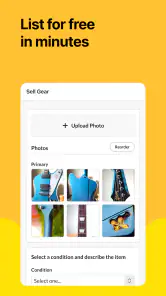
Now, selling gear on Reverb? It's like playing a familiar tune. I decided to sell my old keyboard to fund a new synthesizer. Listing it was a breeze – just a few snaps, write a description, set your price, and you're good to go. The app also offers insights on pricing so you’re not shooting in the dark. And can I just say, the sense of community among musicians on Reverb is heartwarming? It's not just a marketplace; it feels like a club of gear enthusiasts.
For sellers, pricing guidance is a starting point, not a decision-maker. A keyboard with a hard case, a missing knob, or signs of heavy use should not be treated as identical to another listing just because the model matches. I’d photograph the condition plainly and explain what comes with the sale; accurate details may make the listing less flashy, but they help the right buyer judge it. If the priority is selling a bulky item locally and quickly, a local classifieds option can be more practical than reaching a wider specialist audience.
If the gear belongs to more than one person, I’d settle the details before the listing goes live: who has permission to sell it, how the minimum acceptable amount was chosen, and where the proceeds will go. That may feel like unnecessary admin for a single pedal, but it matters more for an amp or keyboard that several people use. A quick agreement avoids having to renegotiate after someone has already shown interest.
Community and Content
One of the standout features of Reverb is its vibrant community and educational content. Browsing through the app, you'll find a plethora of articles, gear reviews, and even how-to guides written by fellow musicians. It's not just about buying and selling; it's about learning and connecting with other music lovers. I found myself diving into articles about pedalboards and amp setups, learning tips and tricks I never knew I needed.
I’d use that reading as a way to get oriented, not as a replacement for checking whether a specific piece of gear suits your room, instrument, or playing style. A guide can help a newer musician learn the vocabulary to compare options, while an experienced player may use it to explore a setup idea before shopping. Either way, separating research from checkout makes it easier to notice when a useful article has turned into an excuse to buy equipment you didn’t set out to find.
In everyday use, I’d browse when I have enough time to compare rather than treating the app as a guaranteed solution for an urgent need. A musician preparing for a planned upgrade can investigate several options, learn the names of features to check, and bring a more informed shortlist to a household discussion. Someone whose cable or instrument has failed just before a performance may be better served by a local shop or another source with immediate availability. The specialist selection is valuable, but it does not remove the practical advantage of buying nearby when timing is the priority.
Reverb has been around since Nov 4, 2014, and the scale of its audience is reflected in roughly 6,500 reviews as well as its ratings. I see that as a reason to expect a developed marketplace, not a promise that every transaction will be effortless. The app is most compelling for musicians, collectors, and home-recording enthusiasts who want a focused place to explore used, vintage, and newer gear. It is less suited to shoppers who need a guaranteed in-person inspection, want only a brand-new item from a conventional retailer, or prefer not to assess individual listings.
My main practical caution is that browsing a specialist catalog can make a very particular instrument feel like an obvious purchase simply because it is hard to find elsewhere. I’d set the household’s maximum spend before looking and decide which condition issues would be deal-breakers. If the listing leaves you unsure about an important detail, pause and seek clarification rather than assuming the photographs tell the whole story. That discipline matters more than browsing for longer.
In conclusion, Reverb: Buy & Sell Music Gear is more than just an app; it’s a hub for musicians and gearheads alike. Whether you're hunting for a rare find or looking to pass on a piece of your collection, Reverb makes the process enjoyable and rewarding. It's a must-have app for anyone serious about music gear. So, if you haven't tried it yet, what are you waiting for? Dive into the world of Reverb and let your musical journey begin!
Reverb: Buy & Sell Music Gear Frequently Asked Questions
Can I browse Reverb before creating an account?
Reverb is centered on exploring music-gear listings, so it can be useful to look around and see what kinds of instruments and equipment are available before deciding whether to take part as a buyer or seller. If you plan to make a purchase or list an item, expect to use the app’s account and transaction features. It is designed as a marketplace, not just a gear catalog.
Does Reverb focus only on new instruments?
No. Reverb’s appeal is that it brings together used, vintage, and newer music gear, so you can explore more than standard new retail items. The marketplace is focused on instruments, equipment, and accessories for musicians. Listings can vary, and checking each seller’s description and photos is a practical way to understand the condition and details of a particular item before making a decision.
Is Reverb: Buy & Sell Music Gear free to download, and who can use it?
Reverb is a free shopping app from Reverb.com, with an Everyone content rating. It is built around buying and selling music gear, so it may be useful whether you are browsing for an instrument or looking to list equipment of your own. The app has a 4.8 average rating from around 34,000 ratings.
What is Reverb: Buy & Sell Music Gear?
Reverb is an online marketplace specifically designed for musicians, allowing users to buy and sell new, used, and vintage music gear. It offers a wide array of instruments, equipment, and accessories for both amateur and professional musicians. The app provides a platform where sellers can list their products, and buyers can search for gear that suits their needs.
How does the buying and selling process work on Reverb?
The buying and selling process on Reverb is straightforward. Sellers can create a free account to list their gear, providing detailed descriptions and images. Buyers can browse through listings, compare prices, and make purchases directly through the app. Reverb handles the transaction process securely, ensuring protection for both parties, and offers customer support if issues arise.
Pros
- Wide range of musical instruments.
- User-friendly interface.
- Trusted seller ratings.
- Secure payment options.
- Global shipping available.
Cons
- High shipping costs for international buyers.
- Limited customer support options.
- Some listings lack detailed descriptions.
- Occasional app crashes reported.
- Inconsistent refund process.

- Category
- Shopping
- Version
- 5.54.0











