RaceTrac
- 6.68K
- 4.8
- Installs
- 1.00M
- Price
- Free
Screenshots
Analysis by Reviewed
Ever found yourself cruising down a highway with a craving for some quick snacks or maybe a caffeine boost? That's where RaceTrac comes into play. This app is your ultimate pit-stop buddy, offering everything from checking fuel prices to grabbing munchies on the go. But does it really live up to the hype? Let's dive into the nitty-gritty of this app.
A more useful routine than a quick glance
I get the most value from a store app when it supports a stop I was already planning to make. With RaceTrac, that means treating the phone as a small planning tool before I leave, rather than something to fiddle with while driving. I can decide where a stop fits, make a note of what I need, and check the app while parked. That keeps the visit simple and avoids turning a loyalty program into an excuse to spend more.
For a commuter, the practical rhythm is different from a one-off road trip. A familiar route makes it easier to remember which location is convenient, while a quick check before setting out can help avoid an unnecessary stop. If I’m travelling somewhere unfamiliar, I would use a dedicated maps app for the route and use RaceTrac only for the brand-specific parts of the visit. Keeping those jobs separate is less confusing than expecting one shopping app to handle every travel decision.
What is RaceTrac?
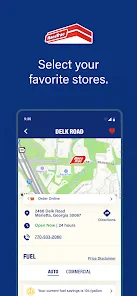
RaceTrac is not just a gas station – it’s a one-stop-shop for all your travel needs. With its user-friendly app, you can easily locate the nearest RaceTrac store, check the latest fuel prices, and even explore their food and beverages menu. It's like having a mini convenience store right in your pocket.
First Impressions
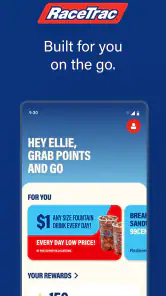
At first glance, the app is quite straightforward. The interface is clean, and navigating through the options is a breeze. I was impressed by how quickly it loads, even on a spotty internet connection. The home screen gives you quick access to essential features like finding the nearest store and current promotions.
That straightforward feel suits a quick-stop app: I don’t want to learn a complicated system just to check a store or manage a rewards visit. I’d still take a moment to confirm the location I’m looking at before relying on it, particularly if there are several possible stops along a route. A little attention at the planning stage is more useful than trying to resolve a mismatch after arriving.
Features that Stand Out
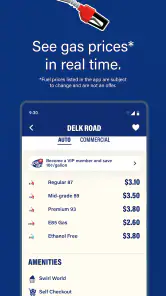
One of the features I found incredibly handy is the fuel price tracker. With fluctuating gas prices, it’s a relief to have real-time updates at your fingertips. No more guesswork or driving around to find the best deal!
More From Our News Desk

Clash of Clans Is Won Between the Battles

Android Auto Makes the Case for Quieter Car Software

MobiOffice: Transforming Mobile Productivity with Seamless Integration

EA SPORTS FC™ Mobile Soccer: Redefining Mobile Sports Gaming

How Microsoft OneDrive Became a Mobile Productivity Giant

How Google Translate Breaks Language Barriers Effortlessly
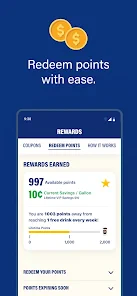
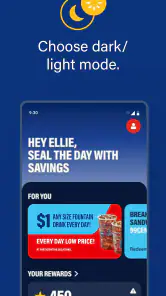
Another perk is the RaceTrac Rewards program. By using the app, you can easily earn points for every purchase you make, which can later be redeemed for discounts or free items. It's a win-win situation!
The strongest reason to keep the app installed is the ability to connect repeat visits with points you can track and redeem. I would check the account before paying rather than assume I can sort out every detail afterward. That small habit is especially useful on a busy stop, when I’m more likely to forget what I intended to do. Once the visit is over, reviewing the balance gives me a clearer picture of whether the rewards routine is worth maintaining.
The Food Factor
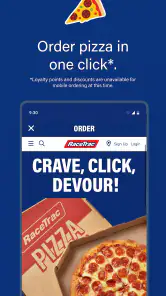
You might think it’s just a gas station app, but let me tell you, the food options are surprisingly diverse. From fresh sandwiches to hot pizza slices, the app lets you order ahead, so your food is ready by the time you arrive. It’s convenient, especially when you're on a tight schedule.
Order-ahead is most appealing when I already know where I’m stopping and can build the pickup into the journey. For instance, on a weekday drive, I might decide before leaving that I’ll get food at a convenient stop, check the available choices, and avoid spending extra time deciding once I arrive. I would not make the plan so tight that a delay leaves me without another option; a scheduled pickup is helpful, but a rushed trip still needs some flexibility.
Settings and small habits worth checking
I’d begin by checking the basic account and location choices that appear in the app, then use only what supports my routine. The useful question is not how many screens I can explore, but whether I can get to the store or rewards information I need without searching at the counter. If I visit regularly, keeping the same simple sequence—open the app while parked, check the relevant details, then deal with points during the purchase—makes the experience more dependable.
Location access is a practical trade-off for a store finder: it can make nearby stops easier to identify, while a manually chosen location may be enough when I already know where I’m going. I’d use whichever approach feels appropriate rather than leave the app open just in case. I would also avoid interpreting a displayed promotion or price as a promise that it applies to every stop; checking the details for the intended location is the sensible step before changing plans.
Areas for Improvement
No app is perfect, and RaceTrac is no exception. While the app offers a plethora of features, it occasionally suffers from minor glitches, especially during peak hours. This can be a bit frustrating when you're in a rush. Additionally, integrating a map feature for detailed directions could make it even more user-friendly.
That friction matters most when the app is being used at the last possible moment. If a page is slow or an option does not behave as expected, I would switch to the simplest fallback: complete the stop without relying on the app and try again later. It is a better trade than holding up a queue or making a purchase depend on a screen that is not cooperating.
Making the Rewards Habit Work
I’d treat the points as a small bonus on purchases I already planned to make, rather than a reason to detour or buy extra. A practical routine is to open the app before paying, check that the account is ready to use, and then review the balance after the visit. That simple sequence makes it easier to notice whether a purchase has been credited and to keep track of points before deciding when to redeem them.
For a regular stop, it also helps to think ahead about what you would actually use as a reward. A discount is only valuable if it fits something you normally buy; otherwise, the points can feel more compelling on screen than they are in everyday life. I’d avoid making a special trip just to chase a points balance, especially if another nearby shop is more convenient.
One useful way to judge the program is to compare it with how I already shop, not with an imagined best-case reward. If I buy fuel or a snack there anyway, points can make that visit a little more rewarding. If earning them requires changing a route or choosing something I would not otherwise want, the extra effort is the real cost. That distinction keeps the app useful without letting a balance dictate the day.
Who Will Get the Most from It?
This is most useful if RaceTrac is already part of your routine: commuters who stop for fuel and a drink, drivers who take familiar routes, or anyone who likes keeping purchases and rewards in one place. For example, on a weekday drive, I could check a nearby stop before leaving, pick up a snack with fuel, and use the app’s rewards flow as part of checkout rather than trying to remember it later.
If you rarely visit RaceTrac, the loyalty side may not justify installing another shopping app. A general fuel-price comparison tool can be a better choice when your main goal is comparing stations across brands, while a maps app is more useful when detailed navigation is the priority. RaceTrac makes the strongest case when the store itself is already where you want to shop.
It is also a weaker fit for someone who prefers not to use a phone during errands or who wants one app to compare a broad range of retailers. In that case, paying without opening a loyalty app may be simpler, and a general shopping or navigation tool will better match the task. I’d install this for a repeated brand-specific routine, not just because I occasionally pass a convenience store.
Details Worth Checking Before a Trip
RaceTrac is a free shopping app from RaceTrac, Inc, with an Everyone age rating. Its store summary points to earning, tracking, and redeeming points, so I’d make those actions the center of my routine rather than assume every visit requires the app. The current version is 8.15.0, and it requires iOS 9 or later; the app has been available since March 15, 2016.
Before setting out for a specific item or meal, I would use the app to check what it shows for the store I have in mind, then keep a backup plan if the visit is time-sensitive. Location information can help narrow down a convenient stop, but I wouldn’t treat a displayed price or offer as a reason to make a long detour without checking the details in context. The app is best as a planning aid, not a guarantee that every location will suit a particular need.
For someone deciding whether to try it, the practical questions are simple: Do you visit these stores often enough to use points? Is the location information relevant to the route you actually take? Would checking food choices ahead of time make a stop easier? If the answers are mostly yes, the app has a clear job. If not, its benefits may be too occasional to outweigh keeping another app on the phone.
Where It Sits Among Shopping Apps
Compared with a broad retailer app, RaceTrac is much more tied to a particular kind of quick stop: fuel, convenience-store purchases, and a points relationship with the same brand. That narrower focus can make it easier to use when you already know where you’re going, but it won’t replace a general shopping app for comparing products or browsing many sellers. I’d keep it for repeat visits, not as my all-purpose road-trip planner.
The app has an average rating of 4.8 from around 22,000 ratings, with roughly 6,700 written reviews and over one million installs. Those figures suggest many people find it useful, but they don’t settle whether it fits your routine; how often you visit and whether you value the rewards matter more. I’d judge it by whether it makes a stop you already need a little easier.
Against the usual alternatives, its advantage is focus rather than breadth. A fuel comparison service is better when I want to weigh different brands, and a navigation app is better for turn-by-turn planning. A general retailer app suits a wider range of purchases. This one makes sense when I have already chosen a RaceTrac stop and want the related store and points tasks together, rather than switching between tools for every small detail.
Keeping Expectations Grounded
There are trade-offs beyond occasional glitches. A store-focused app is less helpful if your route takes you away from RaceTrac locations, and checking a phone while driving is never worth the convenience. I’d set up my habit before getting on the road, then use the app only while parked or as a passenger. If the connection is unreliable, I would not depend on an on-screen detail as the sole plan for a rushed stop.
I also wouldn’t assume that every feature mentioned in a broad overview is available at every location or works in exactly the same way each time. For a quick visit, the simplest test is whether the app helps with the task in front of you: finding a suitable stop, handling points, or planning a food pickup. If it adds extra steps instead, paying normally and moving on is a perfectly sensible choice.
For the smoothest use, I’d keep the app out of the driving portion of the trip: plan while parked, decide what I need, and leave the phone alone once moving. That is not just a safety point; it also prevents a minor loading delay from becoming a distraction. The app can support a routine, but it should never be the thing that makes a time-sensitive stop feel more complicated.
A grounded verdict for repeat visitors
RaceTrac has a clear purpose, and that is both its strength and its limit. It can bring store-finding, food planning, and rewards into a familiar stop, but it is not a universal shopping or trip-planning tool. I’d recommend it to someone who already visits often enough to remember to use the points and who appreciates checking a stop before arriving. For infrequent visitors, the simpler choice may be to skip the extra app and use a general map or fuel comparison tool when needed.
All in all, the RaceTrac app is a solid companion for anyone frequently on the road. Whether you need to refuel, grab a bite, or just want to rack up some reward points, this app has got you covered. While there's room for improvement, the convenience it offers is undeniable. Next time you’re on the road, give it a try and see how it enhances your travel experience!
RaceTrac Frequently Asked Questions
Is RaceTrac suitable for someone who only visits its stores occasionally?
It can still be useful for occasional visitors if they want a way to earn, track, and redeem points. The app is focused on the RaceTrac shopping experience, so its value depends on whether you expect to use those rewards or other store-related features. Frequent customers may have more opportunities to make it part of their routine, while occasional shoppers can decide whether managing points is worthwhile for them.
What kind of app is RaceTrac, and who might find it useful?
RaceTrac is a shopping app from RaceTrac, Inc, intended for people who visit RaceTrac convenience stores. Its main purpose is to help users earn, track, and redeem points. It may be a good fit if you already shop at RaceTrac and want a dedicated place for rewards-related activity; people who do not visit its stores may find less reason to install it.
Is RaceTrac free to download, and what devices can run it?
RaceTrac is free to download and is made for Android and iOS devices. On Android, the app requires version 9 or later, so it is worth checking your device’s software before installing. The app is listed for everyone, making it suitable for a broad audience. Its shopping focus centers on earning, tracking, and redeeming points.
Who develops RaceTrac, and what is the app mainly used for?
RaceTrac is developed by RaceTrac, Inc and is a shopping app built around the RaceTrac convenience-store experience. Its central purpose is to help users earn, track, and redeem points. If you regularly visit RaceTrac, the app can provide a place to manage rewards and access features intended to make store visits more convenient.
What is RaceTrac and what services does it offer?
RaceTrac is a convenient app designed to enhance your experience at RaceTrac convenience stores and gas stations. Through the app, users can find the nearest RaceTrac locations, check fuel prices, and even earn rewards through the RaceTrac Rewards program. Additionally, it offers features like mobile ordering, allowing you to skip the line and pick up your items swiftly, making it a must-have for frequent visitors.
Pros
- User-friendly interface for easy navigation.
- Wide range of fuel options available.
- Convenient location finding feature.
- Real-time fuel price updates.
- Fast and efficient customer service.
Cons
- Limited payment options.
- Occasional app crashes reported.
- Inconsistent fuel price updates.
- Limited features in some regions.
- No loyalty rewards program.
- Category
- Shopping
- Version
- 8.15.0











