QVC Mobile Shopping (US)
- 10.71K
- 4.2
- Installs
- 1.00M
- Price
- Free

Screenshots




Analysis by Reviewed
I think QVC Mobile makes the most sense when you enjoy shopping with a presenter rather than browsing a vast catalogue in silence. It brings a familiar, show-led style to a phone: you can watch, discover an item, and shop without switching to a separate screen. That can be handy when you have a few spare minutes at home, though it is a different experience from opening a general retailer’s app to search for one exact product and leave.
QVC, Inc. has kept this shopping app in circulation since its 2010 release, and its current version is 5.21.0. That long-running presence is useful context, but a version number alone does not tell me which screens or features have changed recently. I’d judge it by how well the current experience fits your habits, rather than assuming every update brings a visible redesign.
Where it fits into a shopping routine
A practical way to use the app is to treat live viewing as discovery, not as a reason to buy immediately. If a demonstration catches your eye, pause to check the item details and compare them with what you actually need. This small step matters with television-style shopping: seeing a product in use can clarify its appeal, but the pace and presentation can also make a purchase feel more urgent than it is.
For example, if I had a quiet moment after dinner and wanted to look for a gift, I could browse the app, watch a relevant presentation, and save the item for a closer look rather than trying to decide on the spot. That workflow suits people who like seeing products explained. If I already knew the exact model I wanted, a conventional retailer with a broader search-and-filter catalogue would probably be faster.
Who is likely to enjoy it
The app is a better fit for regular QVC viewers, shoppers who appreciate product demonstrations, and anyone who wants to browse without sitting in front of a television. It is less compelling if you dislike video, prefer a quiet list of search results, or mainly shop by comparing many brands and sellers side by side. In those cases, a general shopping marketplace may make the decision process easier.
Its free price lowers the barrier to trying it, and its Everyone age rating makes the intended audience broad. The app has a 4.2 average from around 31,000 ratings, alongside more than 1 million installs. Those figures suggest it has an established audience, but they cannot tell you whether the show-based approach will suit your own taste; that is the real question to test.
Getting Started with QVC Mobile Shopping
First things first, downloading the QVC Mobile Shopping (US) app is a breeze. Available for both Android and iOS, it's just a quick search away in your respective app store. Once installed, the app welcomes you with a sleek and intuitive interface. I was pleasantly surprised at how easy it was to navigate through the various categories and find exactly what I was looking for.
More From Our News Desk

Clash of Clans Is Won Between the Battles

Android Auto Makes the Case for Quieter Car Software

MobiOffice: Transforming Mobile Productivity with Seamless Integration

EA SPORTS FC™ Mobile Soccer: Redefining Mobile Sports Gaming

How Microsoft OneDrive Became a Mobile Productivity Giant

How Google Translate Breaks Language Barriers Effortlessly
Features That Make Shopping a Breeze
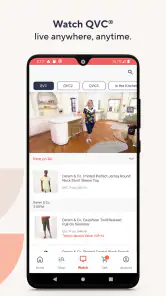
One of the standout features of this app is its live TV streaming. Yes, you heard that right! You can watch live QVC broadcasts directly from the app. This means you won't miss out on any exclusive deals or product demonstrations. Plus, the app allows you to purchase items directly from the live stream, which is incredibly convenient.
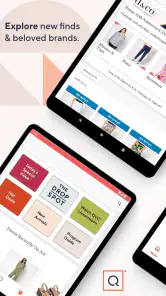
Another feature that caught my eye is the personalized recommendations. The app seems to learn from your shopping habits and suggests products that you'll likely be interested in. It's like having a personal shopper at your disposal, and who doesn't love that?
One useful habit is to separate browsing from buying. I’d add a promising find to my mental shortlist, check the product information, and consider whether it fits my budget before completing checkout. That is especially sensible when a live presentation is persuasive: the stream is good for seeing an item explained, but it is not a substitute for taking time to decide.
User Experience and Interface
The user interface is clean and clutter-free, which I absolutely appreciate. The developers have clearly put a lot of thought into making the app user-friendly. The search function works like a charm, and I was able to find products in no time. However, I did notice that the app tends to lag a bit when streaming live TV, but it's nothing too disruptive.
That streaming trade-off is worth considering before settling in to watch. A live video experience depends more on a steady connection than a simple product search does, so if the picture stutters, switching to browsing may be less frustrating than repeatedly waiting for the stream to catch up. People who mostly want quick, text-based shopping will likely find a standard retailer app more efficient.
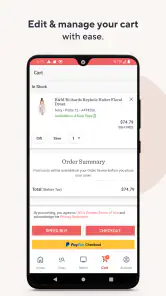
Payment options are plentiful, and you can easily save your preferred method for future purchases. The checkout process is smooth, making it almost too easy to keep adding items to your cart!
Final Thoughts
All in all, the QVC Mobile Shopping (US) app is a fantastic tool for anyone looking to bring the QVC shopping experience to their mobile device. Its strong points are the live TV streaming and personalized recommendations. While there are minor hiccups like occasional lag during live streams, the overall experience is seamless and enjoyable.
So, if you're a fan of QVC or just love the idea of shopping from the comfort of your home, give this app a whirl. It might just become your new favorite shopping companion!
What I’d keep in mind before installing
Before relying on it for a particular purchase, I’d check whether the app is available for your device and that the operating system is compatible; the Android release requires version 9 or later. I’d also avoid assuming that a personalized suggestion is automatically the best match. Recommendations can make discovery easier, but I still prefer to use search when I have a specific need and judge each item on its own details.
My main expectation for future use is modest: I’d want the live viewing and checkout to stay dependable, especially since video is central to what distinguishes QVC from ordinary shopping apps. The version history by itself is not a promise of any particular upcoming feature. For now, I’d choose it when I want QVC’s presentation-led way of shopping, and choose a conventional retailer when speed, broad comparison, or a strictly search-first experience matters more.
A more deliberate way to use the stream
I find the app most useful when I decide what kind of browsing session I’m having before opening it. If I’m just curious, I can let the broadcast introduce me to products I wasn’t searching for. If I’m shopping for something specific, I’d start with search and treat a video presentation as a second opinion on how an item is shown, not as the whole decision. That distinction keeps the app’s strongest feature from getting in the way of a practical purchase.
For a household purchase, I’d also make a short checklist before watching: the intended use, the space available, and the amount I’m comfortable spending. A demonstration may help me understand an item’s appearance or use, but my checklist keeps the comparison tied to my own needs. This is a small but useful guardrail in a format designed to hold attention and encourage discovery.
Useful for gifts, less so for urgent errands
Imagine I need a present but don’t yet know what would suit the recipient. A QVC presentation can give me a starting point because it puts an item in context instead of leaving me with a wall of product tiles. I’d note a couple of possibilities, then revisit the details when I have time to think. That makes the app a reasonable companion for browsing during a relaxed evening or a quiet break.
It is a weaker choice when I need a replacement today, already know the exact item, or want to compare specifications across several sellers. In that situation, I would turn to a retailer with direct search results, filters, and a broad range of alternatives. QVC’s appeal is the curated, presenter-led route into shopping; the trade-off is that it is not the most direct route from a precise need to a purchase.
How it differs from shopping marketplaces
Compared with a large marketplace, QVC feels more like a shop window with a host guiding your attention than an open directory. That can reduce the effort of deciding what to look at when I’m browsing casually. It also means I shouldn’t expect the same kind of side-by-side seller comparison or endless choice that makes marketplaces useful for price and specification hunting.
I wouldn’t use either style for every purchase. Marketplaces tend to suit a focused comparison task; QVC is better when a product explanation and the act of browsing are part of the enjoyment. A regular retailer’s app may sit between those approaches, with a more conventional catalogue and less emphasis on live presentation. Choosing among them comes down to whether I want discovery, breadth, or speed at that moment.
Making recommendations work for you
Personalized suggestions can be convenient when I’m open to ideas, but I’d treat them as a changing shelf rather than a reliable record of what I need. A recommendation may be worth opening if it matches a current interest; it doesn’t replace searching for an exact product or checking the item information. Keeping those two paths separate makes the recommendations feel helpful instead of letting them steer the whole session.
If I’m shopping with someone else, I’d show them the item or presentation before committing, especially when the purchase is meant for their home or personal taste. The app’s visual explanations can help start that conversation, while a pause gives both of us room to consider whether the item is genuinely suitable. That is more useful than treating a persuasive demonstration as a final verdict.
Practical questions before checkout
A natural question is whether watching is necessary to shop. I would not make it a requirement for every visit: search and browsing are useful when I already have a direction, while live viewing is the distinctive option for product discovery. If I’m short on time or using a connection that struggles with video, I’d skip the stream and use the app in a more conventional way.
Another question is whether the app makes sense for someone who has never watched QVC on television. I think it can, provided that person enjoys being shown products and is comfortable browsing without a narrowly defined search. The familiarity of being a regular viewer is a bonus, not the only reason to try it; the format itself is the deciding factor.
I’d also ask myself whether I’m comfortable shopping in a presentation-led environment. If I tend to make impulse purchases, I would build in a pause: leave the item, compare it with my original need, and come back later if it still seems right. The convenience of buying from the stream is real, but ease should not be confused with a reason to buy.
What I’d want to see stay dependable
For existing users, the most meaningful evolution is not a version label by itself but whether the basic rhythm remains reliable: find something, understand it, and complete a purchase without unnecessary friction. I can’t infer a specific redesign or new capability from version 5.21.0 alone, so I’d focus on the parts that affect daily use. Stable video, sensible product discovery, and a checkout that doesn’t interrupt the experience are the areas that matter most to this app’s identity.
My advice is to install it when you want a mobile way into QVC’s particular style of shopping, especially if demonstrations help you assess products or you enjoy browsing without a fixed destination. Skip it as your main shopping tool if you depend on fast, comprehensive comparisons, dislike video, or want every visit to begin and end with a precise search. Used for the right kind of session, it has a clear purpose; used for every errand, its format can feel like extra steps.
QVC Mobile Shopping (US) Frequently Asked Questions
Does QVC Mobile Shopping require an account, and what can I do before signing in?
The app is built around browsing QVC products and shopping from a mobile device. You can explore its shopping experience and product presentations, while account features such as order tracking and purchase history are intended for managing your activity. If you plan to buy something, having your QVC account details ready can make it easier to access the account-related features described in the app.
Can I watch QVC broadcasts and product demonstrations in the app?
Yes. QVC Mobile Shopping lets users view live broadcasts and watch product demonstrations on a mobile device, alongside browsing products and making purchases. This can be useful if you prefer to see items presented before deciding whether to shop. The app also includes notifications about promotions, so you can choose whether to keep up with QVC updates while using it.
Is QVC Mobile Shopping free to download, and which devices can use it?
QVC Mobile Shopping is a free shopping app from QVC, Inc. The Android version is listed as QVC for Android™, and its store description is QVC Mobile. It is intended for devices running Android 9 or later. Before downloading, check that your device meets this requirement and has enough available storage for the app.
What features does the QVC Mobile Shopping app offer?
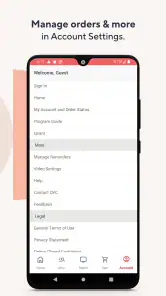
The QVC Mobile Shopping app provides users with a seamless shopping experience, allowing them to view live broadcasts, browse products, and make purchases directly from their mobile devices. Users can watch product demonstrations, access exclusive deals, and receive notifications about special promotions. The app also offers a flexible payment option, including Easy Pay, and supports account management features such as order tracking and purchase history.
Is the QVC Mobile Shopping app user-friendly for first-time users?
Yes, the QVC Mobile Shopping app is designed to be intuitive and user-friendly, even for first-time users. The interface is clean and well-organized, providing easy navigation through various categories and product listings. Helpful tutorials and FAQs are available within the app to assist users in understanding how to utilize the app's features effectively. New users will find it easy to search for products, watch live shows, and complete transactions with minimal hassle.
Pros
- Wide variety of products available.
- User-friendly interface for easy navigation.
- Live broadcasts for real-time shopping.
- Secure payment options for users.
- Regular updates with new features.
Cons
- Limited international shipping options.
- Occasional app crashes reported.
- Some items may have delayed shipping.
- High data usage during live streams.
- Limited customer support availability.

- Category
- Shopping
- Version
- 5.21.0











