Pose Tool 3D
- 331.00
- 4.0
- Installs
- 10.00K
- Price
- $6.99
Screenshots
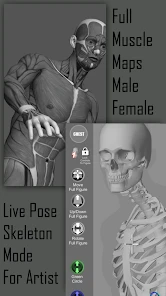
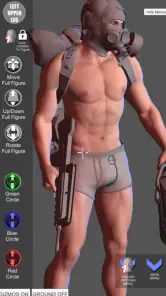
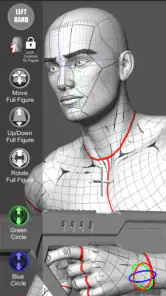
Analysis by Reviewed
When I need to work out a figure’s pose before drawing, I’d rather solve the awkward angle in a movable model than keep guessing from a flat reference. That is the practical appeal of Pose Tool 3D: it is a paid art-reference app from Riven Phoenix, built around arranging human figures for drawing. I see it as a focused aid for sketch planning, not a replacement for observation, anatomy study, or a finished illustration program.
A practical first pass
My most useful routine with a pose tool is to begin with the action, not the details. I decide whether the figure is reaching, leaning, sitting, or turning, then adjust the view until the gesture reads clearly. Only after that would I spend time refining a hand, foot, or head angle. This order matters: polishing small parts of a pose that still feels stiff is a good way to waste a drawing session.
For example, if I have ten minutes before a class or a short break between other tasks, I can use a model to check the broad silhouette of someone carrying a bag or reaching for a shelf. I would make a quick sketch from that reference, then put the device aside and draw from memory or observation. The model is most valuable as a way to answer a specific visual question, rather than as a template to copy mechanically.
Settings and habits that make reference useful
Before settling on a pose, I would check the viewing angle and the lighting together. A figure that looks readable from the front can become confusing when viewed from the side, while a strong shadow may hide the shape of an arm against the torso. Rotating the view and checking the silhouette helps reveal those problems early. I also prefer to test a pose at the same rough scale as my intended drawing; a tiny figure can conceal awkward overlaps that become obvious when enlarged.
Saving a pose, where that workflow is available, is most useful when it serves a repeatable purpose: keeping a reference for a sequence, returning to a difficult gesture, or comparing several variations of the same action. I would label or organize saved references consistently if the app supports it, rather than accumulating near-identical poses that are hard to tell apart. That small habit turns a pose collection into a practical resource instead of a pile of unfinished experiments.
I would also decide what question each session is meant to answer before adjusting the figure. For a panel with a character falling, for instance, I might focus first on the direction of the torso and the relationship between the limbs, rather than trying to perfect every joint. A second pass can check whether the head and hands point the viewer toward the next beat of the action. Keeping those checks separate makes the process quicker and stops the reference from dictating details that belong to the drawing itself.
Where it fits among art tools
Compared with searching for photo references, a 3D figure can be useful when I need to inspect an angle that is hard to find quickly or want to adjust a pose rather than accept a photographer’s framing. A photo, however, shows the variety of real bodies, clothing, weight, and incidental gesture that a posed model may not capture. A traditional wooden mannequin is quick to reposition but offers less anatomical guidance. I would use each for a different job, and combine them when a drawing needs both a clear pose and convincing lived-in detail.
More From Our News Desk

Weather by Xiaomi Review: Clear at a Glance, Less Clear Up Close

X Under Pressure: Can It Recover When Posting Goes Wrong?

Clash of Clans Is Won Between the Battles

Android Auto Makes the Case for Quieter Car Software

MobiOffice: Transforming Mobile Productivity with Seamless Integration

EA SPORTS FC™ Mobile Soccer: Redefining Mobile Sports Gaming
This is especially helpful for beginners who struggle to imagine foreshortening, and for illustrators who need a fast check before committing to a composition. It is less suitable if the goal is polished finished artwork, lifelike expression, or a reference that precisely matches a particular person’s build and clothing. In those cases, personal observation or photography is a better starting point, with the app used only to clarify the underlying gesture.
It also helps to think of the model as a camera-ready block-in, not a source of final anatomy. A pose can communicate the direction of a movement while still needing changes to feel believable: a shoulder may need to rise, a hip may need to carry more weight, or the hands may need to tell a clearer story. I would use the adjustable figure to establish the broad structure, then deliberately alter what feels generic. That trade-off is worthwhile when speed matters, but less so when a scene depends on a very specific body type or expressive performance.
Pose Tool 3D sits in the comics and art-reference space, and its public audience includes more than ten thousand installs. It has an average rating of 4.0 from around fifteen hundred ratings, with 331 reviews, and is rated for Everyone. It costs $6.99, so I would treat it as a considered purchase rather than an automatic download: it makes the most sense if you regularly draw figures and expect to return to it. The app was released on October 14, 2012, and its current version is 6.8.181.
For a comic artist, a practical use is checking whether a character’s silhouette stays legible in a small panel. I would set up the broad action, inspect it from the panel’s likely viewpoint, and then sketch the pose with fewer construction lines than I might need if guessing from memory. For a personal illustration, I might instead use the model to test a difficult seated angle, then look at photos to add believable folds and weight. These are different jobs, and the app is more valuable when I know which one I am asking it to do.
A common question is whether it can replace photo references. I wouldn’t treat it that way. It can help me explore a view or pose that is inconvenient to find, but photographs remain better for clothing, facial expression, natural asymmetry, and the small signs of effort that make a body feel lived in. If I need a distinctive individual rather than a general figure arrangement, a photo or live observation should lead the process.
Another useful question is whether the purchase makes sense for someone who draws only occasionally. At $6.99, I would buy it only if figure poses are a recurring obstacle or if I expect to use the reference in several projects. A beginner can get value from checking basic balance and foreshortening, but someone who mainly draws landscapes, objects, or stylized characters may get little from a dedicated pose tool. The rating and audience suggest it has found users, but those numbers do not change the basic question of fit: will you reach for it often enough?
One useful way to judge whether it earns a place in my routine is to try a small, repeatable exercise: make three gesture sketches from one reference, changing the camera view between them, then compare which view made the action easiest to understand. That tests whether the tool is helping me see form rather than simply encouraging closer copying. I would also keep a few minutes for drawing without the screen, because a reference is a support for visual thinking, not a substitute for it.
Let me take you on a journey through the intriguing world of Pose Tool 3D, an app that’s become a staple for artists, illustrators, and anyone with a penchant for sketching human figures. Whether you're a seasoned artist or just starting out, this app might just be the digital companion you didn't know you needed.
Getting Started with Pose Tool 3D
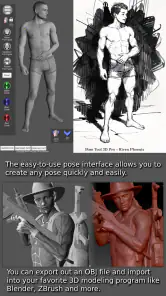
As soon as you launch Pose Tool 3D, you'll notice its sleek and intuitive interface. It’s like stepping into a virtual studio, where the possibilities for creativity are endless. The app offers a wide range of customizable 3D models, allowing you to manipulate and pose figures with ease. It’s like having a mannequin right on your screen, minus the bulky wooden limbs.
Features That Stand Out
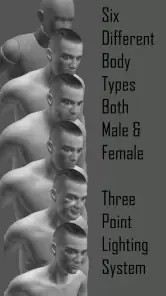
One of the standout features is the app’s ability to adjust lighting and shadows, giving your figures a more realistic touch. This is a game-changer for artists who want to understand how light interacts with the human form. Plus, the zoom-in and out feature lets you get up close and personal with your model, perfect for focusing on those minute details that bring your sketches to life.
Another cool aspect is the variety of poses available. Whether you're looking to sketch a dynamic action scene or a serene, relaxed posture, the app has got you covered. You can even save your favorite poses for future use, which is a huge time-saver. It’s like having a library of inspiration at your fingertips.
Why Artists Love It
What truly makes Pose Tool 3D a beloved app among artists is its versatility. The app supports both beginners and advanced users, offering a platform where growth is visible and tangible. Newbies can explore basic poses and gradually progress to more complex ones, while seasoned pros can challenge their skills with intricate compositions.
Additionally, the app doesn’t just stop at human figures. It includes a selection of animals, which is perfect for those times when a sketch demands a bit of wildlife. This feature broadens the scope of what you can create, making the app not just a tool, but a muse.
Turning a reference into a repeatable workflow
For a faster session, I would keep a simple sequence in mind: establish the gesture, inspect the silhouette, adjust the camera, and only then look at the lighting. That order makes it easier to notice whether the pose itself works before shadows begin to make it look more dramatic than it really is. If a pose is destined for a comic panel, I would also check whether its outline reads at a glance; a clear pose matters more than intricate joint placement when the drawing will be small.
When I return to a saved pose, I would treat it as a starting point rather than a finished solution. A small change to the angle or limb placement can turn a neutral stance into a more specific action, but copying the same reference repeatedly can make separate characters feel stiff or alike. I would use saved references to preserve useful setups and compare options, then introduce changes that reflect the character’s intention, balance, and mood.
Experienced artists may wonder whether a 3D reference risks making drawings look mechanical. It can, especially if every joint is copied literally and the artist ignores rhythm, exaggeration, and weight. My workaround is to make the first sketch quickly, then close or move away from the reference and redraw the gesture with more intent. The model can settle spatial questions; it cannot decide which lines should be simplified or pushed for style.
Where the limits become important
The app’s strongest use is spatial problem-solving, not expressive storytelling. A movable figure can make an arm’s path or a turned torso easier to understand, but it does not automatically give a character believable emotion or a convincing reason to move. I would be cautious about relying on it for a close-up where fingers, facial acting, or subtle tension carry the scene. In those cases, a photo, a mirror, or careful observation gives me more useful material to interpret.
It is also not the right choice if I want an all-in-one drawing workspace. I would still need my usual sketching tools to make the artwork, and I would need other references when the scene depends on clothing, props, age, or a specific person’s proportions. This separation is not a flaw so much as a boundary: Pose Tool 3D is worthwhile when a pose question is slowing me down, but it should not become another step I open out of habit when a quick thumbnail would answer the same question.
The animal figures may widen the kinds of sketches I can plan, but they do not remove the need to study the particular animal I am drawing. For a creature’s gait, fur, or distinctive anatomy, real imagery remains the richer reference. I would use the app to test a broad arrangement or viewpoint, then bring in observation to make the result specific. That keeps the convenience without mistaking a pose aid for a complete reference library.
The Verdict
In a nutshell, Pose Tool 3D is more than just an app; it’s a gateway to creativity. It empowers artists by providing a dynamic canvas where imagination can run wild. Whether you're drawing for fun, for work, or for improvement, this app is a must-have in your digital toolkit.
Think of it as your digital art studio, always ready, always available, and always inspiring. So, if you haven’t already, give Pose Tool 3D a try and experience firsthand how it can transform your artistic workflow. Who knows, it might just become your go-to app for all things sketch-related!
My more measured recommendation is to see it as a specialist reference aid, not a must-have for every artist. If you regularly draw people and often get stuck on a turn, reach, or foreshortened limb, its movable figure and adjustable view can save time and give you a dependable place to test ideas. If you draw figures only now and then, or need a convincing real-world person with specific clothes and expression, photos and observation are likely to serve you better.
For me, the app earns its place when I use it with a clear question and stop once that question is answered. A few deliberate checks of gesture, viewpoint, and silhouette can make a sketch session more confident; endless tweaking can just delay the drawing. That balance is the real skill in using a pose reference well, and it is what makes this focused tool most useful.
Pose Tool 3D Frequently Asked Questions
Is Pose Tool 3D a one-time purchase, and what should I know before buying it?
Pose Tool 3D costs $6.99, so it is worth considering how often you expect to use a 3D figure reference before downloading. The app is intended for artists who want to create human figure poses for their artwork, rather than a general-purpose drawing or 3D modeling program. If pose planning is a regular part of your process, having a reference tool on hand may be useful.
Who makes Pose Tool 3D, and is it a well-established app?
Pose Tool 3D is developed by Riven Phoenix and has been available since October 14, 2012. It has over 10,000 installs, and its average rating is 4.0 from around 1,500 ratings. Those figures suggest that artists have been using it for some time, while the rating and written reviews can help you decide whether its approach to pose reference suits your needs.
What is Pose Tool 3D and how can it benefit artists?
Pose Tool 3D is an innovative application designed for artists to explore and create 3D poses with ease. It provides a comprehensive platform for visualizing human anatomy and poses in three-dimensional space. By using Pose Tool 3D, artists can enhance their understanding of proportions, perspective, and anatomy, leading to improved artistic skills and more accurate and dynamic artworks. The tool is especially beneficial for those who want to refine their figure drawing or need a reliable reference for complex poses.
Is Pose Tool 3D user-friendly for beginners?
Yes, Pose Tool 3D is designed with both beginners and professionals in mind. It offers an intuitive interface that is easy to navigate, making it accessible for those who may not have experience with 3D modeling software. The app includes tutorials and guides to help new users get started, and its straightforward controls allow artists to manipulate poses without a steep learning curve. Whether you are a beginner or an experienced artist, Pose Tool 3D caters to varying levels of expertise.
What devices are compatible with Pose Tool 3D?
Pose Tool 3D is available for both Android and iOS devices, ensuring a wide range of compatibility. It is optimized for smartphones and tablets, allowing users to take advantage of the app's features on the go. To ensure smooth performance, it is recommended to use Pose Tool 3D on devices with updated operating systems and adequate processing power. Check the app store listings for specific system requirements to ensure the best user experience.
Pros
- Realistic 3D models for accurate posing.
- Wide range of customizable poses.
- User-friendly interface for easy navigation.
- Supports multiple characters in a scene.
- Detailed anatomy for precise adjustments.
Cons
- Limited free features without subscription.
- Occasional app crashes reported by users.
- High storage usage due to 3D models.
- Some tools require steep learning curve.
- In-app purchases can be costly.
- Category
- Comics
- Version
- 6.8.181