PayRange
- 40.33K
- 4.5
- Installs
- 1.00M
- Price
- Free
Screenshots
Analysis by Reviewed
I judge payment apps by whether they still help after the novelty of tapping a phone wears off. PayRange is a free shopping app from PayRange Inc. for paying at participating machines, so its value depends less on how often I open it and more on whether the places I already visit support it. If your routine includes shared laundry rooms or vending machines, that can make it a useful tool to keep ready; if you rarely encounter compatible machines, it may not earn much space on your phone.
Check the setting before you count on it
The first question I would answer is not whether the app is easy to install, but whether it fits the place where you expect to use it. A machine payment app is only useful at equipment that accepts it, so look for PayRange identification on the machine or nearby instructions before building a routine around it. If you are visiting a laundromat for the first time, having coins or another accepted payment option available is sensible until you know how that location works.
This is also where the app differs from a general-purpose mobile wallet. A wallet may be useful at a broad range of shops, while PayRange is aimed at transactions with participating machines. That narrower purpose is a strength when it matches a regular chore: there is less need to handle change for a familiar washer or vending machine. It is a limitation when you want one payment tool for errands across many kinds of businesses.
A Convenient Payment Alternative
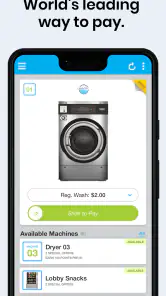
Picture this: you're in a rush, and the last thing you want to do is fumble around looking for coins. PayRange eliminates that hassle by allowing you to make payments with just a swipe on your smartphone. It's super handy, especially for those of us who live in a digital-first world. With this app installed, you'll be able to pay for laundry, parking, vending machines, and even arcade games without breaking a sweat.
The first-week appeal is practical, not magical
At first, the appeal is easy to understand: fewer moments spent hunting for coins when a machine supports the service. The app has a 4.5 average from around 90,000 ratings, and it has passed one million installs, so it is not an obscure experiment. Still, those figures cannot tell me whether the machines near your home, workplace, or laundromat are compatible. I would check the machine itself before relying on the app for an urgent purchase.
That first week is a good time to test the whole process on a low-pressure visit, rather than discover how it behaves when you are late or juggling bags. I would choose a machine I can identify clearly, keep the app open while following its prompts, and pay attention to whether the connection and payment steps feel straightforward in that specific location. One successful attempt tells you more about your own routine than a general impression from installing it at home.
How It Works
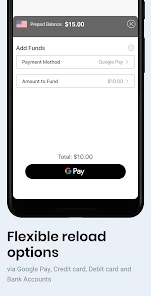
Getting started with PayRange is a breeze. Once you download the app, you'll need to load it with funds using your credit or debit card. The app then connects to machines equipped with PayRange technology via Bluetooth. Just swipe up on your phone, and voila, payment is made! It's incredibly simple and saves you from the embarrassment of being caught without cash.
More From Our News Desk

Clash of Clans Is Won Between the Battles

Android Auto Makes the Case for Quieter Car Software

MobiOffice: Transforming Mobile Productivity with Seamless Integration

EA SPORTS FC™ Mobile Soccer: Redefining Mobile Sports Gaming

How Microsoft OneDrive Became a Mobile Productivity Giant

How Google Translate Breaks Language Barriers Effortlessly
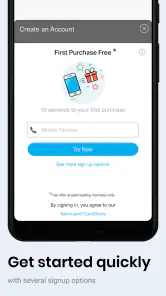
A useful habit is to set up the account before you are standing beside a washer with a basket of clothes. Check that Bluetooth is available, confirm the machine is part of the network, and make sure your balance is ready. That small bit of preparation matters: a phone payment is convenient, but it does not help if you discover a compatibility or connection snag while in a hurry. I would still carry a backup payment method when the task is time-sensitive.
For a first transaction, I would also slow down enough to check that I have selected the intended machine and that the machine responds as expected before walking away. A phone interface can make paying feel effortless, but the physical machine is still the thing you need to start. Taking a moment to match the app's instructions to the equipment helps avoid the frustrating assumption that a tap alone has completed the chore.
Month-to-month value depends on your routine
The app makes the most sense when the same kinds of machines recur in your week. Someone who regularly does laundry in a shared facility can avoid keeping a stash of coins specifically for that chore; a person who only buys from vending machines now and then may find cash or a card just as straightforward. Unlike a general mobile wallet that you can use across many everyday shops, this is a focused option tied to participating equipment. Its value is therefore local and habitual, not universal.
A realistic use case is arriving at the laundromat after work with a full basket and no change. If the machines there accept PayRange, paying from the phone can remove one annoying errand. I would use the app as a convenience for that particular stop, rather than assume it replaces every form of payment around town. Before making it part of a routine, look for its availability at the places you actually use, not merely places you might visit someday.
For a household that shares laundry duties, the useful question is who will handle payment and whether that person can reliably access the account and phone at wash time. A single person who regularly visits the same room may benefit most, because familiarity reduces the friction of finding the right machine and completing the payment. If several people take turns, agree on a practical payment arrangement first; a dedicated app will not automatically make shared chores simpler if the account and available balance are an afterthought.
It can also be handy for occasional vending purchases in a building where you already spend time, such as a workplace or shared facility. The point is not to install it for every possible snack stop, but to notice whether one recurring location makes it worthwhile. If you only encounter compatible machines on rare outings, carrying your usual payment method is likely simpler than remembering a separate app for a one-off transaction.
Why You'll Love It
What really makes PayRange stand out is its ease of use. The app's interface is intuitive and user-friendly, which means anyone can navigate it without any fuss. Plus, it supports a wide range of machines across the country, making it a versatile tool to have on your phone. I love how it sends me notifications when my balance is low, so I never have to worry about being unable to make a payment.
One trade-off to consider is the balance workflow. Loading funds ahead of time can make a later transaction quick, but it also means remembering that money is sitting in an app rather than in your bank account. I would start with only what fits my near-term use and check the balance after a purchase, especially if I use the service infrequently. That makes it easier to tell whether the convenience is worth maintaining an account and a preloaded balance.
There is a small but important distinction between having an app ready and having a payment ready. If your balance is low, a machine-side errand may turn into an account task before it becomes a purchase. I would check the balance when planning laundry rather than waiting until clothes are already sorted and the machine is waiting. That simple timing choice preserves the convenience without encouraging me to keep more funds loaded than I expect to use soon.
The developer is PayRange Inc., and the app is rated for Everyone. It is free to install, which lowers the barrier to trying it, though the practical question is still whether your local machines accept it. The current version is 7.0.7, and it requires Android 6.0 or later on Android devices. Those details make it accessible to many users, but compatibility with the machine—not simply the phone—is the part I would verify first.
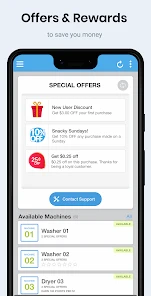
Another fantastic feature is the rewards program. Every time you use the app, you earn points that can be redeemed for future services. It's a nice little perk that adds value to an already awesome app. Who doesn't love getting rewarded for everyday tasks?
I would treat any rewards as a bonus, not the reason to change how I pay. A benefit tied to future use is most relevant when the app already fits your habits; chasing it at machines you would not otherwise use can turn a small convenience into an unnecessary routine. The better test is still whether the payment itself saves time or hassle at a place you visit often.
Maintenance and sources of fatigue
Keeping it useful does not require constant attention, but it does ask for some small upkeep: keep the app installed, maintain access to the payment method you use, and remember to check the available balance before a machine-side purchase. Bluetooth is another practical dependency during a transaction. If you prefer not to keep funds in a specialized app or do not want to troubleshoot a phone connection while doing chores, coins or another accepted payment method may feel less fussy.
One way to reduce maintenance is to review the account after a planned use rather than constantly checking it. If you see that the balance is enough for the next expected visit, there is no need to top it up just because the app offers a way to do so. If you have not used it in a while, check the account before heading out and decide whether keeping the app installed still makes sense. That light routine keeps the tool from becoming something you only remember when it is inconvenient.
Phone readiness matters too. A flat battery, unavailable Bluetooth, or a connection problem can defeat the point of leaving coins behind. I would not make it my sole backup for a necessary laundry trip or an urgent purchase, especially when I do not know how reliable the setup is at that particular machine. Keeping another accepted payment option available is not a criticism of the app; it is a sensible response to making a phone part of a physical transaction.
The main source of fatigue is repetition without enough opportunity. If you install it for one machine and then rarely see another compatible one, opening a dedicated payment app can feel like an extra step rather than a shortcut. It is also not the right choice for someone who wants one mobile payment method that works broadly at ordinary retailers. I would skip it unless a place you visit regularly supports it, or unless the convenience of avoiding coins matters enough to justify keeping it ready.
Another reason to pass is personal preference around prepaid balances. Some people are comfortable setting aside money in a focused payment app; others would rather pay directly with a card or use cash only when a purchase happens. Neither approach is automatically better. If keeping track of a separate balance annoys you more than carrying change, the convenience may not feel like a genuine improvement even when the machine is compatible.
The app is best for people who have a repeatable machine-based chore and are willing to prepare a little before arriving. It is less compelling for travelers who cannot predict which machines they will encounter, for people who rarely use vending or laundry equipment, and for anyone whose preferred payment method is already effortless at their regular locations. Knowing that distinction before installing it saves the disappointment of expecting a universal wallet from a service with a more focused job.
Final Thoughts
In a world where technology is rapidly advancing, PayRange is a refreshing and practical innovation that fits seamlessly into our digital lifestyles. It's perfect for anyone tired of dealing with coins and cash. So, next time you're about to hit the laundromat or grab a snack from a vending machine, consider giving it a try. With its convenience, ease of use, and rewarding system, it's bound to become a staple on your smartphone. Trust me, once you've tried it, you'll wonder how you ever lived without it!
My longer-term verdict is more measured: it earns a place when it repeatedly solves a small, familiar problem at machines you already use. I would keep it if laundry or vending payments become noticeably easier, and remove it if compatibility is rare or maintaining a prepaid balance feels like clutter. That is the honest test after the first-week novelty fades: not whether paying by phone feels modern, but whether the next ordinary errand is genuinely simpler.
PayRange Frequently Asked Questions
What kinds of places can I use PayRange at, and is it useful if I rarely use machines?
PayRange is a shopping app for making mobile payments at machines, including vending machines, laundromats, and other point-of-sale locations. It is most useful if you regularly visit places where the machines accept the service. Before downloading, consider where you expect to use it and whether PayRange-supported machines are part of your routine; it is not a general-purpose payment app for every store.
Who develops PayRange, and what is the app’s age rating?
PayRange is developed by PayRange Inc. and is intended for Everyone. It is a shopping app focused on mobile payments at machines, so its main purpose is straightforward: helping users pay at participating locations with a phone. If you are choosing apps for a family device, the Everyone rating may be useful context, while the app’s practical value will depend on whether nearby machines support PayRange.
Is PayRange free to download, and what should I know before setting up an account?
PayRange is free to download and is intended for Everyone. It is a shopping app from PayRange Inc. that provides a mobile payment option for machines. Before using it, consider whether the machines you visit support PayRange, since the app is useful for payments only at participating locations. You can check for the app on your device’s official app store.
What is PayRange and how does it work?
PayRange is a mobile payment app that allows users to make cashless payments at various vending machines, laundromats, and other point-of-sale locations. Users simply need to download the app, add funds via credit/debit card or digital wallets, and then use their smartphone to connect and pay for services or products without the need for cash or coins.
Is PayRange available for both Android and iOS devices?
Yes, PayRange is available for both Android and iOS devices. Users can download the app from the Google Play Store for Android devices or the Apple App Store for iOS devices. The app is designed to be user-friendly and compatible with a wide range of smartphones, ensuring a seamless payment experience across different platforms.
Pros
- Easy setup with Bluetooth connectivity
- Secure transactions with encryption
- Wide range of supported machines
- User-friendly interface
- Quick payments with a tap
Cons
- Limited to participating locations
- Requires stable internet connection
- Occasional app crashes
- No cash payment option
- Sometimes slow to update balance
- Category
- Shopping
- Version
- 7.0.7











