Orto: License Plate VIN Lookup
- 3.97K
- 4.5
- Installs
- 500.00K
- Price
- Free

Screenshots
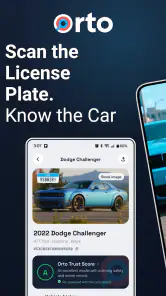
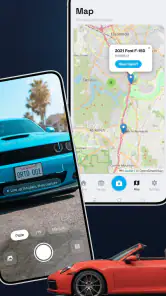
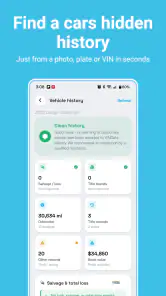
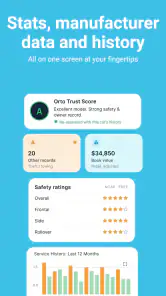
Analysis by Reviewed
If you are looking at a used vehicle and want more context than a seller’s description provides, Orto: License Plate VIN Lookup is designed to give you a practical starting point. I see it as an Auto & Vehicles app for checking a vehicle identification number or a license plate, then looking at details such as title information, recalls, estimated value, and available history. It is free to install, and the age rating is Everyone, so the basic idea is approachable even if you are not familiar with vehicle records.
My first impression is that this is not meant to replace a mechanic, an official government record, or a proper inspection. Its value is in helping you decide what deserves a closer look before you spend time or money on a vehicle. That makes it especially useful during the early stage of a purchase, when you are comparing several listings and need a quick way to separate promising options from cars that raise immediate questions.
The app comes from Orto Industries LLC and has built a strong audience, with an average rating of 4.5 from around 9.6 thousand ratings and more than 500 thousand installs. Those figures suggest that the concept is easy for many drivers to understand, although they should not be treated as a guarantee that every lookup will answer every question. Vehicle records vary, and the usefulness of a result depends heavily on the information available for the particular car.
What to expect before your first lookup
Before opening the app, it helps to understand what a VIN and a license plate can each do for you. A VIN is the more direct route when you have access to the vehicle or its paperwork. It identifies the car itself, while a plate can be convenient when you are browsing an advertisement or checking a vehicle before arranging a viewing. In practice, I would use whichever identifier the seller gives me, then compare the returned details with the listing.
The most useful mindset is to treat the result as a screening tool. If the vehicle description says one thing but the lookup points toward a different title status, history detail, or value picture, that mismatch deserves attention. It does not automatically prove that the seller is dishonest, because records can be incomplete or delayed, but it gives you a specific question to ask instead of relying on a vague feeling.
Latest News
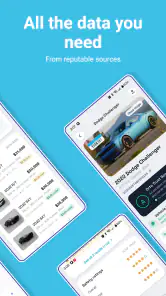
The app’s store summary focuses on decoding VINs and looking up plates, with checks related to title, recalls, value, and history. That combination makes it broader than a simple VIN decoder that only displays basic specifications. At the same time, broader coverage can make the experience feel less immediate than a single-purpose decoder. You are not just reading a model name; you are interpreting several kinds of information that may have different levels of importance.
I recommend having the identifier ready before you begin. A VIN is usually found on the vehicle, registration paperwork, or an insurance document. A plate is normally visible in a listing or on the car itself. Copying the characters carefully matters because one mistaken letter or number can lead to an unsuccessful search or, worse, information for a different vehicle. I would double-check similar-looking characters before assuming the app has failed.
There is also a practical reason to avoid doing the lookup only after you have fallen in love with a car. Once you have arranged financing, travelled to see it, or negotiated emotionally, inconvenient information becomes harder to accept. Running the check early keeps the result in its proper role: one piece of evidence in a larger buying decision.
How I would prepare a vehicle check
For a private sale, I would save the listing details first, including the advertised mileage, trim, model year, and seller’s claims about accidents or maintenance. Then I would run the identifier through the app and compare the result with those claims. This simple before-and-after habit is more useful than opening the app without any notes, because it helps you notice inconsistencies rather than merely collecting a report.
For a dealership visit, I would use the app before driving across town whenever the listing includes a plate or VIN. If the identifier is not shown, asking for it can itself be informative. A seller may have a reasonable explanation for withholding it temporarily, but a buyer should not feel pressured to commit before having enough basic information to evaluate the vehicle.
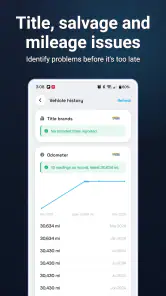
One less obvious benefit is that the app can help you organize questions. A recall result may lead you to ask whether the repair was completed. A title-related detail may prompt you to ask for documentation. A value estimate may encourage you to compare the asking price with other vehicles in similar condition. The lookup is most powerful when it changes your conversation with the seller.
Getting through setup without overthinking it
Orto: License Plate VIN Lookup is a free app, so the initial decision is straightforward if you want to test it. The current version is 6.0.2, and it supports Android 7.0 or later. That makes it accessible on many older Android phones, which is useful if you keep a spare device in the car or do not upgrade frequently. I would still check that your phone meets the minimum system requirement before planning a viewing around it.
The first screen should be approached with one goal: identify where to enter the information you actually have. If you possess a VIN, use that rather than trying to reconstruct a plate from memory. If you only have a plate from an advertisement, start there. The fastest route is not always the same for every vehicle, and forcing the wrong identifier can create unnecessary confusion.
When entering a VIN manually, I would slow down and inspect the characters one by one. VINs are long enough that a small typing error is easy to make, especially on a phone keyboard. If the app accepts pasted text, copying from a reliable source is preferable to retyping. After submitting, compare the returned vehicle identity with the car you intended to check before reading further into the history.
That identity check is an important safety habit. If the displayed make, model, or other identifying information does not match the listing, stop and correct the input. Do not continue as though the mismatch were a minor display issue. A report about the wrong vehicle can look convincing while being completely irrelevant to your purchase.
The free entry point is helpful for occasional users, but the app also includes in-app purchases ranging from $3.99 to $449.99 per item. I would pay close attention to the wording and scope of any purchase screen before confirming anything. A low-cost lookup and a much broader package are not the same commitment, and someone checking one car should not assume that a larger option is necessary.
This is one area where I think first-time users should be deliberate. Decide what question you are trying to answer before paying for anything. Are you checking whether the car appears to have a troubling title history? Are you looking for recall information? Are you comparing several vehicles? Knowing that beforehand makes it easier to judge whether an optional result is worth the cost rather than buying simply because the screen creates urgency.
The first meaningful success
Your first successful action is not merely getting a result to load. It is confirming that the result belongs to the vehicle in front of you and then turning one useful detail into a next step. For example, if the information supports the seller’s description, you can move on to questions about service records and inspection. If the information conflicts with the listing, you can pause and request clarification before arranging a purchase.
I would begin with a vehicle I am seriously considering, not a random car. That gives the lookup an immediate purpose and makes the information easier to interpret. After entering the VIN or plate, I would read the basic vehicle identification first, then review title, recall, value, and history-related information in that order. Starting with identity prevents a striking detail later in the result from distracting you from a simple input mistake.
Recall information deserves special attention because it can affect safety and ownership planning. A recall entry is not the same thing as proof that the vehicle is unsafe today; the key follow-up is whether the corrective work was completed. I would ask the seller for documentation or have a dealer confirm the status. The app can alert you to the topic, but the repair question belongs in your inspection and purchase process.
Value information is also easy to misuse. I would treat it as a comparison point, not a fixed price. Condition, mileage, equipment, location, maintenance, and demand can all change what a particular car is worth. If the app’s estimate differs from the asking price, that is a reason to investigate the gap, not an automatic instruction to reject the vehicle or make an aggressive offer.
History information works best as a prompt for verification. If it suggests previous damage, ownership changes, or a title concern, ask for the supporting paperwork and arrange an independent inspection. If the history looks clean, I would still inspect the car. A clean-looking lookup cannot reveal every mechanical problem, cosmetic repair, or issue that has not entered the available records.
A realistic example would be a first-time buyer comparing two similar used cars after work. One listing includes a VIN, so I would check it at home before contacting the seller. The result matches the advertised model, but a recall entry appears. Instead of dismissing the car, I would ask whether the repair was completed and request proof. If the seller cannot answer, the second car may become the safer appointment even if its asking price is slightly less attractive. That is the kind of decision support I find more valuable than a long list of raw vehicle facts.
Where new users can get confused
The biggest source of confusion is assuming that every lookup produces a complete life story for a vehicle. Records depend on what has been reported and connected to the identifier. A result can be useful without being exhaustive, and a lack of a particular entry should not be interpreted as proof that the event never happened. This is why I would combine the app with paperwork, a test drive, and an inspection by someone qualified to evaluate the car.
Another common mistake is treating a plate lookup as interchangeable with a VIN lookup in every situation. A plate may be convenient, but the vehicle can change plates while the VIN remains tied to the car. If you have both, I would use the VIN as the main reference and the plate as a cross-check. If the two paths appear inconsistent, stop and resolve that issue before relying on the result.
Users may also expect the app to make the buying decision for them. It does not remove the need to judge condition, ownership documents, financing, insurance, or the seller’s credibility. Its strength is narrowing uncertainty. It can tell you what to investigate; it cannot stand beside you during the inspection or guarantee how the vehicle will perform after purchase.
Purchase screens can create a second kind of friction. Because optional items range from a few dollars to several hundred dollars, I would avoid tapping through quickly when I am standing in a dealership or speaking with a seller. Read what the selected item covers, check whether it matches the vehicle you entered, and consider whether the same question can be answered through an inspection or official channel. The most expensive option is not automatically the most appropriate one.
There is also a privacy and practical consideration whenever you handle someone else’s vehicle information. I would use the app for a legitimate purchase, ownership, or maintenance decision and avoid assuming that a result gives permission to investigate unrelated personal details about a vehicle owner. Keeping the lookup focused on the car makes the process more responsible and easier to explain if a seller asks what you are doing.
When another option may suit you better
If all you need is a basic specification decode, a simpler VIN decoder may feel faster because it avoids history and value-related choices. If you already have a trusted mechanic and complete official paperwork, you may prefer to spend your effort on an inspection rather than an additional app-based lookup. Orto is most useful when you want several vehicle checks gathered around one identifier and need help deciding which questions to ask next.
It is also not the right sole tool for a high-stakes purchase. For an expensive vehicle, a car with unusual paperwork, or any result that conflicts with the seller’s story, I would use the app as an early warning system and then seek stronger confirmation. A professional inspection and direct document review provide a different kind of confidence that a mobile lookup cannot replace.
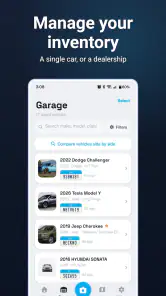
On the other hand, people who regularly browse private listings may find the combination especially convenient. The app gives you a repeatable workflow: capture the identifier, verify the vehicle, review the main categories, record questions, and decide whether the car deserves an in-person visit. That is more disciplined than relying on memory from several listing pages.
My next-step routine after a result
After a lookup, I would write down three things: what matched the advertisement, what needs explanation, and what must be checked in person. This prevents the result from becoming a forgotten screen that made you feel informed without changing your behavior. It also gives you a clear script for contacting the seller.
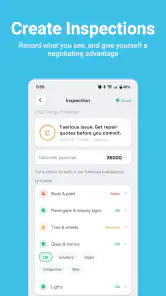
If everything appears consistent, the next step should be a physical inspection and a test drive. Check the vehicle identification on the car against the paperwork, look for signs of repair, and ask for maintenance records. Use the app’s recall and history information to focus your questions, but do not let a reassuring result shorten the inspection.
If you find a mismatch, keep the conversation factual. Ask the seller to explain the difference and provide documents rather than making an accusation. A reasonable explanation may resolve the concern; an evasive response is useful information in itself. In either case, the app has done its job by helping you notice something before you committed.
For people comparing several cars, I would use the same checklist for each one. Record the asking price separately from the app’s value indication, note any recall or title questions, and compare the condition only after seeing the vehicles. This avoids the trap of choosing a car because one number looks attractive while ignoring maintenance, mileage, or visible damage.
The app is also worth revisiting when ownership circumstances change. A recall check can be useful after buying a vehicle, while a history or value check may help when preparing to sell or trade it. I would not run repeated checks without a reason, especially if an optional purchase is involved, but the information can still support decisions beyond the initial shopping trip.
Who I think will get the most from it
I would recommend Orto: License Plate VIN Lookup to first-time buyers who want a guided starting point, shoppers comparing private listings, and owners who want a convenient way to organize questions about a vehicle. Its free availability lowers the barrier to trying the basic workflow, and the Everyone rating makes it suitable for a broad audience. The app’s current release, 6.0.2, also shows that it is an actively presented product rather than an abandoned one.
I would be more cautious recommending it to someone who expects a definitive guarantee about a vehicle’s condition or history. It is not a substitute for an inspection, and its results should be interpreted alongside documents and direct evidence. I would also tell budget-conscious users to review optional purchases carefully, because the available item prices extend from $3.99 to $449.99 and may not all fit a one-car check.
Overall, I like the app most when I use it before becoming emotionally invested in a purchase. It turns a plate or VIN into a set of practical follow-up questions, which is exactly where a lookup tool earns its place. Use the result to investigate, not to stop thinking. That approach keeps the strengths of Orto Industries LLC’s app in perspective and protects you from treating a convenient mobile report as the whole buying decision.
My final recommendation is simple: install it when you are actively checking a vehicle, start with the identifier you can verify, confirm that the returned car is the right one, and then follow up on every important warning with documents or an inspection. For that focused purpose, this free Auto & Vehicles app is a useful companion and a sensible first step for anyone who wants more information before arranging a purchase.
Orto: License Plate VIN Lookup Frequently Asked Questions
What devices and operating systems can run Orto: License Plate VIN Lookup?
Orto: License Plate VIN Lookup is an Auto & Vehicles app from Orto Industries LLC. Its minimum operating system requirement is version 7.0, so check your device’s software version before installing. The app is available for Android and iOS users, and compatibility can depend on the specific device and operating system. It is rated for Everyone.
Who develops Orto, and what do its ratings suggest about its popularity?
Orto is developed by Orto Industries LLC and has attracted a sizeable user base for a vehicle lookup app. Its average rating is 4.5, based on around 9,600 ratings, with roughly 4,000 written reviews and over 500,000 installs. Ratings can help you get a sense of other users’ experiences, but they do not guarantee that a particular lookup will contain every detail you need.
What is Orto: License Plate VIN Lookup used for?
Orto: License Plate VIN Lookup is designed to help users research vehicle information using a license plate number or VIN, depending on the available lookup options and regional coverage. It may provide details such as vehicle identification data, specifications, registration-related information, or history indicators. Its store summary highlights VIN decoding and plate lookup, including checks for title, recalls, value, and history. Results can vary by country, state, database availability, and the type of report selected.
Is Orto: License Plate VIN Lookup available for every vehicle and country?
No, coverage is not necessarily universal. The app’s results depend on the databases and public or commercial records available in your region. Some license plates may not be supported, while VIN lookups can produce more consistent results when the vehicle is registered in a covered market. Before relying on a report, check the app’s supported locations and search limitations.
Does the app provide a complete vehicle history report?
Orto may present useful vehicle information, but users should not automatically assume that every search is a complete or official history report. Accident records, ownership changes, mileage events, theft information, title status, recalls, and service records may depend on the sources consulted. Treat the results as a research aid and verify important information with official records or a qualified professional.
Pros
- Quickly retrieves vehicle details from a license plate or VIN
- Useful for checking basic car information before a purchase
- Simple interface that is easy for first-time users
- Can help identify mismatched vehicle details or listing claims
- Convenient mobile access without needing a desktop lookup service
Cons
- Coverage and accuracy may vary by country
- region
- and vehicle database
- Some detailed reports or searches may require in-app payment
- A license plate search may reveal limited information compared with a VIN
- Results can be outdated if recent ownership or registration changes are missing
- Users should review privacy terms before submitting personal or vehicle data

- Category
- Auto & Vehicles
- Version
- 6.0.2











