Ollie's Bargain Outlet, Inc
- 2.07K
- 4.1
- Installs
- 1.00M
- Price
- Free

Screenshots

Analysis by Reviewed
If you are curious about what is available at Ollie’s Bargain Outlet before making a trip, the Ollie’s Bargain Outlet app is a simple place to begin. I approached it as a first-time shopper would: install it, look around without a fixed shopping list, and see whether it helps me decide if a store visit is worthwhile. It is a free shopping app from Ollie's Bargain Outlet Holdings, Inc., aimed at people who enjoy browsing discounted merchandise rather than ordering from a tightly predictable catalog.
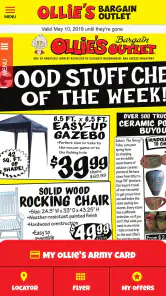
That distinction matters. I would not treat this as a replacement for every online retailer. Its value is closer to getting a preview of the bargain-hunting experience and staying connected to the retailer’s current shopping world. The store summary describes it as a way to take a sneak peek at “Good Stuff Cheap,” and that idea fits the experience better than expecting a full, conventional online department store.
The best way to use it is as a trip-planning companion, not as a guarantee that a particular bargain will still be waiting on the shelf. If you like discovering unexpected household items, seasonal products, closeouts, and changing merchandise, the app makes sense. If you need a precise product catalog, dependable stock counts, or a fast repeat purchase of the exact same item, you may find the usual retailer website or a dedicated marketplace more convenient.
What to expect before you start browsing
Ollie’s Bargain Outlet belongs to the shopping category, but it has a different personality from apps built around a massive searchable inventory. Bargain outlets often reward curiosity: you may open the app with one idea and leave with a plan to inspect several departments in person. I found that mindset important because it changes what counts as a successful session. The app does not need to show every possible item to be useful; it needs to give me enough direction to decide whether I want to explore further.
The application has been available since May 17, 2018, and its current version is 1.12.3. It supports devices running Android 7.0 or later, which makes it accessible to many older Android phones. That broad compatibility is helpful if you keep a spare device for shopping or do not replace your phone frequently. At the same time, anyone using an older handset should keep expectations realistic: a compatible operating system does not automatically mean every screen will feel equally quick or spacious.
Its audience is also fairly clear from its scale. The app has passed one million installs and holds a 4.1 average from around 4.4 thousand ratings, with roughly 2.1 thousand written reviews. Those figures suggest an established shopping utility rather than an obscure experiment, while still leaving room for mixed experiences. I would read the rating as a sign that many shoppers find it worthwhile, not as proof that it will suit every shopping style.
Because the app is free and rated for Everyone, the barrier to trying it is low. I would still approach installation with a specific purpose. For example, decide whether you want to preview the retailer’s current offer, prepare for a store visit, or simply learn how the app organizes its shopping information. That small decision prevents aimless scrolling and makes it easier to judge whether the app is saving you time.
More From Our News Desk

Clash of Clans Is Won Between the Battles

Android Auto Makes the Case for Quieter Car Software

MobiOffice: Transforming Mobile Productivity with Seamless Integration

EA SPORTS FC™ Mobile Soccer: Redefining Mobile Sports Gaming

How Microsoft OneDrive Became a Mobile Productivity Giant

How Google Translate Breaks Language Barriers Effortlessly
One useful mental adjustment is to separate discovery from availability. Seeing an item or promotion in an app does not necessarily mean the same product will be in the nearest location when you arrive. Bargain retail changes quickly, so the app is most helpful when it inspires a flexible shopping plan. Make a short list of categories or types of products to inspect rather than building your entire outing around one exact item.
Installing it without overcomplicating the first visit
After installation, I recommend opening the app when you have a few uninterrupted minutes rather than while standing in a checkout line. The first session is more useful when you can notice how the content is arranged and identify the parts that deserve a return visit. Start by scanning the main areas calmly. Look for the path that leads you toward current shopping information, then explore enough to understand whether the app is primarily helping you browse, plan, or locate a store-related opportunity.
I would not begin by trying to master every screen. A first-time user can easily assume that a shopping app should behave like a large online marketplace, with every department, product variation, and stock status available in a few taps. That expectation can make a straightforward companion app feel limited. Instead, ask a practical question: “Can this help me decide what to look for during my next Ollie’s visit?” If the answer is yes, you are using it in the right way.
It is also worth checking the app before leaving home, not only after arriving at a store. That gives you time to form a loose route through the shopping experience. If you are visiting for home supplies, for instance, think in terms of a few related areas rather than a single item. The advantage is flexibility: if the exact product is gone, you can still make the trip worthwhile by checking nearby categories.
For a first setup, keep your expectations about personalization measured. I would not assume that the app will automatically understand your household, remember every preference, or turn a casual browse into a perfectly tailored feed. Treat the opening session as orientation. Learn where the app puts its most useful information, then return when you have a real shopping reason.
Turning the first browse into a meaningful result
The first successful action should be small and concrete. Rather than spending twenty minutes scrolling, use the app to create a decision: “I know what I want to check when I visit,” or “This trip is probably not worth making today.” That is a better test than simply counting how much content you viewed.
Here is the everyday scenario I found most realistic. Imagine that I need inexpensive storage items and a few cleaning supplies, but I do not want to drive to the store without some idea of what the visit may offer. I open the app at home, browse the current shopping material, and note the relevant categories or themes that catch my attention. I then make a short, flexible list: storage first, cleaning supplies second, and a few minutes for unexpected bargains. The app has done its job if it helps me arrive with a plan without making me believe that every item is reserved for me.
This workflow is especially useful for shoppers who enjoy comparing possibilities in person. A typical online marketplace encourages exact searches: enter a product name, compare sellers, and place an order. Ollie’s experience is better suited to a category-led approach. I can decide what kind of bargain I am looking for, use the app to get oriented, and let the store visit handle the final selection.
A second practical use is preparing for a group shopping trip. If someone in the household needs kitchen goods while another person is looking for seasonal merchandise, the app can help everyone agree on the purpose of the visit before leaving. That reduces the familiar problem of wandering through the store with no shared plan. I would keep the list short, because the whole point of this retailer is that the selection can invite spontaneous discoveries.
My most useful tip is to record categories, not promises. If you see something appealing, remember the type of product and the reason it interested you. This protects you from disappointment when a specific bargain changes or disappears. It also makes the app more valuable over time: you begin to recognize which kinds of visits are productive for you instead of treating every opening as a random browse.
Where first-time shoppers may get confused
The main source of confusion is the difference between promotional visibility and guaranteed inventory. A preview can create the impression that a product is waiting at your local store, but bargain retail is not the same as ordering from a warehouse with a uniform national assortment. I would avoid making a long drive for one item unless you have another reason to visit. Use the app to improve your odds and your planning, not to eliminate uncertainty entirely.
Another possible misunderstanding is assuming that every useful shopping action must end with an in-app purchase. Some shopping apps are designed around a complete digital transaction, while this one is more naturally connected to browsing and visiting Ollie’s. If you do not see the exact checkout flow you expected, that does not necessarily mean the app has failed. It may simply be serving a different part of the shopping journey.
There is also a temptation to measure value by how polished the app feels compared with major online marketplaces. Those larger alternatives usually win when I want detailed filters, extensive product specifications, predictable delivery, or easy reordering. Ollie’s can be more appealing when the goal is to discover discounted merchandise and decide whether an in-person trip is worth my time. The comparison should be based on the task, not on the number of screens or search controls.
Older Android users should pay attention to comfort as well as compatibility. Since the minimum operating system is Android 7.0, an older phone may be able to install the app, but browsing can still feel less pleasant if the device has a small display, limited storage, or sluggish performance. I would close unnecessary apps before browsing and avoid judging the service from a single slow moment on aging hardware. If the experience remains cumbersome, a normal browser or a newer device may be the better route for planning.
Privacy-conscious shoppers may also want to take a measured approach to account-related choices. I would only provide information that is necessary for the particular function I am trying to use, and I would avoid signing up for anything merely because it appears during an exploratory session. That is not a criticism unique to this app; it is a sensible habit for any shopping service. Start with browsing, then decide whether additional personalization is worth it for you.
How it compares with familiar shopping alternatives
Against a large marketplace app, Ollie’s is less suitable for exact product research. If I need to compare several brands, read a deep set of technical specifications, or arrange delivery to my door, a conventional retailer or marketplace has the advantage. Those services are built around certainty and repetition. They make it easy to buy the same item again, but they can also make bargain discovery feel more like a search exercise.
Against a retailer’s ordinary website, the app’s biggest potential advantage is convenience during repeat planning. A dedicated app is already on the phone and feels natural to open before a shopping trip. Its weakness is that an app alone cannot solve the changing nature of outlet merchandise. If the website presents information more clearly on your device, or if you only shop occasionally, using the mobile browser may be enough.
Against deal-focused apps and circular aggregators, the comparison depends on what you value. A deal aggregator may be better for scanning many stores at once, while Ollie’s keeps the experience centered on one retailer. I prefer the focused approach when I already know I want to shop there. I would choose the broader alternative when I am simply hunting for the lowest price across different chains.
That focus is both the app’s strength and its boundary. It does not need to compete with every shopping tool because it serves a narrower decision: should I explore Ollie’s current bargain selection, and how should I approach that visit? For a loyal shopper, that can be enough. For someone who wants one universal shopping dashboard, it will probably feel too specialized.
Small habits that make the app more useful
I found three habits particularly helpful. First, open the app before you make a shopping list, not after. That lets the current material influence your plan instead of forcing the app to confirm a list you already wrote. Second, group your intended purchases by shopping area or purpose. This keeps the visit efficient while leaving room for unexpected finds. Third, revisit the app when your need is flexible. It is more valuable for “I need affordable household items” than for “I must buy this exact model today.”
A fourth habit is to use a two-level plan. The first level contains essentials that justify the trip; the second contains categories worth browsing if time allows. This is a useful trade-off for outlet shopping because it protects you from both extremes: arriving without direction and becoming frustrated when a specific product is unavailable. The app supports the planning side, while your flexible second list handles the uncertainty of the physical selection.
I also recommend judging the app after several purposeful sessions rather than one random opening. A first browse may not reveal its value if you are not currently shopping for anything. Try it before a household restocking trip, a seasonal search, or a visit with a friend. If it repeatedly helps you decide what to inspect, it has earned a place on your phone. If it only adds another screen to an already simple routine, removing it is reasonable.
Who should install it, and who should skip it
I would recommend Ollie’s Bargain Outlet to people who already enjoy the retailer’s bargain-hunting style, shoppers who like planning a store visit without locking themselves into one product, and households trying to make an inexpensive shopping trip more deliberate. It is also a sensible option for someone who wants a quick preview before visiting rather than relying entirely on memory or chance.
I would be more cautious if you need guaranteed local stock, home delivery, detailed product comparisons, or a dependable reorder button for everyday staples. In those cases, a standard online retailer is likely to save more time. I would also skip it if you rarely shop at Ollie’s and do not expect to make a visit soon; a separate app may not add much value when a browser search is enough.
The app is free, and its Everyone age rating makes it approachable for a broad household audience. Still, “easy to install” is not the same as “essential for everyone.” Its usefulness depends on whether the retailer’s changing bargain selection fits the way you shop. That is the honest dividing line I would use before keeping it installed.
My recommendation after using it as a first-time shopper
My overall impression is positive, with a clear condition: use it to prepare for discovery, not to demand certainty. The app gives Ollie’s shoppers a convenient starting point for seeing what may make a visit worthwhile, and its free price removes most of the risk of trying it. The established install base and 4.1 average also make it feel like a practical part of the retailer’s shopping experience rather than a tool that only a few people use.
The most reassuring path for a new user is straightforward. Install it on a compatible Android phone, open it at home, spend a few minutes learning where the current shopping information appears, and choose one realistic purpose for your next visit. Use the app to form a flexible category list, keep one or two backup reasons for going, and remember that outlet merchandise can change. That process leads to a meaningful result without asking the app to promise more than it can deliver.
My final advice is to keep the app if it helps you turn curiosity into a better-planned Ollie’s trip. It is not the right choice for every kind of online shopping, and I would choose a conventional marketplace when precision, delivery, or repeat ordering matters most. But for the specific pleasure of previewing bargain possibilities and arriving with a sensible plan, Ollie’s Bargain Outlet is a useful, low-commitment companion.
Ollie's Bargain Outlet, Inc Frequently Asked Questions
What devices can run the Ollie’s Bargain Outlet app?
Ollie’s Bargain Outlet is a shopping app for Android and iOS users. The current version is 1.12.3, and the Android version requires Android 7.0 or later. Before downloading, check your device’s operating system and available storage, and use the official app store for your platform so you get the intended app from Ollie’s Bargain Outlet Holdings, Inc.
What is Ollie’s Bargain Outlet, Inc., and what can I do with its app?
Ollie’s Bargain Outlet is a discount retailer offering closeout merchandise, overstock items, and brand-name products at reduced prices. Its mobile experience is mainly useful for browsing current deals, locating nearby stores, checking opening hours, and learning about promotions. Product availability can vary significantly by store because many items are sold in limited quantities and may not be restocked.
Can I purchase products directly through the Ollie’s app or website?
The Ollie’s digital platform is primarily designed to help customers discover bargains and find store information rather than function like a traditional online shopping marketplace. Depending on the current service and region, some products or promotions may be displayed online without being available for direct delivery or checkout. Always confirm whether an item is sold online or requires an in-store visit before planning your purchase.
Does Ollie’s Bargain Outlet offer coupons, rewards, or special promotions?
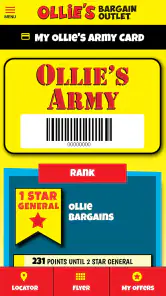
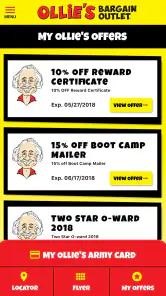
Ollie’s regularly promotes discounts, limited-time offers, and member benefits through its digital channels and stores. Customers may also find information about the Ollie’s Army loyalty program, which can provide promotional savings or other member perks when available. Offers can have expiration dates, exclusions, or location-specific conditions, so read the complete terms and verify eligibility before relying on a promotion.
How accurate is the store inventory shown through Ollie’s digital services?
Inventory information at discount retailers can change quickly, especially when products are available in small quantities or are sold only at selected locations. Any product or store details shown online should therefore be treated as helpful guidance rather than a guarantee. If a particular item is important, contact the store directly or visit as soon as possible, since another customer may purchase it before you arrive.
Pros
- Frequent discounts on home goods
- toys
- seasonal items
- and everyday essentials.
- Clearance finds can offer excellent value compared with regular retail prices.
- Store locator helps users quickly find nearby Ollie's locations.
- Digital ads make it easy to browse current deals before visiting a store.
- Useful for discovering changing inventory and limited-time bargain opportunities.
Cons
- Inventory varies widely
- so popular products may sell out quickly.
- The app may feel less useful if there is no Ollie's store nearby.
- Not every item is available online or eligible for delivery.
- Deals and prices can differ between locations and may change without notice.
- Limited product information may make comparison shopping more difficult.

- Category
- Shopping
- Version
- 1.12.3











