Old Navy: Fashion at a Value!
- 6.39K
- 4.8
- Installs
- 1.00M
- Price
- Free

Screenshots



Analysis by Reviewed
I judge a clothing app less by how much it can tempt me to browse and more by whether it helps me move from a vague idea to a sensible choice. Old Navy: Fashion at a Value is most useful to me as a focused way to explore one retailer’s clothing range: I can look through adult and kids’ styles, collect possibilities, and come back when I am ready to decide. That makes it easier to shop with a purpose, though it does not replace the benefits of seeing a garment in person or comparing several brands side by side.
Collections Make a Broad Clothing Range Easier to Explore
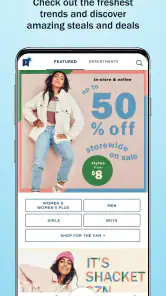
The first thing I noticed when I opened the Old Navy: Fashion at a Value app was how user-friendly it is. The layout is sleek and intuitive, making it super easy to navigate through different categories. Whether you’re looking for the latest in men’s, women’s, or kids’ fashion, everything is nicely organized. I particularly love their curated collections which update regularly, ensuring that you’re always in the loop with the freshest styles.
Finding a useful starting point
For me, the strongest idea here is browsing by collection rather than trying to scan every item in the shop. When I have a loose goal—say, finding a few pieces for a family trip or refreshing everyday basics—a grouped selection gives me a quicker way to spot a direction. I can then compare colors and styles within that context instead of treating the app like an endless catalogue. That is especially handy when shopping across adult and kids’ clothing, because the sections keep the search from becoming one mixed-up scroll.
Old Navy is a shopping app from Gap Official, and its focus is clothing rather than the broad mix of goods I might find in a general online marketplace. That focus is useful if I already know I want apparel; it is less helpful if I am comparing unrelated brands, looking for secondhand pieces, or hoping to shop across many retailers in one place. I would use it to explore Old Navy’s own range, then turn to a multi-brand retailer when brand-to-brand comparison matters more than browsing one label.
Turning browsing into a practical plan
A collection is more than a shortcut to a product grid when I use it to define the job I am shopping for. Before opening one, I try to name the need in ordinary terms: comfortable clothes for a trip, a replacement for a worn-out basic, or a coordinated set of options for different family members. That simple framing helps me judge whether a piece fits the purpose instead of being distracted by an appealing image. It also makes it easier to stop browsing once I have found a few realistic candidates.
When I am shopping for several people, I would handle one person or one clothing need at a time, even though the app brings different departments together. I can note which options are for whom and avoid treating a family clothing refresh as one undifferentiated basket. This is a small but useful discipline: it reduces the chance that an item looks like a good buy in isolation but does not fit the actual plan. Collections help me start; a clear list of needs helps me finish.
Deals are useful only when they fit the plan
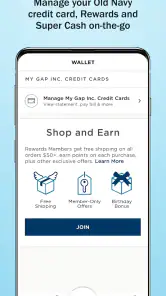
One of the standout features of this app is the exclusive deals and discounts. I’ve scored some amazing finds during their flash sales, and the best part is, these deals are just a tap away. The app sends notifications about upcoming sales, so you never miss out. Plus, they offer loyalty rewards that accumulate with every purchase, turning your shopping spree into a rewarding experience.
More From Our News Desk

Clash of Clans Is Won Between the Battles

Android Auto Makes the Case for Quieter Car Software

MobiOffice: Transforming Mobile Productivity with Seamless Integration

EA SPORTS FC™ Mobile Soccer: Redefining Mobile Sports Gaming

How Microsoft OneDrive Became a Mobile Productivity Giant

How Google Translate Breaks Language Barriers Effortlessly
One practical way I’d use the app is to save a few possible purchases and wait before checking out, rather than letting a sale notification set the pace. A discount only helps if the item is something I would have considered buying anyway. Keeping a short wishlist can make it easier to compare choices later and avoid adding a second item just because it appears alongside a deal. If alerts are distracting, I’d treat them as optional prompts and browse when I actually have a shopping need.
For a more considered purchase, I would compare the saved options against what I already own before reacting to a promotion. If I am looking for a top to go with clothes I have, I can think about its color and use rather than judging it only by the offer attached. For a family shop, I would also keep separate mental totals by person or need, so a small saving on one item does not obscure the cost of the whole basket. That is where saving candidates for later can be more valuable than making a quick purchase straight from a notification.
Checking fit and using stores as a second step
Shopping through the app is a breeze. The checkout process is straightforward, and you can save your payment information for even quicker transactions. I found the size guide to be quite accurate, which is a relief because let’s be honest, there’s nothing more frustrating than ordering something online and having it not fit. Plus, the app offers a convenient store locator if you prefer to pick up your items in person or need to make a return.
Even with a size guide, I would not assume that every cut will fit exactly the same. For a first order in a style I have not tried, checking the garment details and comparing them with something I already own is a sensible extra step. That small pause matters most when the item is meant for a particular occasion or when there is little time to sort out a replacement. The store locator is another useful bridge between app browsing and an in-person visit, especially if I would rather see a color or feel a fabric before deciding.
I would treat online sizing as guidance rather than a guarantee, especially when buying for someone else or choosing a shape I have not worn before. A familiar size can be a useful starting point, but checking the item’s own information and thinking about how I want it to sit on the body is a better way to reduce guesswork. If I am uncertain about fabric or color, I would use the app to narrow down possibilities and then consider visiting a nearby store if that suits my plans. The store locator makes that handoff practical without turning the whole experience into an either-or choice between online and in person.
Another cool feature is the wishlist option. I often find myself browsing through the app, adding items to my wishlist for later. It’s a great way to keep track of everything I want without breaking the bank all at once.
A realistic way to shop without rushing
Imagine I notice that a family trip is coming up and realize a few everyday pieces need replacing. I could browse relevant collections during a quiet break, save a small set of candidates, and leave the final decision until I am home. At that point I can check what is already in the wardrobe, compare the saved choices, and decide whether a store visit would help with color or feel. The advantage is not simply that I can shop on a phone; it is that I can separate discovery from commitment.
That workflow also answers a common practical question: do I have to buy as soon as I find something appealing? I would not. The wishlist gives me a place to keep possibilities while I think, and that can make the app useful even when I am not ready to spend. It is particularly handy for planning a clothing refresh over time, but it works best when I review saved items with a real need in mind rather than letting the list grow into a second catalogue.
Who gets the most from it
I think this app suits people who already shop Old Navy, families looking across adult and children’s clothing, and anyone who likes to browse on a phone before deciding what to buy. It is free, rated for Everyone, and has reached over a million installs. Its average rating is 4.8 from around 119,000 ratings, which suggests many shoppers find it useful, though ratings alone cannot tell me whether a particular item or fit will work for me. The current version is 16.1.4, and the app first appeared on March 17, 2021.
In an ordinary week, I might open it during a lunch break, save a couple of clothing options, and revisit them at home when I can think about what I actually need. That workflow makes the wishlist more valuable than impulse browsing: I can separate “nice to have” from “needed soon” and make a more deliberate choice. The app is less compelling for someone who rarely buys clothing from this retailer, prefers to inspect every garment in person, or wants a single app that searches many brands at once.
The best fit is a shopper who values convenience but still wants to make their own decisions about fit, use, and spending. Parents may appreciate being able to move between adult and children’s apparel without starting over in a general marketplace. Someone replacing familiar basics may also find a retailer-specific browse more direct than sorting through unrelated labels. On the other hand, people who buy mostly secondhand, need a particular item from a different brand, or prefer to compare prices across many sellers will get more from a multi-brand or resale option.
One question I would ask before installing any shopping app is whether it is useful without an immediate purchase. Here, I think it can be: browsing collections, saving options, and checking what is available for a possible store visit all have value during the planning stage. I would not download it expecting a universal fashion search, though. Its usefulness depends on being interested in Old Navy’s own clothing, and the closer that matches my needs, the more worthwhile the focused experience becomes.
What the focused approach cannot do
Because the app centers on one retailer, it is not the place I would go to decide which brand offers the best version of a particular garment. A dedicated store app can make its own range easier to browse, but it naturally narrows the comparison. If I care more about comparing fabric, design, or prices across retailers than staying within one collection, I would start with a broader shopping service instead and use this app only if Old Navy is already on my shortlist.
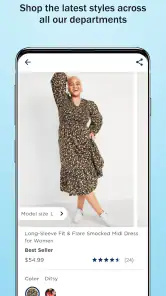
There is also a trade-off between quick browsing and careful evaluation. Product images can help me shortlist styles, but they cannot reproduce the experience of handling a garment or seeing how a color looks in my own light. That matters more for a special-occasion purchase, a first try with a particular cut, or an item where texture is central to the decision. In those cases, the app is a useful research step rather than a complete substitute for seeing the clothing firsthand.
I would also avoid treating alerts as a shopping plan. Notifications can draw attention to offers, but they do not know whether I need another item or whether a particular choice works with what I own. Turning them off or simply ignoring them is a reasonable option if they interrupt more than they help. The app remains useful for deliberate browsing without making every promotion a reason to open it.
Why You’ll Love It
So, why should you download this app? Well, not only does it offer a plethora of choices for every style and budget, but it also provides a platform where shopping is fun and convenient. The app is constantly updated with new products, ensuring you’re always ahead in the fashion game. Plus, with the added perks of discounts and rewards, it’s a joy for any savvy shopper.
My main caution is to treat convenience as a tool, not a reason to buy more. A phone makes it easy to browse at odd moments, but the best experience comes when I have a clear idea of what I need and take time to check the details before ordering. For a quick, focused look at Old Navy clothing, that is a fair trade-off; for broad brand comparisons or careful in-person inspection, a different shopping route may suit me better.
In conclusion, the Old Navy: Fashion at a Value app is a must-have for anyone who loves to shop smart. It’s reliable, easy to use, and packed with features that make fashion shopping a delightful experience. Give it a try, and you might just find your new favorite shopping companion!
Old Navy: Fashion at a Value! Frequently Asked Questions
Is the Old Navy app suitable for someone who wants to shop from a phone rather than visit a store?
Yes. Old Navy: Fashion at a Value! is a shopping app for browsing and buying apparel from a mobile device, including jeans, dresses, kids’ fashion, and men’s clothing. It gives you a way to look through Old Navy’s clothing collections on your phone. If you prefer shopping digitally, the app provides a direct route to the brand’s fashion range.
What operating system does my device need to run the Old Navy app?
The Old Navy app is available for Android and iOS devices, and the device must meet the applicable minimum operating-system requirement. For Android, the minimum is version 9. Checking your device’s software version before downloading can help you avoid compatibility issues. The app is free, so the main consideration is whether your phone or tablet meets the system requirement.
Is the Old Navy app free, and what devices can I use it on?
Old Navy: Fashion at a Value! is a free shopping app for browsing and buying apparel, including jeans, dresses, kids’ fashion, and men’s clothing. It is available for Android and iOS devices that meet the relevant minimum operating-system requirements. The app is rated for Everyone, making it suitable for a broad audience. Its current version is 16.1.4.
What can I shop for in the Old Navy app?
The app is focused on apparel, with options that include jeans, dresses, kids’ fashion, and men’s clothing. You can browse Old Navy’s collections and shop from a mobile device, which makes it convenient to look through clothing options without visiting a store first. It is a shopping app rather than a general marketplace, so its focus is Old Navy fashion.
What features does the Old Navy app offer to enhance my shopping experience?
The Old Navy app provides a variety of features designed to enhance your shopping experience, including easy navigation of the latest fashion collections, personalized offers, and exclusive discounts. You can also track your orders, manage your account, and access your Old Navy credit card information. Additionally, the app offers a seamless checkout process and store locator to find the nearest outlet.
Pros
- Wide variety of trendy clothing
- Affordable prices for all budgets
- User-friendly interface
- Regular discounts and promotions
- Easy returns and exchanges
Cons
- Limited size range options
- Occasional app glitches
- Shipping delays reported
- In-app ads can be intrusive
- Limited customer support hours

- Category
- Shopping
- Version
- 16.1.4












