OBDeleven VAG
- 1.70K
- 4.5
- Installs
- 1.00M
- Price
- Free

Screenshots
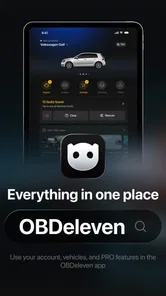
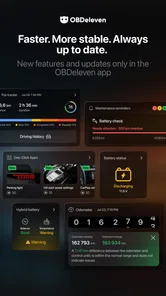
Analysis by Reviewed
I’d consider OBDeleven VAG car diagnostics when I want more insight into a Volkswagen Group car than a warning light alone can provide. It’s a phone-based companion for vehicle diagnostics and customization, but it isn’t a magic fix or a substitute for a mechanic. The key is knowing what a scan can tell you, what it can’t, and when it’s worth slowing down before changing a setting.
Getting Started with OBDeleven
First off, setting up OBDeleven VAG car diagnostics is a breeze. All you need is the OBDeleven device, which you plug into your car's OBD-II port, and the app on your smartphone. The app is available on both Android and iOS, so no worries about compatibility. Once connected, the app seamlessly pairs with your vehicle, giving you access to a treasure trove of data.
What to expect from a diagnostic session
OBDeleven is a free Auto & Vehicles app from OBDeleven, and its focus is VAG cars rather than every make on the road. The free download is a useful starting point, but the app also offers in-app purchases, so I would check what a particular function requires before assuming every option is included. Its Everyone age rating describes the app listing; it does not mean coding vehicle electronics is automatically suitable for every driver.
Speed is best judged in context. The app can only show useful information after the phone, the OBDeleven device and the car have connected, so I would not treat it like a standalone phone diagnostic tool. Once the connection is established, reading a fault can be a more direct first step than trying to interpret a dashboard warning by memory. For a quick check before booking a garage visit, that convenience is the main appeal.
Features That Stand Out
This app is packed with features that make it a must-have for any VAG vehicle owner. The real-time data monitoring is impressive, allowing you to see how your car is performing at any given moment. It provides detailed diagnostic trouble codes (DTCs) and even suggests solutions. This means you can potentially save a trip to the mechanic by diagnosing and understanding issues yourself. Pretty cool, right?
The customization options are another highlight. Ever wanted to tweak the settings of your car's electronics? The app offers a "One-Click Apps" feature that lets you customize and adjust various vehicle settings, like enabling or disabling certain features. It's like having a mini garage in your pocket!
When a quick check becomes a bigger task
A useful everyday workflow is to scan when a warning appears, note the code and the conditions around it, then decide whether the issue calls for professional attention. A code is a clue, not a complete diagnosis: several causes can produce similar symptoms, and clearing a warning without understanding it can hide information a mechanic would want. I would use the app to arrive at a repair conversation better informed, not to replace a qualified inspection when the car feels unsafe or behaves unusually.
More From Our News Desk

 Instagram
’s Power Comes From Its Place in Your Phone
A close look at how Instagram turns Meta’s reach, recommendation systems and everyday camera habits into durable platform power—and what that costs users.

 Gmail
Gmail in a Busy Inbox: Who Benefits Most?
From first account to crowded workday, Gmail earns its place through dependable search and flexible sorting—but its best fit depends on how much inbox maintenance you can tolerate.

 Prime Video
Switching to Prime Video: What Changes in Your Viewing Routine
Prime Video can make a compelling second home for streaming, but switching means learning a different catalog, rental layer, and route from browsing to playback.

 Universal TV Remote Control
 Works Best as a Reliable Backup
A phone remote earns its place through quick setup and reliable habits. Here is how to get more from Universal TV Remote Control—and where its limits show.

 Weather - By Xiaomi
Weather by Xiaomi Review: Clear at a Glance, Less Clear Up Close
Xiaomi’s weather app makes everyday forecasts quick to scan, but its calm surface can leave useful details and recovery paths harder to find than they should be.

 X
X Under Pressure: Can It Recover When Posting Goes Wrong?
A resilience-focused review of X, examining setup, mistaken posts, interruptions, weak connections, and the gaps that matter when recovery needs to be dependable.
Latest News



Customizing settings also deserves a slower approach than simply tapping through options. Before changing anything, I would make sure I understand what the setting does, whether it suits the car’s configuration, and how to restore the previous behavior if I dislike the result. For a first session, changing one item at a time makes it much easier to connect cause and effect. That practical caution matters more than the appeal of experimenting with several settings at once.
User Experience
Using the app is a straightforward experience. The interface is intuitive, and even if you're not a tech wizard, you’ll find your way around with ease. The dashboard is clean, displaying all the crucial information without overwhelming you. Plus, the app is regularly updated, ensuring compatibility with new car models and improving functionality.
For those who love a community feel, the app also includes a user forum. Here, you can share insights, ask questions, and even brag about your latest car mods. The sense of community is strong and adds an extra layer of value to the app.
Making sense of the readings in real life
One practical use is checking a car before a longer drive. If a warning appears during an ordinary commute, I’d first make a note of when it happened, whether the car felt different, and whether the warning stayed on. I’d then use a scan as one more piece of context, rather than treating a displayed code as a verdict. That record can make a later conversation with a repair shop clearer, especially if the warning is intermittent and has disappeared by the time someone else sees the car.
There is a useful distinction between collecting information and acting on it. Reading data is generally the lower-commitment part of the process; changing vehicle settings or clearing faults has more potential to complicate troubleshooting. If I were helping a family member who simply wanted to know whether a dashboard light deserved attention, I’d keep the session to reading and recording first. The more uncertain the cause, the more valuable it is to preserve the original symptoms and let a professional decide what to test next.
How it fits alongside other tools
Compared with a basic code reader, the phone-based setup can put diagnostics and vehicle customization in one place, which is appealing if you already like exploring your VAG car’s settings. A simple reader may be the better choice if all you want is an occasional warning-code check and you do not care about customization. At the other end, a workshop-grade diagnostic setup and a mechanic’s experience are more appropriate when the fault is complex, safety-related or difficult to reproduce.
For reliability, I would separate the app’s interface from the whole connection chain: the phone, the plugged-in device and the vehicle all have to cooperate. If a session does not connect smoothly, I would check the physical connection and try again before treating one failed attempt as proof of a car problem. Keeping the app current is sensible, but a new version cannot guarantee that every vehicle or task will behave identically. The app is currently version 0.102.0 and supports Android 8.0 or later, so an older phone may be a practical limitation even if the car itself is compatible.
Performance, stability, and device limits
I wouldn’t judge its speed by how quickly an ordinary app opens. The useful part depends on establishing a connection with the car, and that adds steps before a scan can begin. For occasional checks, that extra setup is a reasonable trade-off; for someone who expects instant answers every time they get into the car, it may feel like friction. I’d plan a first session when I have time to learn the connection process rather than waiting until I’m stranded or rushing to leave.
Heavy use is a different proposition from a quick warning check. Exploring live readings while also browsing customization options can turn a short visit into a longer session, and that is when I’d be deliberate about what I’m trying to learn. Pick one question, such as whether a symptom coincides with a particular reading, instead of opening every screen without a plan. This keeps the session easier to interpret and reduces the temptation to change settings just because they are available.
Stability also depends on the whole setup, not just the app. If a connection drops or a screen does not respond as expected, I would stop before repeating a potentially consequential action. Check that the device is seated properly, reconnect, and distinguish a communication hiccup from a vehicle fault. I would not assume that a failed connection means the car has developed a new problem, nor would I assume a successful connection proves that every system is healthy.
Phone compatibility is worth checking before making this part of a maintenance routine. The Android minimum is version 8.0, and the app is also available on iOS. A phone that is old, low on free space, or already unreliable can make an otherwise useful diagnostic session less convenient. I would also avoid starting a scan with a nearly depleted phone if I expect to spend time comparing readings or consulting information; having enough battery is a simple way to avoid interrupting the work.
Who will get the most from it
I think it makes the most sense for VAG owners who enjoy understanding their cars and expect to use diagnostic or customization functions more than once. A hands-on owner can use it to gather clues between service visits, keep track of recurring warnings, or investigate a setting before deciding whether it is worth changing. It is also useful for someone who wants to discuss a fault with a garage in more specific terms, as long as they stay open to the possibility that the code is only one part of the diagnosis.
It is less compelling for a driver who owns a different make, wants a universal tool, or only needs a one-time answer to a simple warning. In that case, a basic reader or a direct visit to a repair shop may be less involved. I’d also steer away from experimenting with coding if you are uncomfortable researching what a setting does or accepting that an unexpected result may require further help. The most capable tool is not automatically the right tool for every owner.
Why It's Worth It
So, why should you consider downloading the OBDeleven app? For starters, it's cost-effective compared to traditional diagnostic tools. You get a plethora of features for a fraction of the price. Moreover, the ability to troubleshoot and customize your vehicle enhances your driving experience and potentially saves you money in the long run.
It has earned a 4.4 average from around 42,000 ratings, with over a million installs, which suggests many drivers have found a reason to keep it on their phones. Those figures are encouraging, but they do not tell me whether it will suit your exact car or how often you plan to use it. If you only need help once, compare the cost of the required hardware or app functions with a straightforward garage check before buying anything.
There are also around 1,700 written reviews, but I’d still treat public feedback as a starting point rather than a promise that a particular phone, car, or task will work the same way for me. The app is free to install, while optional purchases range from $2.99 to $499.99 per item. That broad spread makes it especially sensible to check the exact function and its cost before committing, and to consider how often you will use it rather than focusing only on the initial download.
The release history goes back to July 10, 2014, which gives the app a long presence in the vehicle-tools space, but longevity alone does not remove the need to confirm that the specific function you want suits your car. I’d approach it as an evolving tool: install it, identify the task you actually need, and learn the limits of that task before relying on it during an urgent situation. That is a better measure of value than assuming every feature will matter to every owner.
However, the real kicker is the peace of mind it brings. Knowing you have the power to understand your car’s health and performance at your fingertips is invaluable. Whether you're a car geek or just someone who wants to maintain their vehicle in tip-top shape, this app is a wise investment.
In conclusion, OBDeleven VAG car diagnostics is more than just an app; it's a companion for your car. With its comprehensive features and user-friendly interface, it empowers you to take control of your vehicle’s maintenance and performance. So, go ahead, give it a whirl, and drive with confidence knowing you have a tech-savvy buddy riding shotgun.
OBDeleven VAG Frequently Asked Questions
What phones and operating systems can I use with OBDeleven VAG?
OBDeleven VAG is an Android app that requires Android 8.0 or later, so check your phone’s operating system before downloading. The app is free to install, and its age rating is Everyone. If you are deciding whether it will fit your setup, also consider whether you have a compatible vehicle and the necessary OBDeleven hardware for connecting to it.
Do I need an OBDeleven device, or can I use the app on its own?
The app is intended to work with an OBDeleven Bluetooth device that plugs into your vehicle’s OBD-II port. Your phone runs the app and communicates with the car through that hardware, so downloading the software alone does not provide the physical connection needed for vehicle diagnostics. Check that you have the required device and that it suits your vehicle before relying on the app.
What should I check before downloading OBDeleven VAG car diagnostics?
OBDeleven is an Auto & Vehicles app from OBDeleven, with a free download and optional in-app purchases. It has an Everyone age rating and requires Android 8.0 or later. Consider whether your phone meets that requirement and whether you have a compatible vehicle and the necessary OBDeleven hardware before relying on the app for diagnostics.
What is OBDeleven VAG car diagnostics?
OBDeleven VAG car diagnostics is an advanced tool designed for vehicle diagnostics specifically tailored for Volkswagen Audi Group (VAG) cars. It provides users with the ability to perform comprehensive diagnostics, coding, and programming through their smartphone, offering a convenient and portable solution for both car enthusiasts and professional mechanics. The app is described as innovative software for vehicle diagnostics and customizations.
How does OBDeleven VAG work with my smartphone?
OBDeleven VAG connects to your vehicle via a Bluetooth-enabled device that plugs into your car's OBD-II port. You then use the OBDeleven app on your smartphone to interact with the vehicle's systems. This setup allows you to run diagnostics, view live data, and perform customizations straight from your mobile device, making it a versatile tool for vehicle maintenance. The app is free to download, while some features may involve in-app purchases.
Pros
- User-friendly interface for all skill levels.
- Comprehensive diagnostics for VAG vehicles.
- Regular software updates and improvements.
- Supports multiple languages for global users.
- Affordable alternative to dealership diagnostics.
Cons
- Requires internet connection for full functionality.
- Limited to VAG group cars only.
- In-app purchases can be costly.
- Initial setup may be confusing for beginners.
- Some features require a Pro license.