OBD Scanner ELM327: GaragePro
- 659.00
- 3.4
- Installs
- 1.00M
- Price
- Free

Screenshots
Analysis by Reviewed
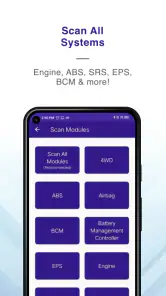
I judge a car diagnostic app by a practical question: can it help me understand a warning light before I decide whether to keep driving or book a mechanic? OBD Scanner ELM327: GaragePro is built around that useful first step. It is a free Auto & Vehicles app from CaRPM, and its central job is reading and deleting OBD trouble codes through an ELM327 scanner. That can make a confusing dashboard warning easier to investigate, though it does not turn a phone into a full workshop diagnostic system.
Why reading and clearing codes can help
A trouble code gives you a starting point, not a complete diagnosis. I find that distinction important: a code can point toward a system or condition without proving which part has failed. GaragePro is most valuable when I use it to gather a clue, note what the car reports, and then decide on a sensible next step rather than treating a cleared warning as a repair.
The app also includes coding functions, which may appeal to drivers who want to explore vehicle settings beyond basic code checks. Compatibility and the available options can depend on the car and scanner, so I would check that the combination suits my vehicle before relying on a particular coding change. If I only want a quick explanation of a warning light and do not own an adapter, a basic code lookup or a mechanic may be the simpler choice.
Making a scan useful in everyday life
To use it, you need a compatible ELM327 OBD scanner connected to the vehicle. Once the app and adapter communicate, I would first read and record any codes before considering deletion. That small habit matters: clearing a code too early can remove a useful clue, while writing it down gives you something concrete to discuss with a repair shop or compare after a repair.
For example, if a warning light appears on the way home, I could scan the car while parked, save the code information, and use it to decide whether the issue needs prompt attention. A scan is not a substitute for checking the owner’s manual or responding to serious symptoms such as unusual noises, overheating, or poor braking. The app helps me ask a better question; it cannot guarantee that the car is safe to drive.
Latest News
A sensible workflow before you clear anything
I would treat the first scan as a snapshot. Before deleting a code, note the exact result and the circumstances around it: whether the warning appeared during a cold start, after a long drive, or while the car was idling. Those details can help a mechanic understand the pattern, and they give you a fair basis for checking whether the same issue comes back after a repair. This is a simple way to make a basic reader more useful without pretending it can identify the failed part by itself.
If you are borrowing an adapter or checking a car for someone else, make sure you know which vehicle is connected before changing anything. Reading codes is a reasonable first step; deleting them can affect what information remains available for diagnosis. I would avoid clearing a warning just before a service appointment, because the original fault may be harder to discuss once its code is gone.
Where it fits among diagnostic options
Compared with a simple handheld reader, a phone app can be a convenient way to view diagnostic information alongside other tasks, and GaragePro adds coding functions to its code-reading purpose. A dedicated professional scan tool may still be a better fit for deep troubleshooting or workshop work. On the other hand, someone who rarely checks a car and does not want to buy or connect an adapter may prefer to let a shop scan it instead.
I would also treat code deletion as a deliberate action, not a way to make a dashboard look reassuring. If the underlying problem remains, the warning may return, and a cleared code does not show that a repair has been completed. Keeping a note of the original code and when it appeared makes the app more useful over time, especially when you are tracking a recurring issue.
A realistic driveway check
Imagine the check-engine light comes on during an ordinary commute, but the car still seems to run normally. Once parked somewhere safe, I would connect the compatible scanner, read the code, and write down the result rather than clearing it in the hope that the light stays off. I would then compare the symptoms with the vehicle manual and decide whether to arrange a prompt inspection. If the car is shaking, losing power, overheating, or showing another serious symptom, I would stop relying on an app-based check and seek appropriate help.
That is the kind of modest job this app can do well: turn a vague warning into a more informed conversation. It is not a remote mechanic, and a code alone cannot tell me whether a vehicle is safe for a particular journey. The benefit is having a clue in hand before I call a shop, not having to guess what the dashboard is trying to say.
Who is likely to get the most from it
GaragePro makes the most sense for a driver who already has an ELM327 scanner, wants to read or delete codes, and is comfortable treating results as guidance rather than a verdict. The app has a 3.4 average from around 6,700 ratings and has been installed over a million times, so it has a sizeable audience, though that alone cannot tell me whether it will work smoothly with a particular adapter and car. It is rated for Everyone, runs from Android 6.0, and version 4.0.0 is the current release.
It is free to install, with in-app purchases ranging from $4.99 to $299.99 per item, so I would check the costs shown in the app before paying for anything. It was released in 2016, and its mix of basic diagnostics and coding makes it more interesting than a bare code reader for the right driver. Still, if you need certainty about a fault, a qualified mechanic and suitable diagnostic equipment are the safer route.
When I would choose something else
If you do not own an adapter, do not want to learn how to connect one, or only need a one-off answer, GaragePro may be more effort than it is worth. A repair shop can scan the car as part of a broader inspection, while a simple code reference can help explain a code you already have. Those alternatives are better when you need a quick definition without setting up a phone-to-car connection, or when the problem calls for tests beyond reading a code.
The coding side also calls for restraint. I would not experiment with vehicle settings just because an option appears available; first check that the change is appropriate for the specific car and that you understand what it does. For a driver who only wants occasional fault-code access, that extra capability may not be a reason to choose this app. For someone curious about coding and willing to verify compatibility, it can make the app more appealing than a reader focused solely on basic codes.
Hey folks! So, I just spent some quality time tinkering with the OBD Scanner ELM327: GaragePro app, and let me tell you, this app is a game-changer for all the car enthusiasts out there. Whether you’re a seasoned mechanic or just someone who loves keeping their car in tip-top shape, this app is worth checking out.
Getting Started with Ease
The first thing that caught my attention was how straightforward it was to get started. All you need is an OBD II adapter, and you’re good to go. Trust me, the setup is as easy as pie. Once connected, the app immediately starts communicating with your car’s ECU, giving you real-time data about your vehicle’s performance and health.
Features That Go Beyond Basics
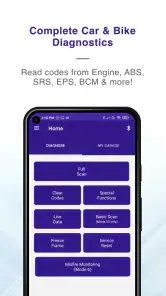
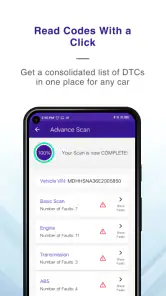
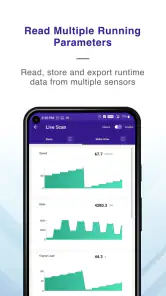
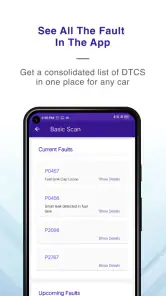
What sets GaragePro apart is its array of features that cater to both beginners and pros. The app not only reads and clears trouble codes but also offers live data streaming, which is super handy when you want to keep an eye on metrics like engine RPM, coolant temperature, and fuel system status.
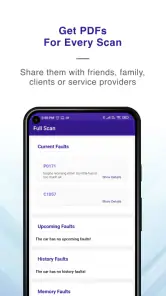
Another cool feature is the app’s ability to generate detailed reports. Imagine having a comprehensive health report of your car right at your fingertips. It’s like having a personal mechanic in your pocket! Plus, the interface is user-friendly, making it easy for anyone to navigate through the app without any hiccups.
The Little Extras that Make a Big Difference
What I personally love about this app are the little extras that just make the whole experience seamless. For instance, the ability to customize the dashboard to show only the data you care about is a neat touch. Also, the app supports multiple vehicles, which is a blessing if you have more than one car in your garage.
Not to mention, the community feature is a gem. It allows users to interact, share experiences, and even troubleshoot issues together. It’s like having a support group that’s just as passionate about cars as you are!
GaragePro also updates regularly, ensuring you always have access to the latest features and improvements. This commitment to continuous enhancement really shows the developers’ dedication to providing a top-notch product.
Pay attention to what a code can—and cannot—tell you
One question new users often have is whether reading a code tells them exactly what to replace. I would not use any code reader that way, including this one. A code narrows the area to investigate, but diagnosis still depends on the vehicle, symptoms, and further checks. Treating the result as a parts order can waste money; treating it as a focused starting point can help you explain the issue clearly and ask a mechanic more useful questions.
Another practical question is whether the app is useful without a scanner. Its central job depends on an ELM327 adapter, so I would sort out that hardware and its compatibility before planning a scan. If the adapter does not communicate with the car, the app cannot provide the code-reading benefit you came for. Checking the connection while parked and giving yourself time to troubleshoot is much less stressful than trying to set everything up beside a busy road.
For a recurring warning, I would keep a small record outside the moment of the scan: the date, symptoms, code, and any work subsequently done. That makes repeat visits easier to discuss and helps distinguish a continuing fault from a new one. I would still follow professional advice rather than trying to draw a repair conclusion from a list of codes, especially when safety-related symptoms are involved.
Final Thoughts
In conclusion, if you’re looking for an app that offers more than just the basics, GaragePro is an excellent choice. From real-time data monitoring to comprehensive vehicle reports, this app is packed with features that make car maintenance a breeze. So, go ahead, give it a spin, and let me know what you think!
My recommendation is more specific: choose GaragePro if you have a suitable ELM327 scanner and want a convenient first look at trouble codes, with coding functions as an extra reason to explore it. The free install lowers the barrier to trying it, but paid items make it sensible to inspect costs before committing. If you need a confident diagnosis, do not want to connect an adapter, or are dealing with worrying symptoms, a qualified mechanic or a more capable workshop tool is the better choice. Used with those limits in mind, it can make the next step after a dashboard warning clearer without mistaking a code for a fix.
OBD Scanner ELM327: GaragePro Frequently Asked Questions
Is OBD Scanner ELM327: GaragePro free to download, and are there in-app purchases?
GaragePro is free to download, so you can install the app without paying an upfront price. It also offers in-app purchases, with listed items ranging from $4.99 to $299.99 each, so check the purchase details in the app before buying anything. The app is aimed at vehicle diagnostics, and the free download is a way to get started before deciding whether any paid options suit your needs.
What is OBD Scanner ELM327: GaragePro and how does it work?
OBD Scanner ELM327: GaragePro is a comprehensive diagnostic tool designed for vehicle owners and mechanics. It connects to your car’s onboard diagnostics system via an ELM327 interface, allowing you to read and clear error codes, view live data, and perform various tests. The app supports a wide range of car models and provides detailed insights into your vehicle's performance and potential issues, making it an essential tool for anyone looking to maintain their car in top condition.
Is the OBD Scanner ELM327: GaragePro app compatible with my car?
The OBD Scanner ELM327: GaragePro app is compatible with most vehicles manufactured after 1996 that have an OBD-II port. This includes a wide array of car brands and models, as OBD-II is a standardized system. Before downloading, you should verify that your vehicle is OBD-II compliant and has an accessible port. Additionally, ensure you have a compatible ELM327 Bluetooth or Wi-Fi adapter, which is required for the app to communicate with your car.
Do I need any additional equipment to use OBD Scanner ELM327: GaragePro?
Yes, to use OBD Scanner ELM327: GaragePro, you will need an ELM327 adapter, which can be either Bluetooth or Wi-Fi based. This adapter plugs into your vehicle’s OBD-II port and facilitates communication between the app and your car's onboard computer. Make sure the adapter you purchase is compatible with your smartphone (iOS or Android) and supports the protocols used by your vehicle. Without this adapter, the app cannot function.
Can I use OBD Scanner ELM327: GaragePro to clear error codes?
Yes, one of the key features of OBD Scanner ELM327: GaragePro is its ability to read and clear diagnostic trouble codes (DTCs). This can help you identify issues with your vehicle and reset the check engine light once problems are resolved. By clearing error codes, you can also verify if a repair has been successful. However, it is crucial to diagnose and fix the underlying issues before clearing codes to ensure your vehicle operates safely and efficiently.
Pros
- User-friendly interface for beginners.
- Real-time data monitoring available.
- Supports multiple car brands and models.
- Affordable compared to professional tools.
- Offers diagnostic trouble codes (DTC) library.
Cons
- Limited advanced features for professionals.
- Connectivity issues with older vehicles.
- In-app purchases for full functionality.
- Occasional app crashes reported.
- Requires ELM327 device for operation.

- Category
- Auto & Vehicles
- Version
- 4.0.0











