New Era Cap
- 803.00
- 4.7
- Installs
- 1.00M
- Price
- Free

Screenshots

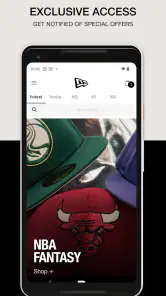
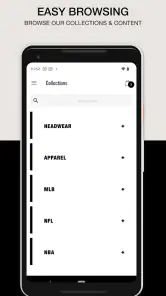
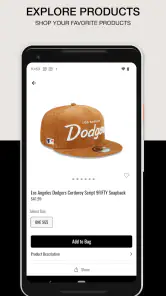
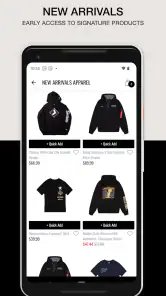
Analysis by Reviewed
My first piece of advice for a new shopper is to treat the New Era Cap app as a brand-specific place to research and shop, not as a shortcut to a perfect fit. I’d begin with one clear aim—replacing an everyday cap, finding a particular look, or checking the brand’s apparel—and use the product pages to decide whether an item actually suits that need. That modest approach makes the first visit feel manageable rather than like an endless scroll.
A good first visit starts with a specific question
Before opening the catalog, it helps to know what you want to learn. Are you after a familiar silhouette, a color that works with clothes you already own, or a gift for someone whose style you know? A specific question gives browsing a useful boundary. If you only want to see what New Era makes, browsing is fine too, but I would still compare a small handful of items instead of treating every appealing thumbnail as a contender.
That focus is especially helpful because a logo alone does not tell you how a cap will look or feel in daily use. I’d check the shape, materials, and sizing details displayed for the individual item, then consider when I would wear it. For a gift, I would not assume that the recipient’s team preference tells me their preferred fit. A little care at this stage can prevent an attractive design from becoming an impractical choice.
I’d approach the New Era Cap app as a focused shopping tool, not a general fashion marketplace. It is built around headwear and apparel from New Era Cap LLC, so its main appeal is being able to browse the brand’s selection in one place. If you already know you want a New Era cap, that focus can make the path from browsing to choosing feel straightforward. If you are still deciding between many brands, a broader retailer may be more useful for comparing styles side by side.
What to expect as a first-time shopper
The app is free and is rated for Everyone, which makes trying it a low-commitment way to explore the catalog. It has a 4.7 average from around 9,300 ratings, and more than a million installs. Those figures suggest that it has found an audience, though they cannot tell you whether a particular style or fit will suit you. I’d use it to narrow down options, then pay close attention to the product details before deciding.
New Era Cap is a shopping app rather than a cap-care guide or a general outfit planner. That distinction matters: it is most useful when you have a specific item in mind, want to browse the brand, or are checking what is available before making a purchase. It is less compelling if you mainly want broad price comparisons across unrelated labels.
Getting started without overthinking it
After installing, I’d start with a simple goal: find a style, team, or type of headwear you already like. Search is a practical first step when you know what you are looking for; browsing categories makes more sense when you are open to alternatives. For a first visit, I would avoid trying to evaluate every option at once. Save your attention for the details that affect your choice, such as the design and the fit information shown for the item.
More From Our News Desk

Clash of Clans Is Won Between the Battles

Android Auto Makes the Case for Quieter Car Software

MobiOffice: Transforming Mobile Productivity with Seamless Integration

EA SPORTS FC™ Mobile Soccer: Redefining Mobile Sports Gaming

How Microsoft OneDrive Became a Mobile Productivity Giant

How Google Translate Breaks Language Barriers Effortlessly
A useful habit is to compare a couple of candidates before adding anything to your basket. A cap can look similar in a thumbnail while having a different shape or finish, and product descriptions are more helpful when you read them as a comparison rather than in isolation. If you are buying for someone else, check the available sizing information carefully instead of relying on your own usual fit.
From browsing to a real decision
For a first meaningful result, I would aim to leave the app with a short list—or a clear reason not to buy—rather than rushing to checkout. Open an item that catches your eye, read its description, compare it with another option, and check customer feedback if it is available on the product page. This process answers the practical question: does this particular item fit the reason I opened the app? It also helps separate a design you enjoy looking at from one you are likely to wear.
Imagine you notice that your usual cap is worn out while getting ready for work, and you want a replacement before the weekend. I’d use the app during a quiet moment, search for the general style I know I wear comfortably, and compare a couple of designs that work with my usual clothes. I would not make a decision while distracted or assume that the first familiar logo is automatically right. If the details leave me uncertain, I can pause and check the fit in person instead of turning convenience into a gamble.
The app is available at no charge, and its current version is 51; it requires Android 7.1 or later. The release date was October 27, 2022, so it has been around long enough to build a substantial user base. These basics make it easy to decide whether it is worth trying on an Android device, but the more important first step is still choosing a sensible shopping goal.
The User Experience
First off, the user interface of the New Era Cap app is incredibly intuitive. From the moment I opened it, I was greeted with a sleek design that made navigation a breeze. The categories are well-organized, so whether you’re searching for the latest MLB caps or a classic snapback, you’ll find it easily. The app's search functionality is top-notch, helping you locate exactly what you want without any hassle.
Features That Stand Out
What really caught my attention were the app's features that cater to both casual shoppers and hardcore cap collectors. One of the coolest features is the virtual try-on option. With just a few taps, you can see how a cap looks on you using your phone's camera. It’s like having a fitting room right in your pocket! Plus, the app provides detailed product descriptions and customer reviews, making it easier to decide on your purchase.
Another feature I loved is the exclusive access to limited edition releases. As someone who likes to stay ahead of the trend, getting first dibs on new drops is a huge plus. The app also offers personalized recommendations based on your browsing history, which feels like having a personal shopper who knows your style preferences.
Making the most of product pages
For a first-time user, the most useful habit is to treat a product page as a decision aid, not just a picture gallery. I’d look at the item from the angles available, read the wording carefully, and compare the listed details with another candidate before settling on one. Customer feedback, where shown, is most useful when it addresses a concern you actually have, such as how a design looks in everyday wear. A review that simply says an item is great may be encouraging, but it cannot answer a fit question for you.
Virtual try-on can be a helpful visual check if you want to get a sense of how a design sits on screen, but I would use it to judge appearance rather than physical comfort. A phone preview cannot replace trying a cap on, and lighting or camera angle can affect how a color comes across. My practical tip is to use that view to rule out a look you dislike, then rely on the item details and your own fit priorities for the final choice.
Shopping and Checkout
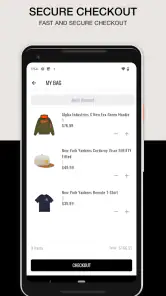
Shopping on the New Era Cap app is as seamless as it gets. The checkout process is quick and secure, with multiple payment options including credit card, PayPal, and even Apple Pay. I appreciated the app's focus on security, ensuring that my personal information remains protected at all times.
Shipping options are clearly laid out, with estimated delivery times provided upfront, which is a relief for anyone who hates waiting around for their package to arrive. Plus, there's an option for store pickup, which is perfect if you’re in a hurry or just prefer the in-store experience.
Choosing between the app and other shopping routes
The main alternative is not another New Era screen; it is choosing where to shop. A general retailer can be better when your priority is comparing different labels, checking a wider range of styles, or weighing offers across brands. A physical shop has a different advantage: you can handle the material and test the fit before paying. The New Era app makes more sense when brand-focused browsing is the point and you are comfortable evaluating an item from its page.
For collectors, a direct brand app can also make it easier to keep browsing within the label they already follow. That does not mean every release is right for every collector, or that a new design is automatically a better purchase. I’d set a budget and a purpose before exploring limited releases: am I filling a gap in a collection, replacing something I wear, or reacting to the excitement of a drop? The answer can keep a fun browse from becoming an impulse buy.
Common snags and who should choose another route
Even a smooth-looking shopping flow cannot remove the main online-shopping trade-off: a screen is not the same as handling a cap in person. A virtual view can help you judge the overall look, but I would not treat it as a guarantee of fit or feel. If getting the exact fit matters more than convenience, visiting a shop where you can try the item on is the safer choice. Likewise, if you want to compare New Era with several other brands in one search, a multi-brand store is likely a better starting point.
Collectors may appreciate checking the app when they are following a particular release, but I would still make the product page the final authority on the item in front of me. Browsing recommendations can help surface something unexpected; they can also pull attention away from a clear shopping goal. I find it more useful to search first, then explore suggestions only if the first results do not fit what I had in mind.
Small choices that make a return visit more useful
If you come back after browsing, start from the decision you still need to make instead of repeating the same broad search. You might be choosing between two shapes, deciding whether a color will work with your wardrobe, or checking whether an item is suitable as a gift. Keeping that question in mind makes the second visit shorter and more purposeful. It also gives you a sensible reason to stop browsing once you have enough information.
If you are shopping for someone else, a low-risk approach is to choose only when you know enough about the person’s usual style and fit preferences. If those details are unclear, browsing can still help you discover possibilities, but it need not end in a purchase. For a gift where fit is important, a store visit or a different kind of present may be kinder than guessing from a product image.
A practical second visit
Once you have found a style you like, use a return visit to compare the details rather than simply repeating the same broad browse. For example, if you are choosing between a familiar everyday cap and a more distinctive design, ask which one will work with clothes you already wear and where you plan to use it. That is a more useful test than choosing solely because a release feels new. For gifts, keep the recipient’s preferred shape and sizing in mind; a popular design is not automatically the right personal fit.
The app’s strongest use case is a shopper who already likes New Era and wants a direct way to explore its headwear and apparel. It can also suit someone who has spotted a style elsewhere and wants to inspect the brand’s own shopping experience. I would skip it as my only shopping app if I were undecided about brands, focused on the lowest price across retailers, or unwilling to order without trying something on first.
Final Thoughts
Overall, the New Era Cap app is a must-have for anyone serious about their cap collection. It combines style, convenience, and cutting-edge technology to deliver a shopping experience that is both fun and efficient. Whether you're a seasoned cap collector or just looking to update your look, this app has something for everyone.
In the end, what makes the New Era Cap app stand out is its ability to blend tradition with innovation. It’s not just about buying a cap; it’s about experiencing the brand in a whole new way. So go ahead, download the app, and step up your cap game today!
New Era Cap Frequently Asked Questions
What devices can I use the New Era Cap app on?
The New Era Cap app is a shopping app for Android and iOS devices. Before downloading, check that your device meets the minimum operating-system requirement: version 7.1. The app is free to install, so you can browse New Era’s headwear and apparel on a compatible phone or tablet without paying for the download.
Who develops the New Era Cap app, and is it popular with shoppers?
New Era Cap LLC develops the app, which focuses on headwear and apparel. It has a 4.7 average from around 9.3 thousand ratings, and has been installed over a million times. Those figures can offer a quick sense of its reach, though the best way to decide whether it suits you is to explore its shopping experience and product selection.
What is the New Era Cap app used for?
The New Era Cap app is designed to provide users with easy access to the latest headwear products and exclusive merchandise from New Era. It allows users to explore and purchase a wide variety of caps, clothing, and accessories. The app also offers personalized recommendations, exclusive deals, and the ability to track orders, making shopping convenient and enjoyable.
Is the New Era Cap app free to download and use?
Yes, the New Era Cap app is free to download from both the Google Play Store for Android devices and the Apple App Store for iOS devices. While the app itself is free, users will need to make purchases if they wish to buy any products. There may also be exclusive promotions and offers available through the app.
What features does the New Era Cap app offer?
The New Era Cap app offers a variety of features, including an intuitive user interface for easy browsing of products. Users can access exclusive collections, receive personalized recommendations, and use the app's search functionality to find specific items. Additionally, the app provides order tracking, secure payment options, and notifications about sales and new product launches.
Pros
- Wide variety of cap designs.
- High-quality fabric materials.
- User-friendly interface.
- Customizable cap options.
- Quick and easy checkout process.
Cons
- Limited international shipping.
- Higher price point for custom caps.
- Occasional app crashes.
- Limited customer reviews.
- Slow customer service response.

- Category
- Shopping
- Version
- 51











