MySubaru
- 6.63K
- 4.7
- Installs
- 1.00M
- Price
- Free

Screenshots

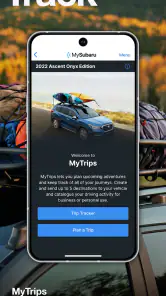
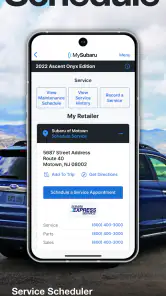
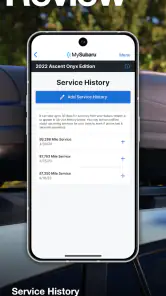
Analysis by Reviewed
My Subaru routine starts before I turn the key: I want to know where the car is, whether it needs attention, and what I should do next. MySubaru is a vehicle companion for Subaru owners, bringing several ownership tasks into one app rather than making me jump between notes, calls, and separate tools. I find that most useful when I treat it as a place to check and coordinate, not as a replacement for paying attention to the car itself.
Deciding whether it fits your household
Before relying on a manufacturer app, I’d ask a practical question: will more than one of its tools make a difference in my week? If I only need to remember an occasional service date, a calendar entry may be enough. If I regularly want to check on a Subaru, arrange service, or use the vehicle-related convenience and safety tools, having those tasks together can be worthwhile. That distinction matters because a full dashboard is useful only when it shortens a real routine rather than adding another place to check.
It is also worth thinking about who actually manages the car. The person who drives it every day may not be the person who books service or keeps track of maintenance. In that household, the app can help make the vehicle a shared responsibility, but I would still agree on who responds to alerts and who contacts the service department. Without that small bit of coordination, a notification can simply move the reminder from one person’s phone to another without getting the work done.
Starting with the car you own
The first question is whether this is the right app for your vehicle. MySubaru is developed by Mobile - Subaru Of America, and its focus is specifically on Subaru ownership. If you drive another make, a general maintenance tracker or your manufacturer’s own app is a better fit. The app is free, rated for Everyone, and has a 4.7 average from around 83,000 ratings, which suggests many owners find a reason to keep it in their routine. It has passed a million installs, but those figures do not change the practical point: its usefulness depends on owning a Subaru and on which features are available for your vehicle and account.
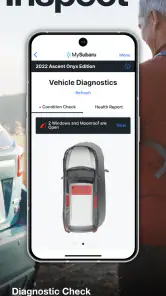
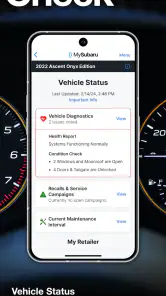
Once I’m set up, I’d begin by checking the vehicle information and status, then look over the health report before arranging service. That order matters. A report can help me notice something worth discussing, but it is not a substitute for a mechanic’s diagnosis or the warning lights and guidance in the vehicle. I would use it to arrive at a service conversation better prepared, rather than treating an app notification as a definitive repair plan.
Latest News
Making the phone-to-car workflow useful
So, picture this: You've got a busy day ahead, and the last thing you want to worry about is your car's health. Enter the MySubaru app. This app is like having a Swiss Army knife exclusively for your Subaru. With features that allow you to check vehicle status, schedule service appointments, and even locate your car in a crowded parking lot, it's pretty much got everything covered.
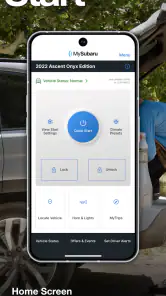
One of the coolest features is the ability to remotely start your car. Imagine those chilly winter mornings, and you can warm up your car without stepping outside. Now, that's convenience at its finest! Plus, the app gives you access to your vehicle's health report, so you can stay on top of any maintenance needs before they become big issues.
A realistic day, from reminder to service visit
On a busy morning, I can see the value in checking the car’s status before heading out, using remote start when I want the cabin ready, and relying on the location feature later if I have parked among rows of similar cars. If the health report points to a maintenance concern, I can use the service appointment option to take the next step instead of leaving the issue in my mental to-do list. The useful handoff is from noticing a possible need to arranging a visit; the app helps organize that transition, while the actual service and any diagnosis still happen outside the phone.
For a smoother workflow, I’d check the report before contacting a service department and keep any questions about unusual alerts or symptoms handy. That makes the appointment more focused. I’d also avoid assuming that a status screen tells the whole story: if the car behaves differently or shows a warning, I’d follow the vehicle’s guidance and seek appropriate help rather than waiting for the app to settle the question.
Getting more from a service handoff
A small habit makes the service workflow more useful: treat the health report as a starting point for a conversation, not as a work order. Before booking, I’d note what I noticed, when it started, and whether the car is showing any warning. Then I can explain the concern clearly when arranging the appointment. This is especially helpful when the app surfaces a general maintenance need but the driver has also noticed a sound, change in handling, or other symptom that deserves separate attention.
I would also check that the appointment step has actually turned into a confirmed plan rather than assuming that beginning the process means the service visit is booked. The phone can help me move from a reminder to an arrangement, but the handoff still involves a service department and a real appointment. Keeping that distinction in mind prevents a convenient app workflow from creating false confidence that the car is already being looked after.
Safety and Security
We all love a little peace of mind, right? Well, this app has got you covered in the safety department too. It includes features like roadside assistance and automatic collision notification. So, if you ever find yourself in a jam, help is just a tap away.
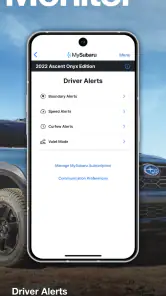
The MySubaru app also lets you set boundary alerts. This is particularly useful if you have a new driver in the family. You can set limits on where the car can go, and if those boundaries are crossed, you'll get an alert. It's like having an extra set of eyes on the road.
Setting expectations for shared driving
For a family using boundary alerts, I’d discuss the intended area and what an alert should mean before turning the feature into a rule. A route can change for an ordinary reason, and the alert by itself does not explain the driver’s situation. It works best as a cue to check in calmly, especially when the household has already agreed on how and when to communicate. That makes it a coordination aid rather than a substitute for trust or conversation.
The same thinking applies when someone else uses the car for an errand. The owner may value knowing where the vehicle is, while the other driver may not expect routine monitoring. Agreeing on how location and boundary tools will be used avoids turning a helpful feature into a source of friction. I’d use these tools where they solve a clear household need, not simply because they are available.
Where alerts help—and where they don’t
Boundary alerts can be useful when a family has agreed on a clear driving area, but I would treat them as a prompt to check in, not as a live substitute for a conversation with the driver. A boundary can make expectations more concrete; it cannot explain why a trip changed or guarantee that an alert arrives at the moment someone needs help. Similarly, roadside assistance and collision notification are valuable ways to connect a driver with support, but I would not make the phone the only part of an emergency plan. Keep the car’s ordinary safety information and appropriate emergency contacts in mind too.
Compared with a generic maintenance app, the appeal here is the connection to Subaru-specific ownership tasks, including vehicle status, service scheduling, remote start, and location. A calendar reminder or notes app can track an oil-change date, but it will not bring those vehicle-oriented tools together. On the other hand, if all you need is a simple maintenance log—or you want one dashboard for several different car brands—a neutral tracker may be less tied to one make and easier to use across a household.
Choosing between a manufacturer app and simpler tools
The main trade-off is breadth versus flexibility. MySubaru brings Subaru-related checks and actions into one place, while a basic calendar or maintenance log can be faster to understand if all I want is a date and a note. A multi-brand tracker makes more sense when the household has vehicles from different manufacturers and wants to record them together. Those alternatives may be less connected to the Subaru itself, but that may not matter to someone who rarely uses remote or vehicle-status features.
I would not install it expecting it to replace every other tool involved in car ownership. A phone’s map is still the natural choice for navigating to a destination, and a service professional remains the right person to diagnose a mechanical problem. The app’s better role is as the Subaru-specific layer between everyday ownership questions and the next action: check, remember, locate, or arrange. If that narrow role matches what I need, the combination is more compelling than any one feature on its own.
Enhance Your Subaru Experience
Beyond the practical features, the app connects you to the Subaru community. You can get tips on how to get the most out of your vehicle, and even join in on some Subaru-sponsored events. It's not just an app; it's a gateway to a community of Subaru enthusiasts.
Plus, the app is designed with a user-friendly interface. Even if you're not the most tech-savvy person, navigating through the app is a breeze. The layout is intuitive, and everything you need is just a click away. It really does make managing your vehicle a fun and straightforward task.
Making the first week useful
I’d resist the urge to explore every screen at once. Start with the vehicle details and status, then decide whether the health report gives you something practical to follow up on. Next, try the service process only if there is a real need to arrange a visit. That order keeps the app connected to actual ownership decisions instead of turning setup into a tour of features that may never matter to you.
If you share the car, settle on who will keep an eye on reminders and who should act on them. If you use location or boundary tools, agree on their purpose first. These are modest steps, but they help the app fit into an existing routine rather than creating duplicate checks or misunderstandings. For a driver who handles everything alone, the same principle applies: use the features that save a step, and leave the rest alone.
Who benefits most from keeping it installed
I’d recommend it most to someone who drives a Subaru regularly and expects to use several ownership tools, especially service scheduling, vehicle checks, or remote start. It can also make sense for a household where another driver needs boundary alerts or where remembering appointments is a recurring headache. If your car is rarely used, you already manage service another way, or you prefer not to use a manufacturer-focused app, the benefit may be small. The app is currently version 3.2.2 and requires Android 10 or later, so Android users should check that their device meets the requirement before planning around it.
My practical advice is to try one task at a time: first check the vehicle details, then see whether the health report and service workflow fit how you already maintain the car. After that, decide whether the security and convenience tools earn a place in your routine. That small test is more revealing than installing an app and expecting every feature to matter immediately.
When I would choose something else
I’d skip it if I do not own a Subaru, if I want one maintenance record that treats several car brands equally, or if I am content with a calendar reminder and a phone call when service is due. I would also avoid making it central to an urgent decision about a vehicle problem: an app report can help frame a question, but a warning in the car or a concerning change in how it drives calls for attention on its own terms.
There is also a practical dependency in any connected vehicle app: the experience has to fit both the particular car and the owner’s account. I would check which of the tools matter to me after setting up my vehicle instead of assuming every Subaru owner will have the same reason to use every feature. If my main need is not supported in my situation, a simpler tool may be the more dependable choice for that one task.
The Final Verdict
All in all, the MySubaru app is a must-have for any Subaru owner. It's packed with features that make driving and maintaining your car a whole lot easier and more enjoyable. Whether it's keeping track of your vehicle's health, enhancing security, or connecting with other Subaru lovers, this app does it all. It's like having your Subaru's best friend right in your pocket!
So, if you haven't tried it yet, what are you waiting for? Give it a go and see how it transforms your driving experience. Trust me, you'll wonder how you ever managed without it!
MySubaru Frequently Asked Questions
Is MySubaru free to download, and could using it involve other costs?
MySubaru is free to download, so you can install it without paying for the app itself. Some connected vehicle services may have separate eligibility or subscription requirements, so check the service options associated with your vehicle before relying on a particular feature. The app is most useful when you can register a Subaru and use the connected services available for it.
What phones and operating systems can run MySubaru?
MySubaru is designed for use on mobile devices, and its minimum operating system requirement is version 10. Before downloading, check your phone’s operating system and make sure it meets that requirement. The app is available for Android and iPhone users through their usual app stores, making it practical to check compatibility and install it on the device you use day to day.
Is MySubaru available for both Android and iPhone?
MySubaru is an app for managing a Subaru-connected experience from a smartphone. It is available through the major mobile app stores, so owners can look for it on Android or iPhone and check that their device meets the platform requirements before downloading. The app is free to install, and its content rating is Everyone.
What is the MySubaru app and what does it offer?
The MySubaru app is a comprehensive mobile application designed for Subaru vehicle owners. It offers a range of features that allow users to manage their Subaru experience from their smartphone, including remote start, vehicle health reports, and service scheduling. The app also provides access to owner's manuals and allows users to locate their vehicle remotely, ensuring convenience and enhanced connectivity with their Subaru.
How do I set up and connect MySubaru to my vehicle?
To set up the MySubaru app, you first need to download it from the App Store or Google Play Store. Once installed, create an account or sign in with your existing Subaru credentials. You'll then need to connect your vehicle by entering your vehicle's VIN and following the on-screen instructions to sync the app with your car's systems. This process allows you to access all connected features seamlessly.
Pros
- Comprehensive vehicle health reports
- Easy remote start and climate control
- Convenient service scheduling
- Access to vehicle manuals and guides
- Enhanced security features
Cons
- Limited features for older models
- Occasional connectivity issues
- Subscription required for premium features
- Navigation can be unintuitive
- Limited support for third-party devices

- Category
- Auto & Vehicles
- Version
- 3.2.2











