myLidl
- 3.13K
- 4.7
- Installs
- 1.00M
- Price
- Free

Screenshots
Analysis by Reviewed
I like having a clear plan before I head to Lidl, but a plan is only useful if I can check it at the right moment. That is where myLidl makes sense to me: it brings store-finding, grocery-list planning and coupons into one shopping app. The useful question is how well those tasks fit into an ordinary trip, especially when I’m relying on a phone while moving around.
A trip planned around a phone connection
I find the app most dependable as a preparation tool. At home, I have time to look through offers, sort out what I actually need and check which Lidl makes sense for the trip. On the move, the same phone can help me consult a list or locate a store, but that convenience depends on being able to reach the relevant information when I need it. I wouldn’t plan a whole grocery run around a last-minute search in a place where reception might be uncertain.
That distinction shapes how I use it: I do the decision-making before I leave and keep the in-store steps simple. If the connection is good, coupons and store details are close at hand. If it is not, I want my basic shopping plan to remain understandable without having to reload page after page. For me, the app works best when connectivity supports the trip rather than becoming the trip.
Useful on short errands, less essential on a long shop
On a quick stop after work, I can make a short list, check whether a coupon is relevant and head to a nearby store. That is a natural use for a phone-based Lidl tool: one destination, a few items and a clear reason to open the app. A more involved weekly shop calls for a little more preparation. I would settle the list and check the offers at home, rather than counting on being able to browse freely while pushing a cart.
For a household shop, a shared paper list or a list in a general notes app may still be more convenient if several people need to add items. The Lidl-specific list is useful when I am the person doing the shopping, but it should not automatically replace a shared system that everyone already understands. The better choice depends on who is coordinating the trip, not simply on whether a digital list is available.
What to do when something does not load
If a store search or offer takes too long, I would check that my phone can reach the internet and try again once, rather than repeatedly tapping through the same screen. If I am already in a queue, troubleshooting is unlikely to be the best use of time. Checking coupons before checkout and keeping a short note of the planned items reduces the chance that a temporary loading problem will derail the visit.
I also think about the difference between a small inconvenience and a genuine dependency. A delayed offer page is frustrating, but a list written somewhere else can keep the shop on track. A coupon that I have not checked until the till is a more avoidable problem. This is why I treat the app as a convenient layer over a shopping plan, not as the only place where the plan exists.
More From Our News Desk

Clash of Clans Is Won Between the Battles

Android Auto Makes the Case for Quieter Car Software

MobiOffice: Transforming Mobile Productivity with Seamless Integration

EA SPORTS FC™ Mobile Soccer: Redefining Mobile Sports Gaming

How Microsoft OneDrive Became a Mobile Productivity Giant

How Google Translate Breaks Language Barriers Effortlessly
A lighter approach to mobile data
Shoppers who prefer to limit mobile data can do most of their browsing while connected at home, then open the app on the go only for the task at hand. That does not require a complicated routine: check the location, decide whether the available offers matter, and prepare the list before setting out. Keeping that sequence focused is more useful than repeatedly browsing promotions while moving through the store.
It also helps me avoid turning deal browsing into the main event. If I have already decided what meals and groceries I need, there is less reason to keep refreshing offers. This approach is especially sensible for someone with inconsistent reception or a small data allowance, while anyone who prefers to explore promotions in real time may find the experience more dependent on connectivity.
The app is free, and its 4.7 average from around 34,000 ratings points to a strong response from shoppers. For my own decision, the important question is less about popularity and more about routine: whether Lidl is a store I visit often enough for its store information and coupons to earn a place on my phone.
Your Personal Shopping Assistant
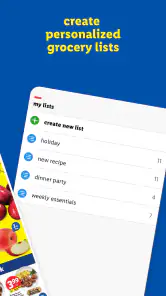
The first thing that caught my attention was how the app turns your smartphone into a personal shopping assistant. You know how sometimes you walk into a store with a list in your head, only to forget half of it once you're in there? This app has got your back. With features like the digital shopping list, I can now jot down everything I need and tick them off as I go. No more wandering back and forth!
Before you leave: deals, coupons and a list
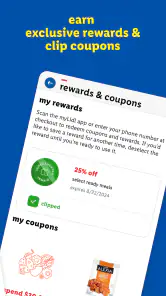
For me, the best time to use a shopping app is before I’m standing in an aisle. I can check the offers, decide which ones actually fit the week’s meals, and then build my list around that choice. That order matters: browsing deals first can save me from adding something just because it looks like a bargain. I’d treat coupons as a prompt to check what I genuinely need, not as a reason to buy extra groceries.
At checkout, coupons are intended to be clipped and applied, so I’d make a habit of checking them before joining the queue rather than trying to remember at the till. Because those steps rely on the app being reachable when I need them, I would avoid leaving the entire trip plan until I’m already inside the store. A paper note or a remembered shortlist can still be a useful backup if my connection is unreliable.
Weekly Deals and Offers
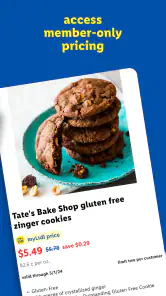
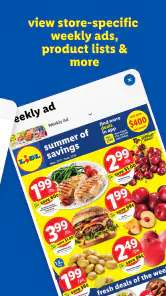
If you're anything like me, you love a good deal. The app does a fantastic job of highlighting weekly deals and special offers. I found it super handy to browse through what's on offer before even setting foot in the store. It’s like having the inside scoop on all the latest bargains without the hassle of flipping through paper flyers.
Compared with paper flyers, the phone is easier to take along and combine with a digital list; compared with a general grocery-list app, the useful distinction is that this one brings Lidl offers and checkout coupons into the same shopping routine. That focus is also its trade-off. If I’m comparing prices across several supermarket chains or doing most of my shopping elsewhere, a broader comparison tool—or simply each retailer’s own app—may suit me better.
Finding the right store while on the move
The store locator is particularly helpful when I’m away from my usual area. Before setting off, I’d look up a nearby Lidl and check its opening hours, then make sure I’ve picked the right location rather than assuming the closest result is the one that fits my route. This is a small but practical step on a road trip or while running errands in an unfamiliar neighborhood.
Another neat feature is the store locator. Whether I'm at home or on a road trip, I can easily find the nearest Lidl store and check its opening hours. It's a small touch, but it makes planning grocery trips so much easier, especially in unfamiliar areas.
Additionally, the app provides detailed information about each store, including amenities like in-store bakeries or whether they have a self-checkout option. It's these little details that make the experience feel personalized.
Those details can help me decide where to stop, but I’d still treat the store information as a planning aid, not a reason to make a special detour without checking the location and hours close to departure. The app is most useful when the destination itself is a Lidl; it is less compelling if I simply need the nearest grocery shop regardless of retailer.
Recipes and Inspiration
Ever find yourself staring at your fridge with no idea what to cook? The recipe section on the app is a lifesaver. It offers a variety of meal ideas and even suggests ingredients that are currently on sale. I’ve found myself trying new dishes just because they popped up on the app!
A practical way to use recipe ideas is to start with what is already at home, then see whether an offer makes an easy addition to the meal. That keeps inspiration from turning into an overfull basket. If I already have a set menu, though, I’d skip browsing recipes and go straight to the list; the extra ideas are helpful when I’m undecided, not essential on every trip.
When the connection becomes part of the trip
Store searches, current offers and coupon use are the moments when I’d expect to want a working connection. I’d check the location and browse what I need before leaving home, where it’s easier to take my time. At the store, I’d keep the list concise and avoid relying on a last-second search to settle a basic question. I wouldn’t assume every part of the app will be available without connectivity, so a simple backup note is sensible for a trip where mobile service may be patchy.
If something fails to load, I’d first check whether the phone has a connection, then try again before relying on a coupon at checkout. If the list is the urgent part, switching to a handwritten note is more practical than repeatedly refreshing the screen in a busy aisle. This is a modest inconvenience rather than a reason to avoid the app, but it does mean I would not make it my only record of a large or time-sensitive shop.
For data-conscious use, I’d do most of the browsing while connected at home and open only what I need on the move. I can also keep the shopping list focused instead of repeatedly loading offer pages while walking around. That workflow makes the app feel like a preparation tool first and an in-store companion second—an important distinction if reception is inconsistent or I prefer to limit mobile data.
Who will get the most from it?
The app is a natural fit if Lidl is already part of your routine, whether you shop there every week or stop in occasionally for particular groceries. The free app is rated for Everyone, and its 4.7 average from around 34,000 ratings suggests many shoppers find the everyday tools useful. It has more than a million installs, is developed by Lidl US, LLC, and version 2.51.0 supports Android 8.0 and later.
It is less useful if you want one neutral list for several retailers, prefer not to use a phone while shopping, or rarely visit Lidl. In those cases, a basic notes app can be faster for lists, while a store-agnostic shopping app may make more sense for comparing different supermarkets. I’d choose this one for the connection between Lidl-specific offers, coupons, store details and list-making—not because it replaces every shopping tool.
Overall, the app is more than just a shopping tool; it’s like having a personal assistant that helps you plan meals, find deals, and make the most of your shopping trip. While it might not transform your entire grocery shopping experience, it certainly adds a level of convenience and efficiency that I’ve come to appreciate.
In conclusion, if you’re a regular Lidl shopper or even an occasional visitor, this app is definitely worth trying out. It’s user-friendly, packed with features, and just makes the whole shopping process a bit more enjoyable. So next time you head to Lidl, make sure to have the app ready – you might just find yourself saving a little more and enjoying the experience a lot more!
myLidl Frequently Asked Questions
Is myLidl only useful if I already shop at Lidl?
myLidl is a shopping app built around Lidl grocery trips. Its main tools are finding a local store, creating grocery lists, and clipping and applying coupons at checkout. If you do not shop at Lidl, those features may have little practical value to you. For existing or prospective Lidl shoppers, the app can bring these tasks together in one place.
Can I use myLidl to prepare a grocery list before I visit a store?
Yes. You can create grocery lists in myLidl to organize the items you plan to buy before heading out. The list feature can help you keep your shopping needs together, while the store-finding tool helps connect your plans to a local Lidl. You can also use the app’s coupon tools at checkout, making it relevant both before and during a shopping trip.
What do I need to know about myLidl before downloading it?
myLidl is a shopping app from Lidl US, LLC, intended to support grocery trips with tools for finding a local store, creating grocery lists, and clipping and applying coupons at checkout. It is available for free and is rated for Everyone. The app has a 4.7 average from around 34,000 ratings, so it may suit shoppers who want these Lidl-focused features on their phone.
Which phones and operating systems can run myLidl?
Compatibility is worth checking before installing, especially if you use an older phone. The current version is 2.51.0 and requires iOS 8.0 or later. If your device meets that requirement, you can download the app and use it to support your Lidl shopping with store-finding, grocery-list, and coupon features. Keeping the app updated can help you use its current version.
What is the primary purpose of the myLidl app?
The myLidl app is designed to enhance your shopping experience by providing a personalized and streamlined way to browse Lidl's latest offerings. Users can explore weekly specials, access digital coupons, and create shopping lists, making it easier to plan their grocery shopping efficiently. Additionally, the app offers store locator features and alerts for special promotions and events.
Pros
- User-friendly interface enhances shopping experience.
- Wide variety of products available.
- Exclusive deals and discounts for app users.
- Efficient navigation with quick search feature.
- Personalized shopping lists improve convenience.
Cons
- Requires account creation for full functionality.
- Occasional app crashes reported by users.
- Limited payment options available.
- Some users find loading times slow.
- Infrequent updates may affect app performance.

- Category
- Shopping
- Version
- 2.51.0











