My H-E-B
- 13.21K
- 4.7
- Installs
- 1.00M
- Price
- Free

Screenshots

Analysis by Reviewed
I judge a grocery app not just by how quickly it can build a basket, but by how clearly it lets me make choices when shopping involves an account, coupons, or a delivery order. My H-E-B is H-E-B’s free shopping app, and its mix of store shopping and online ordering is useful if H-E-B is already part of your routine. It has a 4.7 average from around 40,000 ratings, but ratings alone don’t tell me how well an app fits a particular household, so I’d weigh its convenience against how much you want to manage through your phone.
Start with the way you shop
I find it helpful to decide what I want from the app before doing much inside it. If I only need to check a weekly offer or jot down a few groceries, I can use it as a planning aid rather than turning every shopping trip into an online order. If I already rely on H-E-B, keeping those tasks together is a practical reason to try it; if I shop across several supermarket chains, a store-neutral list may be more useful for the parts of my routine that need to work everywhere.
A sensible first use is to compare the digital version of your usual routine with the one the app encourages. Make a list for a normal shop, then see whether the weekly ad or coupons help you make a decision you would have made anyway. That gives you a better sense of whether the app saves effort or simply adds another place to check. I would judge it by whether it helps me remember essentials and choose a convenient way to shop, not by how many features I can tap through.
Convenience is not the same as certainty
Grocery plans can change between placing an order and getting the food home. A pickup or delivery order may be convenient, but it still asks me to think ahead and review what I selected. I would avoid treating an app basket as a guarantee that every detail will suit the moment: a rushed order can still include the wrong quantity, an item I no longer need, or a choice that deserves a closer look before checkout.
For that reason, I prefer to use the list as the dependable part of the workflow and treat online ordering as an option I choose when it fits. If I am shopping for ingredients where appearance matters to me, going into the store gives me a chance to make those choices directly. If I am restocking predictable household basics, ordering can make more sense because I am less likely to need to inspect each item myself. The right balance depends on what is in the basket, not just how busy the day feels.
Using the app with a little care
First things first, downloading the My H-E-B app is super straightforward. Once installed, you'll be greeted with a user-friendly interface that’s as welcoming as walking into your neighborhood H-E-B store. The app is available on both Android and iOS, making it accessible to almost everyone. No matter what device you’re using, you’re in for a seamless experience.
Trust, choices, and shopping details
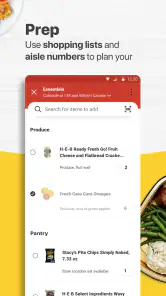
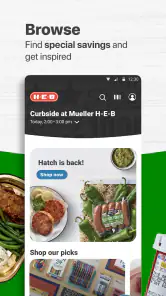
My practical advice is to treat the app as a convenient way to organize a shop, while checking the choices that matter to you as you go. The app brings together shopping lists, coupons, the weekly ad, and pickup or delivery, so a shopper can compare a planned list with current offers before deciding what to buy. That is more useful than opening a separate general coupon app and trying to match deals to a store afterward, but it also means H-E-B’s app is most relevant when you shop at H-E-B.
More From Our News Desk

Clash of Clans Is Won Between the Battles

Android Auto Makes the Case for Quieter Car Software

MobiOffice: Transforming Mobile Productivity with Seamless Integration

EA SPORTS FC™ Mobile Soccer: Redefining Mobile Sports Gaming

How Microsoft OneDrive Became a Mobile Productivity Giant

How Google Translate Breaks Language Barriers Effortlessly
Now, let’s talk about the features. The app is packed with functionalities that make grocery shopping a breeze. You can easily browse through different categories, from fresh produce to household essentials. The search function is top-notch, allowing you to find products quickly and efficiently. Plus, the app keeps track of your purchase history, so you can easily reorder your favorite items without any hassle. Isn’t that neat?
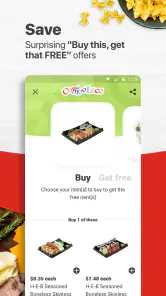
One of my favorite features is the digital coupons. Who doesn’t love a good deal, right? You can clip coupons directly in the app and they’ll automatically apply at checkout. This means more savings without the need to carry around those pesky paper coupons. It’s the 21st century, after all!
Turning coupons and lists into a useful routine
A detail worth watching is the difference between a deal that looks attractive and one that belongs in your actual shop. I would add essentials to the list first, then look at coupons and the weekly ad with that list in view. That order makes it easier to notice a relevant offer without letting a discount dictate what I buy. It is also a useful way to compare planned quantities: a promotion only helps if the item and amount make sense for the household.
For a shared household, the list can act as a final checkpoint before anyone places an order. One person might add breakfast items while another remembers cleaning supplies, but I would still review the combined list for duplicates and quantities. That is a small, practical step that can prevent an online basket from carrying two versions of the same need. It is especially helpful when shopping happens between other tasks and no one has time to reconstruct the pantry from memory.
Useful routines, with sensible checks
A small habit that makes the app more useful is to build a list before browsing the weekly ad. That keeps a tempting discount from turning into an unnecessary purchase, and lets you check whether an offer fits what you actually planned to cook or restock. For a shared household, it can also help to settle the list before placing an order; one person can review essentials while another checks pantry staples, rather than relying on memory during a rushed trip.
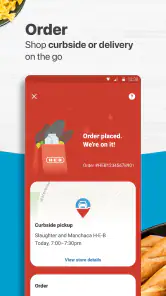
With the My H-E-B app, you have the option to choose between curbside pickup or home delivery. This flexibility is a game-changer, especially on those busy days when you just can’t make it to the store. Simply place your order, choose your preferred pickup or delivery time, and you’re all set. The app even allows you to track your order in real time, so you know exactly when to expect your groceries.
For those who love planning their meals, the app offers a meal planner feature. You can browse through a variety of recipes and add ingredients directly to your cart. It’s like having a personal assistant who takes care of your meal prep!
When the meal plan meets the real week
I would treat recipe planning as a starting point, not a complete meal-prep system. A recipe can help turn an idea into a shopping list, but it is still worth checking what is already in the kitchen and whether the planned meal fits the time available. If I am choosing between two dinners, I might use the ingredients as a prompt to check the ad, then remove anything I already have before placing an order. That keeps recipe inspiration tied to an actual need.
There is also a useful trade-off between convenience and flexibility. Adding ingredients from a recipe can reduce the chance of forgetting a key item, but a ready-made list still needs a human review: household sizes, preferred brands, and what is already in the cupboard vary. For a familiar dish, I would use the planner to get organized and then adjust the basket myself rather than assuming every suggested ingredient belongs in the order.
Who benefits most—and who may prefer another option
Imagine getting home late, realizing breakfast and lunch supplies are running low, and needing to plan the next few days quickly. I’d use the list to capture the basics, check the weekly ad and coupons for items already on that list, then decide whether pickup or delivery suits the day. That workflow can save time and reduce forgotten essentials. It is especially appealing to regular H-E-B shoppers who want store-specific offers and a single place to plan an order.
The trade-off is that the app is not a universal grocery marketplace. If you routinely compare prices across several chains, a retailer-neutral list or shopping service may be a better starting point; if you prefer selecting produce and substitutions in person, a regular store visit gives you more direct control. Pickup and delivery also require planning around the available ordering and collection process, so I would not rely on either as a substitute for an immediate stop when dinner is already underway.
A realistic decision before placing an order
On a busy weekday, I would use the app in stages rather than building a basket in one hurried sitting. First, I would write down what the household needs for the next few days. Then I would check the weekly ad and available coupons against those items, leaving unrelated offers alone. Finally, I would look at the basket again before deciding whether collecting it or having it delivered fits the day. This sequence is useful because it separates planning from the final purchase decision.
That approach also answers a common practical question: can the app still be useful if I do not want to order groceries every time? Yes, the planning tools have value on their own. Lists and the weekly ad can help prepare for a normal in-store visit, while pickup and delivery remain choices for days when they suit the schedule. I would not treat online ordering as mandatory just because it is available.
Account and order decisions
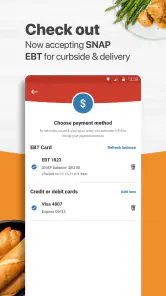
Whenever an app moves a grocery shop from browsing to ordering, I take a moment to review the basket and the chosen fulfillment option before committing. Here, that means checking quantities, coupon selections, and whether the order is set for pickup or delivery. Those are concrete points where I can exercise control over the purchase. I also prefer to make deliberate choices about signing in and sharing information rather than assuming every convenience requires every optional setting; the app’s actual prompts are the place to assess those choices.
For me, that review is not a claim about what information the app collects; it is a reminder to pay attention at the moments when I am asked to make a choice. I would read the wording on any account or checkout screen rather than tap through automatically, and I would distinguish between what I need to complete a task and what I am simply being offered. That is a useful habit with any shopping app, particularly when moving from browsing to a purchase.
If you are wondering whether you can use it just to plan, the shopping lists, coupons, and weekly ad make it useful for preparation even when you are not ready to place an order. If you are deciding between pickup and delivery, choose based on whether you can travel to the store and whether a home drop-off better fits your day. And if you mainly shop somewhere else, the H-E-B-specific benefits are less compelling than a tool built around your usual retailer.
What to check when plans change
It is worth pausing if your needs change after you have prepared a basket. Before completing an order, I would make one final pass for quantities, items added through a recipe, and coupons that no longer match the intended shop. If the plan depends on a particular collection or delivery time, I would check that detail as part of the decision rather than assuming the first option shown is automatically the best one for me.
For last-minute shopping, the app may be less helpful than walking into a nearby store, because planning an order and arranging collection or delivery are not the same as getting an item immediately. On the other hand, for a repeat restock where I already know what I need, the combination of lists and ordering can reduce the mental load. I would choose between those approaches based on urgency and how much direct selection the groceries require.
A cautious recommendation
The app is free, developed by H-E-B, and rated Everyone. It has passed 1 million installs, and its current version is 2.63.4.2, with Android 7.0 or later required. Those basics make it easy to consider, but they do not by themselves answer whether its ordering flow or account choices suit you. I would start with the features that need the least commitment—checking the ad or making a list—then move to an order only when the pickup or delivery details work for your schedule.
My overall view is positive with a clear boundary: this is most useful when H-E-B is already where you shop. It gathers store-specific planning and ordering tasks in one place, while leaving me responsible for checking the basket and deciding how much of the process I want to handle through an account. If you want one app for comparing several retailers, or prefer to make every selection in person, another approach may fit better.
In conclusion, the My H-E-B app is a must-have for anyone looking to simplify their grocery shopping experience. Its user-friendly design, coupled with a wide range of features, makes it stand out in the crowded market of grocery apps. Whether you’re a busy professional or someone who just loves convenience, this app has got you covered.
So, what are you waiting for? Give it a try and see how it transforms your grocery shopping experience. Trust me, once you start using it, you’ll wonder how you ever managed without it!
My H-E-B Frequently Asked Questions
What does My H-E-B do, and who is it for?
My H-E-B is a shopping app from H-E-B for people who want to plan grocery purchases or order groceries through their phone. Its features include grocery pickup and delivery, digital coupons, a weekly ad, and shopping lists. The app is aimed at customers who want to keep common shopping tasks together in one place.
Who publishes the app, and what do users say about it?
H-E-B develops My H-E-B. It has over one million installs and an average rating of 4.7 from around 40,000 ratings, giving prospective users a sense of its reach and overall reception. Its mix of ordering, coupons, weekly ads, and lists makes it useful for more than one kind of grocery-shopping routine.
Is My H-E-B available for my phone?
My H-E-B is a shopping app from H-E-B for Android and iOS users. On Android, it requires version 7.0 or later, so checking your device’s operating system before downloading can help avoid installation issues. The app is free, and its Everyone age rating makes it suitable for a broad audience.
What can I do with My H-E-B without placing a grocery order?
You can use My H-E-B for more than ordering groceries. Its features include shopping lists, a weekly ad, and digital coupons, which can help you plan a store visit or keep track of products you want to buy. The app’s store summary also highlights grocery pickup and delivery, making it useful for both planning and ordering.
What is My H-E-B app and what features does it offer?
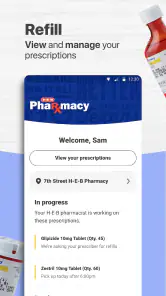
The My H-E-B app is a convenient tool for H-E-B customers to streamline their shopping experience. It offers features such as online grocery ordering, digital coupons, store locator, and pharmacy services including prescription refills. With the app, users can also create shopping lists, view weekly ads, and access personalized deals.
Pros
- User-friendly interface for easy navigation.
- Comprehensive shopping list feature included.
- Real-time updates on item availability.
- Exclusive discounts and promotions available.
- Store locator with operating hours and maps.
Cons
- Limited payment options available.
- Occasional app crashes reported.
- Some features require strong internet.
- Limited language support for non-English speakers.
- Not all store locations are covered.

- Category
- Shopping
- Version
- 2.63.4.2











