

Maru - ComicViewer/TextReader
- 208.00
- 4.8
- Installs
- 1.00M
- Price
- Free

Screenshots
Analysis by Reviewed
When a reading app is used around a household, the challenge is often less about opening a file and more about keeping different people’s reading habits from getting tangled together. I see Maru - ComicViewer/TextReader as a practical option for a shared tablet or phone when everyone is comfortable managing their own reading choices on the device. Its appeal is the combination of comics and text reading, rather than a single-purpose shelf built around one kind of content.
One device, different reading routines
A realistic use is a tablet that stays in the living room: one person reads a comic in the evening, while another opens a book or document later. Having several kinds of reading in one app can reduce the need to switch between separate viewers. The trade-off is that a shared library can become confusing if people do not agree on how to keep files arranged. I would decide on a simple naming or folder habit before adding a large collection, especially if several people use the same device.
That setup also makes the app a better fit for households that already keep their reading files locally and want a straightforward way to open them. It is less suited to someone who expects a social reading service, a curated comic subscription, or a system that automatically separates each person’s library. I would choose a dedicated service instead if browsing and discovering new titles matters more than reading files already in hand.
Practical boundaries for a shared device
Before handing over a device, I would check what is visible in the library and make sure the content is appropriate for whoever may open it. A reader’s age label is not the same as a household content filter: the app is rated Everyone, but that does not mean every comic or document someone chooses to read is intended for every age. For younger readers, I would curate the files myself and keep the device’s general account or screen boundaries separate from the reading app.
For adults sharing a tablet, a quick agreement about who adds or removes files can prevent accidental clutter and preserve a useful collection. This is a small, ordinary step, but it matters more when the app is serving as both a comic shelf and a text reader. Maru is a viewer, not a substitute for the device’s own account arrangements or family rules.
First Impressions: A Sleek and Friendly Interface
As soon as you download and open Maru - ComicViewer/TextReader, you're greeted with a clean and appealing interface. It’s like the developers knew exactly what we wanted: simplicity combined with functionality. The design is minimalistic, allowing your content to take center stage without unnecessary distractions. I personally love how intuitive it is, making navigation a breeze even for first-timers.
Diving into Features: More Than Just a Reader
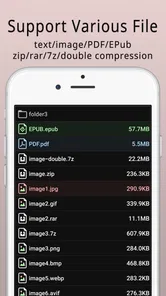
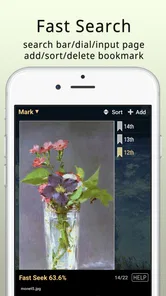
Now, let’s talk features because, oh boy, does Maru pack a punch! Not only does it support a wide range of file formats including CBZ, CBR, PDF, and even EPUB, but it also provides an effortless way to organize and manage your library. I found the library management feature particularly nifty. You can effortlessly sort your comics and texts, making it much easier to locate what you’re in the mood for.
More From Our News Desk

 Weather - By Xiaomi
Weather by Xiaomi Review: Clear at a Glance, Less Clear Up Close
Xiaomi’s weather app makes everyday forecasts quick to scan, but its calm surface can leave useful details and recovery paths harder to find than they should be.

 X
XX Under Pressure: Can It Recover When Posting Goes Wrong?
A resilience-focused review of X, examining setup, mistaken posts, interruptions, weak connections, and the gaps that matter when recovery needs to be dependable.

 Clash of Clans
Clash of Clans Is Won Between the Battles
Its raids are quick; its community is a long-term project of coordination, teaching, rivalry, and shared responsibility—with all the friction that entails.

 Android Auto
Android Auto Makes the Case for Quieter Car Software
The car interface is no longer judged by how much it can do, but by how quietly it helps. Android Auto shows what drivers now expect—and what still gets in the way.

 MobiOffice: Word, Sheets, PDF
MobiOffice: Transforming Mobile Productivity with Seamless Integration
MobiOffice: Word, Sheets, PDF is redefining mobile productivity with a surprising blend of functionality and innovation.

 EA SPORTS FC Soccer Mobile 26
EA SPORTS FC™ Mobile Soccer: Redefining Mobile Sports Gaming
Dive into EA SPORTS FC™ Mobile Soccer, where immersive gameplay and strategic depth transform mobile sports gaming.
Latest News



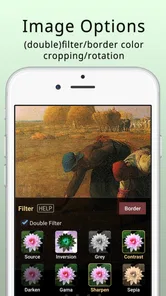
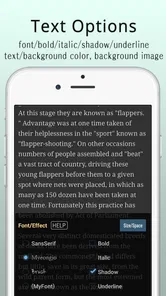
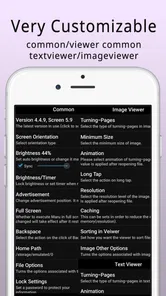
Another highlight is the customizable reading experience. Whether you prefer a night mode for late-night reading or you want to adjust the brightness and saturation to suit your eye comfort, Maru has you covered. It’s these little details that make a huge difference in prolonged reading sessions.
Keeping files and expectations in order
Because one app handles comics, text, PDFs, and EPUB books, I would treat the library as a collection to maintain rather than a magic inbox that organizes everything perfectly on its own. A useful habit is to add a small batch of files, check how they appear, and settle on a naming pattern before importing the rest. That makes it easier to spot the next volume or return to a book without scrolling past unrelated material.
Maru is also a sensible choice when reading means opening files you already have, not syncing a reading life across several services. Compared with a comic platform focused on online catalogs, it puts more emphasis on viewing and organizing your own material. Compared with a basic PDF reader, it is more appealing if comics and text formats share space in your routine. If cloud syncing, recommendations, or an elaborate multi-user setup is essential, I would look elsewhere rather than expect a file reader to provide those things.
Performance: Smooth Sailing All the Way
I was pleasantly surprised by how efficiently Maru handles large files. There’s no lagging or crashing, which is a common pitfall for many reader apps out there. Even when flipping through high-resolution pages, the app maintains its smooth performance, ensuring an immersive reading experience.
Moreover, the text reader is equally impressive, providing crisp and clear text rendering. It’s perfect for those who enjoy reading novels or text-heavy comics. Trust me, there’s nothing more satisfying than having an app that doesn’t stutter or freeze when you’re at a cliffhanger moment in your favorite manga!
Who benefits most from Maru
I think it suits readers who already keep comics, books, or documents as files and want one place to open them, particularly if they alternate between illustrated pages and text. It is also useful for someone who prefers adjusting the view for a comfortable session rather than relying on a publisher’s fixed presentation. The developer is 마루치아라치, and the app is free, so trying it with a few representative files is a low-commitment way to see whether its approach fits your habits.
On the other hand, readers who mainly want to discover or purchase comics inside an app may be happier with a storefront or subscription reader. Likewise, if several people need clearly separated accounts and private reading histories on one device, I would not assume a general-purpose viewer will solve that problem. A simple shared library is convenient only when the people using it are comfortable with the same device-level boundaries.
Age, trust, and the household routine
For a family, I would think of the Everyone rating as an age classification for the app itself, not a guarantee about every file opened in it. The person who manages the device should still choose what goes into the collection and make clear which material is for shared use. That distinction is especially helpful when comics and personal documents sit side by side: convenience should not replace a quick check of what is available to younger readers.
Maru has been available since October 15, 2012, and its current version is 4.11.8, with Android 7.0 as the minimum system requirement. Its average rating is 4.8 from around 57,000 ratings, and it has over one million installs. Those figures suggest a well-established audience, though I would still judge it by how it handles my own files and whether the library stays manageable on my device.
One practical question is what to try first: I would open one comic archive, one PDF, and one text or EPUB file that reflects what I actually read. That small test reveals more than importing everything at once, because it lets me check the reading feel and sorting workflow without creating a cluttered library. If the files are shared, I would also agree on who maintains the collection before it grows.
Sharing without turning the library into a chore
A shared device works best when the app has a clear job: opening reading files that the household has already chosen. I would keep the collection focused instead of treating it as a catch-all for every document anyone might need. For example, a comic series, a novel, and a handful of reference PDFs can coexist naturally; mixing those with temporary work files makes it harder for everyone to find what they opened the app for.
There is also a useful distinction between sharing a device and sharing a reading collection. If one person prefers private reading material or wants a separate progress history, a single common library may feel too exposed or simply inconvenient. In that situation, separate device profiles or a personal device may be a better arrangement than trying to make one viewer behave like a multi-account service.
A low-effort way to test the fit
I would start with a few files that represent different reading situations rather than importing an entire archive. Open a comic on the screen you normally use, read a text file for a while, and inspect a PDF with the kind of page layout you encounter most often. This reveals whether the controls and display adjustments suit your habits, and whether the library organization makes sense before you invest time arranging a larger collection.
For a household, that test should include the person who will maintain the files and anyone who will use the shared device regularly. Agreeing on a simple naming pattern can be more helpful than trying to create a complicated catalog from day one. If people cannot quickly tell which volume or document is theirs, the convenience of having one reader may disappear into repeated searching.
When another reading app is the better choice
The key decision is whether you want a flexible viewer or a service built around discovery. Maru makes more sense when you already have files and value one place for comics, text, PDFs, and EPUB books. A subscription or storefront app is a better fit if you want its catalog, purchasing flow, recommendations, or a reading history tied to an account. Those are different jobs, so I would not choose a file-focused reader expecting it to replace a content service.
Likewise, someone who mostly reads standard PDFs may prefer a simpler document reader, especially if comic formats and text books are irrelevant to them. Maru’s broader range is useful when those formats genuinely appear in the same routine; otherwise, extra versatility may not outweigh the appeal of a tool centered on one document type. I would make the choice based on the files I open every week, not the longest possible feature list.
Final Thoughts: A Must-Have for Comic Enthusiasts
In a world where digital reading apps are a dime a dozen, Maru - ComicViewer/TextReader stands out with its user-friendly interface, rich feature set, and reliable performance. It’s an app that truly understands the needs of comic and text readers alike, providing a seamless experience that’s hard to beat.
If you’re on the hunt for a comic reader that not only meets but exceeds your expectations, give Maru a whirl. It might just become your new favorite reading companion. Happy reading!
Maru - ComicViewer/TextReader Frequently Asked Questions
Can I transfer my existing comics and documents to Maru - ComicViewer/TextReader?
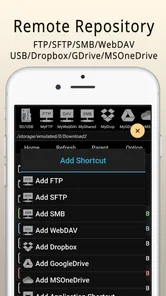
Maru is intended for opening reading files on your device, so you can use it with comics and documents that are already stored there. You can transfer files to your phone or tablet using your usual method, then open them in the app. This makes it useful for building a personal offline library from files you already have, rather than relying on the app to supply reading material.
Who develops Maru - ComicViewer/TextReader, and is it a well-established app?
Maru - ComicViewer/TextReader is developed by 마루치아라치 and has been available since Oct 15, 2012. It has an average rating of 4.8 from around 57 thousand ratings, with over a million installs. Those figures suggest it has reached a sizeable audience, although your experience will still depend on your device, the files you open, and the reading features you prefer.
What devices and operating systems can I use Maru - ComicViewer/TextReader on?
Maru - ComicViewer/TextReader is an Android app for reading comics and text files. It supports Android 7.0 and later, so check your device’s system version before downloading. The app is listed in the Comics category and has an Everyone content rating, making it suitable for a broad audience. If your device meets the minimum requirement, you can use it to read compatible files on your phone or tablet.
Is Maru - ComicViewer/TextReader suitable for younger readers?
The app has an Everyone content rating, so it is considered suitable for a broad audience. Maru is a reader rather than a source of stories: what appears on screen depends on the files you choose to open. Parents and guardians should therefore consider the content of any comics or documents saved on the device, rather than relying on the app rating to describe every file a reader might access.
What is Maru - ComicViewer/TextReader?
Maru - ComicViewer/TextReader is a versatile application designed for reading comics and text files on Android devices. It provides a seamless experience for manga and comic enthusiasts by supporting various file formats like ZIP, RAR, CBZ, and CBR. The app offers features such as customizable viewing options, bookmarking, and a user-friendly interface, making it a popular choice for readers.
Pros
- User-friendly interface design.
- Supports various file formats.
- Smooth page scrolling feature.
- Offers night mode for easy reading.
- High customization options.
Cons
- Limited cloud storage options.
- Ads can be intrusive.
- Occasional app freezes.
- No in-app purchases for ad removal.
- Limited language support.











