Love's Connect
- 13.34K
- 3.6
- Installs
- 1.00M
- Price
- Free

Screenshots
Analysis by Reviewed
For a driver whose plans depend on finding a Love’s stop, a dedicated locator can be more practical than searching a general map from scratch. I see Love's Connect as a focused companion for locating the chain and getting directions, rather than a complete trip-planning or trucking tool. That distinction matters: it can help answer “Where’s the next Love’s?” without replacing the broader navigation app I’d still use for the rest of a journey.
Useful when a stop is part of the plan
A realistic use is checking for a Love’s before leaving a major road or deciding where to pause on a long drive. I’d search while parked, compare the result with my route, then open directions when the stop makes sense. That small bit of planning is more useful than waiting until I’m tired or nearly out of fuel and trying to choose a stop under pressure.
It is most relevant to people who already choose Love’s regularly, including professional drivers and frequent road travelers. If I use several fuel brands interchangeably, a general map or travel-stop finder may be a better first choice because it can help compare a wider range of destinations. This app’s value is its focus, not universal coverage.
A practical stop-planning workflow
I’d use the locator before a drive rather than treating it as something to consult only when I need fuel immediately. While parked, I can check whether a Love’s location fits the route, then decide whether its position makes sense alongside my planned breaks. This is a modest workflow, but it helps avoid making a rushed choice at an exit simply because it is the first familiar name I see.
For a family trip, the same habit can make a stop easier to coordinate: one person checks for a suitable Love’s while the driver stays focused on the road. For a professional driver, checking before reaching a busy stretch can help with deciding where to pause. I would still confirm directions in the navigation app I normally trust, especially if road conditions or a last-minute route change affect the plan.
Your Roadside Companion
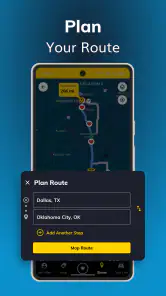
From the moment I downloaded Love's Connect, I knew it was going to be a staple on my phone. The app’s interface is clean and intuitive, making it super easy to navigate. The first thing you’ll notice is how quickly you can find Love's Travel Stops & Country Stores nearby. The app uses your location to pinpoint the nearest stops, ensuring you never have to wander far off your route for fuel or a snack.
What a chain-specific locator does well
The focused approach is both the main attraction and the key limitation. Instead of beginning with a wide search for every possible fuel station, I can use the app when I already want to find a Love’s. That can make the decision simpler for regular customers, particularly when the goal is to locate the chain and get directions without rebuilding a search from scratch.
More From Our News Desk

Clash of Clans Is Won Between the Battles

Android Auto Makes the Case for Quieter Car Software

MobiOffice: Transforming Mobile Productivity with Seamless Integration

EA SPORTS FC™ Mobile Soccer: Redefining Mobile Sports Gaming

How Microsoft OneDrive Became a Mobile Productivity Giant

How Google Translate Breaks Language Barriers Effortlessly
It is not automatically the best tool for choosing the cheapest or most convenient stop overall. A general map is better when I want to compare unrelated stations, food options, or places along a route in one view. I’d keep both kinds of tools available: this one for Love’s-focused decisions, and a broader map for the rest of the journey.
Features That Keep You Moving
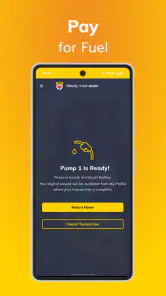
Now, let’s dive into what makes this app a must-have. One feature that stands out is the ability to check fuel prices at different locations. This is not just a time-saver but a money-saver too. You can plan your stops based on the best prices, which is a huge bonus for anyone looking to cut down on expenses.
Price checking is most useful as a comparison aid, not a reason to make a major detour automatically. I’d weigh a listed price against the extra distance and time, especially when traveling with a tight schedule. For a driver already headed past a Love’s, the information can help choose between nearby options; for someone crossing an area with many competing stations, a broader search may offer more context.
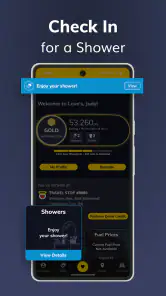
Another cool feature is the shower and parking availability checker. Yes, you read that right! No more guessing if there’s an available shower or parking spot. This feature is a lifesaver after a long day on the road. It’s these little conveniences that make a big difference.
For truck drivers, those checks can shape a stop decision, but I’d treat availability as a useful snapshot rather than a guarantee by the time I arrive. A practical approach is to check before committing to a stop and keep another suitable location in mind when timing is important. The app can reduce uncertainty; it cannot remove the unpredictability of a busy travel day.
Making availability checks work for you
When a shower or parking spot matters to the next part of a drive, I would check availability before leaving my current stop, not only after I’m close to the destination. That gives me more time to reconsider the route if the situation changes. It also prevents a common planning mistake: treating a convenient status check as a promise that conditions will remain the same throughout the drive.
This is a stronger fit for someone whose travel decisions depend on those particular services than for a casual driver who only needs directions to a fuel stop. If a specific facility is essential, I’d keep a backup Love’s or another appropriate option in mind. The app can make the first choice better informed, but relying on a single result can leave little room to adapt.
Stay Connected and Informed
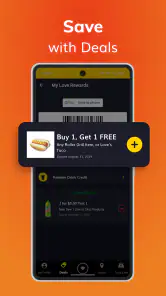
The app also keeps you in the loop with the latest promotions and deals. Who doesn’t love a good deal, right? You can receive notifications about discounts on snacks, drinks, and even services. Plus, the app’s connection to Love’s rewards program means you’re always earning points for every purchase.
I’d keep promotions in perspective: a discount is worthwhile when it fits a purchase I was already going to make, not when it encourages an unnecessary stop or spend. Notifications may suit someone who likes timely offers, while a driver who wants fewer interruptions can be more selective about what they pay attention to.
With real-time notifications, you’ll never miss out on an opportunity to save a few bucks. Plus, the app’s fuel log helps you keep track of your expenses, which is a great tool for budgeting and expense management.
A fuel log is especially handy when I want to review spending after a run rather than relying on memory. For work-related driving, I’d still compare app records with receipts and whatever method I use for formal expense reporting. That extra check helps avoid treating a convenient personal log as a complete accounting system.
Using the rewards and record-keeping tools sensibly
For someone who already shops at Love’s, the rewards connection can make the app more useful than a plain location search. I’d still treat it as a convenience rather than the reason to change a route: points and an offer have value when they naturally fit a stop I would make anyway. This keeps the app’s shopping side from turning a quick travel decision into an unnecessary detour.
The fuel log can also help me notice patterns in my own driving expenses, but it is worth keeping expectations practical. A personal log is useful for a quick review, while a driver who needs records for reimbursement or business accounting should maintain the documentation their usual process requires. The app can support that routine without replacing it.
What the current version means for regular users
Love’s Travel Stops and Country Stores, Inc. develops this free shopping app, which is rated for Everyone. It has been available since May 2, 2011, and its current version is 16.0. That long-running presence suggests an established product, while the version number alone does not tell me which individual features changed or how the app behaves on every device. I’d judge it by whether its location and travel-stop tools work smoothly for my own routes.
Existing users can think of it as a specialized utility to keep alongside their usual navigation, rather than a reason to replace it. With an average rating of 3.6 from around 36,000 ratings and over a million installs, it has a sizable audience, but those figures don’t guarantee the same experience for every driver. If location results or directions are central to a trip, I’d check the route before setting off and keep a familiar navigation option available as a fallback.
What version history can—and cannot—tell you
The app’s long availability and current version give me a sense that it has continued as a product, but a version number is not a change log. I would not assume that a particular feature was recently added or substantially improved just because the version has advanced. For a returning user, the practical test is whether the parts they rely on—finding a stop and moving from its result to directions—fit their current routine.
If you are installing it for the first time, I’d judge it on a familiar route rather than waiting until a time-sensitive trip to learn how it feels. That makes it easier to see whether the location results are convenient for you and whether you prefer opening directions from the app or switching to your usual map. A quick trial while parked is a sensible way to make that decision without adding pressure on the road.
Where I’d draw the line
The main trade-off is that a chain-specific app is most useful when a Love’s stop is already a plausible choice. It is less suited to someone who wants one tool to compare every fuel brand, plan an entire route, or manage every detail of a professional driving day. I would also avoid making a long detour based only on a price or availability check; the benefit needs to outweigh the added miles and uncertainty.
If you’re deciding whether to install it, ask yourself what you need most: directions to Love’s locations, or a broad search across all nearby travel options. For the first, this app has a clear purpose. For the second, I’d start with a general map and use this as a companion when a Love’s stop fits the plan.
Who will get the most from it
I’d recommend it most readily to regular Love’s customers, drivers who often plan breaks around the chain, and people who want a dedicated way to look for its locations. It can also suit someone who values checking stop-related details and keeping travel spending notes in the same brand-focused tool. The benefit grows when those needs come up repeatedly rather than once on an occasional trip.
I’d skip it as a primary travel app if I rarely visit Love’s, need to compare all nearby fuel brands, or want one planner to handle every part of a complex route. A general map is a better starting point in those cases. The app can still be useful as a secondary option, but it is not a substitute for a broad search when the destination is undecided.
The Verdict
If you’re a frequent traveler or a professional driver, Love's Connect is an essential app to have. It’s more than just a tool; it’s your companion on the road, helping you save time, money, and hassle. From finding the best fuel prices to keeping track of your rewards, this app has you covered.
Whether you’re on a cross-country haul or a short drive, Love's Connect ensures you have everything you need right at your fingertips. So, if you haven’t already, give it a download and see how it transforms your travel experience. Trust me, you won’t regret it!
My recommendation in everyday use
My practical recommendation is to treat it as a focused companion, not the only tool on the phone. Before a drive, I’d use it to see whether a Love’s stop fits the route; once I choose one, I’d use my usual navigation for the actual trip and keep an alternative in mind if timing or availability changes. That simple division of jobs plays to the app’s specific purpose without asking it to solve problems better handled by a general map.
It is free to try, and its Everyone age rating makes it broadly accessible. Still, I would install it because I expect to use Love’s locations or related travel-stop tools—not simply because every driver needs another app. If that matches your habits, it can be a handy addition. If not, a general map is likely to earn more space on your phone.
Love's Connect Frequently Asked Questions
Can Love's Connect help me find a nearby Love's Travel Stop while I'm on the road?
Yes. Love's Connect is intended to help travelers locate a Love's Travel Stop and get driving directions. That makes it useful when you want to find a stop along your route or check where a Love's location is in relation to your trip. The app focuses on Love's Travel Stops, so it is most relevant to people who plan to use those locations.
Who is Love's Connect designed for?
Love's Connect is a shopping app from Love's Travel Stops and Country Stores, Inc., intended for people who want to find a Love's Travel Stop while traveling. Its central purpose is to help users locate a stop and get driving directions, which can make it useful when planning a route or looking for a nearby location along the way.
What is Love's Connect and how does it work?
Love's Connect is a mobile application designed to enhance your travel experience by providing real-time information about Love's Travel Stops. The app offers features such as locating the nearest stops, checking fuel prices, and accessing amenities and rewards. Users can easily navigate through the app to plan their trips efficiently, ensuring a smooth and informed journey.
Is Love's Connect available for both Android and iOS devices?
Yes, Love's Connect is available for download on both Android and iOS platforms. Users can find the app on the Google Play Store for Android devices and the Apple App Store for iOS devices. This ensures that users of both operating systems can benefit from the app's features and functionalities.
Does Love's Connect require an internet connection to function?
While some features of Love's Connect, like real-time fuel prices and updates, require an internet connection, the app still offers offline capabilities. Users can access saved locations and settings without an active internet connection, making it convenient for travelers who are on the road and may experience connectivity issues.
Pros
- User-friendly interface for easy navigation.
- Comprehensive matching algorithms enhance compatibility.
- Diverse user base increases connection chances.
- Robust privacy settings ensure user safety.
- Regular updates with new features.
Cons
- Premium features require subscription.
- Limited free version functionality.
- Occasional glitches affect performance.
- High data consumption during use.
- In-app advertisements can be intrusive.

- Category
- Shopping
- Version
- 16.0











