

Live Scores : NFL NCAA NBA MLB
- 116.00
- 4.1
- Installs
- 50.00K
- Price
- Free

Screenshots
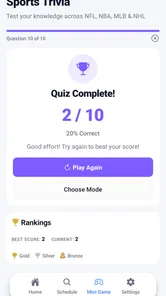
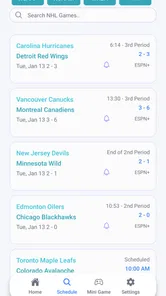
Analysis by Reviewed
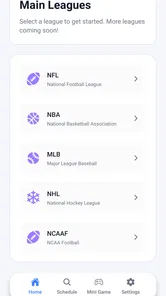
I spend a lot of time checking scores while doing other things, so I usually prefer a focused sports app over a crowded platform that tries to cover news, video, fantasy leagues, tickets, and social features at the same time. Live Scores : NFL NCAA NBA MLB takes the simpler route. It is a free sports app from Biogi Live built around live score coverage for American football, college sports, basketball, baseball, and hockey. After using it, I see the appeal: it is aimed at people who want a quick way to follow a game without turning score checking into a full-time activity.
The first impression is straightforward rather than flashy. Its store summary points to live scores and streams for NFL, NCAA, NBA, MLB, and NHL games, while the short description reduces the idea even further to “Live Scores.” That tells me what kind of app this is supposed to be: a utility for checking what is happening now. I would not approach it expecting a deep sports newsroom or a complete replacement for a dedicated broadcast service.
That narrow purpose is also the reason I found it easy to understand. When I opened it with one question in mind—“What is the current score?”—the concept made sense immediately. The app belongs in the sports category, is rated for Everyone, and is free to install. Its current version is 1.0.2, and it requires Android 7.0 or later. Those details make it accessible to people using older Android phones, although the experience can still depend on the phone, connection, and the freshness of the live information.
What I learned about the app’s trust and everyday usefulness
I judge a score app by whether it fits into an ordinary day without asking for more attention than the game deserves. Here, the useful habit is to treat it as a quick checkpoint, then decide whether a score needs context from another source. That balance matters most when you follow several leagues but want to keep your phone—and your attention—under your control.
A small, focused product with a clear job
Live Scores : NFL NCAA NBA MLB has a modest footprint compared with the biggest sports platforms. It has passed 50 thousand installs, with an average rating of 4.1 from more than 480 ratings and over 110 written reviews. I read those figures as signs of an app that has attracted a real audience, but not as proof that it will suit every league follower or every device.
The developer shown for the app is Biogi Live. Because the product is relatively focused, I found it easier to judge against its stated purpose than against a huge list of promises. A score app earns its place on my phone by making important information easy to locate, not by filling the screen with features I rarely use.
My favorite use case is a busy evening. Imagine following an NBA game while cooking, commuting, or waiting for a meeting to finish. I can check the score, put the phone away, and return later without needing to watch a stream continuously. The same habit works for an NFL game on a Sunday, an MLB game that stretches across several hours, or a college matchup I cannot watch live.
More From Our News Desk

 Gmail
GmailGmail in a Busy Inbox: Who Benefits Most?
From first account to crowded workday, Gmail earns its place through dependable search and flexible sorting—but its best fit depends on how much inbox maintenance you can tolerate.

 Prime Video
Switching to Prime Video: What Changes in Your Viewing Routine
Prime Video can make a compelling second home for streaming, but switching means learning a different catalog, rental layer, and route from browsing to playback.

 Universal TV Remote Control
Universal TV Remote Control Works Best as a Reliable Backup
A phone remote earns its place through quick setup and reliable habits. Here is how to get more from Universal TV Remote Control—and where its limits show.

 Weather - By Xiaomi
Weather by Xiaomi Review: Clear at a Glance, Less Clear Up Close
Xiaomi’s weather app makes everyday forecasts quick to scan, but its calm surface can leave useful details and recovery paths harder to find than they should be.

 X
XX Under Pressure: Can It Recover When Posting Goes Wrong?
A resilience-focused review of X, examining setup, mistaken posts, interruptions, weak connections, and the gaps that matter when recovery needs to be dependable.

 Clash of Clans
Clash of Clans Is Won Between the Battles
Its raids are quick; its community is a long-term project of coordination, teaching, rivalry, and shared responsibility—with all the friction that entails.
Latest News



There is a useful distinction here between checking a game and watching a game. A score app can answer the first need quickly, but it should not automatically be treated as a substitute for a television service or a specialist streaming platform. If my main goal is commentary, replay access, detailed analysis, or a dependable full broadcast, I would choose a service designed around those things instead.
What the available controls mean for trust
When I evaluate a young sports utility, I pay attention to what I can see and control rather than assuming that a clean interface tells me everything. The visible product facts give me a free app, an Everyone content rating, a named developer, and a current version. Those are useful starting points, but they do not by themselves answer every privacy question a careful user may have.
I would therefore install it with the same sensible caution I use for any score app. During setup and normal use, I would read each permission request instead of approving everything automatically. If a request seems unrelated to checking sports results, I would pause and decide whether the app is still worth using. I would also review Android’s permission manager afterward, since that gives me a practical way to inspect and adjust access from the phone itself.
This approach is especially important on a sports app because score checking should generally be a low-friction activity. I do not need to hand over more access than the task requires. The most trustworthy experience is one where the user can understand what is being requested, decline anything unnecessary, and continue using the core function when possible.
I also avoid treating the free price as a guarantee of privacy or quality. Free is convenient, but it does not explain how a product is supported or what information may be handled during use. I would look at the app’s visible privacy disclosures and Android’s own permission screens before making it part of a regular routine. That is not a criticism unique to Biogi Live; it is simply good practice for any free app that connects to live online information.
Where data sensitivity matters most
There are several moments when I become more careful. The first is installation, when the operating system may show permission prompts. The second is any point where the app asks me to create an account, sign in, or provide personal details. The third is when an external stream, notification, advertisement, or other service takes me outside the simple score-checking flow.
I would not enter information casually just to unlock a basic result. If an account is optional, I prefer to keep the experience account-free. If an account is required for a particular function, I would use only the information needed for that function and choose a strong, unique password. I would also check whether the app offers a clear way to sign out or remove the account later. These are practical choices that keep control with me instead of making convenience the only priority.
Notifications deserve similar attention. Live alerts can be useful when I am following a close game, but they can quickly become noise across five sports. My preferred setup is to allow alerts only when they serve a specific purpose, such as following a team during a busy day, and then turn them off when the season or event is no longer relevant. Android’s notification settings make this manageable even when an app’s own controls are limited.
Location access is another area where I would be selective. A score app does not need to know where I am simply because I want to see a result. If the app presents a location-related request, I would inspect the reason shown by Android and choose the least revealing option available, or deny it if it is not essential to my use. I would apply the same thinking to contacts, microphone, camera, and storage access: each request should have a clear connection to something I actually want to do.
My caution also extends to streams. The store summary mentions streams alongside live scores, but I would not assume that every listed game has the same availability, quality, or viewing rights. A stream may depend on region, event, connection, or another service. I would treat the score function as the dependable reason to install the app and consider streaming an extra that needs to prove useful in my own situation.
How I would use it without losing control
My first practical tip is to make the app a check-in tool rather than leaving it open all day. I would open it before a game, note the matchup or competition I care about, and return at natural breaks. This reduces battery use, limits unnecessary background activity, and keeps notifications from taking over the phone. It also matches the app’s strongest apparent role: quick awareness.
My second tip is to separate important alerts from general curiosity. I might want a notification for a playoff game, but I do not necessarily want every update from the NFL, NCAA, NBA, MLB, and NHL at once. If the app provides choices, I would select only the teams or events I genuinely follow. If it does not provide enough detail, I would manage notifications at the Android level and use the app manually instead.
My third tip is to verify a major moment before acting on it. Live scores can change quickly, and a brief delay can matter during a final possession, late inning, or overtime period. If I am making plans around a result, discussing a game with friends, or recording a score for a league, I would refresh and compare it with an official team, league, or broadcast source. This is not because the app is necessarily inaccurate; it is because live information deserves a second check when the consequence matters.
My fourth tip is to avoid confusing a score with context. A number on the screen may not explain an injury, a weather delay, a replay review, a postponed game, or why a contest has stopped. If the app gives me the score but not the reason behind an unusual change, I would look elsewhere for the explanation. This is where a sports news app or official league source can be better, even if it is slower to open.
How it compares with the usual alternatives
The most obvious alternative is an official league app. That option is usually better when I follow one competition closely and want team news, schedules, standings, video, or league-specific context. Live Scores : NFL NCAA NBA MLB is more attractive when my interests are spread across several sports and I want one lightweight place to check them. The trade-off is depth: a broad score utility may be more convenient, while an official app may feel more complete for a single league.
Another alternative is a general sports news platform. Those services are stronger for articles, commentary, analysis, and breaking stories. They can also be busier, with more tabs and more notifications competing for attention. I would choose the Biogi Live app when my question is narrow and immediate. I would choose the news platform when my question is “What happened and why?” rather than simply “What is the score?”
A television or streaming service is the better choice for someone who wants to watch the action. Scores and streams are not interchangeable experiences. A score app helps me follow several games while moving through the day; a broadcast service gives me the visual and audio experience of one event. If watching live is the priority, I would not install this app expecting it to replace the service I already use for broadcasts.
There is also the phone’s web browser. For an occasional search, opening a browser may be enough. The dedicated app becomes more worthwhile when I check several leagues repeatedly and want a consistent sports-focused destination. On the other hand, a browser can be preferable for users who do not want another installed app, who are especially cautious about permissions, or who only look up a score once in a while.
Who will benefit most, and who should skip it
I think this app is a good fit for a multi-sport follower who wants quick score awareness without committing to a large media ecosystem. It also suits someone who checks games in short bursts: during a lunch break, between errands, or while waiting for a train. The coverage across professional and college sports gives it a practical advantage for people whose attention moves from basketball to baseball to football throughout the year.
It may also work well for casual fans who do not need an account-based community, fantasy tools, or long-form coverage. The free price lowers the barrier to trying it, and the Everyone rating makes it suitable for a broad household audience. I would still supervise younger users’ notification and network habits in the same way I would with any internet-connected app, but the subject matter itself is accessible.
I would skip it if I need detailed team reporting, advanced statistics, a full historical database, or a guaranteed broadcast experience. I would also look elsewhere if I follow only one league and want every official feature in that league’s own ecosystem. Finally, if the app’s live updates feel delayed on my connection or if its visible controls do not give me enough say over notifications and permissions, I would not force it into my routine just because it is free.
What I would check before making it a regular app
Before settling on it, I would test the exact sports I care about at different times, especially during a busy schedule. I would see how quickly the score changes, whether the game is easy to find, and whether the information remains readable on a smaller screen. I would also test it on mobile data rather than assuming that a home Wi-Fi experience represents every situation.
I would then inspect the app’s notification behavior. A useful score app should fit around my day, not demand attention constantly. I would start with alerts disabled or limited, use the app manually, and enable only the notifications that prove helpful. This simple trial tells me more about whether the product belongs on my phone than a store summary can.
Finally, I would review the controls available in Android settings after using it for a while. I want to know whether I can revoke permissions, silence alerts, clear its stored information, and uninstall it without difficulty. Those actions are part of user agency, not afterthoughts. A sports app should be easy to leave if it no longer provides enough value.
My cautious verdict
Live Scores : NFL NCAA NBA MLB makes sense to me as a focused companion for following several American sports. Its strongest quality is its clear purpose: I can reach for it when I need a current score rather than opening a much larger platform. The free price, broad audience rating, support for Android 7.0 and later, and early user response make it reasonable to try, especially for casual or multi-league followers.
My recommendation comes with boundaries. I would use it for quick checks, selective alerts, and general awareness, while relying on official league sources or dedicated broadcast services for important confirmation, detailed context, and live viewing. I would also review every permission, avoid unnecessary account sharing, and keep notifications under my control.
In short, I see Biogi Live’s app as a useful utility rather than an all-purpose sports headquarters. If your main need is fast score awareness across several leagues, it is worth trying; if you need deep coverage or dependable full-game viewing, choose a more specialized alternative. That distinction keeps expectations realistic and gives the app a fair chance to succeed at the job it appears designed to do.
Live Scores : NFL NCAA NBA MLB Frequently Asked Questions
Is Live Scores: NFL NCAA NBA MLB available for my phone?
Live Scores: NFL NCAA NBA MLB is an app for Android, and its minimum operating system requirement is Android 7.0. Before downloading, check your device’s software version and confirm that the app is available through the store you use. The app is listed as suitable for everyone, so its content rating is not restricted to adult users.
Who makes Live Scores: NFL NCAA NBA MLB, and what do users think of it?
The app is developed by Biogi Live. It has an average rating of 4.1 from 482 ratings, with 112 written reviews, and has reached over 50,000 installs. These figures can give you a sense of its reception, but they do not guarantee that every feature or update will suit your preferences. Reading recent user feedback can help you decide whether it meets your needs.
What is Live Scores: NFL NCAA NBA MLB?
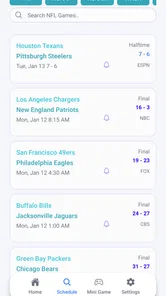
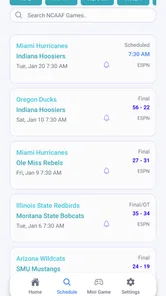
Live Scores: NFL NCAA NBA MLB is a sports-tracking app designed for fans who want quick access to scores, schedules, standings, game results, and other updates from major American sports. It focuses on the NFL, NCAA football and basketball, NBA, and MLB, making it convenient to follow several leagues from one place instead of checking separate websites or applications.
Which sports and competitions can I follow in the app?
The app covers several popular competitions, including the National Football League, NCAA sports, the National Basketball Association, and Major League Baseball. Its store summary also mentions NHL games. Depending on the season and available data, you can usually browse live games, completed results, upcoming fixtures, team information, and league standings. Coverage may vary by competition, so users should check the specific leagues available on their device.
Does the app provide real-time scores and notifications?
Yes, the main purpose of Live Scores: NFL NCAA NBA MLB is to provide timely game updates while matches are in progress. Users can follow scores and important developments without watching the entire event. Notification options may allow you to receive alerts for selected teams or games, although the speed and availability of updates can depend on your internet connection, device settings, and the app’s data provider.
Pros
- Covers major U.S. leagues in one convenient app.
- Fast score updates help users follow games in real time.
- Useful schedules make upcoming matchups easy to find.
- Compact design lets you check results quickly on mobile.
- Helpful for tracking multiple teams across different sports.
Cons
- Coverage may feel limited for users outside U.S. sports.
- Frequent alerts can become distracting without careful settings.
- Some advanced statistics may require extra navigation.
- Information can be less useful during offseason periods.
- Live updates depend on a stable internet connection.





