

Little League World Series
- 19.00
- 3.6
- Installs
- 10.00K
- Price
- Free

Screenshots
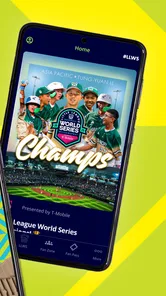
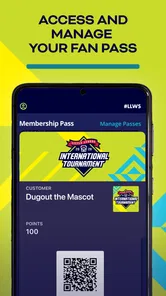
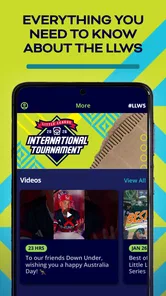
Analysis by Reviewed
Following a youth baseball tournament is usually a scattered experience: one source for schedules, another for news, and social feeds that mix useful updates with unrelated chatter. Little League World Series takes a more focused approach as the official mobile app for the Little League World Series. I found its main value in that narrow purpose. It is not trying to become a general sports hub; it is meant to keep this particular event close at hand on an Android or iOS device.
That focus makes it easy to understand, but it also sets a clear limit. If you already follow several sports and want a broad scoreboard, deep statistics, or a personalized feed across leagues, this will feel small beside a general sports app. If your interest is specifically the Little League World Series, however, the dedicated format is more comfortable than searching the web every time you want to check the event.
One focused way to follow the tournament
I find it useful to think of this as a quick check-in rather than an app that needs to stay open all day. When I have only a short break, I can use that visit to get oriented, then decide whether I need a fuller update elsewhere; that keeps the tournament easy to follow without letting phone checks take over. The next question is how that brief routine fits into the different places a family follows along.
The capability that matters most
The strongest part of the app is its role as a central place for Little League World Series information. My experience with it is less about discovering a large collection of tools and more about reducing the steps between opening the app and checking what is happening around the tournament. That distinction matters for families, supporters, and anyone who wants event-specific information without sorting through a general sports service.
Because the app is developed by Little League International, it has a direct connection to the event’s identity rather than presenting the tournament as one item among thousands. I would describe it as a companion for following the series, not as a replacement for watching games, coaching a team, or managing a local league.
The app belongs to the Sports category and is free to use. Its Everyone content rating makes it suitable for a broad household audience, which fits the nature of a youth sporting event. I could see it being opened by a parent checking an update, a child looking for tournament information, or a relative trying to keep up with a team from another part of the country.
What that focus changes in everyday use
A dedicated event app can be more useful than it first appears because context is already narrowed. With a general sports app, I often have to search for a competition, identify the correct season or event, and ignore unrelated headlines. Here, the purpose is immediately apparent. That makes the app particularly practical during the tournament, when a user may only have a few seconds to check an update between errands, work tasks, or family activities.
More From Our News Desk

 Gmail
GmailGmail in a Busy Inbox: Who Benefits Most?
From first account to crowded workday, Gmail earns its place through dependable search and flexible sorting—but its best fit depends on how much inbox maintenance you can tolerate.

 Prime Video
Switching to Prime Video: What Changes in Your Viewing Routine
Prime Video can make a compelling second home for streaming, but switching means learning a different catalog, rental layer, and route from browsing to playback.

 Universal TV Remote Control
Universal TV Remote Control Works Best as a Reliable Backup
A phone remote earns its place through quick setup and reliable habits. Here is how to get more from Universal TV Remote Control—and where its limits show.

 Weather - By Xiaomi
Weather by Xiaomi Review: Clear at a Glance, Less Clear Up Close
Xiaomi’s weather app makes everyday forecasts quick to scan, but its calm surface can leave useful details and recovery paths harder to find than they should be.

 X
XX Under Pressure: Can It Recover When Posting Goes Wrong?
A resilience-focused review of X, examining setup, mistaken posts, interruptions, weak connections, and the gaps that matter when recovery needs to be dependable.

 Clash of Clans
Clash of Clans Is Won Between the Battles
Its raids are quick; its community is a long-term project of coordination, teaching, rivalry, and shared responsibility—with all the friction that entails.
Latest News



One useful habit is to treat it as a quick-reference tool rather than leaving it open continuously. I would check it before heading out, again when a game window is approaching, and later when I want to catch up. This avoids expecting the app to replace live viewing while still making it easier to stay connected when watching is not possible.
The trade-off is that a narrow purpose can make the experience feel quiet outside the main event period. A broad sports application may offer more reasons to return every day, while this one makes the most sense when the Little League World Series is actively on your mind. That is not necessarily a flaw, but it should shape your expectations before installing it.
How I would use it in practice
My recommended workflow is simple. First, open the app when you want tournament-specific information instead of beginning with a web search. Next, use the available event material to orient yourself before looking elsewhere for commentary or video. Finally, return to it when you need to confirm the latest tournament context rather than relying on a social post that may be incomplete or out of date.
This approach also helps separate official event information from conversation around it. Social networks are useful for reactions and personal stories, but they can be noisy. A dedicated app is better suited to the basic question, “What is happening with the series?” I would still use television, streaming, or other services for the actual viewing experience when those are available to me, because an information companion and a live broadcast serve different purposes.
For parents, the practical benefit is that the app can become part of a small family routine. A child may ask about an upcoming game, a relative may want to know how a team is doing, and the app gives everyone a shared starting point. It is especially handy when family members are following from different locations and do not want to exchange several separate messages just to establish the current tournament situation.
A realistic family scenario
Imagine a parent at work while a child is at home with another family member. The child wants to know whether a favorite team is involved in the day’s action, but the parent cannot watch a game or search through multiple pages. Opening Little League World Series provides a more direct route to the event than browsing a general sports homepage. Later, the parent can use the same app to reconnect with the tournament and discuss what happened.
That scenario shows the app’s real strength: it supports short, purposeful visits. It does not need to dominate the user’s phone to be worthwhile. A few well-timed checks can be more valuable than a constant stream of notifications or headlines, particularly for people who want to follow the event without turning sports tracking into another demanding routine.
Where it sits beside the usual alternatives
The obvious alternative is a general sports app. That option wins if you want many leagues, broad scores, extensive team pages, and a single place for several sports. It may also be preferable for users who follow professional baseball, college sports, and other competitions at the same time. In exchange, the Little League World Series can be harder to locate inside those larger services, and the event may receive less attention than major professional competitions.
A web browser is another alternative. Browsing gives you flexibility and may expose more articles or outside coverage, but it also creates more friction. You have to know which page to trust, deal with unrelated results, and repeat the search when you return. The dedicated app is more convenient when your question is specifically about the tournament and you want a consistent starting point.
Social media is better for atmosphere, reactions, and personal posts. It is worse as the only place to establish a clear event picture because information can be mixed with speculation, reposts, or conversations that assume prior knowledge. I see Little League World Series as a useful anchor: check the app for the tournament context, then use other channels when you want opinion or community discussion.
Important trade-offs before installing
The app’s specialization is both its advantage and its main limitation. Someone who wants a complete baseball information center may find it too narrow. I would not choose it as my only sports app if I needed detailed coverage across many competitions. Its purpose is more specific, and the best experience comes from accepting that rather than expecting a full sports dashboard.
Another consideration is timing. The app is most relevant when the Little League World Series is part of your current interests. Outside that period, the reason to open it may be less immediate. People looking for an always-active sports feed should probably pair it with a broader service instead of expecting this app to supply constant variety.
I also recommend keeping the distinction between information and viewing in mind. Installing the app does not automatically turn a phone into a complete broadcast setup. If your main goal is to watch every inning, you will need to think separately about your preferred viewing source. The app is more valuable as a way to stay oriented, check the event, and return to the tournament when you cannot watch continuously.
There is also a small attention trade-off. A dedicated event app can simplify checking, but installing a separate app for one tournament adds another icon and another place to remember. For a committed follower, that is a fair exchange. For someone who only encounters the event occasionally, a browser bookmark or general sports service may be enough.
Who gets the most from it
I think the best audience is made up of families connected to Little League, relatives following a participating team, and baseball fans who specifically enjoy the World Series. It is also a sensible choice for casual supporters who want an official event-focused reference without building a complicated collection of sports tools.
The app is less suitable for a user who wants advanced baseball analysis, a wide multi-sport dashboard, or a year-round stream of unrelated scores. It is also not the first choice for someone whose only need is live video. In those cases, a broader sports platform or a dedicated viewing option would likely be more efficient.
Its accessible positioning helps here. The app is free, and the Everyone rating removes a common barrier for households deciding whether younger family members can use it. I would still guide children toward the information they are looking for, especially if the phone is shared, but the overall audience is clearly broad rather than restricted to specialist fans.
What the current release tells me
The current version is 4.5.26, and the app requires Android 10 or later. That requirement is worth checking before installation, particularly if you are planning to put it on an older family phone or a spare device used during travel. A modern phone should generally be the more comfortable choice for any event app, since quick loading and readable screens matter when you are checking information in a hurry.
The app was released on July 18, 2022, so it is not a brand-new experiment. It has had time to establish its place as a dedicated companion for the event. Its presence on the store shows over ten thousand installs, while the average rating is 3.6 from around sixty ratings and close to twenty written reviews. I would read that as a sign to keep expectations measured: the app is useful for its defined purpose, but it is not a universally essential sports download.
Those numbers also suggest that the app serves a specific audience rather than trying to compete with the enormous user base of general sports platforms. For me, that reinforces the same conclusion I reached while considering its use: the decision should be based on whether the Little League World Series matters to you, not on whether you want the largest possible sports ecosystem.
Small habits that make it more useful
My first tip is to open it with a question in mind. “What is happening with the tournament?” is a good starting question; “Give me every baseball update” is not. That simple distinction keeps the app in its strongest lane and prevents disappointment caused by asking a specialized tool to behave like a general one.
My second tip is to use it alongside, not instead of, your viewing routine. Before a game, use the app to establish the event context. During a busy day, use it for a quick check. Afterward, return to it when you want to reconnect with the series before reading outside reactions. This three-step pattern gives the app a practical role without making it responsible for every part of following baseball.
My third tip is especially useful for families: make it the shared reference point when people are following from different places. Instead of sending uncertain screenshots or links from unrelated pages, ask everyone to begin with the same official event app. That will not remove every disagreement or answer every question, but it can reduce confusion about which competition everyone is discussing.
A fourth insight is to install it before you urgently need it. If you wait until a game or update is already the center of a family conversation, you may spend that moment searching, updating, or checking device compatibility. Setting it up in advance gives you time to see whether it fits your phone and your preferred way of following the event.
My final recommendation
Little League World Series is a focused Sports app with a clear job: make the Little League World Series easier to follow from a mobile device. I appreciate that it does not need to pretend to be a complete sports universe. Its value comes from being a direct, event-specific companion, especially for families and supporters who want a shared place to check the tournament.
I would recommend it to anyone whose interest is centered on this event and who wants a simpler alternative to repeated web searches or noisy social feeds. I would skip it if I needed broad sports coverage, deep analysis, or a dedicated live-viewing solution. In those situations, another type of app would serve me better.
For the right user, the free price and accessible audience make trying it easy, while the focused design gives it a useful role during the tournament. My honest view is that its strength is not the number of things it tries to do, but the clarity of the one thing it is built to support. If that one thing is exactly what you need, it is worth keeping on your phone for the season and using as your reliable starting point whenever the Little League World Series becomes part of your day.
Little League World Series Frequently Asked Questions
Who publishes the Little League World Series app?
The Little League World Series app is published by Little League International, making it the official mobile app associated with the tournament. That official connection may appeal to fans looking for a dedicated way to follow the event. It is a sports app, and its store summary describes it as the official mobile app for the Little League World Series.
What devices can install Little League World Series?
The app requires Android 10 or later, so it is worth checking your device’s operating system before downloading. If your phone or tablet meets that requirement, you can consider whether the app suits the way you follow the tournament. The app is free, but compatibility and the available features can depend on the device and platform.
What is Little League World Series?
Little League World Series is a sports-focused experience centered on the famous youth baseball tournament. Depending on the version or platform you use, it may provide tournament information, team details, schedules, scores, news, videos, and other event content. It is designed for fans, families, players, and anyone who wants to follow the competition and learn more about participating teams.
Can I watch Little League World Series games through the app?
The availability of live streaming depends on the specific app version, your location, broadcasting rights, and the current tournament schedule. Some content may include live games, highlights, interviews, or video clips, while other versions may focus mainly on scores and news. Before downloading, check the app description and supported regions to confirm whether live viewing is included.
Does Little League World Series provide live scores and schedules?
A key reason to use Little League World Series is to keep track of tournament activity in one place. Users may be able to view upcoming games, results, brackets, team information, and real-time updates. However, coverage can vary by event and region, so it is worth checking whether the app offers live scoring or only periodic updates during the Little League World Series.
Pros
- Official tournament branding and authentic Little League atmosphere.
- Simple controls make games approachable for younger players.
- Short matches suit quick gaming sessions.
- Includes multiple teams and familiar baseball settings.
- Family-friendly presentation with no mature content.
Cons
- Gameplay may feel repetitive after several matches.
- Limited strategic depth compared with full baseball simulations.
- Some features may require in-app purchases or extra downloads.
- Performance can vary on older phones and tablets.
- Online features may depend on an active internet connection.





