

LITPro - GPS Lap Timer
- 11.00
- 4.5
- Installs
- 10.00K
- Price
- Free

Screenshots

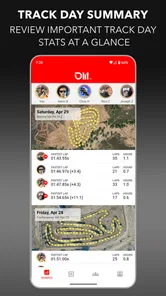
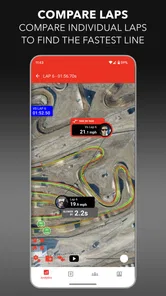
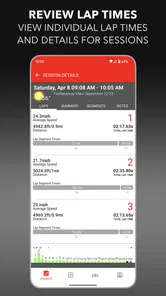
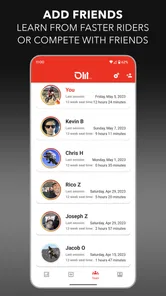
Analysis by Reviewed
I found LITPro most interesting when I stopped treating it like a general fitness app and used it for a very specific job: helping a rider understand what happened during laps. It is a sports app from NZN Labs Inc. that turns a smartphone into a GPS lap timer and a personal riding coach. That description sounds simple, but the practical difference is important. Instead of relying only on memory, a trackside friend, or a basic stopwatch, I can use the phone to create a more consistent record of a ride and review it afterward.
That makes it particularly useful in a household where more than one person rides, or where one phone is sometimes shared between a parent, partner, and younger rider. The app is free to install, aimed at Everyone, and available on Android devices running Android 8.0 or later. Its average rating is 4.5 from around 149 ratings, while its install count has passed 10K. Those numbers suggest a focused niche rather than a huge mainstream audience, which matches my impression: this is not trying to be everything for every athlete.
My experience with it is best summed up this way: LITPro is valuable when a rider wants repeatable lap information and a more thoughtful practice routine, but it is less suitable if all you want is a casual stopwatch or a broad social training platform. The app rewards preparation and consistency. It also asks the user to understand what the phone is doing, who is using the device, and how the resulting information will be interpreted.
Using one phone for several riders
A realistic shared-device situation would be a household with a parent who rides on weekends and a teenager who is learning the same circuit. The phone might belong to the parent, but the teenager may use it during practice. In that situation, LITPro can serve as a common timing tool, yet the phone itself does not automatically make the experience personal for both riders. I would treat the app as a device-based training tool first and a multi-person household tool second.
Before handing over the phone, I would agree on whose session is being recorded and what the rider is trying to learn. That sounds obvious, but it prevents a common mistake: mixing one person’s laps with another person’s practice and then drawing conclusions from a confusing history. If the app is being used by two people, a simple household routine helps. One rider starts and finishes a clearly named practice session, then the next rider does the same. Even without inventing special family features, this small habit makes later review much easier.
The shared-phone approach works especially well when the device is mounted or placed where the rider can start the session before going out. It is less convenient when several people are waiting and each person expects the app to remember a completely separate profile. I would not assume that a shared phone provides automatic account boundaries or family separation. Instead, I would keep responsibility with the household: identify the rider, check the correct session, and avoid treating every recorded lap as interchangeable.
There is also a practical privacy angle. A phone used by several people can contain personal riding history, and the rider may not want every family member examining it. LITPro’s usefulness comes from recording and reviewing activity, so I would decide in advance whether the device is a communal training instrument or someone’s personal phone. If it is communal, the household should be comfortable with the information being visible to whoever can access the device. If that arrangement feels awkward, a dedicated phone for the rider is the cleaner option.
More From Our News Desk

 Gmail
GmailGmail in a Busy Inbox: Who Benefits Most?
From first account to crowded workday, Gmail earns its place through dependable search and flexible sorting—but its best fit depends on how much inbox maintenance you can tolerate.

 Prime Video
Switching to Prime Video: What Changes in Your Viewing Routine
Prime Video can make a compelling second home for streaming, but switching means learning a different catalog, rental layer, and route from browsing to playback.

 Universal TV Remote Control
Universal TV Remote Control Works Best as a Reliable Backup
A phone remote earns its place through quick setup and reliable habits. Here is how to get more from Universal TV Remote Control—and where its limits show.

 Weather - By Xiaomi
Weather by Xiaomi Review: Clear at a Glance, Less Clear Up Close
Xiaomi’s weather app makes everyday forecasts quick to scan, but its calm surface can leave useful details and recovery paths harder to find than they should be.

 X
XX Under Pressure: Can It Recover When Posting Goes Wrong?
A resilience-focused review of X, examining setup, mistaken posts, interruptions, weak connections, and the gaps that matter when recovery needs to be dependable.

 Clash of Clans
Clash of Clans Is Won Between the Battles
Its raids are quick; its community is a long-term project of coordination, teaching, rivalry, and shared responsibility—with all the friction that entails.
Latest News



One advantage of shared use is that a less experienced rider can benefit from the same structured routine as a more experienced one. The parent can help prepare the session, while the younger rider focuses on riding rather than operating the phone. The trade-off is that the adult should not turn the numbers into a constant performance judgment. A lap timer can show change over time, but it cannot explain every reason a lap was slower. Traffic, caution, weather, fatigue, and learning a new line all matter.
What I would prepare before the first session
I would begin at home rather than at the track or riding area. Install the app on the intended phone, check that the phone runs Android 8.0 or newer, and make sure the person using it knows how to begin and end a session. I would also charge the phone and clear enough attention for setup. A phone that is technically ready but being passed around in a hurry is an easy source of mistakes.
The first practice should be treated as a familiarization run, not a test of speed. The rider needs to learn where the phone is kept, when the session begins, and how the lap information will be reviewed later. If the phone is mounted, it should be positioned so that it does not distract the rider. If it stays with a helper, that person should know the routine and avoid making last-second changes.
GPS-based timing also deserves realistic expectations. A smartphone is convenient because it avoids carrying a separate timing device, but convenience is not the same as professional track equipment. I would use the first outing to see whether the recorded laps make sense in that particular environment. Tall buildings, trees, poor phone placement, or a complicated route can affect how confidently the results should be interpreted. The right response to an odd result is to repeat the run and look for a pattern, not to immediately declare that the rider improved or worsened.
This is one of the app’s less obvious lessons: the quality of the conclusion depends on the quality of the routine. Repeating the same start process, using the same phone, and reviewing comparable sessions creates more useful information than collecting random laps under different conditions. LITPro can support that discipline, but it cannot create it for the household.
Keeping setup simple without losing control
For a shared phone, I would create a short pre-ride checklist in ordinary language: identify the rider, charge the device, confirm the session, secure the phone, and decide who will review the result. This is more useful than giving a younger rider a long technical explanation. The goal is to remove avoidable interruptions while preserving adult oversight where it is needed.
I would also avoid changing several things at once. If the rider changes equipment, route, riding style, and practice goal in one session, the lap information becomes difficult to interpret. A better workflow is to focus on one question, such as whether the rider can maintain a consistent pace or whether a particular section is becoming more comfortable. The app is most helpful when the rider uses it to answer a focused question rather than simply collecting numbers.
Another trade-off concerns in-app purchases. The app itself is free, but individual purchases are listed in the range of $4.99 to $11.99. In a household, that means the person who installs the app may not be the same person who decides whether an optional purchase is worthwhile. I would discuss that before a child or guest uses the phone. A free download should not be confused with an unlimited household arrangement, and a rider should understand that paid items may be available inside the app.
Coordinating practice and reading the results
The strongest household use case is not simply pressing start and comparing the fastest lap. It is coordinating practice so that everyone knows what the session is meant to accomplish. A parent can help a newer rider choose a manageable goal, while an experienced rider can use the same app to examine consistency. The app’s value changes depending on that goal.
For a beginner, I would focus on confidence and repeatability. The question is not “Was this lap fast enough?” but “Can the rider complete several laps with a similar rhythm and without rushing?” For an experienced rider, the focus may shift toward identifying where pace changes or where concentration drops. The same GPS timing concept can support both riders, but the interpretation should not be identical.
After a session, I would review the information while the experience is still fresh. The rider can explain where they felt slow, nervous, or unusually comfortable, then compare that memory with the recorded lap pattern. This combination is more useful than either source alone. The phone provides a reference, while the rider supplies context. If the two disagree, that disagreement is worth discussing rather than ignoring.
A helpful coordination method is to give each session one clear purpose. For example, a family might use one outing to learn the route and another to work on consistent laps. That prevents the common trap of turning every practice into a competition. A younger rider may need encouragement to finish a clean session, while an adult may be ready to examine small differences. LITPro can be part of both routines, but the household should decide which standard applies before the ride starts.
I also like the possibility of using the app as a conversation starter after practice. Instead of a parent saying “You were too slow,” the discussion can be more precise: which laps felt different, where did the rider lose confidence, and did the recorded pattern match that feeling? That is a healthier use of measurement. It keeps the app in the role of coach and reference point rather than making it the sole judge of ability.
Where it beats a stopwatch, and where it does not
The usual alternative is a basic stopwatch, either operated by a friend or carried by the rider. A stopwatch is easy to understand and may be perfectly adequate for a single short drill. It also avoids questions about GPS behavior and phone placement. If all I need is a rough start-to-finish time and someone is available to operate it, the simpler tool can be the better choice.
LITPro becomes more appealing when I want lap timing connected to the actual route and a repeatable record on the smartphone. That removes some dependence on another person’s reaction time and makes the session easier to review later. It is also more practical when a rider wants a personal riding coach rather than a single number shouted from the side of the track.
On the other hand, a dedicated timing system may be preferable for serious competition, formal event timing, or situations where official accuracy matters. A phone app is convenient and flexible, but I would not use it as a replacement for sanctioned equipment when the result has legal, competitive, or safety consequences. Likewise, a broad fitness platform may suit someone who wants workouts, nutrition, social challenges, and many sports in one place. LITPro’s narrower focus is its strength for lap-based riding, but it is also the reason it may feel limited to a general fitness user.
The most useful comparison is therefore not “Which app has more features?” It is “What kind of evidence do I need?” If I need simple timing, a stopwatch may win. If I need a riding-focused record on a phone, LITPro is more relevant. If I need official event infrastructure or a complete training ecosystem, I would look elsewhere. That distinction helped me avoid expecting the app to solve a problem it was not designed to solve.
Age, trust, and responsible use
The Everyone age rating makes the app approachable for households with younger riders, but an age label does not remove the need for supervision. The important issue is not only whether a child can operate the interface. It is whether the child understands when the phone should be left alone, who can see the session information, and why a slower lap is not a personal failure.
I would have an adult handle the initial setup and any purchase decisions. The rider can then use the prepared routine independently when appropriate. This division preserves trust without pretending that every user has the same judgment. A teenager who already understands phone safety may only need a quick check-in. A younger child may need the phone managed by a parent or another responsible adult.
I would also avoid asking a rider to look at the screen while moving. The app’s coaching value belongs before and after the ride, not during a moment that requires full attention. The phone should be secured in a way that does not interfere with riding, and the person responsible for the session should be clear about who is watching the device. These are ordinary precautions, but they matter more than squeezing one extra piece of information out of a lap.
Trust also means discussing how results will be used. If a child believes every session will be compared publicly within the family, the app may create pressure instead of confidence. I would agree on a private household rule: use the information to guide practice, celebrate consistency, and identify useful questions. Do not use one unusual GPS result as proof that someone is lazy, careless, or suddenly better.
Version, cost, and the everyday ownership experience
The current version is 3.13.35, and the app was released on September 17, 2021. For me, the more important ownership question is whether the phone remains compatible and whether the household is comfortable with the way the app fits into its routine. Compatibility begins with Android 8.0 or newer, so older devices may not be suitable.
The free entry point makes experimentation easy. A family can try the basic workflow before deciding whether it deserves a regular place in practice. The in-app purchase range of $4.99 to $11.99 per item means I would not approve spending automatically on a shared device. I would first establish whether the free experience already answers the household’s main question and then decide whether an optional purchase has a clear purpose.
Because the developer is NZN Labs Inc., I would look at the app as a specialist product rather than a universal household dashboard. That is not a criticism. Specialist tools can be more useful when they stay close to a real activity. It simply means I would not install it expecting broad family scheduling, general health tracking, or automatic separation of every rider’s information.
For a normal weekend, my workflow would be straightforward. I would charge one Android phone, decide which family member is riding, start the session before the first meaningful lap, and leave the phone alone during the ride. Afterward, I would review the result with the rider and write down one practical takeaway for the next outing. That last step is important: the app becomes a coach only when its information changes what we practice next.
My household verdict
I recommend LITPro for a rider or riding household that wants a phone-based GPS lap timer and is willing to build a consistent routine around it. It is a good fit for comparing practice sessions, giving a beginner a clearer sense of progress, and helping an experienced rider discuss consistency without depending entirely on memory. The free starting point also makes it reasonable to test before committing money.
I would skip it if the main need is official timing, a complete multi-sport fitness system, or a completely automatic family-account experience. I would also skip it for a casual user who will not review sessions or who expects the phone to understand every reason behind a lap time. In those cases, a stopwatch or a more specialized system may be less frustrating.
For shared use, my recommendation comes with boundaries: decide who owns the session, keep the phone secure, supervise younger riders appropriately, and treat the numbers as guidance rather than a verdict. Those habits are not decorative extras. They determine whether the app produces useful coaching or just another collection of disconnected measurements.
After using it in that context, I see LITPro as a focused tool with a sensible place in a rider’s routine. It does not replace judgment, a coach, or proper event equipment, but it can make everyday practice more deliberate. If your household wants clearer lap feedback without carrying a separate timing device, this is worth trying; just keep the setup, privacy, purchases, and expectations under human control.
LITPro - GPS Lap Timer Frequently Asked Questions
Is LITPro - GPS Lap Timer free to download, and are there in-app purchases?
LITPro is a free sports app from NZN Labs Inc., so you can download it without paying an upfront price. It also offers in-app purchases, with listed items ranging from $4.99 to $11.99. Those purchases may matter if you want access to particular features or services, so check the options shown in the app before buying. The app is rated for Everyone.
Will LITPro run on my phone, and which version should I look for?
LITPro is available for devices running Android 8.0 or later, and its current version is 3.13.35. Before downloading, check your phone’s operating system and available storage to ensure it can install and run the app. Keeping the app updated can also help you use its current features and compatibility improvements. LITPro is a GPS lap timer and personal riding coach on your smartphone.
What is LITPro - GPS Lap Timer used for?
LITPro - GPS Lap Timer is designed for riders who want to record and analyze performance during motocross, enduro, karting, or other GPS-based activities. It uses your phone’s location data to measure lap times, speed, distance, and track position. After a session, you can review your results and compare laps to identify where you are gaining or losing time.
Does LITPro work without a dedicated GPS device or track transponder?
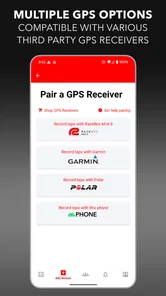
The app can use the GPS sensor in a compatible smartphone, so you may be able to record sessions without purchasing a separate timing transponder. However, accuracy depends on the phone, satellite reception, track layout, mounting position, and environmental conditions. For the most consistent and precise data, users may prefer a compatible external LITPro device or sensor when supported.
Can I create or use tracks in LITPro - GPS Lap Timer?
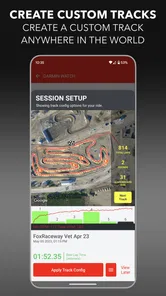
Yes, LITPro is built around recording sessions on tracks and reviewing lap data afterward. Depending on the location and available community information, the app may recognize an existing track or allow you to work with a newly recorded layout. It is still a good idea to check the detected start and finish points before relying on the timing results.
Pros
- Accurate GPS timing helps compare laps without trackside timing equipment.
- Supports live lap data
- making it useful during practice sessions.
- Simple focus on performance keeps the interface practical for drivers.
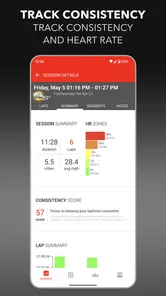
- Can help identify consistency issues across multiple laps.
- Useful for drivers who want portable timing on compatible devices.
Cons
- GPS accuracy may vary with weather
- surroundings
- and phone placement.
- Battery usage can increase during extended sessions with GPS enabled.
- Requires a clear satellite signal before timing data becomes reliable.
- Phone mounting must be secure and positioned where it remains visible safely.
- Advanced racing features may require time to learn and configure properly.





