Lexus
- 4.06K
- 4.8
- Installs
- 500.00K
- Price
- Free

Screenshots
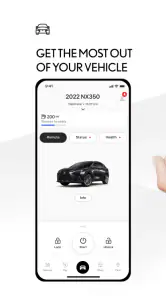

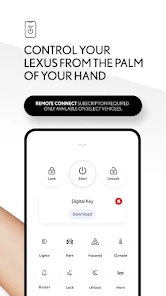
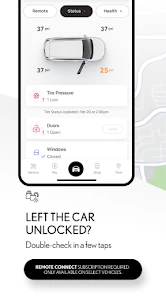
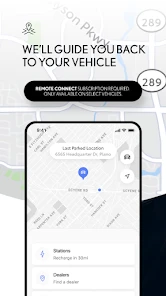

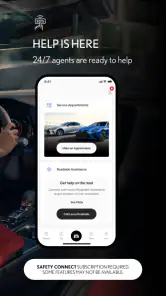
Analysis by Reviewed
The most useful way to think about the Lexus app is as a companion for keeping an eligible Lexus connected to the owner’s routine. That matters more than a glossy interface: the practical value is having a place to manage vehicle-related tasks without treating every service visit or quick check as a separate errand. I’d look at it less as an all-purpose driving app and more as a tool whose usefulness depends on whether you own a supported car and want its connected services close at hand.
Where a connected companion earns its place
In my experience, a vehicle app is most worthwhile when it removes small bits of friction that otherwise accumulate: remembering maintenance, getting help with an ownership task, or checking what the app can do for a particular vehicle. For a Lexus owner, that convenience can make the app worth keeping even if it isn’t something you open on every drive. The key question is whether its vehicle connection fits your model and your habits, rather than whether it looks impressive in a quick demo.
Compatibility is an important first check. The app supports Lexus vehicles from 2010 onward, while Hawaii has a newer cutoff of 2018 onward. I’d confirm that your specific vehicle and region are eligible before building a routine around it. If you’re shopping for a used Lexus, checking this early can help set realistic expectations about the app’s role after purchase.
Checking fit before making it a habit
I would make compatibility the first step, not an afterthought. A sensible approach is to identify the exact vehicle and where it is registered, then check whether it falls within the app’s supported range before depending on any connected service. This matters especially when buying a used car: two Lexus owners can install the same app and have different experiences because their vehicles are different generations or they live in different regions.
That distinction also answers a practical question: does installing the app mean every function will be available? No; the useful expectation is that access depends on the eligible vehicle and its available connected services. I’d explore what appears for my car before changing my routine around it. If the features I care about aren’t available, the app may still be worth keeping for other ownership tasks, but it shouldn’t be treated as a universal remote for every Lexus.
Latest News
A realistic ownership routine
Imagine you notice that a service visit is coming up while planning a busy week. Instead of relying on memory, you can use the app’s maintenance-related tools to keep the task in view and arrange an appointment through the app. I find that kind of workflow more valuable than a feature I might try once and forget: it connects a reminder with the next action, so the car is less likely to slip down the to-do list.
There’s a useful trade-off here. A reminder can help you remember to act, but it doesn’t remove the need to check what your vehicle needs or choose a time that works. I’d still treat the app as an organizer, not as a replacement for paying attention to the car or discussing service needs with a professional. If you drive an older eligible model, it’s especially sensible to check which connected functions are available to that vehicle rather than assuming every Lexus has the same experience.
One small workflow improvement is to deal with service planning when you have the car’s details and your calendar to hand, rather than waiting until a busy day. I’d use the reminder as a prompt to review the task, then make the appointment only once I know when the car can be taken in. That keeps the app useful without letting an alert become a source of pressure or a substitute for deciding what actually needs attention.
For households with more than one regular driver, it also helps to agree who handles service planning. Otherwise, separate people may respond to the same reminder or assume the other person has booked the visit. The app can keep a task visible, but a quick conversation is still the simplest way to make sure everyone knows what has been arranged.
How it compares with familiar alternatives
Compared with a general map, calendar, or notes app, a manufacturer’s companion has a narrower job: it is meant to keep vehicle-related tasks and services connected to Lexus ownership. A calendar may be better for coordinating a household schedule, and a navigation app may be the more familiar choice for everyday route planning. I wouldn’t install this expecting it to replace every driving tool on your phone. Its advantage is the ownership context; its limitation is that this context is useful mainly to people with a compatible Lexus.
That distinction also helps answer whether it suits a prospective buyer. If you’re researching cars but don’t own a supported Lexus, the app may have less day-to-day value than a dealer visit or a general comparison tool. If you already own one and want a central place for connected ownership tasks, it has a clearer purpose. The developer is Lexus Mobile Apps, and the app is free, so trying it is straightforward; the more important question is whether your vehicle is within its supported range.
In practical terms, I’d keep a map app for route choices and a calendar for appointments shared across work or family life. The Lexus app’s case is different: it puts the vehicle relationship at the center of the task. That focus can make ownership-related actions easier to find, but it also means it won’t necessarily be the best place for every reminder or every trip. I see it as a complement to familiar tools, not a reason to abandon them.
First Impressions and Usability
So, I recently got my hands on this app called Lexus, and let me tell you, it's quite the ride! Whether you're a die-hard car enthusiast or just someone who enjoys a smooth drive, this app has a little something for everyone. Here's my take on it after diving deep into its features and interface.
When you first launch the Lexus app, you're greeted with a sleek and modern interface that just screams luxury. It's like stepping into one of their cars—everything is polished and intuitive. The app is designed to provide users with a seamless experience, whether you're searching for the latest Lexus models or scheduling a service appointment.
Exploring the Features
The app is packed with features that are both practical and engaging. One of the coolest things is the virtual showroom. You can check out different Lexus models in 3D, rotate them, and even change the colors. It's like having a dealership at your fingertips! Plus, if you're considering buying a Lexus, you can use the app to locate nearby dealerships and book test drives.
Another neat feature is the maintenance scheduler. It automatically reminds you when your car needs servicing, which is super handy for someone like me who tends to forget these things. You can book your appointments directly through the app, saving you the hassle of phone calls.
For a prospective owner, browsing and arranging a test drive are different kinds of value from ongoing vehicle management. I’d use the shopping tools to narrow down what I want to see, then treat a visit or test drive as the real chance to judge whether a model suits me. For an existing owner, the maintenance workflow is more likely to earn repeat use because it connects a recurring responsibility with an action.
The useful habit is to treat reminders as prompts to verify, rather than as a final verdict on the car’s condition. I’d review the vehicle’s needs and arrange service accordingly, especially if a warning or unusual behavior calls for attention sooner. A reminder system can reduce forgetfulness, but it cannot assess every real-world situation for you.
Navigation and Connectivity
For those who love to hit the road, the Lexus app offers an integrated navigation system that's pretty impressive. It syncs with your car's dashboard, providing real-time traffic updates and suggesting the quickest routes. I found this especially useful during rush hour!
Connectivity is another strong suit. The app connects seamlessly with your Lexus vehicle, allowing you to control certain features remotely. Imagine starting your car on a chilly morning without leaving your house—pure bliss!
For a more grounded setup, I’d begin by pairing the app with the vehicle while parked and checking the available controls before relying on them. Remote access is convenient, but it should complement, not replace, the normal checks I make before a trip. It’s also worth considering who else regularly drives the car: agreeing on who manages reminders and appointments can prevent duplicate bookings or missed messages.
I’d also avoid making a remote control the centerpiece of my routine until I know exactly what is available for my particular vehicle and how it behaves. Trying the controls while parked gives me a chance to understand the interaction without dividing my attention on the road. For a driver who rarely needs connected access, this may be a nice extra rather than a reason to keep opening the app.
Navigation deserves a similar reality check. Even when a vehicle-linked option is useful, many drivers already have a preferred map app and established habits around it. I’d choose based on the trip: use whichever option gives me the clearest guidance in the car I’m driving, and avoid switching between systems while moving. That keeps the app’s connected role practical instead of turning it into another thing to manage mid-journey.
Community and Support
If you're someone who enjoys being part of a community, the app connects you with other Lexus owners through forums and events. You can share your experiences, get tips, and even participate in local meet-ups. It's a great way to meet like-minded individuals who share your passion for cars.
Customer support through the app is also top-notch. Whether you have questions about your vehicle or need assistance with the app itself, help is just a few taps away. The support team is responsive and knowledgeable, making sure you're never left stranded.
There is a broader ownership benefit in having those resources alongside the vehicle tools: when a question comes up, you can look for owner perspectives as well as assistance. I’d use community advice as a starting point, not a substitute for guidance about a specific repair or safety concern. For anything that affects how the car drives, a qualified service professional is the better next step.
For a simple app or account question, an in-app support route can be more convenient than searching through unrelated sources. For a mechanical concern, though, I’d be careful about treating another owner’s experience as a diagnosis. Similar symptoms can have different causes, and a community discussion is best used to help frame questions rather than decide whether a car is safe to drive.
Who will get the most from it
The app makes the most sense for an owner of a supported Lexus who wants service planning and connected vehicle access in one place. It may also interest someone considering a Lexus, particularly for browsing models or finding a nearby dealership, but that shopping use is different from the ongoing value an owner gets. If you don’t own a compatible Lexus, prefer to keep vehicle tasks in a general calendar, or mainly need navigation, I’d skip installing it for now and use the tool that already fits your routine.
Lexus is in the auto and vehicles category, has an Everyone content rating, and is free to download. It has a 4.8 average from around 31,000 ratings, with over 500,000 installs. The current version is 3.0.44, and it requires Android 10 or later. Those figures suggest that plenty of drivers have tried it, but compatibility with your own vehicle is still the deciding factor; a strong rating can’t make an unsupported car connect.
It is also worth keeping the platform requirement in mind before installing: Android users need version 10 or later. The app was released on August 19, 2019, and has a 4.8 average across about 31,000 ratings, with roughly 4,100 written reviews. Those figures may help you gauge how widely it has been used, but I’d still make the decision based on compatibility and whether the ownership tools suit your routine.
I’d recommend it most to someone who owns an eligible Lexus, regularly handles service planning, and likes having brand-specific vehicle tasks separate from general phone apps. A used-car buyer can also find value in checking the experience before purchase, provided they confirm their intended vehicle’s eligibility rather than assuming the app will work the same across model years.
On the other hand, I’d skip it if I didn’t own a compatible Lexus, only wanted turn-by-turn directions, or preferred to manage every appointment in a shared calendar. It is also not the right tool for replacing professional advice about maintenance or safety. Those are not flaws so much as boundaries: the app is at its best when the vehicle connection is relevant and the task is one it can genuinely help organize.
Overall, I’d recommend the app to eligible Lexus owners who value a direct link between everyday vehicle tasks and the brand’s own services. I wouldn’t treat it as essential for every driver or as a replacement for general-purpose navigation and scheduling. Check compatibility first, then judge it by whether its connected functions and service workflow save you effort in your actual routine. The Lexus app is most convincing when it quietly makes ownership easier, not when you expect it to do everything your phone can do.
Lexus Frequently Asked Questions
Can I use the Lexus app if I do not own a Lexus?
The app is primarily intended for people who own or use a compatible Lexus vehicle, since its purpose is to provide access to vehicle-related services. Without a compatible Lexus, many of its functions may not be relevant to you. If you are considering downloading it for someone else’s vehicle, check that you have the appropriate access and vehicle information before getting started.
What should I check before installing the Lexus app?
Before installing, make sure your phone meets the app’s operating-system requirement and that your Lexus is compatible. The app supports Lexus vehicles from model year 2010 onward, while Hawaii support starts with model year 2018. You should also consider which vehicle services you want to use, because availability can depend on the vehicle and connected services.
Is the Lexus app free, and could using its services involve charges?
The Lexus app itself is free to download, but some features may require a subscription or be part of a connected services package. While basic features like vehicle status updates may be complimentary, advanced functionalities such as remote start might incur additional charges. Users should check with their dealership for specific details regarding any costs.
Who is the Lexus app intended for?
The Lexus app is designed for people who own or use a compatible Lexus vehicle and want to manage vehicle-related services from a phone. It sits in the Auto & Vehicles category and is published by Lexus Mobile Apps. The app is free to download, and its content rating is Everyone, making it suitable for a broad audience.
Is my Lexus vehicle compatible with the app?
The Lexus app currently supports Lexus vehicles from model year 2010 onward. In Hawaii, support applies to vehicles from model year 2018 onward. Before downloading, check your vehicle’s model year and location against these requirements so you know whether the app is intended to work with your Lexus. Compatibility also determines which vehicle-related functions you can use.
Pros
- User-friendly interface with intuitive navigation.
- Wide range of car models to explore.
- Detailed car specifications and features.
- Regular updates with the latest car models.
- Availability of virtual test drives.
Cons
- Limited to Lexus brand vehicles only.
- Requires a stable internet connection.
- May have occasional loading delays.
- No offline access to car information.
- In-app purchases for premium features.

- Category
- Auto & Vehicles
- Version
- 3.0.44











