KCL: Coupons, Deals, Discounts
- 8.87K
- 4.8
- Installs
- 1.00M
- Price
- Free

Screenshots





Analysis by Reviewed
I tend to judge coupon apps by what happens after the first burst of browsing: do they still help when I’m planning an ordinary shop, or do they become another source of alerts to ignore? KCL: Coupons, Deals, Discounts is most useful when I treat it as a way to research purchases I already expect to make, rather than a reason to buy things simply because they’re marked down.
Finding a useful routine, not just a first-week bargain
In the first few days, browsing deals can feel like a small treasure hunt. The app brings shopping offers together in one place, and that makes it easier to check for savings before heading to a store or completing an online order. I’d start with categories and retailers I actually use; looking at every offer is entertaining at first, but it can quickly turn into aimless scrolling.
Making a deal useful before leaving home
A small change to the usual shopping routine can make the app more practical: check offers after writing the list, not before. That order helps me distinguish a genuine saving from an appealing promotion that could add an unplanned item to the trolley. I can also note which offers are worth checking at the store, then leave the rest alone instead of trying to remember every deal I saw while browsing.
For a realistic weekday example, imagine I’m planning a grocery run after work. I make the list first, check the app for relevant offers, and use any promising result to compare where I might shop. If an offer needs a particular product size or an extra purchase, I weigh that condition against what I actually need. If the deal changes the trip or basket too much, I pass. The best outcome is a lower bill for the planned shop, not a bigger shop that feels cheaper item by item.
Where it fits into an everyday shop
A practical routine is to open the app while making a shopping list, then look for relevant coupons, rebates, or promo codes before deciding where to buy. For example, if I’m already planning a grocery run, I can check for offers on items that are on my list and use those findings to compare options. The important distinction is that a discount only helps when it applies to something I would have bought anyway.
That approach also answers a common question: is this better for spontaneous bargains or planned purchases? I find it more dependable as a planning companion. An offer spotted in advance can shape a store choice or remind me to check a code at checkout; an alert that arrives while I’m busy may be easy to miss, and it shouldn’t automatically change what I intended to spend.
How it compares with other ways to save
Compared with searching the web retailer by retailer, having deals collected in a shopping app can reduce the effort of getting started. Compared with a store’s own app, though, a general deal finder is less useful when I need a retailer-specific detail or want to manage everything in that store’s account. I’d use KCL to discover possibilities, then check the offer’s terms and the retailer’s checkout before relying on the savings.
More From Our News Desk

Clash of Clans Is Won Between the Battles

Android Auto Makes the Case for Quieter Car Software

MobiOffice: Transforming Mobile Productivity with Seamless Integration

EA SPORTS FC™ Mobile Soccer: Redefining Mobile Sports Gaming

How Microsoft OneDrive Became a Mobile Productivity Giant

How Google Translate Breaks Language Barriers Effortlessly
It also occupies a middle ground between paper coupons and a retailer’s own promotions. Paper coupons can be straightforward when you already have them and know where they apply, but they require collecting and keeping track of them. A store app may be better for account-specific offers or checkout details at that retailer. I like KCL as a discovery step across shopping plans, not as a replacement for every store’s own information.
This extra check matters because coupons, rebates, and promo codes don’t necessarily work the same way. A code may need to be entered online, while an in-store offer may require a different step. I make a habit of checking eligibility, dates, and any purchase conditions before I build a basket around an offer. That small bit of preparation is more valuable than saving a few seconds by assuming every deal applies automatically.
Keeping the habit manageable
For month-to-month value, I’d keep the app focused on stores and categories that match my usual spending. The app is free, which makes trying it low-commitment, but time still has a cost: checking every promotion can eat into the benefit. A short check before planned shopping is a better routine than opening it repeatedly just to see what is new.
One useful discipline is to make the app compete with the list rather than with my attention. I can check it once while planning, decide which offers deserve a second look, and stop there. This turns browsing into a repeatable task with a clear endpoint. It also makes it easier to judge whether the app is earning its place: if I regularly find something relevant during that check, it is doing a job; if I keep scrolling without changing a sensible purchase, I can close it.
Notifications can help bring timely offers to my attention, but they can also become noise if too many are enabled. I’d choose alerts selectively and review them alongside a real shopping plan. If I find myself buying something only because an alert made it seem urgent, I’d turn down that prompt and return to checking deals when I’m already preparing to spend.
Who will get the most from it
This is a good fit for someone who enjoys comparing offers and is willing to spend a little time checking the details. It may be especially handy for a household with recurring shopping needs, since familiar categories make it easier to spot a relevant saving instead of starting from scratch each time. Someone who rarely shops, wants a completely automatic checkout discount, or dislikes browsing promotions may be happier with a retailer’s own offers or no coupon app at all.
I’d also recommend it to a careful planner who is comfortable treating a deal as a possibility rather than a promise. That mindset is useful when comparing a coupon with the total cost of a normal purchase: the offer may look attractive, yet a different shop or product could still be the better choice. By contrast, anyone who expects every offer to apply without reading its conditions is likely to find the process frustrating.
Discovering Deals at Your Fingertips
I've been using the KCL: Coupons, Deals, Discounts app for a while now, and let me tell you, it's a game changer. The app is designed to help you find the best deals, whether you're shopping online or in-store. Gone are the days of clipping paper coupons or endlessly searching the web for promo codes. With KCL, everything you need is right there on your phone.
Easy Navigation and User-Friendly Interface
One of the first things I noticed about the app is its super intuitive interface. You don't need to be a tech wizard to navigate through it. The categories are neatly organized, so you can easily find deals tailored to your needs, whether it's groceries, electronics, or fashion.
Real-Time Updates and Alerts
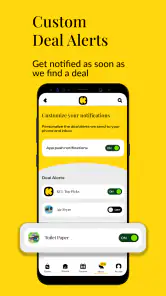
What really sets this app apart is its real-time updates. You'll get notifications about the latest deals and discounts as soon as they become available. Imagine getting an alert about a flash sale at your favorite store just as you're about to check out—talk about perfect timing!
Community-Driven Insights
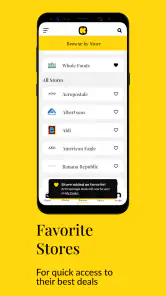
Another cool feature is the community-driven aspect of KCL. Users can share their own deals and finds, creating a vibrant community of savvy shoppers. It's like having a network of friends who are all on the lookout for the best bargains. Plus, the app lets you keep track of your favorite stores and customize your deal alerts.
I’d use community posts as a starting point, particularly when a deal sounds relevant to a purchase I already planned. A shared find can help me notice an option I might have missed, but I still want to check the requirements and final checkout amount myself. That distinction matters: community activity can widen discovery, while the decision about whether a deal suits my basket remains personal.
What makes the savings last
The ongoing value depends less on constant novelty than on whether the offers match your routine. I’d treat community finds as useful leads rather than guarantees: check the details yourself, and compare the final total with your usual option. A lower sticker price is not automatically the best value if it means buying extra items or making an unnecessary trip.
When deciding whether to keep using it, I’d give more weight to repeat usefulness than to one unusually good find. A coupon that occasionally changes a planned purchase can be welcome, but the habit only makes sense if the regular effort stays modest. If I need to investigate too many unrelated offers to uncover one that fits, I’d narrow my attention to familiar stores and categories rather than treating the whole feed as a to-do list.
KCL is a shopping app from Krazy Coupon Lady. It is free, rated for Everyone, and has a 4.8 average from around 64,000 ratings, with more than a million installs. It first appeared in 2015, and version 2025.11.1 supports Android 7.0 and later. Those figures suggest it has an established audience, but the useful test for me is whether I find relevant offers often enough to justify keeping it in my routine.
That makes it relatively easy to try without committing money, although a free app still asks for attention and a little decision-making. I’d judge it over several ordinary shopping plans rather than by how exciting it feels on day one. A run of relevant offers is a better reason to keep checking than a busy feed or a single memorable discount.
All in all, the KCL: Coupons, Deals, Discounts app has made my shopping experience not only cheaper but also way more enjoyable. It's like a treasure map leading you to hidden gems of savings. If you're someone who loves saving money without compromising on quality, this app is definitely worth a try.
So, download it and start exploring the world of deals right at your fingertips. Happy shopping!
My long-term verdict
I’d keep it if I regularly plan purchases, enjoy checking offers, and can use alerts without letting them dictate my spending. I’d skip it if coupon hunting feels like work or if I mainly want automatic discounts with no research. For me, it earns space when it supports a shopping list and saves time compared with hunting across separate sources; its lasting value comes from a selective habit, not from chasing every deal.
When a different approach is better
If most of my purchases come from one retailer, I’d probably begin with that retailer’s own app or website. Its offers and account details may be more directly tied to the checkout I’m using. KCL is more appealing when I want a wider starting point and am willing to verify what I find. For an occasional purchase, a direct search for a specific product or code may be quicker than maintaining another browsing habit.
There is also a practical limit to deal hunting: time spent comparing offers is part of the cost. I wouldn’t open the app for every small purchase, and I wouldn’t make a special trip based only on a headline saving without checking whether the terms and total make sense. For households that already compare regular shopping options, the app can slot into that routine; for someone who wants shopping to be as quick and automatic as possible, it may feel like extra work.
A simple way to decide if it deserves a place
I’d try one deliberate cycle: make a normal list, check the app for matching offers, and note whether the information changes a purchase in a useful way. Repeat that with the kinds of shopping I do regularly. If the app helps me spot relevant possibilities without expanding the list or making me browse for too long, it has a clear role. If the offers rarely match what I need, I can stop checking rather than forcing a habit simply because the app is available.
My lasting recommendation is conditional, but positive. KCL is best as a practical research companion for shoppers who plan ahead, compare options, and are comfortable confirming the fine print. It is less convincing as a hands-off savings tool or an invitation to browse for entertainment every day. Used selectively, it can make a familiar shopping routine a little more informed; used without a spending plan, it can just make more things look tempting.
KCL: Coupons, Deals, Discounts Frequently Asked Questions
Is KCL: Coupons, Deals, Discounts free to download?
Yes. KCL: Coupons, Deals, Discounts is free to download, making it easy to try as a shopping app without paying upfront. Its focus is on helping shoppers find in-store and online deals, rebates, and promo codes. Individual offers can have their own retailer terms, so read the details of a coupon or promotion before relying on it at checkout.
Who makes KCL: Coupons, Deals, Discounts?
KCL: Coupons, Deals, Discounts is developed by Krazy Coupon Lady. It is a shopping app centered on finding deals, discounts, rebates, and promo codes for purchases in stores and online. If you already follow Krazy Coupon Lady for savings ideas, the app brings that deal-finding focus to your phone in a format you can browse while planning a purchase.
Is KCL: Coupons, Deals, Discounts available on Android and iOS?
KCL: Coupons, Deals, Discounts is a shopping app from Krazy Coupon Lady, available for Android and iOS. Its broad focus on in-store and online deals, rebates, and promo codes makes it useful for shoppers who want to look for savings from their phone. The app is free, and its age rating is Everyone.
What is KCL: Coupons, Deals, Discounts?
KCL: Coupons, Deals, Discounts is an app designed to help users find the best deals, discounts, and coupons available for a wide range of products and services. It aggregates offers from various retailers, allowing users to save money by accessing the latest promotions directly from their smartphones. The app is available for both Android and iOS devices.
How do I use KCL to find deals and discounts?
To use KCL: Coupons, Deals, Discounts effectively, start by downloading the app from the Google Play Store or Apple App Store. Once installed, you can browse through categories or use the search function to find specific deals. The app updates regularly, ensuring you have access to the latest promotions. You can also set alerts for specific items or stores to receive notifications when new deals are available.
Pros
- Wide variety of deals available.
- User-friendly interface.
- Regularly updated discounts.
- Saves time and money effectively.
- Includes exclusive online offers.
Cons
- Requires account creation to access deals.
- Contains ads that can be intrusive.
- Notifications can be overwhelming.
- Limited to certain geographic regions.
- Some deals may expire quickly.

- Category
- Shopping
- Version
- 2025.11.1











