

Intervaler - Intervals workout
- 0.00
- 0.0
- Installs
- 50.00
- Price
- $1.49

Screenshots
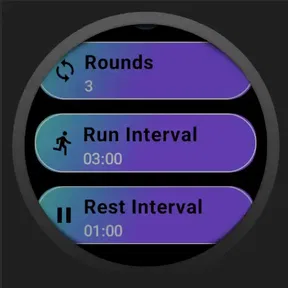
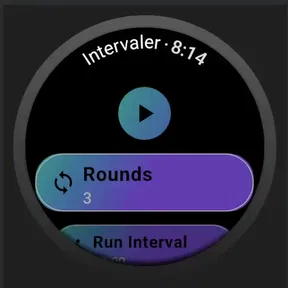
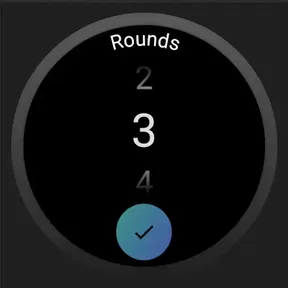
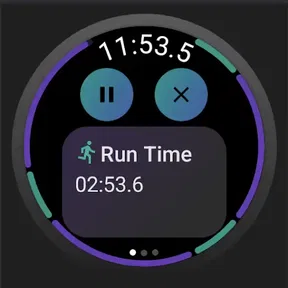
Analysis by Reviewed
I find interval timers most useful when they make the next step obvious without demanding attention at the wrong moment. Intervaler - Intervals workout is a sports app built around that simple need: breaking exercise into timed work and rest periods. Its appeal is practical rather than flashy, especially if you already know what movement you want to do and need help keeping a steady rhythm.
Planning around the timer, not the other way around
Before paying for any interval timer, I’d ask one practical question: will I use timed blocks often enough to make setup worthwhile? If your routine already includes repeated rounds, the answer may be yes. A short conditioning session, alternating walking speeds, or a home circuit can all benefit from a predictable work-and-recovery pattern. If most of your exercise is a continuous walk, casual ride, or unstructured play, a stopwatch—or simply following how you feel—may be less fussy.
The useful distinction is that a timer organizes when to change effort; it does not decide what that effort should be. I would choose the exercises, order, and recovery needs first, then configure the session to serve them. That keeps the clock from becoming the coach. It also makes the app easier to judge: if you want clear timing for a routine you already understand, it has a focused job; if you expect it to invent a safe, progressive program, you are looking for a different kind of product.
Readability and getting around
First impressions are everything, and the Intervaler - Intervals workout app doesn’t disappoint. The interface is clean and intuitive, which means you don’t have to fumble around trying to figure out where things are. You can jump straight into setting up your workout with ease. Whether you’re a seasoned athlete or just starting out, this app caters to all levels of fitness, making it accessible and user-friendly.
That straightforward approach matters during a workout: complicated menus are a nuisance when you are catching your breath or preparing for the next interval. I would set up a session before starting rather than plan it while moving. The developer is As Is, and the app is listed at version 1.0.22; it costs $1.49, so I’d treat it as a paid timer rather than assume it is a free trial or a full coaching program. It is rated for Everyone and requires OS 11 or later.
Making setup easier on a tired brain
A small but useful workflow is to build the session when you are calm, not in the thirty seconds before exercise. Think through the number and length of work and recovery blocks, and decide where equipment changes belong. When you are already breathing hard, even a simple adjustment can distract you from moving safely. Preparing in advance also makes it easier to tell whether a session is realistic: if the transitions leave no time to change position or catch your breath, revise the timing before starting.
For a first trial, I’d keep the routine familiar and modest rather than testing a new exercise and a new timing pattern at once. That gives you a clearer sense of whether the interval rhythm itself helps. If it feels too demanding, the right response is to lengthen recovery or stop—not to treat every cue as an instruction to push harder. The timer can mark a boundary, but your comfort and control should decide whether to continue.
More From Our News Desk

 Gmail
GmailGmail in a Busy Inbox: Who Benefits Most?
From first account to crowded workday, Gmail earns its place through dependable search and flexible sorting—but its best fit depends on how much inbox maintenance you can tolerate.

 Prime Video
Switching to Prime Video: What Changes in Your Viewing Routine
Prime Video can make a compelling second home for streaming, but switching means learning a different catalog, rental layer, and route from browsing to playback.

 Universal TV Remote Control
Universal TV Remote Control Works Best as a Reliable Backup
A phone remote earns its place through quick setup and reliable habits. Here is how to get more from Universal TV Remote Control—and where its limits show.

 Weather - By Xiaomi
Weather by Xiaomi Review: Clear at a Glance, Less Clear Up Close
Xiaomi’s weather app makes everyday forecasts quick to scan, but its calm surface can leave useful details and recovery paths harder to find than they should be.

 X
XX Under Pressure: Can It Recover When Posting Goes Wrong?
A resilience-focused review of X, examining setup, mistaken posts, interruptions, weak connections, and the gaps that matter when recovery needs to be dependable.

 Clash of Clans
Clash of Clans Is Won Between the Battles
Its raids are quick; its community is a long-term project of coordination, teaching, rivalry, and shared responsibility—with all the friction that entails.
Latest News



Building a session that fits your ability
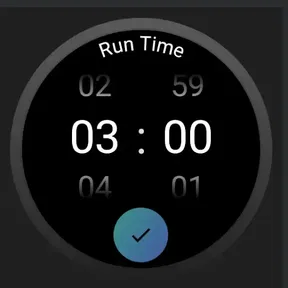
The app comes packed with a variety of features that make it stand out from the crowd. One of my favorite things about it is the customizable interval settings. You can tailor your workout sessions to fit your specific needs, whether you’re in the mood for a short burst of cardio or a longer strength training session.
Custom timing is most helpful when it reflects the exercise, not an ambitious version of it. For example, if you are returning to activity, choose manageable work periods and generous recovery before you begin; a timer can pace effort, but it cannot judge your form or tell you when to stop. For circuit training, decide in advance whether a rest interval means full recovery, moving to the next station, or changing equipment. That small choice prevents the clock from pushing you into a rushed transition.
Motor and sensory considerations
Interval timing can reduce how often you need to touch a phone, which is helpful when your hands are sweaty, holding equipment, or resting between movements. I would still avoid making adjustments while walking or lifting. Put the device on a stable surface before the session, check that you can reach it without crossing a busy floor, and leave enough space around it that retrieving it will not interrupt a movement.
People who rely on spoken information may appreciate being able to listen for a cue instead of reading a display. That is not the same as a complete accessibility solution, though: spoken prompts can be hard to distinguish in a noisy room, and they may not work for someone who needs visual or tactile feedback. If either situation applies, try a short, low-stakes session in the place you plan to exercise before relying on the app for a longer workout.
Sound, attention, and movement
Another feature I found incredibly helpful is the voice coach. Sometimes, it’s easy to lose track of time when you’re in the zone. The voice prompts keep you informed about the remaining time for each interval, ensuring you stay on track without having to constantly check your device.
That can be useful when your hands are occupied or your eyes need to stay on a treadmill, mat, or set of weights. It also gives a practical alternative to repeatedly looking at a screen. I would still test the prompts at a comfortable volume before a demanding session, especially in a busy gym or outdoors where other sounds compete. If you prefer silent workouts, or need visual cues rather than spoken ones, the voice-led approach may not suit you; keep the phone somewhere safe and easy to reach instead of handling it mid-exercise.
Situational access: home, gym, and outdoors
Where you exercise changes how well a voice-led timer fits. At home, a quiet room and a nearby phone make it easy to hear a prompt without turning the device into the focus of the workout. In a shared gym, competing noise can make spoken cues less dependable, while playing them loudly may bother other people. I would use a low-risk session to check whether the cues are audible at a considerate volume before depending on them.
Outside, the most important adjustment is safety rather than convenience. Choose a route with room to move and avoid reaching for the screen while crossing streets, navigating crowded paths, or using equipment. For intervals during a walk, decide on a safe place to slow down or stop before beginning. If you cannot hear the cues over traffic or environmental noise, the timer may not be the right guide for that outing.
There is also a useful distinction between a session that is timed and one that is genuinely hands-free. Voice prompts can reduce screen checks, but they do not remove the need to position the phone, set up the workout, and make sensible decisions when plans change. I would not start an interval session while driving, cycling in traffic, or doing any activity where a notification could compete with attention.
Where it fits into everyday training
A realistic use is a short home circuit between work and dinner: set the intervals while you are still standing beside your mat, place the phone within earshot, then move through bodyweight exercises without checking the clock after every set. The same timer can structure a brisk walk with alternating faster and easier sections, though you should choose a safe route and avoid interacting with the device while moving.
Compared with a basic stopwatch, interval timing reduces mental arithmetic and makes repeated work-and-rest blocks easier to follow. Compared with a broad fitness platform, it is a narrower choice: the main value is pacing an exercise session, not replacing a trainer who can correct technique or a program that builds a long-term plan. Its price makes most sense if you expect to reuse interval workouts regularly; for occasional timing, a free timer already on your phone may be enough.
Choosing it over other fitness tools
The alternatives each solve a different problem. A stopwatch is flexible and familiar, but you have to watch it and calculate when to change pace. A general workout app may offer demonstrations, plans, or progress records, yet that extra material is unnecessary if you only want repeated timed blocks. A coach can adapt a session to your movement and give feedback, but that level of support is a different commitment from buying a small utility.
I see this app as most appropriate for someone who has a routine from a class, trainer, or personal experience and wants a simple way to keep its rhythm when exercising alone. It is less suitable if you need exercise demonstrations, automatic adjustment to fatigue, or a detailed record of improvement. Before choosing it, consider whether your main frustration is losing track of intervals or not knowing what to do in the first place. The former is a timer problem; the latter calls for guidance.
Motivation and company
Let’s face it, working out alone can sometimes feel like a drag. Intervaler has thought of this too! There’s a community aspect that lets you connect with other users, share your progress, and even challenge each other. It's like having a workout buddy in your pocket, cheering you on every step of the way.
The app also integrates with music, so you can groove to your favorite tunes while burning calories. A killer playlist is sometimes all you need to push through those last few reps.
Those social and music elements may make a solo session feel less solitary, but I would keep the practical setup simple. If music and voice prompts compete, the interval cue needs to remain understandable; test the combination before choosing a demanding workout. Some people prefer company in person, or find that music makes it harder to notice their breathing and surroundings. In those cases, a quiet session or a workout partner may be the better choice than adding more audio.
Remaining barriers and sensible limits
Clear timing does not automatically make an exercise accessible to every body. The app can help structure a pause, but it cannot tell whether a movement is comfortable, offer an alternative for limited mobility, or account for pain and balance. If you have a condition that affects exercise, need rehabilitation, or are unsure which movements are appropriate, get qualified advice before using timed effort to shape a routine.
There is a practical limitation for anyone who needs information in a particular format: relying on voice alone may be inconvenient in a loud space, while repeatedly checking a screen can be unsuitable during movement. I would not assume the same setup will work equally well for every person or location. Try the interface and cues when seated or during a gentle practice, then decide whether they remain usable when you are moving and tired.
It is also worth separating motivation from pressure. A countdown can encourage consistency, but it can make people feel they must continue simply because the next interval has started. I would treat each cue as information, not a command. Pausing, shortening a session, or stopping altogether is reasonable whenever effort feels unsafe or unexpectedly difficult.
A practical choice, with clear boundaries
I’d use this section to weigh the app’s focused timing role against the practical demands of setting up and following a workout. That distinction matters most when choosing between a dedicated interval tool and a simpler timer, and it leads naturally to who is likely to benefit from it.
Who will get the most from it
At $1.49, with 50+ installs and a release date of April 29, 2023, this is a small, focused purchase rather than an established all-in-one fitness service. It is best suited to people who already have exercises in mind, like alternating effort and recovery, and want voice cues to reduce clock-watching. Beginners can use that structure too, but should start conservatively and learn movements separately. If you need detailed coaching, progress tracking, silent visual alerts, or a plan tailored to a medical condition, another kind of fitness tool—or a human coach—is likely a better fit.
Who should look elsewhere
I would skip it if you want a complete training system that chooses exercises, teaches technique, and adapts the plan as your fitness changes. It is also a less natural fit if you need silent prompts, cannot reliably hear spoken cues, or exercise in a setting where checking or positioning a phone is unsafe. A built-in phone timer may be enough for occasional use, while a structured training service or in-person instructor makes more sense when planning and form are the real challenges.
One question worth settling before buying is whether the app’s kind of support matches your routine: it is meant to help keep time, not to evaluate your workout. Another is whether you can hear its prompts where you actually exercise; a quiet-room test may not predict a noisy gym or outdoor route. I would also consider whether you will repeat intervals regularly, since that is where a dedicated tool is more useful than a stopwatch. Finally, if your needs depend on visual, tactile, or medically tailored guidance, choose a tool or professional support built around those needs rather than expecting a general interval timer to provide it.
My inclusive verdict
In a world where fitness apps are aplenty, Intervaler - Intervals workout really does hold its own. It’s not just about the physical benefits; it’s about making workouts something you look forward to. The app’s ability to personalize workouts, combined with its motivational features, makes it a must-have for anyone looking to spice up their fitness routine.
So, if you’re ready to take your workouts to the next level, give Intervaler a try. Who knows, it might just be the motivation you need to hit those fitness goals!
Intervaler - Intervals workout Frequently Asked Questions
How much does Intervaler - Intervals workout cost, and what devices can run it?
Intervaler - Intervals workout is a paid fitness app priced at $1.49. It is listed for devices running iOS 11 or later, so it is worth checking your device’s operating system before downloading. The app is rated for Everyone, making its stated age suitability broad, though users should still choose exercise intensity that fits their own abilities.
Who develops Intervaler, and is it a widely used app?
Intervaler is developed by As Is and is a sports-focused fitness app for interval training. It has over 50 installs, so it has a relatively small user base compared with long-established workout apps. If you prefer trying a straightforward tool for structuring interval sessions rather than choosing an app based on a large community, its focused purpose may appeal to you.
What is Intervaler - Intervals workout and how does it help with my fitness routine?
Intervaler - Intervals workout is a fitness app designed to enhance your workout routine through interval training. It allows users to create customized interval workouts, alternating between high and low intensity exercises, which can boost cardiovascular health, improve endurance, and increase calorie burn. Whether you're running, cycling, or doing strength training, Intervaler helps structure your sessions for maximum efficiency.
Is Intervaler - Intervals workout suitable for beginners?
Yes, Intervaler - Intervals workout is suitable for beginners. The app offers customizable workout plans that can be adjusted according to the user's fitness level. Beginners can start with less intense intervals and gradually increase the difficulty as their fitness improves. The app also provides guidance and tips to help new users get the most out of their workouts safely.
Can I use Intervaler - Intervals workout without an internet connection?
Yes, Intervaler - Intervals workout can be used offline. Once you've downloaded the app and set up your workout intervals, you can exercise without needing an internet connection. This makes it convenient for users who might be working out in areas with limited connectivity, like parks or remote locations.
Pros
- User-friendly interface for easy navigation.
- Customizable interval settings.
- Integration with music apps for motivation.
- Provides visual and audio cues.
- Tracks workout history for progress monitoring.
Cons
- Limited to interval training only.
- No meal planning or nutrition guidance.
- Free version contains ads.
- Lacks social sharing features.
- No integration with wearable devices.





