HotStock - in-stock alerts
- 4.00K
- 3.4
- Installs
- 500.00K
- Price
- Free

Screenshots
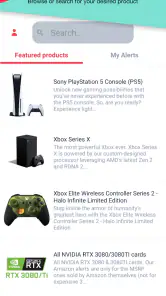


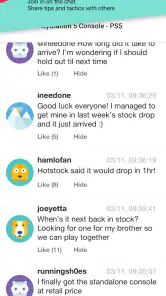
Analysis by Reviewed
I find stock-alert apps most useful when I treat them as a way to narrow the search, not as a promise that I’ll get every item I want. A notification can point me toward a buying opportunity, but I still need to check the retailer, decide whether the price works for me, and act quickly if stock is limited. That distinction is the key to getting practical value from HotStock without letting shopping alerts take over my day.
A routine that keeps alerts useful
My preferred approach is to add only products I genuinely intend to buy, then check that each alert matches the item and retailer I care about. A broad watchlist can become noise: an alert is less helpful if I have to stop and work out which version or store it refers to. Being selective also makes it easier to act confidently when a notification arrives.
For a planned purchase, I would decide my acceptable price and delivery or pickup preferences before the item comes back. That small bit of preparation matters more than repeatedly opening the app. Stock availability is only one part of a good purchase; having a clear budget helps prevent the urgency of an alert from pushing me into a decision I would later regret.
Settings and choices worth reviewing
Alert preferences deserve a quick check after you add a product. If the app offers choices about how often to be notified, I would choose the option that suits the item’s urgency and my own tolerance for interruptions. A hard-to-find item I need soon may justify more immediate attention, while a casual wishlist product probably does not need to compete with everyday notifications.
I would also revisit the list when a purchase is no longer relevant. Removing or ignoring old targets keeps the active watchlist focused, and it reduces the chance that an alert pulls me back toward something I have already replaced or decided against. The useful habit is not simply setting alerts; it is keeping the list current.
Faster habits for a short stock window
When I am watching a particularly competitive item, I keep the likely retailer and product details straight in advance instead of trying to make those decisions in the moment. I also avoid treating a notification as proof that checkout will be effortless: availability can change while shoppers are responding, so I move promptly but still verify the exact product and total cost before buying.
For everyday use, I might add a household item that is often unavailable and check alerts when I have a natural break, rather than refreshing store pages throughout the day. For a time-sensitive purchase, I can keep notifications enabled and my buying criteria ready. Those are different workflows, and separating them helps me avoid giving every item the same level of attention.
More From Our News Desk

Clash of Clans Is Won Between the Battles

Android Auto Makes the Case for Quieter Car Software

MobiOffice: Transforming Mobile Productivity with Seamless Integration

EA SPORTS FC™ Mobile Soccer: Redefining Mobile Sports Gaming

How Microsoft OneDrive Became a Mobile Productivity Giant

How Google Translate Breaks Language Barriers Effortlessly
Where alerts have limits
A stock alert cannot guarantee that an item will remain available long enough for me to complete checkout, and it cannot make an unsuitable price into a good deal. Retailer stock information and the buying process are outside the convenience of receiving a notification, so I see this as a discovery tool rather than a reservation system.
That makes HotStock less useful if I am happy to buy from whichever store has the lowest price and can already compare shops quickly, or if I am only browsing without a particular product in mind. A retailer’s own alert may be a better fit when I care about one store alone. And if I find alerts distracting, a smaller watchlist and quieter notification choices are more sensible than tracking every tempting item.
Who gets the most from it
The app makes the most sense for shoppers who have a specific hard-to-find product in mind and are willing to respond when it becomes available. It is less compelling for someone who wants general shopping inspiration, guaranteed access, or a complete price-comparison service. I would judge it by whether it saves me repeated checking for a few important targets, not by how many products I can add.
One realistic example is looking for a particular gift while balancing work and other errands. I can set up the alert ahead of time, keep my budget in mind, and let the app tell me when it is worth checking the retailer. If the notification arrives at a bad moment, I still have to accept that stock may disappear; the benefit is that I did not have to spend the whole day refreshing pages.
Making a stock alert part of a sensible purchase
I also find it useful to separate “I want this item” from “I should buy this offer.” Before tracking something, I would note the exact version, colour, size, or bundle I actually mean, where those differences matter. That reduces a common snag with sought-after products: spotting an alert quickly, then realizing the available listing is not the one I wanted.
For a gift, I would build in a fallback before I start watching. If the item does not return in time, I can choose a different present rather than treating scarcity as a reason to keep waiting. For a replacement household purchase, the same idea means deciding how long I can reasonably manage without it. These simple decisions make alerts less stressful because they keep the shopping plan from becoming open-ended.
When an alert appears, I would treat it as a cue to verify, not as an instruction to check out. I would confirm the retailer, product details, delivery or collection option, and final cost. This is particularly important if I am looking at a promotion or a bundle: a low headline price can be less attractive once the exact contents or checkout total are clear. The app helps with timing; my own checklist still does the work of deciding.
Choosing between HotStock and other ways to track items
Compared with manually refreshing retailer pages, a dedicated alert app can save attention when I am following several specific products or simply cannot keep checking during the day. A retailer’s own alert can be simpler if I already know I will buy from that one shop. Price-comparison tools make more sense when my priority is finding the best offer across stores, rather than being notified about availability for a chosen target.
Those approaches can complement each other, but I would not assume that one replaces all the others. If I care most about a particular item becoming available, an alert is useful. If I care most about price, I still need to compare current offers and consider delivery costs. And if I am flexible about brand or model, ordinary browsing may uncover an acceptable substitute faster than waiting for one precise listing.
A practical setup is to use HotStock for the few products where timing is the problem, while keeping a separate note of acceptable alternatives and prices. That avoids turning the watchlist into a general catalogue and helps me respond with a clear decision when something changes. The trade-off is that I need to do a little planning up front; the payoff is less reactive shopping later.
Have you ever found yourself endlessly refreshing a webpage, hoping that a coveted item will come back in stock? We've all been there. Well, let me introduce you to a nifty little app that could save you a lot of that hassle: HotStock. This app promises to keep an eye on those hard-to-find items for you, sending real-time alerts when they become available. Let's dive into what makes this app tick and see if it's worth a spot on your device.
Getting Started with HotStock
First things first, HotStock is available for both Android and iOS, so no matter your device preference, you're covered. The installation process is straightforward, and once you open the app, you're greeted with a clean and intuitive interface. It’s easy to navigate, which is always a plus in my book. You don’t need a degree in rocket science to figure this one out!
Setting Up Alerts
Setting up alerts is as simple as pie. You can search for nearly any product you have in mind, from electronics to toys, and add them to your watchlist. The app offers a comprehensive list of retailers, so you’re not just limited to one or two stores. I was pleasantly surprised to see how extensive this list was.
Once you've added an item, you can tailor the alert preferences to suit your needs. Want to be notified the second something is in stock, or perhaps just get a daily summary? You have the control. This flexibility is a nice touch, allowing you to customize your experience.
Real-Time Notifications
Here's where the magic happens. When a product becomes available, HotStock sends you a notification faster than you can say "add to cart." The app claims to offer real-time alerts, and from my experience, it delivers on this promise. I tested it with a few popular items, and the notifications came through swiftly. It's almost like having a personal shopper who’s always on the lookout for you.
Additional Features
Beyond just tracking stock availability, HotStock offers a few neat extras. For instance, it provides historical pricing data on some products, so you can gauge whether you're getting a good deal or not. This feature is handy for anyone who loves a bargain.
The app also has a community feature where users can share tips and experiences about purchasing certain items. It’s like having a mini forum right there in the app, which can be incredibly helpful if you're navigating a particularly tricky purchase.
User Experience and Design
In terms of design, HotStock nails it with a clean and user-friendly interface. The color scheme is easy on the eyes, and everything is laid out logically. You won’t find yourself lost in a maze of menus, which is always a relief in an app that's meant to make your life easier.
The app runs smoothly, and I didn’t encounter any glitches during my time using it. It’s clear the developers put a lot of thought into making sure the user experience is seamless.
Costs, compatibility, and audience
HotStock is a free shopping app from Litebox, with optional in-app purchases priced from $5.49 to $10.99 per item. I would start with the free experience and only consider paying if the extra value is clear for the way I shop. The app is rated for Everyone, and its current version is 1.0.178; Android users need version 7.0 or later. Those details make it straightforward to judge whether it fits your device and budget before building a routine around it.
Its audience is narrower than “anyone who shops online.” I’d recommend it to someone who has a specific product in mind, has already missed it at a preferred retailer, and is willing to act when an alert arrives. If you mostly browse casually, prefer to compare prices across many shops before choosing an item, or do not want shopping notifications, a retailer’s own stock alert or occasional manual check may suit you better.
What the community and price history can—and cannot—do
Historical pricing is helpful as context, but I would not treat it as a verdict on whether a purchase is a bargain. I still compare the current offer with my own budget and check the final amount at the retailer. Similarly, community tips can help me learn what other shoppers found useful, but they are not a substitute for checking the product details and checkout terms myself.
That is a useful distinction when an item is scarce: urgency can make a purchase feel automatically worthwhile. I use the price context and other shoppers’ comments to inform my decision, then make the call based on the exact product and what I am prepared to spend. The app can help me notice an opportunity; it cannot decide whether that opportunity is right for me.
Popularity and day-to-day fit
HotStock has an average rating of 3.4 from around 7,800 ratings, with roughly 4,000 written reviews, and has been installed over 500,000 times. I read that as a sign that it has found a real audience, while the middling average is a reminder that stock alerts are not a perfect solution for every shopper. I would try it against one or two purchases I already care about rather than expecting it to transform how I shop.
That limited trial also helps answer a practical question: will it actually reduce effort for me? If I still find myself checking several retailer pages, comparing the same details repeatedly, or receiving alerts I do not act on, I would narrow the watchlist or stop tracking those products. A useful alert is one that changes what I do, not simply another notification to clear.
Final Thoughts
So, would I recommend downloading HotStock? Absolutely. If you're someone who frequently finds themselves hunting for in-demand items, this app is a real game-changer. It takes the stress out of tracking stock availability and offers a suite of features that enhance the shopping experience.
Whether you’re looking for the latest gaming console or a limited-edition collectible, HotStock ensures you’re always in the loop. Plus, with its easy setup and reliable notifications, it really feels like having a shopping assistant in your pocket.
In summary, if you're tired of endlessly refreshing webpages and missing out on must-have items, give HotStock a try. It might just be the app you didn’t know you needed.
HotStock - in-stock alerts Frequently Asked Questions
Is HotStock suitable for tracking products beyond electronics?
HotStock is a shopping app for following sought-after products, including electronics and collectibles. Its main appeal is helping you spot when an item you want becomes available, rather than serving as a general shopping catalog. Before downloading, consider whether the products you are hoping to track are the kind of hard-to-find items the app is designed to alert you about.
What should I know about HotStock’s compatibility and age rating before installing it?
HotStock is rated for Everyone and is available on Android and iOS. On Android, it requires version 7.0 or later, so it is worth checking your device’s software before installation. The app is developed by Litebox and is intended for shoppers who want notifications about product availability, making it straightforward to assess whether it fits your device and shopping needs.
What is HotStock and how does it work?
HotStock is an app designed to help users track the availability of sought-after products. It alerts you when items, such as electronics or collectibles, are back in stock or available at certain retailers. By setting up notifications, you can be informed instantly, ensuring you don’t miss out on limited stock items.
How reliable are the stock alerts provided by HotStock?
The alerts from HotStock are generally reliable as they are based on real-time inventory checks from various retailers. However, availability can change rapidly, especially for high-demand items. The app provides the best chance to secure an item, but it’s essential to act quickly upon receiving an alert.
Is HotStock free to use, or are there any costs involved?
HotStock is free to download, and in-app purchases are available for users who want additional options. The app’s paid items are listed within a range of $5.49 to $10.99. You can begin with the free app and decide whether any paid features suit your needs, while keeping in mind that optional purchases may add to the cost.
Pros
- Real-time stock alerts for popular products.
- User-friendly interface with intuitive navigation.
- Customizable alert settings for precision.
- Supports multiple retailers for broader coverage.
- Minimal battery and data usage.
Cons
- Limited to specific regions and retailers.
- Occasional delays in notification updates.
- Requires account setup for full features.
- Advertisements can be intrusive at times.
- No offline functionality available.
- Category
- Shopping
- Version
- 1.0.178











