Grocery Outlet Bargain Market
- 2.58K
- 4.6
- Installs
- 500.00K
- Price
- Free

Screenshots


Analysis by Reviewed
I approached Grocery Outlet Bargain Market as a practical shopping companion rather than as a simple digital leaflet. Grocery shopping can already be tiring when you are comparing prices, remembering household needs, moving through a busy store, or trying to make a quick decision with limited time. An app in this category is useful only when it reduces some of that effort instead of adding another complicated step.
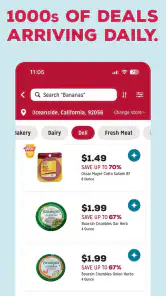
This free shopping app comes from GROCERY OUTLET HOLDING CORP. and is built around the Grocery Outlet experience. Its central appeal is straightforward: it helps shoppers look for lower-cost groceries, with the store presenting savings of 40–70%. I found that the most important question is not whether the app sounds attractive, but whether its information is easy to find and useful for the way you personally shop.
It has earned a 4.6 average from around 17 thousand ratings, with more than 500 thousand installs. Those figures suggest that it has reached a substantial group of shoppers, although popularity alone does not guarantee that it will suit every ability, routine, or shopping style. My review focuses especially on how comfortably it supports different contexts, including people who need clearer navigation, less visual strain, or a simpler way to prepare before entering a store.
How the shopping experience works for different people
Readability and navigation before a store visit
The app’s strongest idea is its focus. It is not trying to be a general marketplace with thousands of unrelated sellers. The connection to Grocery Outlet gives the experience a clear purpose: use the app to orient yourself around a discount grocery trip. That narrower role can be helpful for someone who does not want to scroll through a broad supermarket platform filled with delivery options, restaurant listings, loyalty promotions, and unrelated recommendations.
For me, the best way to use it is before leaving home. I would open it while making a rough meal plan, check what seems relevant to the trip, and then create a short mental or written list. This approach matters for users who find busy environments difficult, because a little preparation can reduce the number of decisions made in the aisle. It also helps shoppers who need to limit walking, avoid repeated trips, or keep the visit brief.
The app is available for devices running Android 7.0 or later, which makes it usable on a wide range of older Android phones. That is a meaningful practical advantage for people who do not replace their phone frequently. At the same time, an older device may have a smaller display or slower performance, so the experience can vary depending on the phone rather than on the app alone.
I would not treat the app as a replacement for a carefully organized grocery list. Its value is better understood as a preparation layer. If you need exact quantities for a recipe, a detailed pantry inventory, or a tightly controlled weekly budget, you may still need a notes app, spreadsheet, or dedicated list tool beside it. The shopping app can help you decide where to look for bargains, but it does not remove the need for personal planning.
More From Our News Desk

Clash of Clans Is Won Between the Battles

Android Auto Makes the Case for Quieter Car Software

MobiOffice: Transforming Mobile Productivity with Seamless Integration

EA SPORTS FC™ Mobile Soccer: Redefining Mobile Sports Gaming

How Microsoft OneDrive Became a Mobile Productivity Giant

How Google Translate Breaks Language Barriers Effortlessly
Readability is especially important for people with low vision, dyslexia, attention difficulties, or temporary visual fatigue. In my use, I would keep the phone at a comfortable distance, increase the device’s text size where possible, and avoid relying on the screen while walking. I also recommend checking information at home or in a quiet place rather than trying to read everything beside a crowded display. These habits are not glamorous, but they make the app more manageable.
A useful, less obvious workflow is to separate browsing from decision-making. First, look through the app without trying to build the entire shopping trip. Then pause and write down only the items that genuinely fit your meals and budget. This prevents bargain hunting from turning into impulse buying. Discount shopping can save money, but a low price is not automatically useful if it leads to food waste or purchases that do not fit your household.
Motor comfort and sensory load
Shopping apps are often judged by how quickly someone can tap through them, but that overlooks users with tremors, limited dexterity, joint pain, or one-handed phone use. I found that the app is most comfortable when used in short sessions, with the phone supported on a table or held in the hand that feels more stable. Preparing at home is preferable to trying to operate the screen while carrying bags or pushing a cart.
For shoppers with motor limitations, the practical trade-off is clear. The app may reduce unnecessary movement by helping you decide what to look for before arriving, but it cannot make the physical store itself easier to navigate. You may still need to reach shelves, compare packaging, move through narrow areas, or ask an employee for help. I would use the app to reduce planning effort, not to assume that the whole shopping trip becomes accessible.
People who are sensitive to visual clutter may also prefer a slower approach. Grocery shopping already involves bright packaging, changing signs, background noise, and many competing choices. A discount-focused app can add another stream of information if you browse without a plan. I recommend opening it with one question in mind, such as whether it can help with tonight’s dinner or a small set of household staples.
That single-purpose method is one of the most useful ways to make the experience calmer. Instead of attempting to memorize every attractive offer, I would take a screenshot or write a short note only when it supports a concrete plan. The app should assist memory, not become another source of information that you must constantly hold in your head.
Voice features, magnification, contrast controls, and other support tools may depend on the phone’s operating system and personal settings. I would not assume that every part of the interface will respond perfectly to every accessibility setting. Anyone who depends on a particular assistive setup should test the app at home before relying on it for an important trip. That is especially sensible when the shopping visit involves limited time, transportation constraints, or another person’s schedule.
Using it when circumstances change
The most convincing use case is a short, budget-conscious trip after work. Imagine that I have little energy, need ingredients for a few meals, and do not want to walk through several stores comparing prices. I can use the app before leaving, identify the Grocery Outlet option as my first stop, and go in with a smaller list. If the trip does not provide everything I need, I can then decide whether another store is worth visiting instead of making multiple unplanned stops.
This can also help caregivers and family members who shop for someone else. A relative could prepare a short list at home, review the app before traveling, and use the store visit for the items that appear most worthwhile. The benefit is not just potential savings; it is reducing uncertainty. A planned visit is easier to explain and coordinate than a trip based entirely on wandering through the aisles.
For people using public transportation, situational access becomes even more important. A bargain is less useful if finding it requires an extra journey that costs time, energy, or transit fare. I would compare the likely savings with the effort of reaching the store, especially when shopping with a mobility aid, a child, or heavy bags. The app can support that decision, but it cannot calculate the personal cost of the trip for you.
It is also useful for flexible shoppers. Grocery Outlet’s appeal is closely tied to finding deals rather than following a rigid catalog of identical products every week. If I am willing to change a brand, flavor, or meal based on what looks worthwhile, the app fits that mindset better than a conventional supermarket app built around repeat ordering.
On the other hand, it is less suitable for someone who needs guaranteed availability of a specific product. A person managing strict dietary requirements, allergies, medical nutrition needs, or a highly particular household routine may need a store with more predictable inventory and clearer product control. In that situation, the ability to browse bargains is secondary to certainty, and a standard supermarket ordering app may be the safer choice.
Where the app still creates barriers
The first barrier is the nature of discount grocery shopping itself. Lower prices can involve changing stock and a less predictable selection. That uncertainty may be enjoyable for an adventurous shopper, but frustrating for anyone who needs to plan exact meals or avoid substitutions. The app can make the search more efficient, yet it cannot turn a bargain-oriented store into a fully predictable supermarket.
A second barrier is the difference between digital preparation and physical access. Even a clear screen does not solve problems such as difficult parking, long walking distances, crowded aisles, heavy doors, or shelves that are hard to reach. If those issues determine whether a store visit is realistic, I would investigate the physical location and arrange assistance rather than relying on the app alone.
A third barrier is cognitive load. Savings language can encourage shoppers to keep looking for one more deal, even after the useful part of the trip is complete. I recommend setting a stopping rule before browsing: for example, choose the items needed for the planned meals, then stop. This is a small but important protection against overspending disguised as bargain hunting.
The app is also not the right tool for every shopping pattern. If you mainly want recurring delivery, a precise digital cart, automatic replenishment, or a detailed record of household consumption, a larger supermarket platform may serve you better. If you enjoy visiting Grocery Outlet but rarely plan ahead, the app may offer limited value unless you make it part of a repeatable routine.
Version 7.2.0, identified as build 732, is the current version I reviewed. The app was released on November 4, 2022, and carries a Mature 17+ content rating. The age label is worth noting for families who share devices or supervise younger users, even though grocery shopping itself is an ordinary household activity. I would check the store’s current compatibility and content details before installing on a shared family phone.
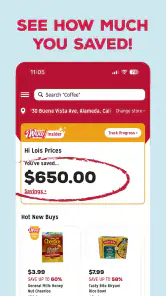
Because the app is free, trying it carries little financial risk. Still, “free” does not mean it will save every shopper money. The real result depends on whether the available bargains match your needs, whether the store is convenient, and whether the app helps you avoid unnecessary purchases. I judge it as a tool for better preparation, not as a promise that every trip will cost less.
Who I would recommend it to
I would recommend it to shoppers who are comfortable with flexible product choices and want a simple way to make a Grocery Outlet trip more deliberate. It is particularly useful for people who compare prices, cook around available ingredients, or want to reduce the number of decisions made inside a busy store. It can also help someone who experiences fatigue by shifting part of the planning process to a quieter moment at home.
I would be more cautious for users who rely on highly structured shopping systems. If your list must match exact brands, sizes, or nutritional specifications, the app may be better as a secondary reference than as your main shopping system. The same applies if you need a shopping experience designed around delivery, recurring orders, or detailed accessibility controls.
For older adults or anyone nervous about new shopping technology, I would start with a single trip rather than attempting to learn every part at once. Open the app with a family member or support person, decide what information is actually useful, and write down the final list in a familiar format. That combination keeps the app from becoming a barrier in its own right.
For users with visual, motor, or sensory needs, the most inclusive strategy is to customize the surrounding routine: use device-level text and display settings, browse while seated, avoid using the phone while moving, and leave enough time for a backup plan. These steps do not prove that every interface element will work for everyone, but they make the app more adaptable in everyday use.
My inclusive verdict
After using it as a planning aid, I see Grocery Outlet Bargain Market as a focused shopping app with a clear audience. Its connection to a discount grocery chain makes it more useful for flexible, price-aware shoppers than for people seeking a fully controlled online supermarket. The free price removes an obvious obstacle, and support for Android 7.0 or later means it is not limited to the newest phones.
What I appreciate most is the chance to move some of the shopping effort away from the store floor. That can improve comfort for people dealing with fatigue, sensory overload, limited time, or difficulty making quick decisions. The strongest results come when I use it briefly, turn promising information into a small personal list, and accept that the store’s selection may require flexibility.
My main reservation is that digital convenience should not be confused with complete accessibility. Physical store conditions, changing inventory, exact product requirements, and the effort of comparing deals can still create real barriers. If those factors matter more to you than bargain discovery, another grocery option may be a better fit.
Overall, I would suggest giving it a try if Grocery Outlet is convenient and you enjoy planning meals around worthwhile finds. I would skip it as a primary solution if you need guaranteed products, recurring delivery, or a highly structured cart. Used with realistic expectations, Grocery Outlet Bargain Market is a helpful preparation tool: not a replacement for your list, your judgment, or assistance when you need it, but a practical way to make a discount-focused shopping trip more intentional.
Grocery Outlet Bargain Market Frequently Asked Questions
Who develops Grocery Outlet Bargain Market, and is it the official store app?
Grocery Outlet Bargain Market is developed by GROCERY OUTLET HOLDING CORP. and is intended for shoppers looking for information and savings connected with Grocery Outlet. If you already shop at the chain, the app can be a convenient place to explore its shopping-related features before or during a store visit. It is a shopping app rather than a general grocery marketplace.
How much space does the app need, and should I check anything before installing it?
Before downloading, check that your device meets the app’s operating-system requirement and has enough available storage for an installation and future updates. The Android minimum is 7.0 or later. Keeping your operating system and app current can also help avoid compatibility issues. The app is free to download, so you can install it without paying an upfront purchase price.
Is Grocery Outlet Bargain Market available for my phone?
Grocery Outlet Bargain Market is a shopping app for Android and iOS users. On Android, it requires version 7.0 or later, so it is worth checking your device’s operating system before downloading. The app is free, and the developer is GROCERY OUTLET HOLDING CORP. Its age rating is Mature 17+, which may also affect whether it can be installed through your device’s store settings.
Who is the app intended for, and what kind of shopping experience should I expect?
The app is aimed at people who shop at Grocery Outlet and want a convenient way to keep up with savings and store information. Grocery Outlet Bargain Market is a shopping app, not a general-purpose grocery delivery service. Its store summary highlights savings of 40–70% on groceries, while the in-store experience can involve changing products and offers. It is most useful for shoppers who are comfortable checking what is available locally.
What is the Grocery Outlet Bargain Market app used for?
The Grocery Outlet Bargain Market app is designed to help shoppers discover deals, check promotions, and stay informed about products available at participating stores. It can be useful for planning a budget-friendly grocery trip, although product availability and pricing may vary by location. Because Grocery Outlet stores often carry changing inventory, the app should be viewed as a way to find savings rather than a complete real-time catalog.
Pros
- Deep discounts on groceries
- snacks
- and household essentials
- Treasure-hunt shopping makes finding unexpected bargains enjoyable
- Many products include premium and specialty brands
- Frequent inventory changes can reveal new deals each visit
- Private-label options often provide good value for everyday items
Cons
- Stock varies widely
- so a favorite product may not be available
- Fresh produce quality and selection can differ between locations
- Some deals require checking expiration or best-by dates carefully
- Stores may have limited quantities of popular discounted items
- Not every location offers the same brands
- products
- or services
- Category
- Shopping
- Version
- 7.2.0 (732)











