GovAuctions.com - Shop Surplus
- 2.19K
- 4.8
- Installs
- 500.00K
- Price
- Free

Screenshots
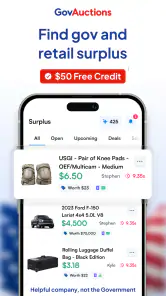
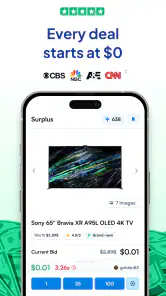
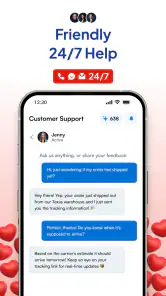
Analysis by Reviewed
I approached GovAuctions.com - Shop Surplus as a beginner looking for a practical way to browse government and retail surplus without starting from scattered web searches. It is a free shopping app from Auctions LLC, aimed at people who want to discover listings and decide whether a surplus purchase is worth further attention. My first impression was that it works best as a discovery and research tool rather than as a replacement for ordinary online shopping.
The appeal is easy to understand. Surplus buying can uncover unusual products and potentially attractive deals, but it also asks you to slow down and inspect what you are considering. This app puts that browsing experience on a mobile screen, which is useful when I want to check listings during a commute, compare possibilities from the sofa, or save something to revisit instead of making a rushed decision.
What to Expect When You Open the App
The app belongs to the shopping category, but it does not feel like a conventional retail catalog where every item follows the same format and buying process. The focus is on government and retail surplus, so I would expect variety in the listings and differences in how appealing or practical each opportunity may be. That variety is part of the fun, although it also means I need to read carefully rather than judge an item from its title alone.
Its store summary presents the central idea clearly: discover and save on surplus. In practice, I found that the most useful mindset is to treat each listing as a lead. I can browse, identify items that fit my needs, and keep promising options together while I investigate the details. That is more valuable than simply scrolling through products with the expectation that every listing will offer a straightforward, familiar checkout experience.
The audience response is encouraging. The app holds a 4.8 average from around 15 thousand ratings, with roughly 2.2 thousand written reviews, and it has passed 500 thousand installs. Those figures suggest that the concept has attracted a substantial group of shoppers. They are not a guarantee that every listing will suit me, but they do make the app feel established enough to try rather than experimental.
It is free to install and carries an Everyone age rating, so the initial barrier is low. The release date is October 3, 2025, and the current version is 7.13.16. Compatibility begins with Android 7.0, which is helpful for people using older Android phones. I still recommend keeping expectations realistic: compatibility and a free download make access easy, but they do not remove the need for careful shopping judgment.
Who will get the most from it
I think this is a strong fit for bargain hunters, resellers, collectors, repair-minded shoppers, and anyone who enjoys looking through unusual inventory. It can also help a person who has a broad need rather than a very specific brand requirement. For example, someone searching for equipment, furniture, tools, or other practical goods may appreciate seeing surplus possibilities that would not appear in a normal retail search.
More From Our News Desk

Clash of Clans Is Won Between the Battles

Android Auto Makes the Case for Quieter Car Software

MobiOffice: Transforming Mobile Productivity with Seamless Integration

EA SPORTS FC™ Mobile Soccer: Redefining Mobile Sports Gaming

How Microsoft OneDrive Became a Mobile Productivity Giant

How Google Translate Breaks Language Barriers Effortlessly
The app is less suitable for someone who wants a predictable product page, a uniform return experience, and immediate certainty about condition. If I need a new item with a precise specification today, a standard retailer may be the better choice. Surplus shopping rewards patience and inspection, so a user who dislikes ambiguity may find the process tiring.
Getting Set Up Without Overcomplicating It
My advice for a first-time user is to begin with a clear purpose. Before browsing, I would decide whether I am looking for something for personal use, a possible resale item, or simply an interesting deal. Each goal changes how I judge a listing. Personal use puts condition and suitability first; resale adds room for transport, cleaning, and demand; casual browsing can be more exploratory, but it still benefits from a spending limit.
After installing the app, I would spend a few minutes learning how its browsing and saving flow feels before searching seriously. The important early action is not finding the cheapest-looking item. It is understanding how I move from a listing to a saved shortlist and how easily I can return to that shortlist later. A smooth saving habit prevents the common mistake of losing a promising item among dozens of quickly viewed results.
I also recommend creating a simple note outside the app for anything that may affect the real cost. I might record the item, the apparent condition, the location or collection concern if shown, and the maximum amount I am comfortable spending. This is not busywork. Surplus deals can look attractive when viewed individually, while the combined cost of travel, delivery, repair, accessories, or cleaning changes the decision.
One of the less obvious strengths of this type of app is that it supports a two-stage workflow. First, I use the phone for fast discovery and saving. Later, I return to the shortlist with a calmer eye and compare the candidates. That separation is useful because browsing encourages impulse, while reviewing a shortlist encourages judgment. I would not treat every saved item as a purchase intention; I would treat it as a research folder.
Privacy and practical preparation
Because this is a shopping app, I would install it from the official store and review the screens presented during setup in my own device. I would avoid entering information simply to browse unless the app requires it for a particular action. Keeping the first session limited to discovery lets me decide whether the catalog and workflow are genuinely useful before investing more time.
I would also make sure my phone has enough battery and a reliable connection when I plan to compare several listings. That sounds basic, but surplus browsing often leads to side-by-side checking, repeated revisits, and notes. A rushed session makes it easier to overlook an important detail or save an item without remembering why it seemed worthwhile.
Reaching the First Meaningful Success
For me, a successful first session would not be completing a purchase. It would be finding one realistic candidate, saving it, and explaining to myself why it deserves a second look. That is a more reassuring first milestone because it teaches the app’s value without pressuring me into spending money before I understand the process.
I would begin with a category or type of item I already understand. Familiarity gives me a reference point for judging condition and value. If I search for something completely unfamiliar, an attractive title or photograph can influence me more than it should. With a product I know, I can ask better questions: Is the apparent condition acceptable? Would replacement parts be easy to find? Is the item still useful if it needs work?
Once I find a candidate, I would read the entire listing rather than stopping at the first appealing detail. I would look for information about what is included, what may be missing, and whether the description changes my original impression. I would then save it and continue looking for at least one alternative. The comparison matters because the first acceptable option is not automatically the best one.
A realistic everyday scenario would be a person furnishing a workshop on a limited budget. Instead of buying every tool new, I could use the app during a lunch break to look for surplus possibilities, save a few candidates, and review them at home. I would then compare the likely usefulness of each item with the time and money needed to collect, repair, or supplement it. The app helps with discovery; my decision still depends on the complete situation.
Another useful workflow is to search with a specific ceiling in mind. If I am shopping for a personal project, I might decide that the total commitment must remain within a fixed amount, including likely extras. I would save only listings that appear compatible with that limit. This turns an open-ended browsing session into a manageable shortlist and reduces the temptation to rationalize an expensive “deal.”
How I judge whether a surplus listing is worthwhile
I use a simple three-part check. First, I ask whether the item solves a real need. Second, I consider whether I can accept its apparent condition and any uncertainty. Third, I estimate the effort after acquisition. An item that is cheap but difficult to move, clean, repair, or verify may be less useful than a more ordinary retail purchase.
The strongest non-obvious lesson is that the app’s saving function is most valuable when I use it negatively as well as positively. Saving several options helps me notice which ones I would reject after a closer look. That teaches me what matters in the listings and improves later searches. I am not just collecting bargains; I am building a personal filter for surplus inventory.
I would also separate “interesting” from “actionable.” Some listings may be fascinating because they are unusual, but that does not mean they fit my budget, space, skills, or schedule. Marking the difference prevents the app from becoming an endless stream of distractions. My first meaningful success is a candidate I could realistically pursue, not the most surprising item I happened to see.
Where First-Time Users Can Get Confused
The biggest source of confusion is assuming that surplus shopping behaves exactly like standard retail shopping. In a normal store, two similar products often have comparable descriptions, condition, and purchasing expectations. Surplus inventory may require more interpretation. I would read each listing on its own terms and avoid assuming that an item is complete, ready to use, or equivalent to a new product merely because the title sounds familiar.
Another common mistake is confusing a low apparent price with a low total cost. I would consider transportation, delivery, storage, cleaning, repairs, missing components, and the value of my time. This is especially important for bulky goods or equipment. A deal that works for someone nearby may not work for me if reaching it requires a long trip.
Saving an item can also create a false sense of progress. A saved listing is useful because it gives me a place to return, but it is not the same as verifying suitability. I would revisit saved items and remove anything that no longer meets my criteria. A small, current shortlist is more useful than a large collection of forgotten possibilities.
I would be cautious about relying on photographs alone. Images can help me spot obvious wear, missing pieces, or a size problem, but they cannot replace careful reading. If an item matters financially, I would seek the clearest available understanding of its description and practical acquisition requirements before committing. The app can make discovery easier; it cannot turn an uncertain surplus item into a guaranteed purchase.
There is also a psychological trap in browsing. The unusual nature of surplus can make an item feel rare or urgent, encouraging me to decide too quickly. My workaround is to save first and evaluate second. If the item still makes sense after I compare it with alternatives and calculate the broader cost, then it deserves further attention. If not, I have avoided an impulse decision without losing anything important.
When another shopping option is better
I would choose a conventional retailer when I need a new product with consistent specifications, predictable availability, and a straightforward purchase path. Retail marketplaces are also better when I need to compare identical items across sellers or find a replacement quickly. Their strength is standardization, while this app’s strength is the chance to discover surplus inventory that does not fit a normal catalog.
I would choose a local classified marketplace when proximity is my main concern and I want to communicate directly with a nearby seller. That option may make inspection or collection easier, but it can be less organized for browsing a broader surplus selection. GovAuctions.com - Shop Surplus is more appealing when I want a dedicated place to explore government and retail surplus rather than search through unrelated listings.
I would skip the app for a purchase where safety, exact condition, or guaranteed compatibility is critical and I cannot comfortably verify those points. That does not make the app poor; it simply reflects the trade-off of surplus shopping. The more consequences a wrong purchase carries, the more valuable a standardized retailer or specialist supplier becomes.
Turning Browsing Into a Repeatable Routine
Once I understand the basic flow, I would use the app in short, intentional sessions instead of leaving it open for aimless scrolling. One session can be for discovery, another for reviewing saved items, and a later one for deciding whether a candidate is worth pursuing. This rhythm keeps the app useful without allowing every interesting listing to compete for my attention at once.
A helpful routine is to maintain separate mental groups: items I would buy for myself, items that might be worthwhile for resale, and items that are merely interesting. Even if the app does not provide dedicated labels for those purposes, I can preserve the distinction through my notes and browsing habits. The trade-off is a little organization in exchange for much clearer decisions.
For resale, I would be especially conservative. A surplus item is not automatically profitable because resale demand, storage, testing, cleaning, and time all matter. I would only pursue a candidate if I could describe who might want it and why. If I cannot answer that before acquisition, the app has shown me an opportunity to investigate, not a business opportunity.
For personal projects, I would prioritize repairability and completeness over the lowest visible cost. A slightly less exciting item that can be used quickly may create more value than a cheaper one that becomes a long-term repair project. This is where the app works well as a research companion: it exposes possibilities, while my own practical knowledge determines which ones are sensible.
The developer, Auctions LLC, has positioned the product around surplus discovery rather than a broad, generic shopping identity. I appreciate that focus because it gives the app a clear reason to exist. Its value depends on whether I actually want this kind of inventory, though. If I rarely shop for surplus, I may not return often enough to justify making it part of my regular shopping routine.
My recommendation after using it
I recommend trying GovAuctions.com - Shop Surplus if you enjoy searching for value and are willing to inspect opportunities carefully. The free entry point makes experimentation easy, and the app is particularly useful for building a shortlist of unusual or practical surplus items before deciding what deserves serious attention.
I would not recommend approaching it as a magic bargain button. The best results come from setting a purpose, saving selectively, comparing alternatives, and accounting for the full effort behind a purchase. Users who want instant certainty may be happier with a traditional retailer, while patient shoppers can find the app a more interesting way to broaden their options.
My suggested next step is simple: install it, choose one product area you already understand, save a small number of credible candidates, and review them later with a realistic budget and practical plan. If that process produces even one item worth investigating, you have learned the app’s real strength. Use it as a careful surplus-discovery tool, not as a substitute for judgment, and it becomes much easier to decide whether it belongs in your shopping toolkit.
GovAuctions.com - Shop Surplus Frequently Asked Questions
What does the app’s Everyone age rating mean for families?
GovAuctions.com - Shop Surplus has an Everyone content rating, so it is presented for a general audience. The app is a shopping platform, and its auction listings can involve high-value purchases and detailed terms. Parents and guardians may still want to discuss bidding, spending limits, and payment decisions with younger users. Review each listing carefully before taking part in an auction.
Who develops GovAuctions.com - Shop Surplus, and how popular is it?
GovAuctions.com - Shop Surplus is developed by Auctions LLC. It has an average rating of 4.8 from around 15,000 ratings, with about 2,200 written reviews and over 500,000 installs. These figures offer a broad sense of its reach and user feedback, but individual experiences may differ. Reading recent reviews can help you decide whether the app suits the way you prefer to browse auction listings.
Is GovAuctions.com - Shop Surplus free to download, and what devices can run it?
GovAuctions.com - Shop Surplus is free to download and is intended for Android devices running version 7.0 or later. It is a shopping app from Auctions LLC for discovering and saving government and retail surplus opportunities. Before installing, check that your device meets the minimum operating-system requirement and that you are downloading the app from a trusted app store.
What is GovAuctions.com - Shop Surplus?
GovAuctions.com - Shop Surplus is a shopping platform focused on surplus, seized, and government-related auction listings. It allows users to browse available items, review auction details, and explore opportunities to purchase vehicles, equipment, electronics, property, and other goods. The exact inventory can change frequently, so users should read each listing carefully and confirm the seller, auction terms, location, and closing date before placing a bid.
Can I buy items directly through the GovAuctions.com app?
The app is primarily designed to help users discover and review auction opportunities, while the actual purchase process may depend on the specific listing and auction provider. Some items may require registration on an external website, account verification, or participation through a separate bidding system. Before assuming an item can be bought immediately, check the listing instructions, payment requirements, buyer fees, and whether bidding is handled inside the app or through another platform.
Pros
- Access to surplus listings from government agencies in one place.
- Useful search filters help narrow results by category and location.
- Listings may include vehicles
- equipment
- electronics
- and more.
- Can reveal lower prices than traditional retail for some items.
- Mobile access makes browsing auctions convenient while away from a computer.
Cons
- Availability and inventory can vary significantly by region and agency.
- Some listings may require pickup
- creating extra travel and transport costs.
- Item condition and descriptions can differ between individual auctions.
- Bidding may involve buyer premiums
- taxes
- or other additional fees.
- Auction purchases may have limited returns or no return option at all.
- Category
- Shopping
- Version
- 7.13.16











