

GotSport Live
- 13.00
- 3.0
- Installs
- 10.00K
- Price
- Free

Screenshots

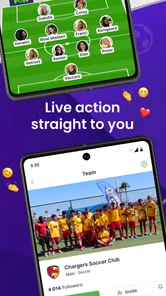
Analysis by Reviewed
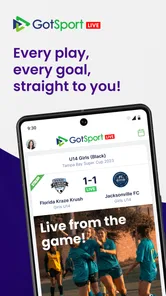
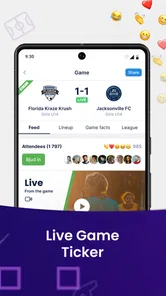
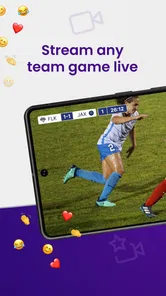
Following a youth soccer match from the touchline is one thing; trying to keep up with several fields, teams, or tournament moments at once is another. GotSport Live is built for the second situation, putting live sports coverage into a mobile app instead of making you depend entirely on being at the venue. I reviewed it as a sports companion for people who want updates and action close at hand, especially when travel, scheduling, or multiple matches make direct viewing difficult.
My overall impression is cautiously positive. The idea is useful and easy to understand, and the app is free, which makes it simple to try without committing money. At the same time, its modest public reception suggests that expectations should stay realistic. It is not a universal replacement for attending a match, a complete team-management platform, or a broad sports network. Its value depends heavily on whether the competitions and live coverage you care about are available through the GotSport ecosystem.
What GotSport Live is really useful for
GotSport LLC positions this as a sports app focused on bringing live action to your phone wherever you happen to be. In practical terms, I see it as most useful for supporters, families, players, and coaches who need a convenient way to follow events while away from the field. The strongest use case is not casual browsing for every sport; it is staying connected to organized soccer activity that matters to you.
Imagine a parent whose child is playing on one field while a sibling has a match elsewhere in the same tournament. Watching both in person may be impossible, but a mobile live-action service can reduce that frustration. A relative who could not travel can also use the app as a way to feel more involved. For a coach, it may be helpful when checking what is happening around a busy event, although I would not treat a phone stream as a substitute for direct tactical observation.
The app is free to install and carries an Everyone content rating, so it is approachable for a broad household audience. It runs on Android devices using version 6.0 or later, which covers many phones still in everyday use. The current version is 1.1.1.9, and the project was released on January 5, 2024. Those details matter because a reader with an older handset can quickly judge whether trying it is practical.
Its public footprint is still relatively small, with over ten thousand installs and an average rating of three out of five from around thirty ratings. There are also around thirteen written reviews. I would not read those figures as a definitive verdict, but they do tell me to approach the app as a developing service rather than a mature, universally proven platform. The limited volume means individual experiences may not represent every tournament or device.
Trust starts with knowing what the app is not
One of the most important distinctions is between live sports viewing and the broader tools people often expect from a soccer platform. I would not download this expecting a full club administration suite, a detailed training planner, a universal scoreboard for every league, or a social network for all sports. The app’s clear purpose is live action, so its usefulness should be judged by how well it helps you follow relevant events rather than by features belonging to other categories.
More From Our News Desk

 Gmail
GmailGmail in a Busy Inbox: Who Benefits Most?
From first account to crowded workday, Gmail earns its place through dependable search and flexible sorting—but its best fit depends on how much inbox maintenance you can tolerate.

 Prime Video
Switching to Prime Video: What Changes in Your Viewing Routine
Prime Video can make a compelling second home for streaming, but switching means learning a different catalog, rental layer, and route from browsing to playback.

 Universal TV Remote Control
Universal TV Remote Control Works Best as a Reliable Backup
A phone remote earns its place through quick setup and reliable habits. Here is how to get more from Universal TV Remote Control—and where its limits show.

 Weather - By Xiaomi
Weather by Xiaomi Review: Clear at a Glance, Less Clear Up Close
Xiaomi’s weather app makes everyday forecasts quick to scan, but its calm surface can leave useful details and recovery paths harder to find than they should be.

 X
XX Under Pressure: Can It Recover When Posting Goes Wrong?
A resilience-focused review of X, examining setup, mistaken posts, interruptions, weak connections, and the gaps that matter when recovery needs to be dependable.

 Clash of Clans
Clash of Clans Is Won Between the Battles
Its raids are quick; its community is a long-term project of coordination, teaching, rivalry, and shared responsibility—with all the friction that entails.
Latest News



This narrower purpose can be a strength. A focused app may be easier to open when you simply want to check an event instead of navigating through a large collection of unrelated functions. It can also be a weakness if you want standings, registration, team messaging, or deep match analysis in the same place. In that case, a league’s official app or a dedicated team-management service may suit you better.
Controls, privacy choices, and everyday confidence
When I assess an app like this, I separate what is visibly controllable from what I might merely assume. The confirmed basics are straightforward: it is a free sports app from GotSport LLC, intended for Everyone, and available for compatible Android devices. Those facts make the initial decision easy. The more personal questions—what information is requested, how accounts are managed, and what notifications can be adjusted—deserve attention inside the app and its permission prompts rather than guesswork.
I recommend taking a slow look at every permission request when first opening it. If the app asks for access that feels unrelated to watching live sports, pause before accepting. Android’s permission manager lets you review and change granted access later, so you do not have to treat the first prompt as permanent. This is a small habit, but it is especially useful when a sports app is used by a child’s family or on a shared device.
The same principle applies to account controls. If sign-in is offered, use an email address you are comfortable associating with sports activity, and avoid recycling a password used for banking, work, or another important service. If the app can be used without an account for some content, that may be preferable for occasional viewers. If an account is required for the event you need, keep the profile limited to necessary information rather than adding personal details simply because a form presents extra fields.
I would also review notification settings before a tournament becomes busy. Live sports can generate alerts at inconvenient times, particularly when several teams or events are followed at once. Allowing only the notifications that help you—such as an event you are actively tracking—can make the experience feel much less intrusive. If the controls are difficult to find, Android’s system notification settings provide a second place to reduce interruptions.
Handling sensitive moments around youth sports
Sports apps connected to youth competitions deserve a little more care than ordinary entertainment apps. Match coverage can be linked to team names, schedules, venues, and identifiable participants. I would avoid posting screenshots that expose more information than necessary, especially when sharing them publicly. A family group chat is different from a public social feed, and the safest choice is usually to share only what relatives actually need.
Parents should make the installation decision together with the young athlete’s responsible adult. The Everyone rating is reassuring in terms of broad suitability, but an age label does not answer every privacy or account question. It is still sensible to check who controls the account, which device receives notifications, and whether the child needs direct access at all. In many families, an adult’s phone is the better arrangement because it keeps viewing and account decisions with the parent.
There is also a practical safety issue: phones are distracting around fields. I found the app’s value highest when used before kickoff, during a break, or from a place where checking the screen does not interfere with supervising children or watching the match in front of me. Live coverage should add convenience, not encourage people to walk through a venue staring at a display.
For travel, I would prepare before leaving home. Open the app while connected to a trusted network, identify the event you expect to follow, and check that your account or viewing path works. This is more reliable than waiting until you are in a crowded venue with weak connectivity. I would also bring a charger or power bank if I planned to monitor a long day, because live video and frequent screen use can be demanding on a phone even when the app itself is lightweight.
Where user agency matters most
The best way to use GotSport Live is to make deliberate choices about what deserves your attention. Instead of leaving every possible event active, focus on the teams or matches that have a clear reason to matter to you. This reduces notification noise, conserves battery, and makes the app feel more like a personal viewing tool than an endless stream.
A useful workflow is to decide your priority before opening the app: one match to watch closely, one event to check occasionally, or a tournament to monitor while traveling. That simple distinction prevents a common mistake—trying to follow everything and enjoying nothing. If you are attending one game but want awareness of another, use the app for brief updates rather than keeping it open continuously.
I would also treat mobile coverage as a supplement rather than the only record of what happened. If a result or moment is important for a family decision, confirm it through the event organizer or the team’s established communication channel when appropriate. A live app can be convenient, but a single digital source should not be the only basis for changing travel plans, assuming a player is available, or deciding whether a match has ended.
For users who care about data practices, the responsible approach is to inspect the app’s current permission prompts, privacy information, and account options directly before entering personal details. I cannot responsibly turn a general sports purpose into a promise about data handling. What I can say is that visible choices matter: deny unnecessary access, keep notifications selective, use the smallest profile possible, and remove access later if your usage changes. Those steps preserve more control regardless of how often you use the app.
How it compares with familiar alternatives
The usual alternative is simply attending the match. Being at the field gives you atmosphere, context, and a view that does not depend on a phone connection. If you can attend, that remains the richer experience. GotSport Live earns its place when attendance is impossible or when several events overlap. It is a convenience layer, not a replacement for the community side of youth sports.
Another alternative is relying on messages from a coach, parent, or tournament organizer. Messaging can be better for confirmed logistics, lineup changes, and direct questions. It is usually worse for immediate visual connection with the action. I would use personal communication for decisions and the app for following the event itself, rather than expecting either tool to do both jobs perfectly.
Dedicated streaming platforms may offer a broader catalog, stronger playback tools, or more established viewing features, depending on the sport and competition. Their disadvantage is that they may not carry the particular local or organized soccer event you care about. The deciding factor is therefore coverage, not branding. If your team’s event is available here, the focused experience may be more useful than a larger service that does not include it.
Team-management apps sit in a different lane. They can be preferable for schedules, attendance, announcements, and administrative work. GotSport Live makes more sense when your immediate question is, “Can I follow the action?” rather than, “Can I organize the entire season?” Knowing that difference prevents disappointment and helps families avoid installing several apps without understanding which job each one performs.
Who should try it, and who should skip it
I would recommend trying it if you are connected to events that use GotSport’s live coverage, regularly miss matches because of work or travel, or want a simple way for distant relatives to stay involved. It is also a reasonable low-risk experiment for families because there is no purchase price and the age rating is Everyone.
I would skip it if you want a universal sports destination, extensive statistics, a complete team-management system, or guaranteed value without first checking whether your specific event appears. I would also choose another option if your phone cannot run Android 6.0 or later, if you have very limited mobile data, or if watching through a small screen would make you more anxious than connected.
My cautious verdict is that GotSport Live has a clear, worthwhile role: it can bridge the gap between being at a soccer venue and being completely out of the loop. I like the practical use case, the free entry point, and the possibility of following important action when real life gets in the way. Still, the three-out-of-five average and relatively small user base are reasons to test it with one relevant event before building your whole viewing routine around it.
In the end, I would keep it installed only if it consistently connects me to competitions I actually care about. Use it selectively, check permissions and notifications instead of accepting everything automatically, and keep official team communication available for important details. Its strongest quality is convenience with a specific purpose; its biggest risk is expecting a focused live-action app to behave like an entire soccer ecosystem.
GotSport Live Frequently Asked Questions
Which devices can run GotSport Live?
GotSport Live is a sports app from GotSoccer LLC. On Android, it requires Android 6.0 or later, so check your device’s system version before downloading. The app is also available for iOS. Keeping your device’s software current can help with general compatibility, while the experience may vary depending on your phone or tablet.
Who is GotSport Live intended for?
GotSport Live is aimed at people who want to keep up with soccer events, including players, parents, coaches, and supporters. It can be especially useful when a team’s tournament or league shares its information through GotSport. The app has an Everyone content rating, making it suitable for a broad audience, though families should still use sensible privacy practices when managing team-related details.
What is GotSport Live used for?
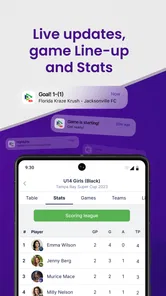
GotSport Live is designed to help players, parents, coaches, and supporters follow youth soccer events through mobile devices. Depending on the tournament or league, you can use it to find schedules, check field locations, view brackets, follow scores, and review standings. Its usefulness depends on whether the competition is managed through the GotSport platform and whether organizers have published complete event information.
Do I need an account to use GotSport Live?
Some information in GotSport Live may be available without signing in, such as public event details, schedules, scores, or standings. However, certain features can require a GotSport account or access provided by a team or event organizer. If you are a player or parent, the correct team registration and contact details may also be necessary for personalized information to appear correctly.
Can GotSport Live show live scores and match updates?
The app can display scores, results, standings, and other match updates when tournament staff or referees enter the information into the GotSport system. Updates are not always instantaneous, because they depend on the organizer’s reporting process, internet connectivity, and the availability of official data. If a score appears late or is missing, it may not indicate a problem with your phone.
Pros
- Live scores and match updates are easy to follow on the go.
- Useful for tracking youth and amateur soccer tournaments.
- Team schedules
- standings
- and results are grouped in one place.
- Helpful notifications can keep families informed about match changes.
- Clean layout makes finding clubs
- teams
- and events relatively simple.
Cons
- Coverage may depend heavily on whether organizers use the GotSport platform.
- Some event information can be incomplete or updated later than expected.
- The app is less useful outside supported tournaments and competitions.
- Frequent notifications may become distracting during busy tournament weekends.
- Performance and loading times may vary with weak mobile connections.





