GigU
- 136.00
- 4.0
- Installs
- 1.00M
- Price
- Free

Screenshots


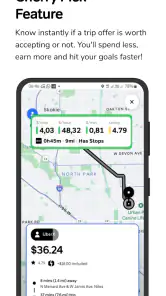
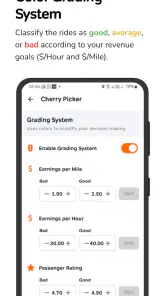
Analysis by Reviewed
I use GigU as a work companion for the practical decisions that come with driving for gig work, rather than as a general-purpose communication app. Its focus is helping drivers manage their work and keep their goals in view. That makes it most relevant if your income depends on time spent on the road and you want a more deliberate routine around each shift.
A useful baseline for a driving shift
My simplest approach is to decide what I want from a shift before I start: a clear work window, a target I can track, and a plan for taking breaks without losing sight of the day. GigU can fit into that routine as a tool for organizing gig work, but it cannot make a slow period busy or guarantee a particular outcome. I would treat its guidance as support for decisions, not a promise about earnings.
A realistic use is checking in with my plan before leaving home, then reviewing how the shift is going when I stop somewhere safe. That small pause helps me decide whether to continue, take a break, or call it a day. I would avoid trying to read or adjust anything while driving; the value of a planning app disappears if it becomes a distraction behind the wheel.
Settings and habits worth checking
Before relying on any work app, I make sure its basic setup reflects how I actually work: the right account details, the goals I care about, and any available preferences that affect how information is presented. I also check the current version and keep the app updated when practical. GigU is at version 1.1.55, and it supports Android 8.0 or later.
One useful habit is to separate planning from driving. I set up what I need while parked, then use a consistent point in the shift to review progress. Another is to avoid changing several preferences at once: if the experience feels better or worse afterward, I can tell which adjustment mattered. These are simple practices, but they make a tool easier to judge than constantly changing settings in the middle of a workday.
Latest News
Where it fits among driver tools
StopClub develops this free Auto & Vehicles app, which is rated for Everyone. It has an average rating of 4.0 from around 7,900 ratings, with more than 1 million installs. That level of adoption makes it a recognizable option for gig workers, though popularity alone does not tell me whether it suits a particular driving routine.
Compared with relying only on notes, a spreadsheet, or a basic timer, a dedicated gig-work app may keep relevant planning in one place and encourage a repeatable routine. Those simple alternatives can still be better if all I need is a quick record of hours or a personal target. I would also keep any platform-specific work decisions within the tools required for that work; GigU should not be mistaken for a replacement for a delivery or rideshare service.
Building a repeatable routine without overcomplicating it
For someone who works irregular hours, the main benefit is having a reason to pause and assess the shift instead of making every decision on impulse. I would try it for a few ordinary workdays, note whether it actually changes how I plan, and keep it only if that routine feels useful. If I rarely drive for gig work, a plain calendar or notes app is likely enough.
Faster patterns, with sensible limits
Experienced users can save time through habits rather than assuming there are hidden shortcuts: prepare before leaving, check progress only when parked, and use the same review point each shift. A short end-of-day note about what worked can make the next plan more realistic. The trade-off is that any extra tracking takes attention, so I would keep the routine lightweight and skip details that do not help me make a decision.
GigU is not the right fit for someone looking for navigation, direct access to every gig platform, or a guarantee of higher earnings. I would also be cautious about paying for features before understanding what is included: the app is free to download, while in-app purchases range from $6.95 to $49.95 per item. I would check the purchase details in the app and decide whether a paid option addresses a specific need rather than buying on the assumption that it will improve results.
Who is likely to get the most from it?
I would recommend giving it a look if gig driving is a regular part of your week and you want help making your workdays more intentional. It may be less useful for occasional drivers, people who already have a tracking system they trust, or anyone who expects an app to find work or control demand. The best test is whether it helps you make a better plan without adding another chore.
Making the routine work across a mixed day
A driver who switches between different kinds of gig work can benefit from keeping the planning question consistent even when the actual jobs vary. I would decide what counts as a useful shift before starting, then review the day against that same intention rather than judging every hour in isolation. This helps prevent a quiet stretch from turning into a rushed decision to keep going indefinitely. The app can support that structure, but the judgment about fatigue, expenses, and whether the day still makes sense has to remain mine.
For example, imagine starting with a morning work window and a personal target, then finding that demand is uneven. Rather than repeatedly checking the phone from the car, I would wait until a safe stop, compare progress with the time and energy I have left, and choose whether to continue or pause. If I do stop early, that is useful information for planning the next day; it is not necessarily a failure to hit the target. A tool is most helpful when it makes the decision clearer without pressuring me to chase a number.
Choosing what to track, and what to leave out
One trade-off with any goal-oriented driver app is that tracking can become its own job. I would keep the routine focused on details that change a real choice: whether to extend a shift, take a break, or set a more realistic plan next time. If a field or metric does not affect those decisions, I would not spend time maintaining it just because it is available. The best workflow is the one I can repeat on a busy day, not an elaborate system I abandon after a week.
It is also worth separating the app’s planning role from the records needed for personal finances or tax preparation. I would not assume that a work-planning tool replaces whatever bookkeeping method I rely on; if accurate expense records matter, I would keep a dedicated recordkeeping process as well. That distinction matters especially for drivers who want one app to handle everything. GigU makes more sense as part of a small toolkit than as a reason to discard tools that serve a different purpose.
How I would judge whether it earns a place
To decide whether it is useful, I would compare a few ordinary shifts rather than testing only on an unusually good or bad day. Before each one, I would write down a simple intention; afterward, I would ask whether the app helped me stick to a sensible plan or make a better adjustment. That gives me a practical test without pretending that a short trial can predict earnings. If I end up doing the same thing I would have done with a note on my phone, the simpler option may be enough.
People often want to know whether they need to pay to get value from it. I would begin with the free app and explore the available functions before considering an in-app purchase. Paid items cost between $6.95 and $49.95 each, so the sensible question is not whether a paid tier sounds more complete, but whether a specific item solves a recurring problem for me. I would read the purchase screen carefully and avoid buying anything based only on an expectation of increased income.
Another practical question is whether it replaces the driver’s existing platform apps. I would not treat it that way. GigU is a companion for organizing gig work, while the service through which I accept and complete jobs remains a separate part of the routine. Likewise, if I mainly need turn-by-turn directions, a navigation app is the more direct tool. Keeping those roles distinct reduces clutter and prevents me from expecting one app to cover tasks it is not meant to handle.
When a simpler or different tool is better
If my driving is occasional, my hours are predictable, or I only want to remember a weekly target, a calendar reminder or a basic note may be faster and easier to maintain. A spreadsheet can be a better fit when I need custom calculations or a record I can organize in my own way. GigU has a stronger case when I want a dedicated gig-work companion and am willing to build a small repeatable check-in around it. That is a meaningful distinction: the app is not automatically better just because it is purpose-built.
I would also skip it if having another screen-based task would make me more distracted or anxious during a shift. The useful version of this routine happens while parked, before setting off, or after finishing work. Drivers who feel tempted to monitor progress constantly may be better served by setting one planned review point and otherwise leaving the phone alone. Safety and attention matter more than squeezing another check into the day.
What the store details mean in practice
The app is free to download, is intended for Everyone, and was released on August 18, 2024. Its rating averages 4.0, and it has 136 written reviews alongside its broader rating activity. Those details give me a little context about its audience, but I would still judge it by whether its workflow matches my own. A rating can summarize other users’ reactions; it cannot tell me whether I will find the planning routine helpful.
On Android, the stated minimum is version 8.0, and the current version is 1.1.55. I would check compatibility before setting up a work routine around the app, especially on an older phone that I depend on throughout a shift. The store identifies it simply as GigU, so I would make sure I am choosing the intended app from StopClub rather than assuming a similarly named result is the same product. I would also avoid doing setup while heading out; a calm first session at home is easier than trying to learn an interface between jobs.
From a trial to a dependable habit
If I were introducing it into my week, I would begin with one familiar shift rather than changing my whole work system. I would set a modest plan, use one safe check-in point, and make a brief note afterward about whether the routine helped. After several normal workdays, I could decide whether to keep the habit, adjust it, or return to my old method. This gradual approach helps separate the app’s actual usefulness from the excitement of trying something new.
That trial also answers a question many drivers have: does a planning companion make work less stressful? It may help if uncertainty comes from losing track of your own intentions, but it cannot remove uncertain demand or guarantee a better day. I find that distinction important. A good tool can make my decisions more deliberate; it cannot take responsibility for them or change the conditions on the road.
When it comes to staying connected in our fast-paced digital world, having a reliable app that ensures seamless communication is a must. That's where GigU comes into play. You might be wondering what sets this app apart from the rest. Well, let me take you through my experience with this nifty tool and why it might just be the app you've been searching for.
Getting Started with GigU
Downloading and setting up GigU was a breeze. Available on both Android and iOS, the app is designed with user-friendliness in mind. I remember opening the app for the first time and being greeted with a clean, intuitive interface that made navigation feel like a walk in the park. It's like the app was reading my mind, offering me exactly what I needed, when I needed it.
Features that Stand Out
One thing that truly impressed me was the array of features packed into GigU. Whether you're looking to connect with friends, family, or colleagues, this app has got you covered. It offers everything from high-quality voice calls to video chats that make you feel like you're in the same room.
But that's not all. I found the group chat feature to be a game-changer. It's not just about texting; it's about creating a space where you can share files, images, and even plan events with ease. Plus, the app's robust security measures ensure that all your conversations remain private and secure. It's like having a digital fortress at your fingertips.
Performance and Reliability
Now, let's talk about performance. During my time using GigU, I was blown away by its reliability. The app runs smoothly without any hitches, even when I'm juggling multiple conversations at once. I never experienced any lag during calls, and messages were delivered instantaneously. It's as if the app was designed to keep pace with my hectic schedule.
Moreover, the app's lightweight design means it doesn't hog your device's resources. This was a huge plus for me, as I often find myself using several apps simultaneously. GigU blended seamlessly into my digital routine without slowing me down.
Final Thoughts
In the sea of communication apps, GigU stands out as a reliable and feature-rich option. Whether you're a busy professional or someone who just wants to stay connected with loved ones, this app ticks all the boxes. With its user-friendly interface, top-notch performance, and secure communication features, it's hard not to fall in love with GigU.
So, if you're on the hunt for an app that promises to keep you connected effortlessly, give it a try. Trust me, you won't be disappointed.
GigU Frequently Asked Questions
Is GigU free to download, and are there any costs to use it?
GigU is free to download, so you can try the app without paying an upfront price. It also offers in-app purchases, with items ranging from $6.95 to $49.95 each. Those purchases may affect the overall cost if you choose them, so check the purchase details in the app before completing a transaction.
What is GigU and what does it offer to users?
GigU is a versatile app designed to connect users with freelance gigs and short-term job opportunities. It provides a platform where individuals can find various types of gigs ranging from creative tasks to technical projects. Users can browse through available listings, apply for jobs, and manage their gig work all within the app. It's ideal for freelancers looking to widen their job opportunities and manage their work efficiently.
How does the payment system work on GigU?
GigU incorporates a secure payment system to ensure seamless transactions between employers and freelancers. Once a gig is completed, the payment is processed through the app, where funds are held in escrow until both parties confirm the completion of the task. This approach minimizes risks and ensures that freelancers get paid promptly for their services.
Is GigU available for both Android and iOS devices?
Yes, GigU is available for download on both Android and iOS platforms. Users can easily find the app on Google Play Store for Android devices and the Apple App Store for iOS devices. The app is designed to provide a smooth user experience regardless of the operating system, making it accessible to a wide range of users.
What measures does GigU take to ensure user security?
GigU prioritizes user security by implementing robust safety features. It requires identity verification for both freelancers and employers, ensuring that only legitimate users are on the platform. Additionally, the app uses encryption to protect user data and transactions, making sure that sensitive information remains confidential and secure from potential threats.
Pros
- User-friendly interface for easy navigation.
- Offers high-speed internet connectivity.
- Supports multiple devices simultaneously.
- Reliable customer support available 24/7.
- Competitive pricing with no hidden fees.
Cons
- Limited availability in rural areas.
- Occasional connectivity drops.
- Installation fees may apply.
- Data caps on certain plans.
- Router rental fees can be expensive.

- Category
- Auto & Vehicles
- Version
- 1.1.55











