Giant Food
- 1.77K
- 4.3
- Installs
- 500.00K
- Price
- Free

Screenshots
Analysis by Reviewed
I like to know what a grocery app can actually do before I build a routine around it. Giant Food is a free shopping app from Giant of Maryland LLC, and I’d treat it as a handy way to plan a shop, look for savings, and manage an order—not as a replacement for every reason I might visit a store. It’s rated for Everyone, has a 4.3 average from around 5,700 ratings, and has been installed over 500,000 times. That gives a first-time shopper a useful sense of its reach, while the real test is whether its tools fit your own weekly routine.
Getting Started with Giant Food
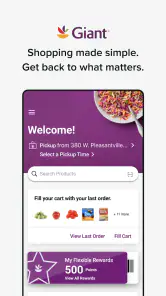
First things first, downloading the app was a breeze. Available on both Android and iOS, it’s just a tap away from turning your phone into a personal shopping assistant. Once you fire it up, you’re greeted with a clean, user-friendly interface that makes navigation a piece of cake. Setting up an account took me less than five minutes, and I was ready to dive into the world of groceries.
Features That Make Life Easier
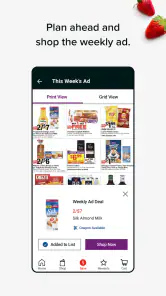
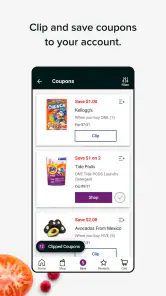
One of the things I absolutely love about the app is the personalized shopping experience. As you shop, the app learns your preferences and starts suggesting items you might like. It’s like having a store clerk who knows exactly what you need. Plus, the weekly ads and coupons are a godsend for those of us who love to save a buck or two.
The search functionality is top-notch, allowing you to find everything from organic avocados to your favorite brand of cereal with just a few keystrokes. And if you’re like me and sometimes forget that one crucial item, the app lets you easily add items to your cart even after you’ve started the checkout process.
Planning a first useful shop
For a first run, I’d begin with a short list of familiar staples rather than trying to recreate a whole pantry order. Search for the items you already buy, then take a moment to look through the weekly ads and coupons before settling on quantities. That order matters: a deal is only useful if it suits your household and won’t leave you buying something you would not otherwise use.
A practical test is a midweek top-up: add milk, fruit, and one forgotten ingredient for dinner, then review the cart before choosing how to get the order. That small shop helps you learn the search and checkout flow without making your first attempt feel like a major project. If you shop for someone else too, check the list together before placing the order; product names and package sizes can be easy to mix up when you are moving quickly.
Seamless Shopping Experience
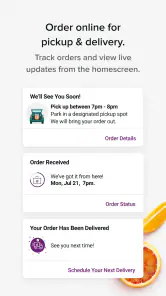
Let’s talk about the checkout process. It’s as smooth as butter. You can choose between delivery or pickup, which is perfect for those days when you just can’t bear to leave the house. The app keeps you updated on your order status in real time, so you’re never left wondering when your groceries will arrive. Plus, the contactless delivery option is a great feature for maintaining social distance.
More From Our News Desk

Clash of Clans Is Won Between the Battles

Android Auto Makes the Case for Quieter Car Software

MobiOffice: Transforming Mobile Productivity with Seamless Integration

EA SPORTS FC™ Mobile Soccer: Redefining Mobile Sports Gaming

How Microsoft OneDrive Became a Mobile Productivity Giant

How Google Translate Breaks Language Barriers Effortlessly
Making the order work for your household
Once the first small order feels familiar, I’d use the app differently depending on the kind of shop I need. For a planned weekly grocery run, I find it useful to group items mentally by meal or by aisle before searching. That makes it easier to notice when the basket contains ingredients for a real plan rather than a collection of tempting deals. For a quick top-up, I’d keep the list narrow and avoid adding extras just because a coupon catches my eye.
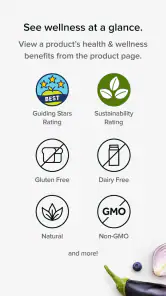
There is also a useful trade-off between speed and confidence. Searching by a specific brand can help me get closer to what I normally buy, while searching by a general food name may surface alternatives worth comparing. When the exact product matters—because of a preferred ingredient, size, or dietary need—I’d take the time to read the product details instead of assuming two similar names mean the same thing. The app can make finding options easier, but the final choice still needs a human check.
For a family shop, I’d make the list before opening the weekly offers and use the offers as a second pass. That keeps the meal plan in charge and helps prevent a discount from turning into an unnecessary purchase. If another person is sharing the shop, agree on substitutions and quantities before checkout. It is a small bit of coordination that can prevent a useful convenience from becoming a surprise when the groceries arrive or are collected.
Where it fits—and where it doesn’t
I’d recommend this app most to people who already shop at Giant Food and want to check offers, build a grocery order, or save a trip through the aisles. Compared with a paper list and an in-store browse, it makes searching and comparing your intended purchases more deliberate. Compared with a general shopping app, its appeal is the connection to Giant Food’s grocery shopping rather than a broad marketplace. If you prefer choosing produce by hand, or your shopping depends on browsing unfamiliar ingredients, an in-person trip may still be the better choice.
One useful habit is to treat suggestions as prompts, not instructions. They can help jog your memory, but I’d still check the cart against the meals you plan to make and the quantities you actually need. Likewise, I would review the order before confirming it, especially when changing a quantity or adding something late; a quick final scan is easier than discovering a missing dinner ingredient after the order is underway.
Choosing between the app and other ways to shop
The closest alternative is often not another app but the way you already shop: a handwritten list, a quick store visit, or ordering through a broader grocery marketplace. A list is simpler when I only need a handful of basics and already know where to find them. A store visit wins when I want to inspect produce or make decisions by looking at items in person. Giant Food makes more sense when I want to search for familiar products, review offers, and organize a shop tied to this grocery retailer.
I would not assume that an app-based order is automatically the cheapest or best choice for every basket. I’d compare the offer with what I intended to buy, consider whether a different size or brand actually suits my needs, and check the total before placing the order. For someone who shops at several grocery stores and always chooses the lowest available price, comparing across retailers may matter more than the convenience of keeping everything in one store’s app. For someone who values a repeatable routine at Giant Food, that narrower focus can be a strength.
It is also worth separating convenience from control. Pickup or delivery can save a trip through the aisles, but shopping in person gives me direct control over the produce I choose and lets me change course as I browse. If I’m buying ingredients for a particular dinner, the app helps me assemble a list in advance; if I’m still deciding what looks good, walking through the store may be more satisfying. Neither approach is universally better, so I’d use the app for the kind of shop it handles well rather than expecting it to replace every store visit.
Common questions before you rely on it
Is it free to download? Yes, the app itself is free. Is it suitable for a first-time user? I think so: start with a small list and learn the layout before doing a full weekly shop. Does it remove the need to visit a store? Not necessarily; delivery and pickup are useful choices, but shoppers who want to select every item themselves may prefer going in person. Those are the practical trade-offs I’d weigh before making it my only grocery routine.
Another question is whether it is useful if I do not have a complete meal plan. I think it can still help with a short essentials list or a midweek restock, but I would be more careful about browsing offers without a plan. That is when it is easiest to add appealing extras that do not solve an actual need. If I am exploring new recipes, I’d decide what I want to cook first, then search for the ingredients, rather than expecting the shopping app to do all the meal planning for me.
New users may also wonder whether they should build an account and a large cart right away. I’d start small, get used to how search and the cart behave, and only then rely on it for a larger shop. Before confirming an order, I would check quantities, product choices, and the selected pickup or delivery option. The most reassuring first success is not a perfect weekly routine; it is a modest order that arrives at the right point in your day and contains the things you meant to buy.
Who will get the most from it
In my view, the best fit is a regular Giant Food shopper who wants to make routine grocery tasks more organized. That could be someone planning meals for a household, a student restocking a few staples, or a busy person who would rather assemble a list at home than wander the aisles for every item. Its free price makes trying it a low-commitment way to see whether searching, offers, and order management match your habits. The app’s 8.13.1 version supports devices running Android 8.1 or later, so compatibility is worth checking before installing on an older phone.
I’d be less likely to recommend it as a main shopping tool to someone who rarely buys from Giant Food, prefers comparing every retailer before each purchase, or wants to make all product choices by hand. It is also not a substitute for deciding what your household needs: suggestions and coupons can help, but they cannot know whether you already have enough of an item or whether a deal fits your plans. The app works best when I bring a list and use its tools to carry out that plan, rather than asking it to make every decision for me.
Final Thoughts
In a world where time is money, Giant Food is a game-changer. It’s more than just an app; it’s a lifesaver for anyone looking to simplify their grocery shopping routine. Whether you’re a busy parent, a college student, or just someone who values convenience, this app is worth a download. So go ahead, give it a try, and thank me later!
My more measured recommendation is to try it with one ordinary shop and judge it by the parts of grocery shopping you most want to simplify. Make a short list, check the offers without letting them dictate the basket, and review everything before placing the order. If that feels easier than your usual routine, keep using it for the shops that suit it. If you still prefer selecting each item in person or comparing stores, there is no reason to force the app into a role it was not built to fill.
Giant Food Frequently Asked Questions
Is Giant Food free to download, and who is it for?
Giant Food is a free shopping app from Giant of Maryland LLC, designed for people who want to plan grocery trips, look for savings, and find meal inspiration. Its content rating is Everyone, so it is broadly suitable for users of all ages. As with any shopping app, you can decide whether its grocery-focused tools fit the way you prefer to shop.
What is Giant Food and how does it work?
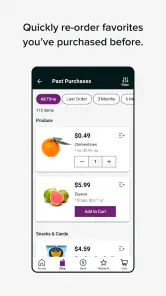
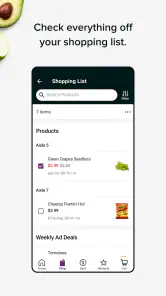
Giant Food is a comprehensive grocery shopping app that allows users to browse a wide selection of products, create shopping lists, and access exclusive deals and promotions. Users can shop for groceries online and choose either home delivery or in-store pickup at their convenience. The app also offers personalized recommendations based on shopping history, making it easier to find favorite items and discover new ones.
Is Giant Food available on both Android and iOS devices?
Yes, the Giant Food app is available for download on both Android and iOS platforms. Users can visit the Google Play Store for Android devices or the Apple App Store for iOS devices to download the app. The app is designed to provide a seamless shopping experience across both operating systems with features optimized for each platform. On Android, check that your device meets the app’s minimum operating-system requirement before installing.
Does Giant Food offer any loyalty or rewards programs?
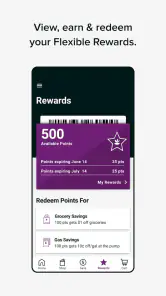
Giant Food has a loyalty program known as "Giant Choice Rewards" which allows users to earn points on every purchase. These points can be redeemed for discounts on future grocery purchases, fuel savings, and other exclusive offers. Users can easily track their points and rewards through the app, making it convenient to maximize savings and benefits.
Can I manage my grocery orders through the Giant Food app?
Yes, the Giant Food app allows users to manage their grocery orders efficiently. You can view your order history, track current deliveries, and modify or cancel orders if needed. The app provides real-time updates on delivery status, ensuring that users are informed every step of the way. This feature enhances the overall shopping experience by offering flexibility and control over your orders.
Pros
- Wide range of products available
- User-friendly interface
- Easy grocery delivery options
- Frequent discounts and promotions
- Efficient customer service
Cons
- Limited payment options
- App occasionally crashes
- Slow loading times
- Inaccurate product availability
- No loyalty program
- Category
- Shopping
- Version
- 8.13.1











