Giant Eagle
- 1.87K
- 4.5
- Installs
- 500.00K
- Price
- Free

Screenshots
Analysis by Reviewed
My first question with a grocery app is whether it helps me make a better trip, or just gives me another place to browse. Giant Eagle is most useful when I already shop at the chain and want to plan around its offers, keep a list, and remember account-linked savings. It is a free shopping app from Giant Eagle, rated for Everyone, and it makes the most sense as a companion to a regular store routine rather than a universal grocery planner.
Where it fits in a shopping routine
I see the app as a bridge between deciding what to buy at home and getting through a Giant Eagle shop. The useful question is not whether it replaces every shopping tool, but whether bringing the store’s ads, coupons, and list together saves me enough effort to keep using it. For a regular shopper, that can mean fewer separate steps before leaving the house. For someone who visits only now and then, the setup and account habits may not pay off as quickly.
A useful way to try it is to start with one ordinary trip, not a full household overhaul. Add the things you genuinely need, check whether any current offers apply, and see if the list is easier to use than your usual notes. This low-commitment test also reveals whether a retailer-specific tool suits you: if you routinely shop at several chains, you may prefer a neutral list that stays useful wherever you go.
Who gets the most from it
I’d recommend it most to regular Giant Eagle shoppers who like to plan ahead and are willing to use an Advantage Card for digital offers. If you only visit occasionally, the app can still help you check the weekly ads, but setting up a list and reviewing coupons may feel like extra work for a one-off trip. And if your main goal is comparing prices across several grocery chains, a retailer-specific app is naturally less useful than a general price-comparison approach.
A realistic use is a midweek shop after work. I’d look through the current ads at home, add the items I actually intend to buy to a list, then check available coupons before leaving. That order matters: browsing offers first can tempt you into adding things you didn’t need, while starting with your list helps keep the trip focused. The app is most useful when it supports a plan rather than becoming a reason to shop.
Small habits that make the app more useful
One practical detail is to treat the list as the trip’s working plan, not just a place to collect every interesting deal. When an advertised item belongs on your regular list, adding it from the ad can connect planning with the offer without rewriting the item later. I’d also review coupons before checkout rather than assume that simply browsing them applies savings; the original workflow described here is to add eligible coupons to the Advantage Card and scan that card at checkout.
Past purchases can help with repeat buying, but I wouldn’t let suggested items decide what goes in the basket. They are better used as reminders for staples you may have forgotten than as a substitute for checking what you need. That small distinction keeps personalization helpful instead of turning it into a longer shopping list.
More From Our News Desk

Clash of Clans Is Won Between the Battles

Android Auto Makes the Case for Quieter Car Software

MobiOffice: Transforming Mobile Productivity with Seamless Integration

EA SPORTS FC™ Mobile Soccer: Redefining Mobile Sports Gaming

How Microsoft OneDrive Became a Mobile Productivity Giant

How Google Translate Breaks Language Barriers Effortlessly
How the app fits into a grocery routine
The app sits between a store’s paper circular and a general-purpose notes app. A notes list is more flexible and works for shopping anywhere, but it won’t bring Giant Eagle’s weekly offers and digital coupons into the same flow. A paper ad is easy to glance at, yet it takes more effort to move an advertised item onto a list. If you already shop at Giant Eagle, keeping those tasks together is the main advantage; if you switch stores often, the convenience may not outweigh the limits of a single retailer’s ecosystem.
Navigating the Store with Ease
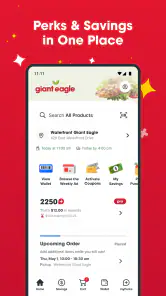
First off, let's talk about the user interface. The Giant Eagle app is super intuitive. Right from the moment you open it, you’re greeted with a clean and organized layout. I was impressed with how easy it was to find different sections like weekly ads, digital coupons, and even your personalized shopping list. You know that feeling when you walk into a store and know exactly where everything is? That’s what using this app is like. The app makes it really simple to navigate through all the features without feeling overwhelmed.
Weekly Ads and Deals
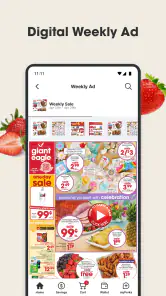
One of my favorite features has to be the weekly ads. It's like flipping through your favorite store circular, but better. I mean, who doesn’t love a good bargain? The app lets you browse all the current deals and even plan your shopping trip ahead of time. You can easily add items to your shopping list directly from the ads, which is a huge time-saver. Plus, you can set up notifications so you never miss out on deals. If you’re a budget-conscious shopper, this feature alone is worth checking out.
For a more disciplined shop, I’d use the ads to spot discounts on things I already buy, rather than treating every promotion as a saving. A deal only helps if the item suits your household and the purchase fits your plan. This is especially useful when shopping for a family: one person can build the list from the offers, then share the plan verbally or check it together before heading out, avoiding last-minute impulse additions.
Digital Coupons at Your Fingertips
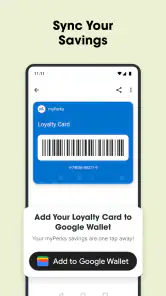
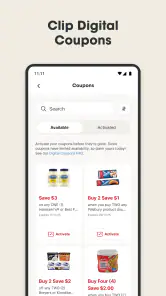
If you're anything like me and hate the hassle of clipping coupons, you’re going to love the digital coupons feature. With just a tap, you can add coupons directly to your advantage card. It’s super convenient because you don’t have to carry around physical coupons or remember to bring them to the store. Just scan your advantage card at checkout, and voila, savings galore! This feature makes it really easy to save money on your everyday purchases without any extra effort.
The trade-off is that digital savings depend on remembering the account-linked step at the register. I’d make checking the Advantage Card part of my checkout routine, just as I check that I have a payment card, so I don’t reach the end of the transaction and realize I overlooked it. Shoppers who prefer handling every discount automatically, or who don’t want to manage another store account, may find ordinary paper coupons or simply shopping without coupons less fiddly.
Personalized Shopping Experience
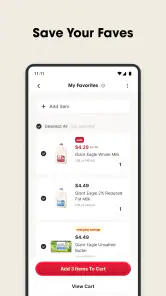
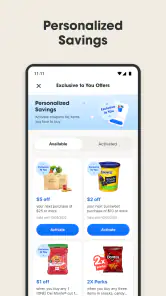
Another cool aspect of the app is the personalized shopping experience. The app learns from your shopping habits and suggests items you might be interested in. It’s like having a personal shopper who knows your tastes and preferences. Plus, the app keeps track of your past purchases, making it easy to reorder your favorite items. This feature is a game-changer for anyone with a busy lifestyle who wants to streamline their shopping process.
For returning shoppers, purchase history can be particularly handy when rebuilding a list after a busy week: use it to recall household staples, then remove anything you still have at home. That second check prevents an easy reorder from becoming unnecessary spending. I’d also treat suggestions as optional prompts, not proof that an item is currently needed; convenience is valuable, but the final list should reflect your cupboard and budget.
What regular users should know
The app’s current version is 3.2.157, and it first arrived on September 30, 2019. That gives existing users a clear point of reference for the product’s life so far, but a version number alone doesn’t tell me which individual screens or functions changed along the way. I’d judge it by whether the present combination of ads, coupons and list-making suits my routine, rather than assume a particular recent redesign or new capability.
For someone already using it, the best reason to keep it is continuity: a familiar place to check offers and revisit purchases before the next trip. Someone considering it for the first time can expect a retailer-focused tool rather than a complete grocery marketplace. It is not the right fit if you need one list that works equally well across competing stores, or if you’d rather avoid linking coupon savings to a store card.
What I’d watch for as I use it
Giant Eagle has an average rating of 4.5 from around 13,000 ratings, with over 500,000 installs and about 1,900 written reviews. Those figures suggest it has found an audience, though they can’t tell you whether its workflow matches your own shopping habits. It is available at no cost, and the stated minimum operating system is Android 6.0, so compatibility is worth checking on an older Android device before relying on it for a trip.
I’d also pay attention to whether notifications genuinely help me catch relevant offers or simply interrupt the day; setting them up only makes sense if I find them useful. The most important test is simpler: after a few trips, am I checking the ad, building a realistic list and remembering to scan the Advantage Card without extra hassle? If yes, the app is earning its place. If not, a basic list and the store’s in-person promotions may suit me better.
How to decide whether to keep it
One fair test is to compare the app with the method you already use, rather than expecting it to transform your shopping. On one trip, make a list in your usual notes app; on another, build it alongside Giant Eagle’s ad and coupons. Notice which method makes it easier to remember planned items and which creates more browsing. The point is not to track every cent, but to see whether the app reduces a real friction in your week.
It is also worth separating convenience from savings. A coupon can make an eligible purchase less expensive, but an offer on something you would not otherwise buy can still increase the total you spend. I’d decide what belongs in the cart before exploring deals, then treat the offers as a chance to adjust that plan—not as a shopping mission on their own.
Practical trade-offs before checkout
If more than one person contributes to the household shop, the app can help one person assemble a plan from the ads and purchase reminders. The practical limitation is that a list only helps if everyone can see and act on the same plan; if your household already coordinates through a shared notes tool, switching to a store-specific routine may not be worthwhile. I’d keep the household’s existing method if it prevents duplicate purchases and works across different stores.
For a quick stop, I would use the app selectively: check the list and any relevant coupon, then head in. For a larger planned shop, browsing the weekly ad first can be useful, but it is also where I’d be most deliberate about sticking to the budget. These two situations call for different levels of preparation, and the app is better when I use only the parts that solve the problem at hand.
What its track record can—and cannot—tell me
The app has a substantial audience, but popularity is not a guarantee that every shopper will like its workflow. A store-focused tool naturally serves people who already shop with that retailer better than people who want a single hub for every grocery run. I’d read the overall reception as a reason to consider trying it, not as a substitute for checking whether its list-and-card routine feels straightforward on my own device.
For Android users, the minimum system requirement matters most before installation on an older phone. I’d check compatibility before planning a shop around the app, especially if I rely on it to pull together the list and offers. The app is free, so trying it does not require a purchase, but a useful trial still depends on whether it fits the way I shop.
In conclusion, the Giant Eagle app offers a seamless shopping experience that combines convenience, savings, and personalization. Whether you're looking to snag the best deals, save time in-store, or just simplify your shopping routine, this app has got you covered. So, why not give it a try? You might just find that grocery shopping becomes a whole lot more enjoyable!
Giant Eagle Frequently Asked Questions
Is the Giant Eagle app free, and what devices can run it?
The Giant Eagle app is free to download and is designed for grocery shopping. On Android, it requires version 6.0 or later. It is also available for iOS devices, so shoppers can use the app on either platform. Before downloading, check that your device’s operating system meets the requirement and that you are installing the app published by Giant Eagle.
Can I use Giant Eagle without creating a shopping list or placing an online order?
Yes. The app can be useful even if you simply want to browse products or look for shopping deals. You can use its shopping tools to prepare for a store visit, while online ordering is another option rather than a requirement. This makes Giant Eagle suitable for shoppers who prefer choosing groceries in person as well as those who want to plan ahead on their phone.
What is Giant Eagle and how does it work?
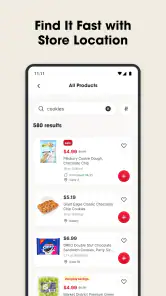
Giant Eagle is a supermarket chain that offers a mobile app to enhance your shopping experience. The app allows users to browse products, create shopping lists, and access exclusive deals and discounts. It also features a built-in rewards program to earn points on purchases. The app is designed to make grocery shopping more convenient, whether you choose to shop in-store or online.
Is the Giant Eagle app available for both Android and iOS devices?
Yes, the Giant Eagle app is available for download on both Android and iOS platforms. You can easily find it on the Google Play Store for Android devices and the Apple App Store for iOS devices. The app is free to download and offers a seamless experience across both operating systems, ensuring all users can access its features.
How does the Giant Eagle rewards program work through the app?
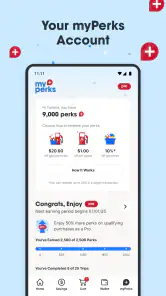
The Giant Eagle app integrates with the store's rewards program, allowing users to earn points on their purchases. These points can be redeemed for discounts on future shopping trips. The app lets you track your points, view available rewards, and receive personalized offers based on your shopping habits. It's a great way to save money while shopping at Giant Eagle.
Pros
- User-friendly interface for easy navigation
- Extensive product range available
- Convenient online shopping options
- Loyalty program offers good discounts
- Efficient customer service
Cons
- Limited delivery areas
- Some items may be out of stock
- Occasional app crashes
- Inconsistent app updates
- Requires account creation to browse
- Category
- Shopping
- Version
- 3.2.157











