Food Lion
- 10.96K
- 4.5
- Installs
- 1.00M
- Price
- Free

Screenshots
Analysis by Reviewed
I judge a grocery app less by how many screens it offers than by whether it helps me make a better trip without turning meal planning into another chore. Food Lion is most useful when I already know I’m shopping at Food Lion: it brings offers, a shopping list, and digital coupons into the same routine. It is free, developed by Food Lion, LLC, and rated for Everyone, so it is easy to try with a household member who helps plan or shop.
Quick checks work better than browsing on the go
For speed, I’d use the app in two short passes rather than browse everything in the aisle. At home, I can look through offers, decide which ones match meals I actually intend to make, and build a list. In the store, I can use that prepared list to keep moving and check a promotion only when it affects a real choice. That approach makes the app feel like a planning aid, not another distraction to manage while pushing a cart.
Its strongest time-saving idea is keeping the list and Food Lion-related savings close together. A paper flyer may be quick to scan, but it leaves me to remember which deals matter when I make the list. A generic notes or list app can be simpler for jotting down groceries, yet it does not serve the same store-specific role described here. If I shop at several chains and want a single view of their prices, I’d use a broader comparison method instead.
When a shopping session gets busy
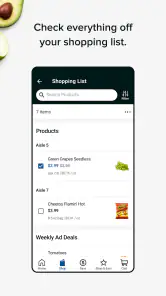
The app is a better fit for a planned grocery run than for making every decision from scratch in a crowded aisle. Imagine I’m heading home after work and need dinner ingredients plus the household basics. I can check relevant specials first, add the ingredients and essentials, then leave optional purchases off the list. At the store, the list gives me a practical path through the errand; I don’t have to repeatedly reconstruct the plan from a flyer or text thread.
There is a trade-off when several people are involved. Shared, real-time list updates can be convenient when one person remembers an item while another is shopping, but last-minute additions can also disrupt a carefully planned trip. I’d agree on the core items before leaving and treat new list entries as a prompt to check whether they are truly needed. That small habit makes collaboration more useful without making the list feel like an open-ended shopping invitation.
Reliability and a sensible backup
In ordinary use, the interface feels straightforward, and searches return results quickly in my experience. I did run into an occasional delay loading product images; refreshing is a reasonable recovery step, but I would not make an image-heavy screen the only place I record an important item. If I have a time-sensitive or unusually specific shopping list, I’d keep the essentials visible in the list before I arrive and have a simple written backup for anything I cannot afford to forget.
That is less a reason to avoid the app than a practical way to shop with any phone-based tool. A screen can be awkward to consult when I’m moving around, and a slow page can interrupt the flow even if the rest of the visit is smooth. I’d do detailed browsing before the trip, then rely on quick checks in-store. The app’s value is highest when it reduces decisions at the point of purchase rather than asking me to make more of them there.
More From Our News Desk

Clash of Clans Is Won Between the Battles

Android Auto Makes the Case for Quieter Car Software

MobiOffice: Transforming Mobile Productivity with Seamless Integration

EA SPORTS FC™ Mobile Soccer: Redefining Mobile Sports Gaming

How Microsoft OneDrive Became a Mobile Productivity Giant

How Google Translate Breaks Language Barriers Effortlessly
How it fits different shoppers
I’d recommend it first to regular Food Lion shoppers who want a retailer-specific list and are willing to check digital offers before shopping. It is also a reasonable choice for someone who is just beginning to organize grocery trips: a list is a clear place to start, and coupons can be considered alongside the items already planned. A household that shares shopping responsibilities may find the list workflow especially helpful, provided everyone keeps additions focused.
I’d skip it as a primary planning tool if I rarely shop at Food Lion, need to compare prices across multiple supermarkets, or want a retailer-neutral inventory of groceries. In those cases, a general list app or a multi-store comparison routine is a better match. The distinction matters: a store-focused app can make one retailer’s trip more convenient, but it should not be mistaken for an independent guide to the cheapest option across town.
Another useful habit is to separate “needed” from “interesting” while browsing deals. I’d put meal ingredients and household staples on the list first, then look at offers as a final check for a sensible substitute or planned purchase. This keeps a discount from quietly becoming an extra item. It also makes it easier to tell whether the app is helping my budget: the useful measure is whether it changes the cost of things I meant to buy, not how many promotions I viewed.
What the app is best suited for
I see this as a practical companion for people who already shop at Food Lion and want to prepare before heading out. It is less useful if you mainly compare prices across several supermarket chains: a store-focused app naturally makes it easier to plan around Food Lion than to evaluate every nearby alternative in one place. The app is free, and Food Lion, LLC is its developer; its Everyone age rating makes it suitable for a broad audience.
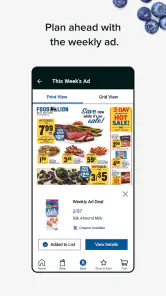
A useful routine is to check the weekly offers before writing a list, then add only the items you actually need. That small order of operations matters: starting with promotions can tempt me to buy things simply because they look like a deal. I’d treat the offers as a way to reduce the cost of a planned shop, not as a reason to change the whole meal plan.
First Impressions
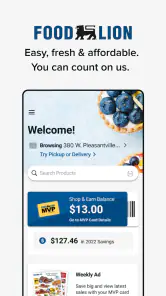
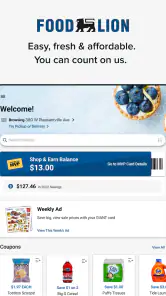
Upon opening the Food Lion app, I was greeted with a clean and user-friendly interface. The home screen is intuitive, with everything neatly categorized for easy navigation. Whether you’re looking for weekly deals, shopping lists, or digital coupons, everything is just a tap away. It’s like having your personal grocery assistant right in your pocket!
Shopping Made Simple
One of my favorite features is the ability to build a shopping list directly in the app. You can add items manually or simply scan barcodes from products at home. This not only saves time but also ensures you never forget an item again. Plus, the app syncs your list in real-time, so if your partner adds "milk" while you're at the store, you'll know instantly.
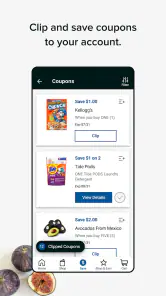
Another nifty feature is the digital coupons. Gone are the days of clipping paper coupons; now you can browse and add them directly to your MVP card with just a click. It’s a game-changer for those of us who love a good deal but hate the hassle of traditional couponing.
Planning around offers without overbuying
For a realistic after-work shop, I’d check the specials while deciding what to cook, add the needed ingredients to the list, and clip relevant coupons before leaving home. At the store, the list keeps the trip focused; if a promoted item is not on it, I can pause and decide whether it genuinely replaces something I planned to buy. This is where the app can help with budgeting, though it still takes a little discipline to avoid treating every discount as a saving.
Compared with paper flyers, the app puts offers and list-making in the same place, so I don’t have to transfer every useful item by memory. Compared with a general shopping-list app, its advantage is the connection to Food Lion deals and the MVP card. A neutral list app may be better if I shop at many different chains or want one shared list independent of a particular retailer.
Exploring the Weekly Deals
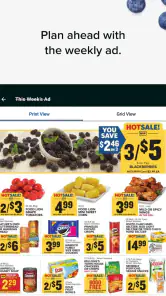
Every week, the app updates with new promotions and discounts. The "Weekly Specials" section is a treasure trove of savings, allowing you to plan your shopping around the best deals. I found the layout straightforward, with options to filter by category or search for specific items. It’s a great way to maximize savings without spending hours flipping through flyers.
User Experience
The app runs smoothly with minimal lag, and I appreciate how it minimizes the clutter often found in other grocery apps. The search function is robust, delivering accurate results quickly, whether you’re looking for a specific brand or a type of product. And if you ever find yourself lost, the help section is comprehensive, providing answers to common questions with ease.
One minor hiccup I encountered was the occasional glitch when loading images, but it was nothing a quick refresh couldn't fix. Overall, the performance is solid, making it a reliable companion for any shopping trip.
Speed, stability, and everyday recovery
The app’s quick-feeling search and generally smooth navigation suit short visits: checking an offer, adding a forgotten item, or confirming what is on the list. If a product image stalls, refreshing is a simple first step, but I would avoid relying on a slow-loading screen as the only record of what I need. Keeping the list prepared before entering a busy store is a sensible backup and also reduces time spent browsing on a weak connection.
For heavier use, such as searching through several departments while comparing promotions and editing a shared list, the main trade-off is attention rather than complexity. I’d make the bigger decisions at home and use the app in-store for quick checks. That workflow is especially helpful when shopping with someone else: agree on the essentials first, then use list updates for genuine additions rather than repeatedly revisiting the same choices.
Device fit and who may prefer another option
The current version is 8.13.1, and the minimum operating-system requirement is 8.1. If you use an older device, checking compatibility before planning your routine around the app is worthwhile. I also wouldn’t assume every phone will feel equally responsive; a device with limited space or an older system can make image-heavy pages less pleasant, so a written backup list remains useful for an important trip.
Food Lion has an average rating of 4.5 from around 37,000 ratings, with about 11,000 written reviews and over 1 million installs. Those figures suggest that many shoppers have tried it, but they can’t guarantee that every offer or screen will suit an individual routine. It was released on January 11, 2017, and remains a focused shopping tool rather than a universal grocery-price comparison service.
Final Thoughts
In conclusion, the Food Lion app is a must-have for anyone looking to simplify their grocery shopping routine. With its user-friendly interface, seamless shopping list integration, and excellent deals, it’s designed to make your life easier. Whether you’re a seasoned shopper or just someone looking to save a few bucks, this app is definitely worth a download. Happy shopping!
My more measured recommendation is to try it if Food Lion is already part of your regular routine, especially if you use the list and coupons together. It is less compelling for shoppers who need cross-store price comparisons or prefer to keep every purchase in one retailer-neutral tool. Used as a planner rather than a promise of automatic savings, it can make a familiar grocery trip more organized without asking you to change how you shop.
Food Lion Frequently Asked Questions
Does the Food Lion app help me plan a shopping trip before I visit a store?
Food Lion is intended to make grocery shopping easier from a mobile device, including preparing a list and browsing available offers. It can be useful to organize what you want to buy before heading out, while the app’s shopping features also support exploring products and deals. If you prefer to plan as you shop, you can use it as a companion to your grocery trip.
Can I browse grocery products and offers without placing an order?
Yes. Food Lion can be useful even if you are not ready to check out: its shopping features let users browse grocery-related products and explore available offers. You can look through deals while deciding what belongs on your list, then choose whether to continue with an order or use the information to plan an in-store visit. This makes it relevant for both online shoppers and trip planners.
Who develops the Food Lion app, and what kind of app is it?
Food Lion is a shopping app developed by Food Lion, LLC. It brings grocery-related shopping features together in one place, so users can browse, plan purchases, and explore available offers from a mobile device. The app is intended for people who want a more convenient way to manage parts of their grocery shopping, whether they are preparing a list or placing an order.
Is Food Lion free, and which devices can install it?
Food Lion is free to download, and its content rating is Everyone. It is available for Android and iOS devices, with the listed minimum operating-system requirement set at version 8.1. Before installing, check that your device meets the requirement and has enough available storage. The app has more than one million installs, and its current version is 8.13.1.
What is Food Lion's primary purpose as an app?
Food Lion's app is designed to enhance the grocery shopping experience by offering features such as online ordering, delivery options, and easy access to weekly deals and coupons. It aims to provide a seamless and convenient way for users to manage their shopping lists, track savings, and discover personalized discounts, making grocery shopping more efficient and affordable.
Pros
- User-friendly interface
- Wide range of grocery items
- Digital coupons available
- Weekly specials and discounts
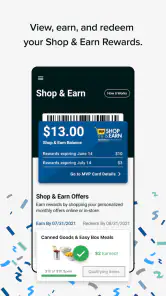
- Loyalty rewards program
Cons
- Limited delivery options
- Occasional app crashes
- Inconsistent inventory updates
- No curbside pickup
- Customer service response time

- Category
- Shopping
- Version
- 8.13.1











