Flowbird Parking
- 1.12K
- 3.7
- Installs
- 1.00M
- Price
- Free

Screenshots
Analysis by Reviewed
In a shared household, parking rarely involves just one driver. I find the app most useful when each person who drives handles their own parking session on their own phone, rather than treating one login as a family account. That small boundary makes it clearer whose vehicle and visit a payment belongs to, especially when two people are out at different times.
Keep the account tied to the driver
Before relying on mobile payment, I’d have each regular driver check that the app is set up for the way they personally park and pay. A shared phone can be convenient in a pinch, but it can also blur who started a session and who needs to watch its end time. I wouldn’t assume the app coordinates multiple household members or provides family controls; a quick text about who is using it is a more dependable handoff.
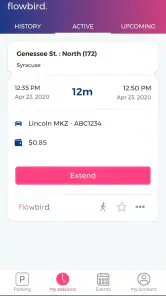
That distinction matters most when plans change. If one person parks and another takes over the car, the person who began the session should make sure the right driver knows when it expires and whether an extension is needed. The remote extension option can help when the original driver is delayed, but it is not a substitute for checking that the vehicle is still in a permitted space and that the session applies to that location.
A practical routine for shared errands
Imagine a weekday errand where one household member parks near an appointment while another expects to pick up the car later. I’d use the map and location details before leaving the vehicle, then share the expiry time directly rather than assuming everyone can see the same account notifications. If the appointment runs long, the person responsible can decide whether to extend the session. This is a simple workflow, but it avoids the familiar confusion of “I thought you were watching the meter.”
Flowbird is a free Auto & Vehicles app from Flowbird, rated for Everyone, and it has an average rating of 3.7 from around 48,000 ratings, with over one million installs. That reach makes it a familiar option for many drivers, but popularity does not make it the right tool for every trip. Its usefulness depends on whether the parking location you need is supported and whether you prefer handling payment on a phone instead of at a meter.
Latest News
Compared with paying at a machine, the main advantage is less stopping to find coins or return to the meter to manage a session. Compared with a general map app, the value is the parking-focused payment and session workflow rather than simply getting directions. I would still read the signs at the curb: an app cannot make a restricted space legal, and local rules matter more than a map pin. For a garage or lot with its own payment process, that operator’s method may be the simpler choice.
Who should use it—and who should not
I’d recommend trying it if you regularly park in places covered by the app and want to manage payment and time from your phone. It is less compelling if you rarely drive, strongly prefer cash or a parking machine, or need one shared household account to coordinate every driver. If you’re parking somewhere unfamiliar, check the posted restrictions and the app’s location information before paying; don’t choose a space based only on convenience.
For younger drivers, the Everyone age rating is not the same as permission to make payments independently. I’d have a parent or responsible adult help with account and payment decisions where appropriate, and keep any household payment method under the account holder’s control. The practical trust question is simple: who is allowed to start a session, and who is expected to respond to an expiry alert?
For a household deciding whether to try it, I’d begin with one familiar parking area rather than making it part of every driver’s routine immediately. That gives each person a chance to check how the location appears, understand the payment steps, and decide whether the app suits their own habits. If someone mainly drives a car shared with others, agreeing in advance who starts and monitors each session matters more than installing the app on every phone.
There is also a useful distinction between sharing information and sharing access. Sending the driver a clear message with the location and expiry time keeps responsibility visible without passing around a phone or relying on one person’s account. If the driver changes, make the handoff explicit; a vague “parking is sorted” can leave the next person unsure whether a session is active or when it ends.
When the phone is not the best tool
Mobile payment is most helpful when the parking arrangement is straightforward and the driver can stop to confirm the correct location. It is less attractive when a passenger-free driver is trying to navigate a complicated curbside area, when signs are unclear, or when the destination uses a separate garage process. In those moments, I’d prioritize understanding the parking rules and use the method clearly accepted at that site, rather than forcing an app into the workflow.
I’d also avoid treating a map result as a promise that a space will be waiting. Finding parking information and securing a particular space are different things. A practical approach is to choose a legal space first, check its sign and location details, then complete the session while safely parked. That sequence keeps the app useful without letting the screen distract from traffic or curb rules.
For a routine appointment, the biggest benefit may be avoiding a return walk to a meter, not discovering a perfect space from the driver’s seat. If the visit might overrun, I’d make a quick note of the expiry time and decide beforehand who will handle an extension. That small bit of planning is especially helpful when the car is shared and the person who parked is not the one coming back to it.
Alright, folks, let me take you on a little journey into the world of parking apps. Have you ever found yourself in the middle of a bustling city, frantically searching for a parking spot? Well, let me introduce you to a nifty app called Flowbird Parking. This app is here to save the day and make your parking experience a breeze. Trust me, once you start using it, you'll wonder how you ever managed without it.
Simplifying Your Parking Experience
Flowbird Parking is like having a personal parking assistant right in your pocket. The app is designed to make finding and paying for parking spots easier than ever. When I first downloaded it, I was amazed at how user-friendly it was. The interface is super intuitive, so even if you're not tech-savvy, you'll have no trouble navigating through it.
Finding a Spot
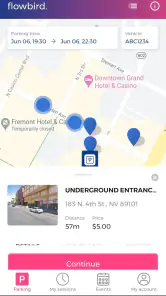
Picture this: you're driving around a busy street, and every parking space seems to be occupied. That's where Flowbird Parking comes in handy. The app provides real-time information about available parking spaces nearby. You can easily search for spots by entering your destination, and voila! The app shows you all the available options. It's like magic!
Paying for Parking
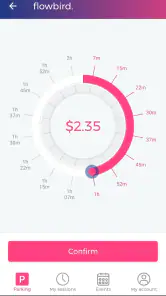
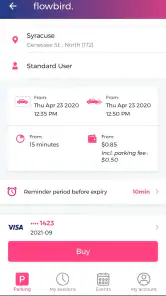
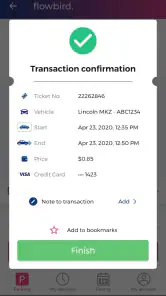
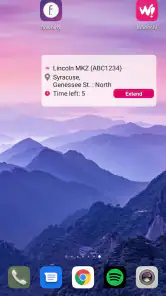
Now, let's talk about one of the best features of Flowbird Parking—the ability to pay for parking right from your phone. No more digging for loose change or waiting in line at the parking meter. With just a few taps, you can pay for your spot and be on your way. Plus, the app sends you notifications when your time is about to expire, so you can avoid those pesky parking tickets.
Additional Features Worth Mentioning
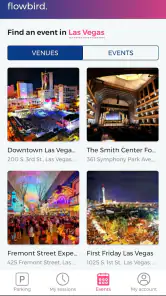
Besides its core functionalities, Flowbird Parking offers a few extras that I found pretty cool. For instance, the app provides detailed information about each parking location, including rates and restrictions. It also allows you to extend your parking session remotely, which is a lifesaver if you're running late. Oh, and did I mention the map feature? It's super handy for getting a visual of where you can park.
Where the convenience has limits
The most useful habit I’ve picked up is to check the location details before I commit, then compare them with the sign beside the space. Rates and restrictions are the details that can turn an easy phone payment into an expensive mistake if you assume every nearby space follows the same rules. I also treat an expiry notification as a reminder to make a decision, not as proof that an extension is always available or appropriate.
In practical terms, this works best when I’m already stopped safely or when a passenger can handle the phone. I wouldn’t search through a map or enter a destination while moving through traffic. If I’m in a hurry, I decide on a legal space first and deal with the app once parked; the convenience should reduce distraction, not create another reason to look down while driving.
It’s also worth having a fallback. A phone payment depends on being able to use the app at the time you park, while a meter may be the better route if you prefer a visible, immediate transaction or don’t want to manage a session digitally. I’d keep the local parking instructions as the final authority and avoid assuming that a successful payment guarantees a particular space will remain available.
Version and everyday expectations
The current version is 3.16.1, and the app first appeared on December 7, 2018. It is free to download and supports Android 7.1 or later. Those basics make it an approachable option for someone trying a parking app for the first time, though I’d still make sure the phone is ready before a trip rather than attempting setup at the curb under pressure.
My household verdict is that Flowbird works best as an individual driver’s practical tool, with a little communication around shared cars. It can replace some meter trips and make it easier to respond when plans run late, but it doesn’t remove the need to read signs, check the location, or agree who is responsible for a session. If those habits fit the way you park, I’d give it a try; if your usual locations aren’t covered or you want a single coordinated family setup, a meter or the parking operator’s own option may suit you better.
Another thing I appreciate about Flowbird Parking is its commitment to security. The app ensures that all transactions are secure, so you can have peace of mind when making payments. In a world where data breaches are all too common, this is a big plus in my book.
In conclusion, Flowbird Parking is a game-changer for anyone who drives and parks regularly. It takes the stress out of finding and paying for parking, making your daily commute a lot more pleasant. So, if you haven't already, give it a try. Your future self will thank you for it!
Flowbird Parking Frequently Asked Questions
Is Flowbird Parking free to download, and what will I pay for?
Flowbird Parking is free to download, but using the app to park may involve charges for the parking session. The amount depends on the location and the time you choose, and a local service fee may also apply. Review the total shown before confirming a session so you understand what you will be charged.
Is Flowbird Parking suitable for someone who has never used a parking app?
The app is built around mobile-phone parking, so it can be a convenient option if you would rather manage a parking session on your phone. Before relying on it, take a moment to explore the available location and session details. At the parking area, follow the local instructions and make sure the session you start matches your vehicle and parking needs.
What should I check before relying on Flowbird Parking for a trip?
Before setting off, make sure Flowbird Parking is installed and that you can sign in and open the app. When you arrive, check that the specific parking area is supported and review the local rules and session options shown there. Parking coverage and regulations can vary from one place to another, so confirm the details in the app before leaving your vehicle.
What is Flowbird Parking and how does it work?
Flowbird Parking is a mobile application designed to simplify the process of finding and paying for parking spaces in urban areas. Users can locate available parking spots, pay electronically, and even extend parking time remotely through the app. It integrates with local parking regulations to provide real-time updates and secure cashless transactions.
Is Flowbird Parking available in my city?
Flowbird Parking is expanding its coverage rapidly, but availability varies by region. Users should check the app's supported locations list or the official website for the most up-to-date information. The app is primarily used in major urban centers across Europe and North America, but new cities are being added regularly.
Pros
- User-friendly interface with intuitive navigation.
- Wide coverage of parking locations.
- Secure payment options.
- Real-time parking availability updates.
- Supports multiple languages.
Cons
- May experience occasional app crashes.
- Limited customer support options.
- Some features require in-app purchases.
- GPS location tracking can drain battery.
- Notifications can be overwhelming.

- Category
- Auto & Vehicles
- Version
- 3.16.1











