Five Guys Burgers & Fries
- 4.20K
- 4.5
- Installs
- 1.00M
- Price
- Free

Screenshots

Analysis by Reviewed
When I want a burger from Five Guys, I’d rather take a moment to build my order on my phone than try to decide while a line forms behind me. The Five Guys Burgers & Fries app is most useful for that simple job: it puts ordering for the restaurant in a more deliberate, less rushed setting. It is a free shopping app from Five Guys Franchisor LLC, and its focus is narrow by design. I’d recommend it to regular customers who already know what they like, though it is less compelling if you only visit occasionally or want one app for comparing lots of restaurants.
A practical fit for repeat orders
The app has been available since March 3, 2011, and its current version is 5.17.0. It has a 4.5 average from around 11,000 ratings, with over 1 million installs. That suggests it has found a substantial audience, but I wouldn’t treat popularity as a guarantee that every order will be effortless: the value depends on whether ordering ahead suits your routine and whether a nearby Five Guys location works for you.
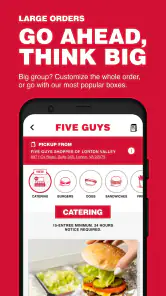
For a familiar order, the main advantage is reducing small decisions at the counter. I can review the choices at my own pace, check that I have selected what I meant to select, and avoid holding up anyone else while I remember my usual toppings. That makes the app especially handy when ordering for more than one person: each person can settle on their own combination before checkout rather than negotiating changes aloud at the register.
Ordering with fewer last-minute decisions
Right off the bat, the app impresses with its sleek and intuitive design. As soon as you open it, you're greeted with a simple yet engaging interface that makes ordering a breeze. Everything is laid out in an organized manner, so even if you’re not the most tech-savvy person, you’ll find it super easy to navigate. The app even remembers your last order, which is perfect for those days when you just want your go-to meal without any fuss.
Customization galore, with a reason to review the basket
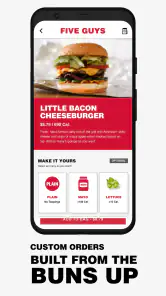
One of the standout features of the Five Guys Burgers & Fries app is the level of customization it offers. You can tailor your burger just the way you like it, whether you're into a classic cheeseburger or want to add a twist with jalapeños and grilled mushrooms. The possibilities are endless, and the app lets you visualize your creation before you hit that order button. Now, that’s what I call a personalized dining experience!
That flexibility is useful, but it also creates a small trade-off: the more changes I make, the more carefully I need to check the finished order before placing it. I’d use the final review as a quick checklist, especially when ordering for someone else or repeating a burger with several additions. Saving a familiar order can speed things up, but it is still worth checking that it suits today’s appetite rather than assuming yesterday’s choices are right every time.
Pickup convenience depends on the plan
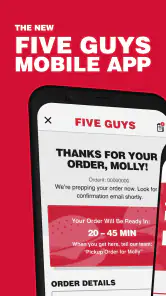
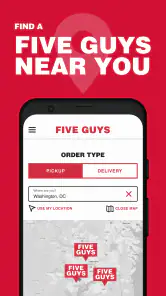
Let’s talk about convenience. The app allows you to place an order for pickup or delivery, which is a game-changer for busy days. No more waiting in long lines or trying to shout your order over the din of a bustling burger joint. You can schedule your pickup time, and if you’re opting for delivery, you can track your order in real time. It’s like having a personal assistant dedicated to satisfying your burger cravings.
More From Our News Desk

Clash of Clans Is Won Between the Battles

Android Auto Makes the Case for Quieter Car Software

MobiOffice: Transforming Mobile Productivity with Seamless Integration

EA SPORTS FC™ Mobile Soccer: Redefining Mobile Sports Gaming

How Microsoft OneDrive Became a Mobile Productivity Giant

How Google Translate Breaks Language Barriers Effortlessly
A realistic use is ordering before leaving work or while heading home, then choosing pickup when you know you can reach the restaurant without a detour. I’d avoid placing an order too early if my plans are uncertain; advance ordering is only convenient when the timing still makes sense. For delivery, tracking can help me follow the order’s progress, but it doesn’t remove the usual uncertainty of coordinating a meal arriving at the right moment. If I’m already near the counter or want to change my mind face-to-face, ordering in person may be simpler.
Compared with general restaurant-delivery apps, this one is a more focused choice: it is for people who want Five Guys rather than a broad menu of nearby cuisines. That focus can make it easier to get straight to a brand-specific order, while a multi-restaurant app is the better pick when I’m deciding between several places, comparing options, or ordering from a restaurant that isn’t Five Guys. I’d also choose the ordinary in-store route if I’m just browsing or need to discuss an unusual request with staff.
Loyalty is a bonus, not the whole reason to install
Who doesn’t love a good rewards program? The app features a loyalty program where you earn points with every purchase. These points can be redeemed for free food, which is a sweet deal for any burger lover. Plus, the app keeps you updated with exclusive offers and promotions, ensuring you never miss out on a great deal.
I see rewards as a pleasant extra rather than a reason to order more often than I otherwise would. They matter most if Five Guys is already part of my routine; an occasional customer may not find loyalty features as useful as someone who returns regularly. The app is rated for Everyone and requires Android 7.0 or later, so Android owners with an older device should check compatibility before planning to use it. On iOS, I’d check the current store page for device requirements before downloading.
Who should keep it handy
In conclusion, the Five Guys Burgers & Fries app is a must-have for anyone who loves a good burger and values convenience. It combines the deliciousness of Five Guys with the ease of modern technology, making it simpler than ever to enjoy your favorite meal. Whether you’re a dedicated burger enthusiast or simply looking for a quick and easy way to satisfy your hunger, this app has got you covered. So, next time you’re hankering for a mouth-watering burger, just whip out your phone and let the Five Guys app do the rest.
My recommendation is a little more specific: install it if you order from Five Guys often enough to benefit from saved choices, customization, and ordering ahead. Skip it if you rarely visit, prefer deciding at the counter, or want one app to search across restaurants. For its intended audience, it makes a familiar meal easier to arrange; it does not need to replace every other way of ordering to be worthwhile.
Making an order work for a real day
The best time to use the app is when I can make a few decisions without pressure and have a fairly clear plan for getting the food. Imagine finishing work with a short stop on the way home: I can build the order before leaving, check each person’s choices, and use pickup if the restaurant fits the route. The useful part is not simply tapping faster. It is taking the menu decisions out of a busy moment and reducing the chance that I forget a topping or mix up two similar orders.
For a group, I’d collect everyone’s choices first rather than pass one phone around while people change their minds. A quick read-back of the basket helps catch the practical mistakes: a missing item, the wrong burger variation, or an addition that belonged to someone else. This matters most when orders are customized, since a familiar saved selection can be convenient but may also make it easy to accept an old combination without noticing that it no longer matches what the person wants.
There is another useful trade-off in timing. Ordering ahead is most valuable when I know roughly when I’ll arrive and can go to the chosen restaurant without a major change of plans. If a meeting runs late, traffic changes my route, or I am not sure whether everyone is ready to eat, placing the order early may create more coordination rather than less. In that situation, I’d wait until the plan settles or order at the restaurant instead of treating advance ordering as an automatic shortcut.
Where the focused menu helps—and where it doesn’t
As a shopping app built around one restaurant brand, this is not a discovery tool for dinner in general. I would open it when Five Guys is already the decision, not when I’m still weighing burgers against pizza, looking for a nearby café, or comparing menus across several places. A broad delivery service has an obvious advantage in those moments because it gathers alternatives in one place. The dedicated app makes more sense once I have made the brand choice and want to get through that specific order.
The difference is also about the kind of decision I’m making. If I know my usual burger and want to adjust a few details, ordering on the phone gives me room to look carefully. If I am unfamiliar with the menu or have a question that depends on a conversation, the counter can be more helpful. I would not assume a customization screen answers every dietary or preparation question; for anything that needs clarification, asking staff directly is the sensible route.
Delivery can be the right option when leaving home or work is inconvenient, while pickup gives me more control over the trip and avoids making the meal depend on a delivery handoff. Neither choice is automatically better. I’d consider where I am, how fixed my schedule is, and whether I actually want the food brought to me. The app is most effective when its ordering options match the day, not when I use them simply because they are available.
Small habits that make repeat ordering safer
For a regular order, I’d treat the remembered choice as a starting point, not a set-and-forget instruction. Appetite changes, and the person I’m ordering for may want something different today. I’d check the important parts before checkout rather than relying on memory—especially the selected burger, additions, and whether the order is for pickup or delivery. That small pause preserves the speed of a familiar order without letting convenience turn into an avoidable mistake.
If several people are eating, it helps to keep each order distinct while entering it, then review the completed basket from top to bottom. This is more reliable than trying to remember which toppings belonged to whom after everyone has called out changes. When plans are uncertain, I’d also avoid promising a precise arrival time to the group until I have settled on the ordering and travel plan. The app can organize the request, but it cannot make other people’s schedules line up.
Rewards and offers may make repeat use more appealing, but I would not let them dictate the meal. A deal is only useful if it fits what I intended to order; chasing a promotion can turn a convenient routine into an unnecessary extra purchase. For someone who visits often, checking the app while deciding what to order may be worthwhile. For someone who goes rarely, the practical gain is more likely to come from customizing and arranging the meal than from loyalty features.
A clear recommendation, with realistic expectations
The app has a 4.5 average from around 11,000 ratings, and its 1 million-plus installs show that many people have chosen to use it. I take that as useful context, not proof that it will suit every customer or every visit. Its strongest case is specific: I already want Five Guys, I value time to customize the order, and I can use pickup or delivery in a way that fits my plans. When those conditions are true, keeping the app handy is reasonable.
I’d be less inclined to install it just for a one-off visit, particularly if I prefer to browse in person or need to discuss a request before deciding. It also cannot replace a multi-restaurant app when variety and comparison matter more than ordering from a particular brand. The age rating is Everyone, and the listed Android minimum is 7.0; that makes compatibility straightforward for many Android users, while iOS users should check the requirements shown for their device before downloading.
Overall, I see this as a practical ordering companion rather than an essential food app. It helps me slow down customization, organize a repeat meal, and choose a more convenient way to place an order, but the benefit depends on being a Five Guys customer in the first place. If that describes you, it is worth trying and judging against your own routine. If you are still deciding where to eat, or only visit occasionally, ordering in person or using a broader restaurant option may be the better fit.
Five Guys Burgers & Fries Frequently Asked Questions
Can I check whether the app is compatible with my device before downloading?
The Five Guys Burgers & Fries app is available for Android and iOS. On Android, it requires version 7.0 or later, so checking your device’s operating system before downloading can help you avoid compatibility problems. The app is free to download and is rated for Everyone, making it accessible to a broad range of users.
What features does the Five Guys Burgers & Fries app offer?
The Five Guys Burgers & Fries app offers a convenient way to order your favorite meals from the comfort of your home or on the go. With features like customizable orders, quick reordering of your past meals, and store location services, you can easily find the nearest Five Guys and explore their menu. The app also provides exclusive deals and offers, making your dining experience even more enjoyable.
Is the Five Guys app available for both Android and iOS devices?
Yes, the Five Guys Burgers & Fries app is available for both Android and iOS devices. Users can download the app from the Google Play Store for Android devices and the Apple App Store for iOS devices. The app is designed to provide a seamless experience across different platforms, allowing users to enjoy the convenience of ordering their favorite meals no matter the device they use.
How can I customize my order using the Five Guys app?
Customizing your order on the Five Guys app is straightforward and user-friendly. Once you select your desired meal, the app will guide you through various customization options. You can choose from a variety of toppings, sauces, and sides to tailor the meal to your taste preferences. The app interface ensures that all modifications are clearly displayed, allowing for easy adjustments before finalizing your order.
Does the Five Guys app offer any rewards or loyalty programs?
While the Five Guys app does not have a traditional rewards or loyalty program, it does frequently offer exclusive deals and discounts to app users. These offers can appear as limited-time promotions or special discounts for orders placed through the app. By regularly checking the app, users can take advantage of these deals to enjoy their meals at a reduced price.
Pros
- User-friendly interface for easy navigation.
- Fast and efficient order processing.
- Customizable burger options.
- Loyalty rewards for frequent customers.
- Real-time order tracking feature.
Cons
- Limited payment options available.
- App occasionally crashes unexpectedly.
- Longer wait times during peak hours.
- Limited delivery areas covered.
- No vegan burger options available.

- Category
- Shopping
- Version
- 5.17.0











