FillUp - Gas Mileage Log
- 481.00
- 4.4
- Installs
- 500.00K
- Price
- Free
Screenshots
Analysis by Reviewed
I like that FillUp - Gas Mileage Log treats fuel tracking as a practical habit rather than a complicated car-management project. It is an Android Auto & Vehicles app by William D. Kraemer, and its appeal is easy to understand: record refuelling details, then use the accumulated entries to make sense of your car’s fuel use. It is free, rated for Everyone, and has a 4.4 average from around 3,200 ratings, so it has found an audience among drivers who want a focused tool instead of a broad vehicle dashboard.
Clear enough to use between errands
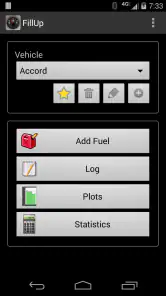
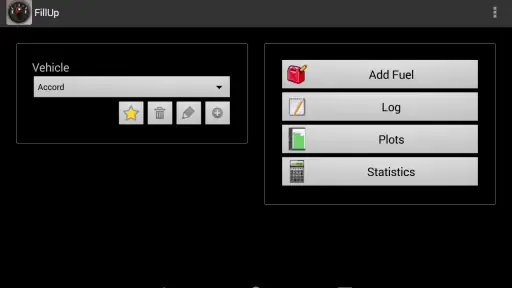
So, I downloaded the app, and within minutes, I was setting it up. The interface is pretty straightforward. You punch in your car details, and voila, you're good to go. I loved how it doesn’t bombard you with unnecessary features. It's clean, simple, and to the point. As someone who appreciates a minimalistic design, this was a major win.
That uncluttered approach matters when you are doing a small task at a busy pump. The main information to keep consistent is the odometer reading and the fuel amount; a hurried or mistyped entry can make later comparisons misleading. I would take a moment to check the odometer before saving rather than trying to reconstruct it from memory after driving away. If several people share a car, agreeing on who records each fill-up also keeps the history more useful.
Tracking Your Mileage
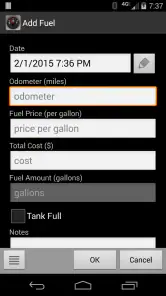
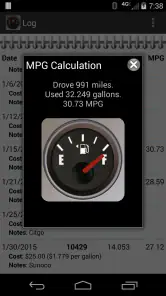
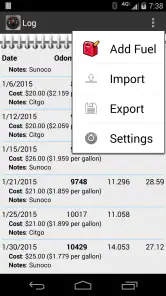
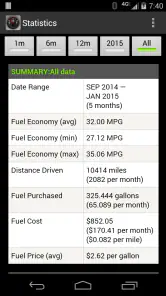
Once you're set up, logging your fuel details is a breeze. You simply enter the amount of fuel added, the price, and the current odometer reading. The app does the rest. It calculates your mileage and provides insights into your fuel consumption patterns. I found this particularly helpful in identifying those sneaky periods when my car seemed thirstier than usual.
The figures become more meaningful when you compare like with like. A long motorway trip, cold-weather commuting, heavy traffic, and a week of short journeys can produce very different results, so I would avoid treating one unusual entry as proof that something is wrong with the car. A steadier run of records gives a more useful baseline. For an everyday routine, I’d enter the details before leaving the station, then review the trend later rather than trying to interpret it while refuelling.
Latest News
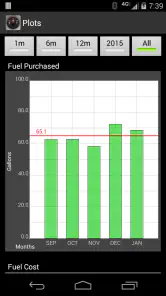
What's really cool is the historical data it generates. You get to see trends over time, and for a data nerd like me, it’s nothing short of fascinating. Plus, it’s a great way to keep tabs on your spending. Who knew saving money could be this engaging?
Useful habits for more reliable records
There is a small trade-off with any manual log: it only helps if you keep feeding it accurate entries. If you skip a stop or enter a reading from the wrong vehicle, comparisons can become less dependable. I’d use the app as a personal record, not as a substitute for a mechanic’s diagnosis or a precise accounting system. Its strength is making ordinary fuel stops add up to a picture you can inspect over time.
For example, if a commute suddenly seems more expensive, I’d first compare several recent fills with similar routes and driving conditions. That can help separate a genuine shift in fuel use from a one-off detour or a different mix of journeys. The price field also gives the record practical value beyond mileage: looking back can show whether higher spending came from buying more fuel or paying more per unit.
Additional Features
Besides the basics, FillUp - Gas Mileage Log offers some neat extras. There's an option to track multiple vehicles, which is perfect if you’re managing a fleet or just happen to have more cars than I do! Also, the backup feature ensures your data is safe and sound. No more worrying about losing track of your records when you switch devices.
Multiple vehicles are especially handy for a household where one person drives a small car during the week and another uses a larger vehicle for family trips. Keeping each record associated with the right car makes comparisons fairer; combining them would blur the very differences you may want to understand. Backup is worth checking as part of a device change, but I’d still make sure the records you care about are preserved before relying on a new phone as your only copy.
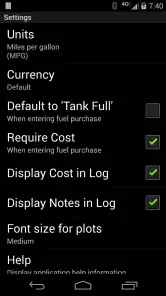
And for those who love a little customization, the app allows you to tweak settings to better match your preferences. From units of measurement to currency settings, it's all right there. It’s these small touches that make the app feel tailored just for you.
Who will find it useful
I’d recommend it to drivers who like seeing their fuel habits in one place, especially people who keep a car for a long time, share vehicles, or want to notice changes before they become an expensive surprise. It can also be useful for someone comparing a regular commute with occasional longer trips, provided they are patient enough to log each fill consistently.
On the other hand, if you want automatic trip detection, live fuel-economy readings, repair reminders, or a full maintenance diary, this focused log may feel too limited. A car’s onboard display is quicker for an immediate estimate while driving, while a spreadsheet can suit someone who wants custom calculations and does not mind setting them up. Compared with relying on memory or scattered receipts, FillUp offers a more organized running history; compared with an all-in-one vehicle app, it keeps the task narrower and asks you to enter the information yourself.
Readability, senses, and access in real situations
The simple setup makes the app less demanding to learn than a feature-heavy vehicle manager, which is helpful if you only want to record a few details. Still, a fuel station is not always a comfortable place to use a phone: there may be glare, noise, a queue, or the need to keep attention on the pump and surroundings. I’d enter the reading while safely parked and not handle the phone while driving. If small on-screen text or touch controls are difficult for you, it is sensible to try the entry flow before committing to a long record-keeping routine.
Its manual approach can be a benefit for drivers who prefer control over what goes into a log, but it also creates a barrier for anyone who finds repeated typing tiring or difficult. A companion can help enter the details for a shared car, though that works best when everyone follows the same routine. The app is not the right choice if you need hands-free recording or automatic capture; in that situation, a vehicle system or a tool with verified support for your specific access needs would be a better fit.
Final Thoughts
In the end, FillUp is a delightful little app that does exactly what it promises. It's not trying to be anything more than a mileage tracker, and that’s exactly its charm. It’s straightforward, reliable, and surprisingly fun to use. If you're keen on understanding your car's fuel habits better, give it a shot. You might just find yourself looking forward to your next fill-up!
Whether you're a road warrior or just someone looking to pinch a few pennies at the pump, this app is worth checking out. Who knew that keeping an eye on your gas mileage could be this rewarding? Happy tracking! With more than 500,000 installs, it has clearly attracted drivers beyond the small group who enjoy spreadsheets, but I’d still judge it by whether manual logging suits your routine. If you can spare a moment at each stop and want a focused history rather than a broader driving app, I think it is a sensible, approachable choice.
FillUp - Gas Mileage Log Frequently Asked Questions
Is FillUp - Gas Mileage Log free to download?
Yes. FillUp - Gas Mileage Log is free, so you can try its fuel-tracking tools without paying to download the app. It is intended for everyday vehicle owners who want a straightforward way to record fuel use and follow their mileage. The app is rated for Everyone, making it suitable for a broad audience.
What features does FillUp - Gas Mileage Log offer?
FillUp - Gas Mileage Log is designed to help users track their fuel consumption and vehicle expenses with ease. The app offers features such as detailed statistics on fuel efficiency, cost per mile analysis, and customizable reports. It also supports multiple vehicles, allowing you to manage all your vehicles in one place. Users can export data for further analysis, ensuring a comprehensive overview of their driving habits.
Is FillUp - Gas Mileage Log compatible with both Android and iOS?
Yes, FillUp - Gas Mileage Log is compatible with both Android and iOS platforms. This makes it accessible to a wide range of users who can download the app from either the Google Play Store or Apple App Store. The app is designed to provide a seamless experience across both platforms, ensuring that all users can efficiently log and track their fuel usage.
How does FillUp - Gas Mileage Log handle data privacy?
FillUp - Gas Mileage Log takes data privacy seriously by implementing robust security measures to protect user information. The app does not share any personal data with third parties without user consent. Additionally, users have the option to back up their data locally or to a secure cloud service, ensuring their information remains safe and accessible only to them.
Can FillUp - Gas Mileage Log track multiple vehicles?
Absolutely, FillUp - Gas Mileage Log supports tracking of multiple vehicles. This feature is ideal for families or businesses with more than one vehicle. Users can easily switch between vehicles within the app, allowing them to maintain separate logs and reports for each vehicle. This ensures that you have accurate and organized data for all your vehicles.
Pros
- User-friendly interface for easy navigation.
- Tracks fuel economy with detailed statistics.
- Supports multiple vehicles for family use.
- Syncs data across devices seamlessly.
- Customizable fuel types and units.
Cons
- Lacks integration with GPS for auto-fill.
- No cloud backup for data security.
- Limited export options for reports.
- Ads in free version can be intrusive.
- No reminders for maintenance schedules.
- Category
- Auto & Vehicles
- Version
- Varies with device











