EVgo - Fast EV Charging
- 2.87K
- 4.6
- Installs
- 1.00M
- Price
- Free
Screenshots

Analysis by Reviewed
I judge a charging app less by how polished its map looks than by whether it helps me make a sensible stop when time, battery, and plans are all in motion. EVgo - Fast EV Charging is built around finding public fast charging and managing a session, so it makes most sense for drivers who expect to use EVgo locations as part of their regular routine. I would treat it as a useful network companion, not as a complete answer to every charging question.
What “fast” means in everyday use
The app can help me locate a fast-charging stop, but it cannot make the car charge faster than the vehicle and station allow. That distinction matters: a quick search and a convenient location are app benefits, while the time spent connected depends on the charging equipment, the car, and the circumstances of the session. I would use the app to plan where to stop, rather than assume that the word “fast” guarantees a short break in every situation.
For a driver who already knows their vehicle’s connector and charging habits, the map and station details can make the decision more direct. For someone new to public charging, I recommend checking the connector information before setting off and comparing the location with the car’s requirements. That small pause is more useful than relying on a station name or choosing the nearest marker without checking what it offers.
Planning a stop instead of reacting to one
A practical workflow is to look for a suitable station before the battery becomes urgent, then keep a second plausible location in mind if the first stop does not fit the trip. I find that a little flexibility is more valuable than aiming for the closest pin on the map. A charger can be nearby but inconvenient for the route, while another option may make a better break in the journey.
Availability information can help avoid arriving blindly, but I would still treat it as a planning aid rather than a promise that conditions will remain unchanged during the drive. If a stop is important, checking again closer to arrival is a sensible habit. That is especially true when the trip leaves little room for delay or when a passenger, appointment, or weather makes timing matter.
Latest News
Here is the sort of everyday situation where I would find the app useful: I am running errands across town and realize that I will need a charge before heading home. I can search for a nearby EVgo location, consider whether its connector suits my car, and choose a stop that does not force an unnecessary detour. If the trip is longer, I would plan the charging stop before leaving rather than waiting until the remaining range dictates the route.
Using a session without losing track of the stop
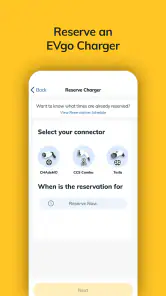
The stated charging workflow is straightforward: choose a location, confirm the connector, and start a session through the app. That can be more convenient than carrying a separate payment card for every network, though the actual start still depends on the station and the vehicle being ready. I would check the connector carefully before confirming; a quick glance at the map is not a substitute for matching the plug to the car.
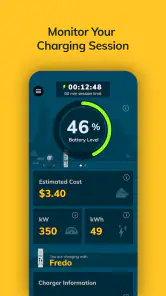
Once a session is underway, tracking its progress can make a stop easier to manage. Rather than repeatedly walking back to the car to guess how things are going, I can use the app’s session view and notifications to keep an eye on completion. This is most useful when I am inside a shop or sitting down nearby. I would still keep an eye on the car and the charger if anything looks unusual, since an app notification is helpful information, not a physical check of the connection.
One small planning tip is to decide what you will do during the stop before plugging in. If I only need a brief top-up, I can stay close and keep the next leg flexible; if I have a longer break in mind, I can choose a location that works for that pause. The app helps with finding and following the session, but the driver still has to make the stop fit the actual journey.
Finding Your Charge: Navigating the App
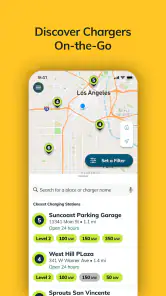
First things first, let’s talk about navigation. The EVgo - Fast EV Charging app is as intuitive as they come. When I first opened it, I was greeted with a sleek interface that didn’t overwhelm me with options. You can easily search for charging stations near you, and the app provides real-time updates on availability. That’s right, no more driving to a station only to find it occupied!
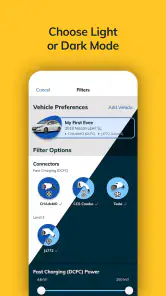
The map feature is a game-changer. It’s detailed and interactive, showing not just the locations but also the types of connectors available. For someone like me who’s always on the go, knowing where I can charge my car quickly is a huge relief.
Choosing it alongside other charging tools
I would compare EVgo with two common alternatives: a general map app and the charging tools attached to a car or another network. A general map may be convenient for seeing a route and nearby services, but a charging-focused app is more relevant when I need station and connector details in one place. A vehicle’s built-in navigation can be better for keeping route guidance inside the car, while another network’s app may be the more direct choice when its stations are the ones I intend to use.
That makes EVgo most compelling when an EVgo station is a realistic option for the route. It is less useful as a sole planning tool for a driver whose usual chargers belong to other networks or whose trips depend on broad, cross-network coverage. I would keep the tools that match my real driving pattern: use EVgo to plan EVgo stops, and use the car’s navigation or another charging resource when that is a better fit. No one app needs to be the answer to every charging need.
Charging Made Easy
Now, onto the most critical part – the charging process itself. Using the app, you can start a charging session with just a few taps. It’s genuinely as simple as that. You select your station, confirm the connector, and boom – you’re charging. No fumbling with cards or cash, just seamless tech doing its thing.
One feature that I really appreciate is the session tracking. You can monitor the progress of your charge in real-time, which means no more guessing games about when your car will be ready to hit the road again. The app also sends you notifications when your charging session is complete, so you can manage your time efficiently.
When the routine gets busy
During a crowded day, the benefit is not just finding a station; it is reducing the number of decisions I have to make at the curb. I can search before leaving, check the connector, and have a likely stop in mind instead of improvising after arriving. If I am travelling with someone else, that also makes it easier to explain where the break will happen and why.
For a time-sensitive trip, I would avoid treating one station as the entire plan. I would identify a backup location and consider how much extra driving it adds. That is a useful trade-off: a nearby alternative may be less convenient but can keep the trip from depending on a single stop. The app supports this kind of planning through station discovery, while the decision about how much reserve to keep belongs to the driver and the vehicle.
If the app or connection seems slow at the moment I need it, I would not keep tapping through the same action without checking what the station is doing. I would first confirm the selected location and connector, then check the charger screen and the car. This avoids confusing a delayed screen update with a failed connection. For a trip where charging is essential, I would also have the route and a second charging option in mind rather than relying on a single phone screen.
Staying Connected
The app isn’t just about charging; it’s about staying connected with the EV community. There are options to view and share tips with other users, making it a bit of a social hub for EV enthusiasts. It’s nice knowing you’re not alone in this electric journey.
Plus, the app regularly updates with new features and improvements. It’s clear that the developers are committed to enhancing the user experience, which is always a plus in my book.
Who will get the most from it
For context, EVgo is a free auto-and-vehicles app from EVgo. It has a 4.6 average from around 8,700 ratings, and more than a million installs. Those figures suggest it has found a substantial audience, but they do not tell me whether its locations suit a particular driver’s commute. The more important question is whether EVgo stations align with the places you travel and the charging stops you need.
I would recommend trying it if you own an electric vehicle and expect to use EVgo stations, especially if you want a dedicated way to find locations and keep track of sessions. It can also help a new EV driver become more deliberate about checking connectors and planning breaks. On the other hand, a driver who mainly charges at home and rarely takes longer trips may have little reason to open it often. Someone whose usual public charging network is different should compare coverage and convenience before building a routine around this app.
Reliability is a workflow, not a guarantee
In my view, reliability here has two parts: whether the app gives me useful station information and whether the physical charging stop works as expected. The app’s availability updates and session tracking can make the process easier to manage, but neither removes the possibility that circumstances change between planning and arrival. A displayed opening in a busy period is useful, yet I would not make a critical journey depend on that one indication alone.
If a session does not appear to start, I would check that the selected connector matches the one I am using and verify that the charger and car show a connected state. I would then follow the station’s on-screen instructions rather than repeatedly initiating actions in the app. This is a practical recovery habit, not a claim that every problem has the same cause. If the issue persists, switching to a backup location may be more sensible than spending too long troubleshooting at a stop that no longer works for the journey.
The same caution applies to completion alerts. They are helpful for managing time, but I would confirm the car is ready before leaving the area. That final check can prevent an avoidable interruption later, particularly if I am in a hurry or have stepped away from the vehicle.
Device and version considerations
The app is free, rated for Everyone, and its current version is 10.16.0; it requires Android 8.0 or later on Android. I would check that requirement before installing it on an older phone. For iPhone owners, I would check the current compatibility shown for their device before downloading, rather than assume that the Android requirement applies to iOS as well.
As with any charging app, practical performance depends partly on the phone being usable when you need it. A low battery, poor connection, or a screen that is hard to read in bright conditions can make station lookup and session monitoring less convenient. I would search for a stop before the phone is nearly out of power, keep the car’s route guidance available, and avoid making the app the only place where I have kept the plan for a long drive. Those habits reduce friction without assuming that the app itself will behave in a particular way on every device.
I also would not judge the app’s speed solely by how quickly its map opens. The important test is whether I can find a suitable station, check its connector, and manage the session without unnecessary confusion. If I use it only occasionally, I may need a moment to reorient myself; if I use it regularly, the same sequence becomes easier to repeat. The app is most useful when it supports a prepared routine, not when I expect it to replace attention at the charger.
Final Thoughts
So, would I recommend the EVgo - Fast EV Charging app? Absolutely. It’s user-friendly, reliable, and makes the whole EV charging experience much smoother. For anyone serious about their electric vehicle lifestyle, this app is a must-have.
If you haven’t tried it yet, give it a whirl and see how it fits into your routine. You might just find it’s the missing piece in your EV puzzle. Happy charging!
EVgo - Fast EV Charging Frequently Asked Questions
Is EVgo free to download, and what devices can run it?
EVgo is free to download, so you can install the app and explore its charging tools without paying for the app itself. It is an Auto & Vehicles app developed by EVgo, and it is rated for Everyone. The app requires Android 8.0 or later, making the operating-system requirement worth checking before you begin installation.
How many fast-charging stations can I look for with EVgo?
EVgo helps drivers find fast electric-car chargers, with a network described as having more than 1,100 fast car-charging stations. The app is designed to help you locate stations and plan charging stops, so its usefulness depends on whether EVgo locations fit your routes. It is worth checking the map for places you regularly travel before relying on it for a trip.
What is EVgo and how does it work?
EVgo is a leading provider of fast-charging solutions for electric vehicles. The app helps users locate and access a network of fast-charging stations across the country. Once you download the app, you can search for nearby charging stations, check availability, and initiate a charging session with just a few taps. The app also offers real-time updates on charging status, making it convenient to plan your trips around charging needs.
How do I find an EVgo charging station using the app?
Finding an EVgo charging station is simple with the app's intuitive interface. Users can easily search for nearby stations by entering a location or using GPS to find the closest stations. The app provides detailed information about each station, including the type of chargers available, pricing, and real-time availability, ensuring that you can efficiently plan your route and charging stops.
What types of electric vehicles does EVgo support?
EVgo supports a wide range of electric vehicles, including those from major manufacturers like Tesla, Nissan, BMW, Chevrolet, and more. The app provides detailed information about each charging station's compatibility with different EV models, ensuring that drivers can find suitable charging options regardless of their vehicle type. This makes EVgo a versatile choice for all EV owners.
Pros
- Extensive charging network coverage.
- User-friendly interface and navigation.
- Real-time charger availability updates.
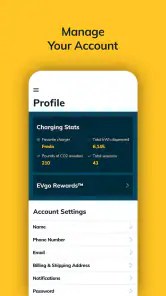
- Multiple payment options supported.
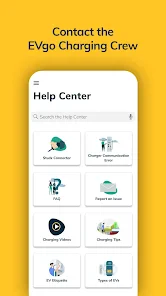
- 24/7 customer support available.
Cons
- Occasional app crashes reported.
- Limited free charging sessions.
- Some locations have outdated chargers.
- High charging fees at peak times.
- Inconsistent charging speeds at times.

- Category
- Auto & Vehicles
- Version
- 10.16.0











