

ElkNut
- 142.00
- 4.3
- Installs
- 10.00K
- Price
- Free

Screenshots
Analysis by Reviewed
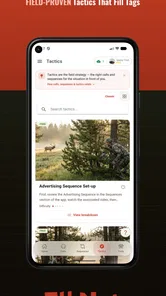
Elk hunting often starts long before anyone reaches the trailhead. I may have a general idea of the area, a few calls in my pack, and a plan that sounds sensible at home, but the real test begins when wind, cover, distance, and animal behavior force me to adjust. ElkNut is built for that gap between knowing the basics and making a better decision in the field. After spending time with it, I see it as a focused sports app for hunters who want call guidance and practical hunt tools in one place rather than scattered across videos, notes, and memory.
ElkNut comes from Got Game Technologies and is free to install, with optional in-app purchases listed at $14.99 per item. It is rated for Everyone, runs on Android starting with version 7.0, and the current version is 4.0.8. Its average rating is 4.3 from more than two hundred ratings, while the app has passed ten thousand installs. Those figures suggest a smaller, specialized audience rather than a mass-market outdoor app, which matches my impression: this is designed around elk calling and hunt preparation, not general hiking or broad wildlife identification.
From a rough plan to a usable elk-calling routine
I start this section with the planning problem rather than the call library: a useful routine should narrow my choices before I’m in a quiet setup, not give me more to browse at the wrong moment. I’ll look at how ElkNut’s guidance can help turn a broad intention into a sequence I can remember, then consider what happens when that plan meets real field conditions.
Starting with the problem I actually had
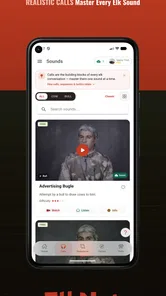
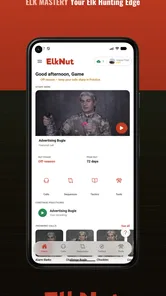
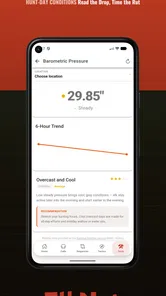
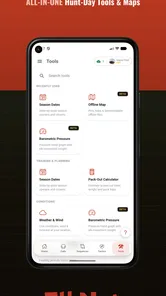
The useful starting condition is simple: I know I want to call elk, but I do not always know which sound belongs in the moment, how to arrange a sequence, or whether my delivery is convincing. ElkNut addresses those questions in a more practical way than a static list of calls. The app combines elk calls, tactics, sequences, AI call coaching, hunt tools, and offline access, so the intended workflow is not just “play a sound and hope.” It is closer to preparing, practicing, choosing a response, and then reviewing the situation as conditions change.
That distinction matters. A basic audio collection can be handy when I want to hear an example, but it leaves the important decisions to me. ElkNut is more useful when I am unsure about the transition between sounds or need a structured reminder of how a sequence should develop. I still have to make the hunting decision myself, yet the app gives that decision a clearer framework.
I would begin at home, not in the middle of a quiet basin. The first job is to listen carefully to the available calls and compare them with my own attempts. This is where the coaching angle has the most value. Instead of treating practice as a vague promise to “work on calling,” I can use the app as a reference point, repeat a sound, and pay attention to timing, tone, and consistency. That is a better use of a phone than opening it only after a setup has already gone wrong.
Building a sequence instead of collecting sounds
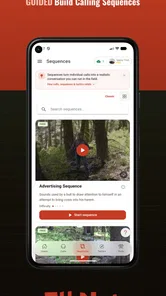
The strongest idea in the app is the emphasis on sequences. Elk calling is not only about whether one note sounds recognizable. The order, spacing, and situation behind a call can affect whether it feels believable. ElkNut helps me think in terms of a complete exchange: what I am trying to communicate, what response I might be looking for, and when silence may be more useful than another call.
More From Our News Desk

 Gmail
GmailGmail in a Busy Inbox: Who Benefits Most?
From first account to crowded workday, Gmail earns its place through dependable search and flexible sorting—but its best fit depends on how much inbox maintenance you can tolerate.

 Prime Video
Switching to Prime Video: What Changes in Your Viewing Routine
Prime Video can make a compelling second home for streaming, but switching means learning a different catalog, rental layer, and route from browsing to playback.

 Universal TV Remote Control
Universal TV Remote Control Works Best as a Reliable Backup
A phone remote earns its place through quick setup and reliable habits. Here is how to get more from Universal TV Remote Control—and where its limits show.

 Weather - By Xiaomi
Weather by Xiaomi Review: Clear at a Glance, Less Clear Up Close
Xiaomi’s weather app makes everyday forecasts quick to scan, but its calm surface can leave useful details and recovery paths harder to find than they should be.

 X
XX Under Pressure: Can It Recover When Posting Goes Wrong?
A resilience-focused review of X, examining setup, mistaken posts, interruptions, weak connections, and the gaps that matter when recovery needs to be dependable.

 Clash of Clans
Clash of Clans Is Won Between the Battles
Its raids are quick; its community is a long-term project of coordination, teaching, rivalry, and shared responsibility—with all the friction that entails.
Latest News



A practical routine would be to choose one scenario before a hunt, study the related sequence, and rehearse it without trying to memorize every option at once. I would then keep the plan narrow enough to remember when tired or distracted. This is one of the app’s less obvious strengths: it can turn an overwhelming collection of hunting knowledge into a small pre-hunt checklist. I am less likely to scroll aimlessly when I have already decided which sequence deserves attention.
There is also a trade-off. A guided sequence can improve discipline, but it can become a crutch if I follow it mechanically. Elk are not reading the same script, and the app cannot see the animal, the wind, or the terrain from my phone. I would use its sequences as starting structures, then stop or change direction when the real situation gives me a reason.
Using AI coaching before the pressure arrives
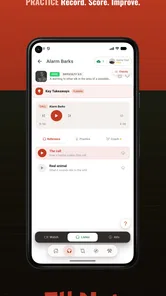
The AI call coaching is most valuable as a practice partner. Calling alone can be frustrating because I cannot always tell whether a weak result comes from breath control, pitch, timing, or simply an inconsistent attempt. Coaching gives the practice session a more active purpose: make a call, receive guidance, adjust, and try again.
I would not treat that feedback as a guarantee that a call will work in the field. It is better understood as a way to identify repeatable habits. If the same problem appears during several practice sessions, I have something specific to work on before heading out. That is more useful than listening passively to expert examples and assuming my own version is close enough.
One concrete workflow is to record a short practice session at home, make one adjustment at a time, and avoid changing the call, sequence, and timing simultaneously. That isolates the improvement. Another is to practice quietly with the phone before a trip, then use the app only as a quick reminder outdoors. This keeps the device from becoming the center of the hunt.
For a beginner, the coaching can make the learning curve feel less abstract. For an experienced caller, its value depends on whether the feedback reveals something genuinely useful rather than repeating fundamentals already mastered. I would expect the greatest benefit for someone between those two groups: a hunter who knows the basics but wants more consistent execution.
Preparing the phone for the handoff to the field
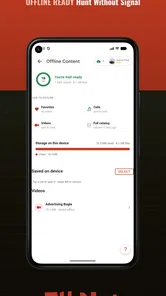
The offline mode changes how I would prepare. In a remote hunting area, relying on a live connection is an unnecessary risk, so I would open the app before leaving service, review the material I expect to need, and confirm that the relevant tools are available for offline use. This is a small preparation step, but it is one of the most important practical details in the entire workflow.
Offline access also changes the role of the app. It becomes less like a website I browse and more like a field reference I have packed in advance. I would keep the phone charged, protect it from weather, and avoid assuming that every last-minute search will be possible. The app can reduce dependence on connectivity, but it cannot solve a dead battery or a phone buried under other gear.
This is also where I would decide whether the free version is enough for my needs. Since optional purchases are offered per item, I would first learn what is available without paying and then consider a purchase only if a particular tool or content area directly supports my hunting style. Someone who only wants occasional call references may not need to spend anything. A dedicated hunter who uses the coaching and planning material repeatedly may find a paid item easier to justify.
Moving from preparation to a real setup
Imagine a realistic morning: I have walked into an area before first light, heard distant elk, and now need to decide whether to move, wait, or call. The app should not replace observation. I would first pay attention to wind, cover, terrain, and the direction of the sound. Only after that would I use ElkNut as a quick prompt for the sequence I prepared earlier.
The handoff from screen to field is where good design matters. I do not want to read a long explanation while an opportunity develops. I want a short reminder of the call or tactic, then I want to put the phone away. The app is most helpful when it supports a decision in seconds and disappears from my attention afterward.
I would also use it during a slower setup rather than during a frantic moment. If I am waiting in cover and considering a change in calling strategy, there is time to check a sequence without rushing. If an animal is already close, reaching for the phone could create noise, movement, or distraction. That is a clear example of where the user’s judgment has to outrank the app’s convenience.
Managing handoffs between hunters
Elk hunting is often shared with a partner, and the handoff is not only between the app and one person. One hunter may handle calling while another watches a likely approach. ElkNut can help the caller prepare a common plan before the setup: which sequence to use, when to pause, and what kind of response would justify changing position.
The benefit is consistency. Instead of one person improvising a series of calls while the other tries to interpret the plan, both hunters can discuss the intended sequence before they separate or settle into position. The app becomes a shared reference during preparation, even if only one phone is used. That can reduce confusion, especially when visibility is poor and quiet communication matters.
The limitation is equally important: the app does not remove the need for a clear agreement between people. It cannot tell a partner when to move, where the wind has shifted, or whether a sound came from the target animal or another part of the drainage. I would use it to establish the calling plan, then rely on simple signals and prearranged decisions once the hunt begins.
Turning the result into a learning loop
The outcome of a hunt is not always a harvest. Sometimes the useful result is a response, a missed opportunity, or a sequence that felt wrong under real conditions. ElkNut is best used when I take that result back into preparation. If a call produced no visible reaction, I would not automatically blame the sound. I would consider distance, wind, timing, cover, animal behavior, and whether I gave the sequence enough quiet space.
That reflective step is where the app can become more valuable over time. I can return to the relevant calls and tactics, compare them with what I attempted, and practice the part that felt least controlled. This creates a loop from input to action to review rather than treating the app as a one-time download.
A useful habit would be keeping a short personal note outside the app about the conditions surrounding each attempt. I would record the type of setup, the general response, and what I would change next time. ElkNut supplies the structured calling reference; my notes preserve the context that a general tool cannot know. Together, they are more useful than either one alone.
Where the flow breaks down
The first weak point is overreliance. No coaching system can turn a phone into field experience, and no sequence should be followed blindly. If I am looking for a fully automated hunting guide that makes decisions for me, this is not the right choice. The app supports judgment; it does not replace scouting, safety decisions, local regulations, or responsible hunting practice.
The second friction point is screen dependence. A phone is convenient during planning, but it can become a distraction in a quiet setup. I would avoid browsing broadly once I am in position. Preparing favorites or a short mental plan beforehand is more sensible than trying to navigate through multiple sections when an animal may be nearby.
The third issue is that specialized content may not suit every hunter equally. A newcomer who has never handled an elk call may still need hands-on instruction and feedback from an experienced person. On the other hand, a highly experienced caller may find basic coaching less valuable than personal observation and established routines. The app sits most comfortably between those extremes.
There is also the question of purchases. The free entry point is helpful, but users should think about their actual workflow before buying anything. If I only hunt occasionally and already have dependable call instruction, the free material may be sufficient. If I expect to use the coaching, sequences, and hunt tools throughout a season, a paid item could make more sense. I would make that decision based on repeated use, not on the assumption that every feature is essential.
How it compares with the usual alternatives
The most obvious alternatives are call recordings, printed guides, videos, and advice from an experienced hunting partner. Each has a place. Audio examples are quick and can be easier to use with gloves. Printed material never runs out of battery. Videos can show technique more clearly. A skilled partner can explain why a sequence fits a particular situation.
ElkNut’s advantage is the way it brings several parts of the process together. It connects sound practice with sequences, tactics, coaching, and field tools, while offline access makes it more practical away from service. That combination is more useful than a folder of disconnected recordings when I am trying to build a repeatable routine.
It is not automatically better than every alternative. A paper guide is preferable when electronics are inconvenient or prohibited by personal preference. A mentor is better when I need nuanced interpretation of terrain and animal behavior. A video is stronger when I need to watch hand position or mouth technique. I would choose ElkNut as a companion to those resources, not as a universal replacement.
Who should install it
I would recommend it to an elk hunter who wants a structured way to practice calling, especially someone who regularly forgets sequences or feels uncertain about when to change tactics. It also makes sense for a hunter who travels into areas with weak connectivity and wants reference material ready offline. The app is small in scope, but that focus is a benefit if elk calling is the specific problem I am trying to solve.
I would be more cautious if my main interest is general outdoor navigation, weather, mapping, or broad wildlife information. ElkNut is not presented as an all-purpose hunting platform, and its strength comes from concentrating on calls and calling decisions. Someone seeking a complete expedition-management tool should look elsewhere or pair it with separate resources.
My final view is positive, with realistic expectations. The app gives me a practical path from uncertain preparation to more deliberate calling: listen, practice, use coaching, prepare an offline reference, apply a sequence carefully, and review the outcome afterward. The best result comes when ElkNut stays in the role of a disciplined coach and field reference, not a substitute for reading the animal or the landscape.
For a free sports app with optional purchases, it offers a focused workflow that is more thoughtful than a simple soundboard. I would install it before an elk trip, test the coaching at home, prepare the material I expect to use, and then keep my field interaction brief. Hunters who approach it that way are likely to get the most from it; those looking for instant answers or a complete replacement for experience should skip it.
ElkNut Frequently Asked Questions
Is ElkNut intended for hunters, and what does it offer?
ElkNut is a sports app focused on elk hunting, bringing together elk calls, calling tactics, and sequences. It also includes AI call coaching and hunt tools, making it relevant to users who want help practicing calls and preparing for a hunt. Its offline mode can be useful when a connection is unavailable in the field.
Who develops ElkNut, and is it suitable for beginners?
ElkNut is developed by Got Game Technologies. Its focus on elk calls, tactics, and sequences makes it useful for people exploring elk hunting as well as those looking to refine their approach. The AI call coaching is part of the app’s learning-oriented toolkit, while the hunt tools add practical support. As with any specialized sports app, its usefulness depends on your hunting interests and needs.
What is ElkNut and what can I use it for?
ElkNut is an app designed to help users organize and manage information in a practical way, depending on the features available in its current version. Before downloading, it is worth checking the app’s description, screenshots, and update notes to understand its exact purpose. The interface is generally intended to be straightforward, making it suitable for users who want a focused tool without an unnecessarily complicated setup process.
Is ElkNut free to download and use?
ElkNut is free to download, though in-app purchases are available at $14.99 per item. Before installing, consider which features or content may involve a purchase and review the payment details displayed in the app store. The free download lets you get started, while optional purchases may provide access to additional offerings. Check your device’s purchase settings if you want to manage or restrict spending.
Does ElkNut require an internet connection?
The internet requirements for ElkNut can vary according to the feature being used. Basic functions may work offline, while account synchronization, online content, cloud storage, updates, or other connected services may require Wi-Fi or mobile data. If you plan to use the app while traveling or in areas with limited coverage, test its essential tools in offline mode first and confirm which information remains available without a connection.
Pros
- Simple interface makes browsing wildlife information quick and approachable.
- Useful reference for learning about elk identification and behavior.
- Works well for outdoor enthusiasts planning wildlife-watching trips.
- Organized content helps users find relevant elk details without much effort.
- Can support nature education for beginners
- families
- and younger users.
Cons
- Information may feel too specialized for users uninterested in elk or wildlife.
- Some content could become outdated if the app lacks regular updates.
- Limited usefulness without reliable internet access
- depending on app features.
- The niche focus may not justify keeping the app for occasional users.
- Advanced wildlife researchers may find the available information too basic.





