Edmunds - Shop Cars For Sale
- 1.90K
- 4.2
- Installs
- 1.00M
- Price
- Free

Screenshots

Analysis by Reviewed
For a first-time car shopper, the hardest part is often knowing what to do after opening a search screen. I’d make the first goal small: turn a broad idea, like “a dependable used car for commuting,” into a manageable shortlist. That keeps browsing focused and makes it easier to compare real candidates instead of getting swept up by appealing photos or a low asking price.
What to expect from a car-shopping app
Car shopping involves more than choosing a make and model. I want to compare asking prices, understand what a vehicle may be like to live with, and decide which sellers are worth contacting. Edmunds brings research and shopping tools together in an automotive app from Edmunds.com. It is free, has an Everyone content rating, and has been available since 2011; its current version is 11.41.103271, with Android 5.0 as the minimum operating system. Its 4.2 average from around 6,700 ratings and more than a million installs show that it has reached a sizable audience, though I’d still judge it by how useful it is for my own search.
Compared with a general classifieds marketplace, the appeal here is being able to consider vehicle information alongside listings rather than judging every result only by its price and seller description. That combination can help me understand what to investigate, but it does not replace seeing the car or checking its condition. I’d use the app to prepare and compare, then verify important details before making a commitment.
Getting Started with Edmunds
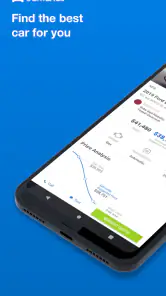
First off, downloading the app is a breeze. Available on both Android and iOS, the Edmunds - Shop Cars For Sale app is free and user-friendly. Once you open it, the clean interface welcomes you with open arms. It’s pretty straightforward, even if you’re not a tech whiz, you’ll feel right at home.
Features You’ll Love
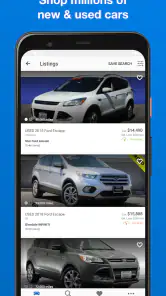
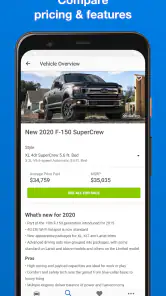
What’s cool about this app is its comprehensive database of new and used cars. You can browse through a myriad of options and filter them down based on your preferences like make, model, price range, and more. It’s like window shopping, but without the pushy salespeople.
Latest News
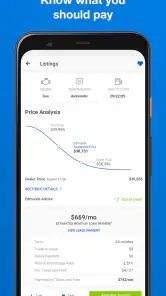
One neat feature is the price comparison tool. It lets you see if the deal you’re eyeing is a steal or if you should keep looking. Plus, the app gives you access to true market value prices, so you can negotiate like a pro.
Make your first search useful
For a first run, I’d begin with a budget range and one or two practical needs, rather than piling on filters immediately. If I need room for a child seat and groceries, for example, I can start with a body style or model shortlist, then compare the candidates that remain. A very narrow search can hide reasonable alternatives; widening it briefly is a good way to learn whether my first choice is unusually expensive or simply one of several comparable options.
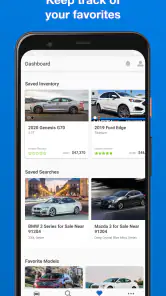
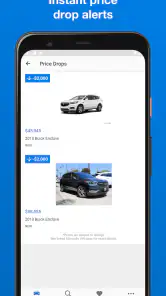
I’d also use saved searches and favorites as separate tools. A saved search keeps the broader market visible, while a saved vehicle lets me revisit a particular candidate. That distinction is handy when I’m comparing several trims or watching for a better-priced example. Price alerts can help with timing, but I wouldn’t treat an alert as proof that a car is a bargain: the vehicle’s condition, equipment, mileage, and seller details still matter.
In-Depth Car Reviews
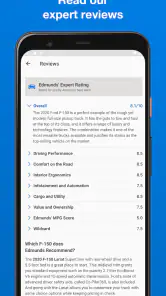
Another great aspect of the app is the detailed car reviews. Edmunds has a team of automotive experts who provide insights into each vehicle’s performance, reliability, and overall value. Reading these reviews feels like chatting with a knowledgeable friend who’s got your back.
I find reviews most useful when I read them before getting attached to a listing. They can help me identify trade-offs to investigate, such as whether a model’s strengths suit my daily routine or whether I should compare a rival. For a first-time buyer, that context can turn a vague question—“Is this a good car?”—into specific questions to ask during a test drive. I’d still separate general model impressions from the condition of an individual used vehicle; an expert overview cannot inspect the exact car I’m considering.
Easy to Navigate
Navigation is a breeze with this app. The search functionality is super intuitive, allowing you to save your favorite searches and vehicles. It’s perfect for people like me who like to mull over decisions before making a big purchase. Plus, you can set up alerts for price drops, ensuring you never miss out on a deal.
The app also includes a dealer locator feature, which helps you find nearby dealerships. You can read dealer reviews and ratings, helping you choose a reputable place to make your purchase. It’s all about making informed decisions, and this app delivers on that front.
Using the tools without losing perspective
A useful way to keep a search grounded is to separate what the app can help me compare from what I must establish in person. Research and market-value context help me judge whether a listing deserves attention; neither can tell me whether the seats feel comfortable, the controls make sense, or a particular used car has been maintained well. I’d write down those personal checks before visiting so a polished listing doesn’t steer the whole decision.
I’d also avoid treating a saved result as a commitment. Favorites are most useful as a temporary comparison set: remove a car when it no longer meets the budget or needs, and keep a broader search open long enough to notice alternatives. This is especially helpful when a first choice is based on habit or brand familiarity rather than a clear advantage for daily use.
From shortlist to a real-world visit
Here’s how I’d use it on an ordinary weekday: during a lunch break, I’d save a few candidates that fit my budget, read the relevant model reviews, and compare their prices. Later, I’d look at the dealer information and choose one or two places to contact. Before traveling, I’d confirm that the specific vehicle is still available and ask about its equipment and history. That small step saves time and keeps an appealing listing from becoming an assumed deal.
The dealer locator is most valuable once I have a shortlist, not while I’m still browsing every possible car. A nearby seller is convenient, but proximity alone doesn’t make a vehicle or dealership the right pick. I’d compare a farther option if it better matches my needs, and I’d keep notes on why each candidate made the list so that changing prices or new search results don’t blur my priorities.
Questions worth settling before a visit
When a listing looks promising, I’d use the app to organize the next conversation, not to skip it. I’d confirm that the advertised trim and equipment match the car on the lot, ask whether the vehicle is still available, and clarify what information the seller can provide about its history. If the answer changes the car’s suitability or the total cost, I’d want that clarified before making the trip.
For a used vehicle, I’d treat a test drive and an independent inspection as separate safeguards. A short drive can tell me whether the car feels right, while an inspection can help assess condition beyond what photos and general model reviews reveal. If a seller is unwilling to let me check the car appropriately, I’d take that seriously and move on rather than relying on the app’s research tools as reassurance.
Where I’d be cautious
The app is a strong fit for people who want vehicle research and shopping tools in one place, especially first-time buyers who need help turning a long list of models into a few sensible options. It may be less useful if I already know exactly what I want and only need a broad classifieds feed, or if my main priority is arranging an inspection or negotiating directly with a seller. In those cases, a dedicated marketplace or an independent mechanic may be the better next stop.
I’d also avoid reading market-value guidance as a guaranteed final price. Local availability, the exact trim, vehicle condition, and the seller’s terms can all change the practical value of a listing. Use comparisons to prepare questions and set expectations, not to assume every seller will accept a particular figure. That is where Edmunds can make me better prepared without making the decision for me.
Who will get the most from it
I’d recommend Edmunds most to someone at the start or middle of a shopping journey: a first-time buyer comparing unfamiliar models, a household deciding whether a larger vehicle is worth the added cost, or an owner replacing a car and wanting to compare new and used possibilities. The combination of reviews, listings, price context, saved searches, and dealer information gives those shoppers several useful steps in one place.
It is less compelling for someone who wants only a quick stream of local classified ads, has already settled on a specific seller, or needs help with the mechanical condition of one car. A general marketplace may offer a different browsing experience, while a mechanic is the right person to assess a vehicle’s condition. I see Edmunds as a planning tool between those steps, not a replacement for either.
Final Thoughts
In a nutshell, the Edmunds - Shop Cars For Sale app is a must-have for anyone serious about buying a car. It’s packed with features that make the car shopping experience not only easier but also more enjoyable. You get all the information you need right at your fingertips, helping you make a decision you’ll feel good about.
Whether you’re a first-time buyer or a seasoned car owner, this app caters to all. So, go ahead, give it a whirl, and let me know what you think. Who knows, you might just find the car of your dreams!
My next step after browsing
Once I have two or three realistic options, I’d stop expanding the search and move into verification: check each listing’s details, contact the seller, and arrange a viewing or test drive. I’d bring the questions prompted by the reviews and compare the actual cars against the same needs and budget. That keeps the app in its best role—as a way to research and organize choices—while leaving the final judgment to a careful look at the vehicle itself.
A practical way to decide whether to keep using it
After my first session, I’d ask whether the app has helped me make a decision clearer, not whether it has already found the perfect car. A useful result might be learning that I should compare two body styles, dropping a model that fails a practical need, or realizing that my budget calls for a wider search. Those are meaningful steps even if I’m nowhere near contacting a seller yet.
If I’m getting too many near-identical results, I’d revisit the filters and remove one constraint at a time rather than restarting from scratch. If I’m seeing too few candidates, I’d broaden the search and use the model research to compare alternatives. That small adjustment can reveal whether my criteria are realistic without nudging me toward a car that does not fit.
A measured recommendation
My overall view is that Edmunds is best when I use it as a guide through the early decisions: what kind of car to consider, which models deserve attention, and which listings warrant a closer look. It is not a buying guarantee, and no amount of in-app comparison can replace confirming the seller’s claims or examining the actual vehicle. Keeping that boundary clear makes the research more useful and the final choice more deliberate.
If you’re beginning with a rough idea and want help turning it into a reasoned shortlist, I’d give it a try. If you need only a particular local listing or a technical verdict on one car, I’d pair it with a more focused resource. The strongest outcome is not simply finding a listing; it is arriving at a viewing with better questions and a clearer sense of what matters to you.
Edmunds - Shop Cars For Sale Frequently Asked Questions
Who develops Edmunds - Shop Cars For Sale, and what is the app for?
Edmunds.com develops this Auto & Vehicles app for people researching and shopping for cars. Its focus is reflected in the store summary, “Find Your Next New or Used Car,” and the app brings vehicle-shopping information and tools together in one place. It is designed to help buyers explore options and compare vehicles, while also offering resources for people considering selling a car.
What should I know about the app’s history and current version before installing?
Edmunds has been available since April 5, 2011, and its current version is 11.41.103271. The app requires Android 5.0 or later, so it is worth checking your device’s operating-system version before downloading. Its long-running focus is car shopping, and the current version continues to present Edmunds as a place to explore new and used vehicle options.
What features does the Edmunds app offer for car buyers?
The Edmunds app provides a comprehensive set of tools for car buyers, including vehicle listings from dealers, pricing information, expert car reviews, and a detailed comparison tool. Users can also access car ratings, inventory updates, and price alerts to ensure they make informed purchasing decisions. Additionally, the app offers a calculator for estimating monthly payments and trade-in values, making it a versatile tool for anyone in the market for a new or used vehicle.
Is the Edmunds app free to use or are there any subscription fees?
The Edmunds app is free to download and use, providing access to a wide range of features without any subscription fees. Users can browse car listings, read reviews, and access pricing tools without any cost. However, some premium features might require in-app purchases or accessing through partner services, so it's always good to check the app details for any such requirements.
How accurate is the pricing and inventory information on the Edmunds app?
The Edmunds app strives to provide users with the most accurate and up-to-date pricing and inventory information by partnering with a wide network of dealerships. While the app updates listings regularly to reflect current market conditions, it's always advisable for users to contact the dealer directly to confirm availability and final pricing, as these aspects can change quickly in the automotive market.
Pros
- User-friendly interface for easy navigation.
- Comprehensive car comparison tool.
- Includes detailed car reviews and ratings.
- Access to a wide range of car listings.
- Regular updates with the latest car models.
Cons
- Limited availability in certain regions.
- Some features require in-app purchases.
- Occasional app crashes reported.
- Limited customization for notifications.
- Requires stable internet connection.

- Category
- Auto & Vehicles
- Version
- 11.41.103271











