DSW Designer Shoe Warehouse
- 16.54K
- 4.5
- Installs
- 1.00M
- Price
- Free

Screenshots




Analysis by Reviewed
When I’m trying to find shoes for a particular outfit, the hardest part is often turning a vague idea into something I can actually compare. That is where the DSW Designer Shoe Warehouse app makes sense to me: it brings a shoe-focused shopping experience to a phone, so I can browse styles without first committing to a trip to a store. It is a free shopping app from Designer Brands Inc., and its focus is firmly on footwear and the accessories that go with it.
The most interesting part of using a dedicated shoe retailer’s app is not simply that it puts products on a screen. It is the way it can help connect a real-world reference—a pair I have seen on someone else, or a style I have spotted while out—with items I can explore at my own pace. That makes the app useful both when I know exactly what I want and when I only have a rough sense of the shape or look I am after.
Turning a passing style reference into a search
The scan-and-search feature is the capability I would pay attention to first. If I notice a pair of sneakers on the train or see a shoe in a shop window, being able to use a visual reference to look for similar styles can be more practical than trying to describe the shoe with a string of search terms. It gives me another starting point when I do not know the brand, the model name, or the right words for a particular detail.
I would treat that search as a way to discover close alternatives, not as a promise that the exact pair will appear. A visual match can be difficult when shoes have similar silhouettes but different materials, colors, or small design details. My useful next step would be to compare the results carefully: check the toe shape, sole, color, and overall profile rather than choosing only because the first result looks broadly similar. That little pause matters when I am shopping for a specific outfit or need a shoe for a particular occasion.
This approach also makes the app more useful for browsing than a plain text search alone. If I cannot remember whether I want a chunky sneaker, a low-profile one, or something in between, an image gives me a concrete reference and lets me explore from there. I would still use category browsing when I have a clear need, such as sandals for warm weather or boots for a particular look, but scan-and-search is a handy route when inspiration comes before vocabulary.
Shopping from discovery to a considered choice
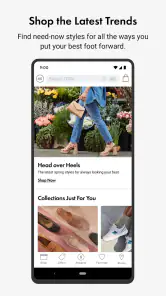
Let's dive into the treasure trove of features that the DSW Designer Shoe Warehouse app has to offer. First off, the app’s sleek design makes it super easy to navigate, whether you're a tech wizard or just someone who knows how to text. The homepage gives you a glimpse of the latest arrivals, trending styles, and exclusive deals that are too good to miss.
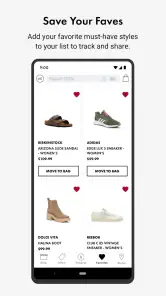
One of my favorite features is the scan and search. Imagine walking down the street, spotting a pair of killer sneakers, and being able to simply scan them with your phone to find similar styles on the app. It's like having a personal shopper with you at all times! Plus, the wishlist feature is a lifesaver for those moments when you want to save a style for later.
More From Our News Desk

Clash of Clans Is Won Between the Battles

Android Auto Makes the Case for Quieter Car Software

MobiOffice: Transforming Mobile Productivity with Seamless Integration

EA SPORTS FC™ Mobile Soccer: Redefining Mobile Sports Gaming

How Microsoft OneDrive Became a Mobile Productivity Giant

How Google Translate Breaks Language Barriers Effortlessly
Shopping Made Simple
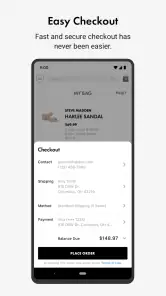
Shopping on the app is a breeze. With just a few taps, you can filter through categories like boots, sandals, sneakers, and more. The app even remembers your size preferences, making the whole process as smooth as a new pair of leather loafers. Not to mention, the checkout process is straightforward, with multiple payment options to choose from.
In practice, I find it helpful to separate browsing from buying. If I am comparing several pairs, I can save a candidate to the wishlist rather than trying to remember its name or retrace the same search later. A sensible workflow is to save a few different shapes, then revisit them together and compare the details that matter to me: whether the style suits the occasion, whether the size I need is available, and whether the price fits my plan. A wishlist is not a substitute for that comparison, but it makes the short list easier to manage.
Size preferences can also reduce repetitive work when I return to look at shoes, but I would not let that convenience make the fit decision for me. Sizing can vary between styles, and a remembered preference is best treated as a starting point rather than a guarantee. If I am choosing a pair for a long day on my feet, for example, I would take time to check the product details and think about how I expect to wear it instead of relying on the size filter alone.
A useful companion to browsing in person
The app is most convincing when I use it alongside ordinary shopping rather than expecting it to replace every part of it. A quick scan can help me turn an in-person sighting into a set of similar options. Browsing on a larger retailer site may be more comfortable when I want to compare many product pages side by side, while a store visit can be the better choice when trying shoes on is central to my decision. DSW’s phone app is a convenient middle ground: it is strongest at helping me discover and save possibilities while I am away from a computer or store.
That distinction is especially useful for practical shopping. If I need a pair for an event coming up soon, I can browse and narrow down the look before deciding how to get it. If I am simply curious about what styles might work with clothes I already own, I can explore without making the outing itself part of the task. The app helps me do the early sorting; my own judgement still has to settle questions of comfort, exact fit, and whether a shoe is right for the occasion.
For an everyday example, picture me getting dressed before work and realizing that the shoes I planned to wear are not suitable for a rainy commute. I can open the app, look through boots, and save a couple of options while I compare their appearance and the information on their product pages. If I later see a style in person that is closer to what I had in mind, scan-and-search gives me a different route into the same decision. The value is not that the app can choose for me; it is that it helps me keep the search organized when I am fitting it around a normal day.
Where the convenience has limits
There are tradeoffs. A phone screen can make color, texture, and scale harder to judge than seeing a shoe in person, and a similar-looking result is not necessarily a substitute for the exact shoe I spotted. Filters and saved items help narrow the field, but they cannot tell me how a pair feels after several hours of walking. For a difficult fit, a comfort-sensitive purchase, or a shoe I need immediately, trying options on in person may be the more dependable approach.
It is also worth keeping the app’s retailer focus in mind. When I want a broad comparison across many different shops, a general shopping marketplace or a web search may give me a wider view. When I want to explore DSW’s shoe selection in particular, the dedicated app keeps that task focused. I would not install it expecting a universal catalogue of every brand and seller; I would use it when DSW is already one of the places I want to check.
The app’s overall reception is strong, with an average rating of 4.5 from around 32,000 ratings, and it has been downloaded over a million times. Those figures make it a well-established choice, but they do not remove the need to judge a pair for yourself. I see them as context for the app’s popularity, not as a reason to assume every search result, fit, or purchase will suit me.
There are a few practical questions I would ask before relying on it for a specific purchase. Can I use it without paying to download? Yes: it is free, so I can install it and browse without an upfront app cost. Is it suitable for younger users? Its content rating is Everyone. Will a visual search settle the choice by itself? I would say no; it is a discovery aid, and I would still verify the style and product details before buying. Should I use the app when I need shoes today? I would first check what options are available for my situation and consider a store visit if trying them on or getting them immediately matters most.
Who gets the most from DSW on a phone
I think the app is a good fit for people who often shop for shoes through DSW, like keeping possible purchases in one place, or enjoy browsing from a visual prompt instead of starting with a product name. It is particularly handy for someone who sees styles while out and wants to investigate them later, or who prefers to make a shortlist before deciding whether to buy online or visit a store. The wishlist and category browsing work well together for that kind of unhurried decision-making.
It is less compelling for someone who wants to compare every retailer at once, needs detailed fit advice before choosing, or dislikes shopping on a phone. In those cases, a broad marketplace, a desktop browser, or an in-person visit may be a better first stop. I would also avoid treating remembered size preferences as a promise of a comfortable fit; they can make browsing quicker, but individual shoes still deserve a careful look.
DSW is a shopping app from Designer Brands Inc., released in May 2017. Its current version is 4.186.0, and it supports devices running Android 9 or newer. Those details make it straightforward to judge whether it fits your phone and shopping habits. For me, its best use is clear: start with a shoe idea, use visual discovery or category browsing to find candidates, save the ones worth a closer look, then make the final decision with fit and occasion in mind.
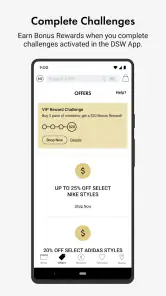
What really stands out is the rewards program. Every purchase earns you points that can be redeemed for discounts on future buys. It's like they're rewarding you for doing what you love—buying shoes! And for those of us who can’t wait to strut our stuff, the app offers free in-store pickup, so you can grab your new kicks on the go.
A final word on the shopping experience
In an era where convenience is king, the DSW Designer Shoe Warehouse app definitely delivers. It's a must-have for any shoe enthusiast looking to keep their collection fresh and fabulous. Whether you're hunting for a specific style or just browsing for inspiration, this app has got your back (and your feet!).
If you're someone who loves shoes—and let's be real, who doesn't?—the DSW Designer Shoe Warehouse app is your new best friend. So, what are you waiting for? Get downloading, and let your shoe journey begin!
DSW Designer Shoe Warehouse Frequently Asked Questions
Can I browse DSW products before creating an account?
The DSW app is designed for browsing and shopping for shoes, boots, and handbags from a mobile device. You can explore the retailer’s selection to see whether the app suits your shopping needs. An account can be useful for features such as rewards and order tracking, while browsing helps you get a feel for the available products and shopping experience.
Who develops the DSW Designer Shoe Warehouse app?
DSW Designer Shoe Warehouse is developed by Designer Brands Inc. and belongs to the shopping category. Its focus is helping shoppers explore DSW’s shoes, boots, and handbags through an app. If you are looking for a mobile route to the retailer’s shopping experience, this is the official DSW app rather than a general fashion or marketplace application.
Is the DSW app free to download, and what devices can use it?
DSW Designer Shoe Warehouse is a free shopping app from Designer Brands Inc. It is suitable for everyone and requires iOS 9 or later. Before downloading, check that your device meets this operating-system requirement; once installed, the app gives you a mobile way to browse DSW’s shoe, boot, and handbag selection.
What is DSW Designer Shoe Warehouse and what does it offer?
DSW Designer Shoe Warehouse is a retail app that provides access to a wide variety of shoes and accessories for men, women, and children. Users can browse the latest trends, get exclusive deals, and enjoy rewards through the VIP program. The app also offers convenient features like store locator, order tracking, and personalized recommendations to enhance the shopping experience.
How does the VIP rewards program work in the DSW app?
The DSW app features a VIP rewards program that allows users to earn points with every purchase. These points can be redeemed for discounts on future purchases. The program has different tiers, offering additional benefits such as free shipping, birthday gifts, and access to exclusive sales events. Joining the VIP program is free and can significantly enhance the shopping experience for frequent buyers.
Pros
- Wide selection of designer brands.
- User-friendly interface.
- Regular discounts and promotions.
- Easy order tracking.
- Secure payment options.
Cons
- Limited customer service hours.
- Occasional app crashes.
- High shipping fees on low orders.
- Limited international shipping.
- Some items out of stock frequently.

- Category
- Shopping
- Version
- 4.186.0











