DriveTime Used Cars for Sale
- 1.29K
- 4.2
- Installs
- 500.00K
- Price
- Free

Screenshots



Analysis by Reviewed
When a household is shopping for a car, the first challenge is often getting everyone onto the same page. One person may care most about monthly costs, another about cargo room, and someone else may simply want a shortlist that is easier to compare than a jumble of browser tabs. I see DriveTime Used Cars for Sale as a practical place to begin that conversation: it brings used-car browsing and financing into one app, though each shopper should still make their own checks before deciding.
A shared shortlist works better than shared assumptions
A useful way to browse together is to agree on a few must-haves before opening listings: the kind of vehicle, a comfortable price ceiling, and which needs are non-negotiable. Then one person can use the filters to narrow the search while the others review the remaining choices. That keeps a household from judging every car by a different standard, and it makes saved or recent searches more helpful when you return later.
For example, imagine a household looking for a car that can handle a daily commute and weekend errands. One person can focus on mileage and price while another checks whether the vehicle suits the practical needs they discussed. The app can help organize the search, but it cannot settle disagreements about priorities; I would treat the shortlist as a starting point for a conversation, not a final verdict.
Keep account and device boundaries clear
If several people use the same phone or tablet, I would avoid treating one person’s browsing or financing exploration as a household-wide decision. A shared device can make it easy to pick up a search, but it can also blur whose preferences, contact details, or next steps are involved. Before anyone submits information or moves toward arranging a visit, make sure the person who will handle the purchase is the one reviewing the details.
That distinction matters especially when someone is only helping a relative compare cars. Browsing together is one thing; taking action on another person’s behalf is another. I’d keep the actual financing discussion and any purchase-related decisions with the adult who is responsible for them, rather than assuming that a family member’s search automatically represents everyone.
Latest News
What this app is—and what it is not
DriveTime is a free Auto & Vehicles app from DriveTime Automotive Group, Inc. It is rated for Everyone, and its average is 4.2 from around 3.7 thousand ratings, with over 500 thousand installs. The current version is 2.0.9887646, and it runs on Android 5.1 or later. Those figures suggest a well-used shopping tool, but popularity alone does not tell me whether a particular car or financing option fits your situation.
I would choose it when I want to explore DriveTime’s used-car inventory and financing path in one place. If I’m comparing vehicles across many sellers, checking listings from private owners, or seeking a broad market scan, general classified and marketplace apps may be a better complement. This app is most useful for focused shopping, not as a substitute for comparing the vehicle’s condition, the complete terms, and alternatives that matter to your budget.
There is also a difference between an estimate and a commitment. A financing calculator can help me think through how a down payment and interest rate might affect a monthly figure, but I would not use that number alone to decide whether a car is affordable. I’d leave room in the budget for ownership costs and verify the final terms directly before moving ahead. That extra step is less exciting than browsing, but it is where a confident decision becomes a careful one.
Parents can use the app alongside an older teen who is learning how car shopping works, but the Everyone age label should not be mistaken for a recommendation that a young person manage financing or buying. I’d keep an adult in charge of financial choices and use the listings as a teaching aid: compare needs, inspect the available vehicle information, and talk through why a tempting monthly payment is only one part of the decision.
For a household, the clearest benefit is shared discovery without pretending that everyone has identical needs. The app is a strong fit if you want a focused way to browse DriveTime cars and start thinking through financing; it is less suitable if you expect it to compare the whole used-car market or make the purchase decision for you. I’d use it to build a sensible shortlist, then have the responsible buyer confirm the vehicle and terms before taking the next step.
Ever found yourself scrolling endlessly through car listings, only to be bombarded with the same generic ads over and over again? Well, hold onto your seatbelt because DriveTime Used Cars for Sale is here to shake things up. This app isn’t just another run-of-the-mill car listing service; it’s like having a personal car advisor right in your pocket. Let me take you on a ride through my experience with this app.
Discovering the App
First off, the layout of the app is as smooth as a well-tuned engine. As soon as I opened DriveTime Used Cars for Sale, I was greeted with a clean interface that didn’t overwhelm me with too much information. It’s like walking into a well-organized showroom where every car has its charm and personality.
Features that Stand Out
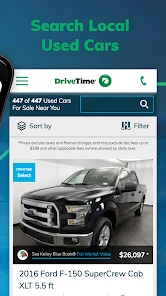
Now, what really revs my engine about this app is its incredible filtering system. You can search for cars based on make, model, price range, and mileage, among other options. It’s like having a personal assistant who knows exactly what you’re looking for. And the best part? It remembers your last searches, making it even easier to pick up where you left off.
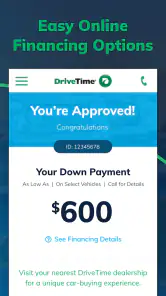
Another nifty feature is the financing calculator. Buying a car isn’t just about finding the right model; it’s about finding the right deal. With this calculator, I could easily see what my monthly payments would look like based on the down payment and interest rate. It’s like having a finance guru whispering sage advice in your ear.
User Experience
Using the app felt like taking a scenic drive through the countryside—pleasant and stress-free. The images of the cars are high quality, allowing you to inspect every nook and cranny without having to leave your couch. Each listing provides detailed information about the vehicle, including its history report, which is a must-have for anyone buying used.
One thing that really got me excited was the ability to schedule a test drive directly through the app. No more back-and-forth emails or calls. Just a few taps, and you’re set to take your potential new car for a spin. It’s convenience at its finest.
Final Thoughts
In conclusion, if you’re in the market for a used car, DriveTime Used Cars for Sale is your go-to app. It’s user-friendly, feature-rich, and makes the whole car buying process feel like a breeze. Whether you’re a first-time buyer or a seasoned car enthusiast, this app caters to all your needs and then some.
So, next time you’re on the hunt for a used car, give this app a whirl. Who knows? You might just find your dream ride with a few swipes and taps. Happy car hunting!
Make the shortlist useful before anyone falls in love with a car
In practice, I would start with the household’s real constraints rather than browsing by favorite makes. Decide who will drive most often, what needs to fit inside, and whether the car must cover a regular commute. Only then use the search filters to reduce the field. This is a small but useful workflow change: it helps prevent attractive photos or a low displayed payment from turning a casual search into a premature commitment.
When a listing catches someone’s eye, I’d ask each person to name one reason it fits and one concern to check. That keeps the conversation grounded in the vehicle rather than in competing preferences. A passenger who cares about comfort can flag that as a question for an in-person visit; the person managing the budget can compare the asking price with the household’s ceiling. The app organizes candidates, while the family supplies the decision criteria.
Use the financing view as a planning prompt
The calculator is most useful when I treat it as a way to test assumptions, not as a promise about what I will pay. I would try more than one down-payment scenario and compare the resulting monthly figures with the amount the household can comfortably set aside. Then I’d consider costs that a payment estimate does not capture, such as insurance, fuel, maintenance, and registration. This makes the tool valuable early in the search, when it can help rule out unrealistic options before anyone spends time arranging a visit.
There is a trade-off in having browsing and financing together: it can make moving from “that looks promising” to “what could I pay?” feel very easy. I’d deliberately pause at that point. A monthly number can look manageable while the total cost or length of the arrangement deserves closer attention. Use the calculation to prepare better questions, and review the full terms with the responsible buyer before agreeing to anything.
Know when a broader search is worth the extra effort
Compared with general classifieds, DriveTime offers a more focused route through its own used-car shopping experience rather than a broad mix of dealer and private-party listings. That focus can save time if you already want to consider DriveTime inventory. It is less useful when your main goal is to establish what similar cars are listed for across the wider market, or when you want to compare sellers with different purchase processes. In that case, I’d use a marketplace alongside it, then verify that comparisons are genuinely like for like: model, condition, mileage, and included terms can vary.
I would also avoid treating a single listing’s photos or history information as a substitute for a careful inspection. Photos are good for narrowing choices, but they cannot answer every question about how a vehicle feels, sounds, or suits the driver. A test drive is the practical next check when a candidate remains appealing. If the person who will buy the car cannot visit, I’d have them review the listing and take part in the decision rather than letting the person holding the phone decide alone.
Plan a shared-device handoff deliberately
For a realistic weekend search, one adult might browse after work, then show a short list to a partner over breakfast. Instead of passing around a phone and assuming everyone knows which search is current, I’d write down the few candidate details the household wants to compare and identify who is responsible for any follow-up. That simple handoff reduces mix-ups between “we’re interested” and “someone has contacted the seller or started a financing step.” It also makes it easier to return to the same shortlist without reopening every search from scratch.
If different household members have different budgets or are shopping for separate cars, I would keep those searches mentally—and where applicable, in separate personal account use—distinct. One person’s financing exploration should not be interpreted as another person’s application or consent. Before entering personal or financial information, the person whose details are involved should take control of the device and read what is being requested. That is a sensible boundary for any shopping app connected to a financial decision.
Who will get the most from it
I think the app suits someone who has moved beyond casual curiosity and wants to narrow down used cars within DriveTime’s inventory while beginning to understand possible financing. It can also help a first-time buyer learn the sequence: define needs, compare candidates, use a payment estimate to shape questions, and arrange a closer look. A household with a clear point person may find it especially convenient because browsing and early payment planning happen in one place.
I’d skip it as the only tool if you are undecided about where to shop, want a complete picture of the local used-car market, or prefer to negotiate directly with private sellers. It is also not a replacement for a mechanic’s assessment, a test drive, or a careful review of the final purchase and financing documents. The app can make the early stages more organized, but the buyer still needs to do the work that protects them from a rushed choice.
Age context and trust at home
The Everyone rating describes the app’s content age category; it does not mean every part of a car purchase is appropriate for a child to manage. I would let a younger family member help compare practical features or talk about why a vehicle suits a household, while keeping account access, personal details, financing decisions, and purchase steps with the responsible adult. That approach gives a teen a useful look at real-world budgeting without confusing participation with authority to commit.
For shared devices, the key question is not only who can open the app but who is making each decision. Agreeing on that boundary ahead of time can prevent an enthusiastic helper from submitting information or arranging a next step without the buyer’s approval. I find this especially important when several adults are contributing to the decision but only one person will be responsible for the financing.
A sensible household stopping point
My recommendation is to use the app as a focused starting point, then step outside it whenever the decision calls for a wider comparison or a closer check of the car. Its filters and financing calculator can help a household turn vague preferences into a manageable shortlist, while the listing photos and information help decide which candidates deserve attention. The best result is not simply finding a car quickly; it is knowing why that car fits and what still needs to be verified.
DriveTime Used Cars for Sale is free, and its 1.3 thousand reviews offer another clue about the experience people report, though no rating or review count can replace your own judgment. I’d install it if I were actively considering DriveTime cars and wanted a convenient way to organize the search. If I were still comparing the entire market, I’d pair it with broader listing sources and keep the final decision anchored to a real inspection, clear financing terms, and the household’s actual budget.
DriveTime Used Cars for Sale Frequently Asked Questions
Is DriveTime Used Cars for Sale free, and what devices can I use it on?
DriveTime Used Cars for Sale is free to download and is listed for Android devices running Android 5.1 or later. It is an Auto & Vehicles app from DriveTime Automotive Group, Inc., and its content rating is Everyone. The app is intended to help people explore used cars and personalized financing options, so you can begin browsing without paying to install it.
What is DriveTime Used Cars for Sale?
DriveTime Used Cars for Sale is a mobile app designed to make the car buying process simpler and more convenient. It offers users access to a wide selection of used cars, along with detailed information about each vehicle, financing options, and tools to help manage the car buying process. The app is available for both Android and iOS platforms, providing a user-friendly interface for browsing and purchasing used cars.
How does DriveTime make car buying easier?
DriveTime simplifies car buying by offering a comprehensive platform where users can search for used cars based on their preferences such as make, model, price, and location. The app also provides detailed vehicle history reports, financing options tailored to various credit profiles, and even an option to schedule test drives. With all these features in one place, DriveTime streamlines the entire car purchasing process.
What financing options are available through DriveTime?
DriveTime offers flexible financing options to cater to a variety of credit situations, including those with poor credit or no credit history at all. The app provides a pre-approval process that doesn’t impact credit scores, allowing users to understand their budget and potential financing terms before visiting a dealership. This transparency in financing helps users make informed decisions.
Can I trade in my current vehicle through DriveTime?
Yes, DriveTime allows users to trade in their current vehicles as part of the purchasing process. The app offers a trade-in valuation tool where users can input their vehicle details to receive an estimated trade-in value. This feature makes it easier for users to offset the cost of their new purchase and manage their budgets effectively.
Pros
- User-friendly interface for easy navigation.
- Wide selection of used cars available.
- Detailed car history reports provided.
- Flexible financing options available.
- Responsive customer support team.
Cons
- Limited search filters for specific preferences.
- App occasionally crashes on some devices.
- Some listings have outdated information.
- No in-app customer reviews on cars.
- Limited availability in certain regions.

- Category
- Auto & Vehicles
- Version
- 2.0.9887646











