Coupert - Coupons & Cash Back
- 630.00
- 4.6
- Installs
- 1.00M
- Price
- Free

Screenshots



Analysis by Reviewed
I approach any shopping app that promises to save money with one practical question: does it help at the moment I’m actually paying, without turning a quick purchase into a project? Coupert - Coupons & Cash Back is designed for that checkout moment, combining coupon discovery with cash back offers. In my view, it’s most useful when you already know what you want to buy and are willing to take a brief pause before placing the order.
When a steady connection matters
Because the coupon-checking process happens around an online purchase, connectivity is part of the experience rather than a detail to ignore. I’d use it while browsing and checking out with a reliable connection, when the app can help look for a code at the point where one could make a difference. If a page is slow or a connection drops, I wouldn’t assume the search has finished; I’d first make sure the retailer’s checkout is still intact and then try again when the connection is stable.
That also shapes how I’d treat a promising offer. I would check the final order total before paying instead of assuming a discount has applied just because a code was tested. A coupon that doesn’t change the checkout price hasn’t saved me anything, and the retailer’s displayed total is the figure I’d use to make the decision.
Discovering the Magic of Coupert
So, what’s the deal with Coupert - Coupons & Cash Back? Well, it’s an app that effortlessly finds, applies, and combines coupon codes for you. It’s like magic, but without the wand. You know that feeling when you're at checkout and you realize there’s a coupon code box just sitting there, empty? I’ve been there too many times. But with this app, you don’t have to worry about missing out on any savings.
How Does It Work?
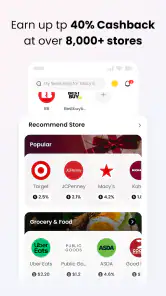
Alright, let’s dive into the nitty-gritty. Once you install the app, it integrates smoothly with your browser. When you shop online, Coupert automatically tests different coupon codes at checkout to find you the best deals—pretty neat, right? It also offers cash back on purchases from partnered retailers. Think of it like a double whammy of savings: first, you save with the coupons, and then you earn a little cash back on top of that.
For a realistic shopping routine, I’d use that process on a planned purchase rather than opening it for every small item. Say I’m ordering a replacement household item: I can compare the checkout total with any available code, then consider whether the cash back offer is worth taking into account. This keeps the decision grounded in the actual price and avoids buying something unnecessary just because a discount appears.
Using it on a phone without adding friction
Coupert is a free shopping app from developer Coupert, rated for Everyone. It has a 4.6 average from around 9,700 ratings, with over a million installs, so it has reached plenty of shoppers. Version 6.4.20 supports Android 7.0 and later. I’d still check that the shopping flow I use works comfortably on my device: the experience described around browser checkout may not feel identical across every phone, browser, or retailer.
More From Our News Desk

Clash of Clans Is Won Between the Battles

Android Auto Makes the Case for Quieter Car Software

MobiOffice: Transforming Mobile Productivity with Seamless Integration

EA SPORTS FC™ Mobile Soccer: Redefining Mobile Sports Gaming

How Microsoft OneDrive Became a Mobile Productivity Giant

How Google Translate Breaks Language Barriers Effortlessly
That distinction matters if most of your shopping happens inside retailer apps rather than a browser. Before relying on a coupon workflow, I’d test it with a low-stakes purchase or browse a retailer I already use. If I mainly want to compare prices across several stores, a dedicated comparison tool may be a better first step; Coupert is more appealing when I’m already at a participating retailer and want to check for a checkout saving.
Why I’m Hooked
Now, I’m not one to get excited over every app I download, but Coupert - Coupons & Cash Back had me hooked from the get-go. Here’s the kicker: it’s incredibly user-friendly. Even if you’re someone who doesn’t consider themselves tech-savvy, you won’t have to break a sweat trying to figure it out. Plus, it supports a wide range of stores, so you’re not limited to just a handful of options.
My useful tip is to treat cash back as a possible later benefit, not money already in my pocket. The app can offer it on purchases from partnered retailers, but I would keep the coupon result and the cash back expectation separate while deciding whether an order makes sense. That makes it easier to compare the immediate checkout price with alternatives and avoid letting a delayed reward distract from the amount due now.
Data-conscious shopping and recovery
I’d keep my use intentional: open the app when I’m shopping, rather than making it part of every phone session. Coupon searches and online checkout depend on network access, so they’re better suited to a connected shopping moment than to a commute with an unreliable signal. If something stalls, I’d return to the retailer’s cart, confirm the items and total, then retry the coupon check only if the order is still unchanged. That simple recovery step helps prevent a repeated attempt from becoming an accidental duplicate order.
For shoppers who are cautious about data use, the practical trade-off is straightforward: checking offers while actively shopping can be useful, but it adds another online step to the purchase. I’d avoid repeatedly refreshing a slow checkout and would compare the final price once, carefully, rather than chasing every possible code. People who prefer minimal app involvement or want to shop entirely through retailer apps may find a manual coupon search or the retailer’s own offers simpler.
Any Downsides?
Nothing’s perfect, right? While Coupert is pretty amazing, there are a few caveats. Sometimes, the app might not find a working coupon code, but that’s more a reflection of the store’s availability than the app itself. And while the cash back feature is awesome, it can take a little while to process. So, if you’re expecting immediate gratification, you might need a smidge of patience.
I’d also avoid making a purchase solely to qualify for a discount or a cash back offer. The strongest use case is a purchase I intended to make anyway, where a working code can lower the total and a cash back offer is a bonus. If I need a guaranteed price right now, I’d compare the retailer’s current total with another seller instead of counting on a coupon search to produce a result.
Who should make room for it?
For someone who shops online regularly, remembers to check for savings, and doesn’t mind a little extra checkout step, Coupert is an easy option to try: it’s free, and the app is listed as released on February 6, 2021. The current version is 6.4.20. It makes less sense for someone who rarely shops online, dislikes browser-related shopping workflows, or expects cash back to be instant. I’d also skip relying on it when a purchase is urgent and there’s no time to check whether an offer actually changes the total.
A sensible way to compare offers
When I’m deciding whether to use a coupon app, I separate the search for a lower sticker price from the wider question of which retailer offers the best deal. Coupert is most useful after I’ve settled on a store and reached the online checkout; it is not a substitute for comparing the same item across sellers. I’d first check whether the retailer’s own promotion already gives a lower total, then see whether a coupon changes that figure. This order keeps me from mistaking a code for a bargain when another store’s ordinary price is better.
There is also a small but important trade-off between convenience and control. Letting a tool test codes can spare me the tedious task of trying them one by one, but I still need to read the checkout carefully. A code may be limited by the items in the cart or by the retailer’s current rules, and the final price is what matters. If applying a code changes shipping or removes another offer, I’d compare the complete order total rather than focus on the discount line alone.
For a phone-first shopper, I’d make the first trial deliberately simple: choose a familiar retailer, put only the intended item in the cart, and check what happens before completing the purchase. That gives me a clearer sense of whether the browser-based steps fit my routine than testing during a complicated order with several products. If the process feels awkward on my device, I can still use the retailer’s own promotions or search manually rather than forcing an unsuitable workflow.
Everyday timing and practical limits
A realistic moment for me would be replacing a kitchen item after noticing the old one has worn out. I’d wait until I have a stable connection, open the retailer’s site in a browser, and check for a coupon once the item and delivery options are in the cart. If a code works, I’d verify the revised total; if it doesn’t, I’d decide based on the normal price rather than postponing a needed purchase in hope of a better result. Any cash back offer would be a secondary consideration, not a reason to add extra items.
This makes the app a better fit for planned online shopping than for quick, low-value errands. The time spent checking an offer is easier to justify on an order where even a modest reduction matters, while repeated checks for tiny purchases can make saving feel like work. I’d also avoid starting the process when I’m distracted or switching between a weak mobile connection and several checkout pages. A calm, single-session check is easier to verify and less likely to leave me unsure about what was applied.
Some shoppers will prefer browser-based coupon help; others are happier with a retailer’s loyalty scheme, a manual search, or a price-comparison service. Those approaches solve different problems. A retailer program can be simpler when I buy from one shop regularly, while manual searching gives me more control over exactly which code I try. Coupert’s particular appeal is bringing coupon testing and potential cash back into the same shopping routine, but that convenience matters only when the retailer and mobile workflow cooperate.
What to do when a check gets interrupted
If the connection falters halfway through checkout, I wouldn’t tap through blindly or assume the order has either succeeded or failed. I’d look at the retailer’s cart and order status first, confirm the items and total, and only then repeat a coupon check if I’m still at the pre-purchase stage. This is a useful habit with any shopping tool, but especially when a savings search and the retailer’s own checkout are both online and can respond at different speeds.
If a discount does not appear, I’d try the straightforward checks before spending more time: confirm that the cart has not changed, see whether the checkout total reflects a code, and decide whether the purchase is still worthwhile at that amount. If the retailer’s page is loading slowly, waiting for it to settle is more sensible than repeatedly refreshing. The goal is a clear decision, not an endless hunt for a code that may not suit that order.
On data-conscious use, I’d reserve the app for active shopping rather than leave it open while browsing without a purchase in mind. Coupon discovery and retailer checkout need a working connection, so I would not count on the experience in places where the signal is unreliable. I also wouldn’t treat a failed search as proof that no offer exists; I’d simply return later if the purchase is not urgent, or continue with the price already shown if it is.
Who may prefer another approach?
Coupert is a reasonable option for someone who shops online often, uses a browser for checkout, and is comfortable checking the retailer’s total before paying. It can also suit a shopper who likes the idea of looking for a coupon and possible cash back in one routine, provided they are happy to regard the latter as a potential benefit rather than an immediate discount. The app is free, and its Everyone age rating makes it broadly accessible, though the practical fit still depends on how and where a person shops.
I’d steer a person who buys almost exclusively inside retailer apps toward the promotions already built into those apps unless they are willing to test a browser workflow. Someone who wants an instant, guaranteed reduction may be better served by comparing listed prices or choosing a retailer with a clear sale price. And if shopping tools make a checkout feel cluttered, a quick manual check of the store’s own offers may be more comfortable than adding another step.
For readers looking at its track record, the app has a 4.6 average from around 9,700 ratings and more than a million installs. Those figures suggest it has found an audience, but they cannot tell me whether a particular code will work for my cart or whether its mobile flow will suit my habits. I’d treat popularity as context, then judge it by a small, low-pressure test with a retailer I already trust.
Connectivity verdict
For me, the best way to use this shopping assistant is as a deliberate checkpoint, not an automatic promise of savings: shop with a stable connection, check the code at the right moment, and verify the final total on the retailer’s page. That approach makes the network-dependent parts easier to manage and keeps a stalled search from taking over the purchase. If the process is smooth, the combined coupon and cash back approach is convenient; if it adds more uncertainty than value, the retailer’s own offer or a direct price comparison is a perfectly sensible alternative.
In conclusion, if you love shopping online and saving money, then Coupert - Coupons & Cash Back should definitely be on your radar. It takes the hassle out of finding coupons and gives you a nice cash back perk too. So, why not give it a whirl? Your wallet might just thank you.
Coupert - Coupons & Cash Back Frequently Asked Questions
Is Coupert available for my device, and what does it cost to download?
Coupert is a free shopping app for Android, and its minimum operating system requirement is Android 7.0. It is rated for Everyone, so it is intended for a broad audience. Before downloading, check that your device runs a compatible version of Android. The app’s free price makes it possible to try its shopping-assistance features without paying to install it.
What is Coupert and how does it work?
Coupert is a mobile application designed to help users save money when shopping online. It automatically finds and applies the best available coupon codes at checkout. Additionally, Coupert offers cashback on purchases made through partnered online stores. To use the app, simply download it, create an account, and start shopping through the app to take advantage of savings and cashback offers.
How do I earn cashback with Coupert?
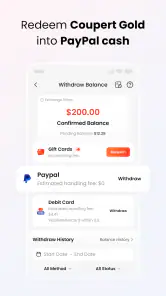
To earn cashback with Coupert, you need to shop through the app at participating online retailers. Once you make a purchase, the cashback will be tracked and added to your Coupert account. The amount of cashback varies depending on the retailer and promotion. Once you accumulate a certain amount, you can withdraw the funds to your bank account or PayPal.
Is Coupert safe to use for online shopping?
Yes, Coupert is safe to use for online shopping. The app does not store any personal payment information, ensuring your financial data remains secure. It functions by redirecting you to the retailer's website, where you complete the purchase. Coupert complies with standard security protocols to protect user data and privacy.
Does Coupert work with all online retailers?
Coupert works with a wide range of online retailers, but not all. The app collaborates with numerous popular stores to provide the best discounts and cashback offers. To see if your preferred retailer is supported, you can browse the list of partnered stores within the app before making a purchase.
Pros
- Easy to use interface for finding deals
- Offers a wide range of coupons
- Provides cashback opportunities
- Quickly applies coupons at checkout
- Supports multiple online stores
Cons
- May not have coupons for all retailers
- Cashback tracking can be delayed
- Requires account creation to use
- Notifications can be overwhelming
- Some coupons may not work as expected

- Category
- Shopping
- Version
- 6.4.20











