Consumer Reports
- 1.56K
- 3.7
- Installs
- 500.00K
- Price
- Free

Screenshots

Analysis by Reviewed
When I’m deciding whether to spend more on a household item or take a chance on a cheaper one, I want more than a pile of star ratings. Consumer Reports is aimed at that moment: it brings product guidance and evaluations into a shopping app, so I can check a decision while I’m researching or standing in a store. I’d treat it as a research companion, not a guarantee that one recommendation will suit every household.
Trust starts with the kind of evidence you need
Shopping advice is only useful when I understand what it helps me judge. The app is developed by Consumer Reports, Inc., and its focus is product ratings, reviews, and advice. That makes it different from a retailer’s product page, where the most visible feedback may be customer impressions, or a general search that mixes expert commentary, promotions, and personal opinions. I find its value is in adding another perspective before I buy, rather than replacing all the other research I might do.
It is worth being clear about the boundary: an overall rating cannot tell me whether a product fits my kitchen, budget, habits, or tolerance for a particular drawback. I use ratings to narrow the field, then check the details that matter to my own situation. That small distinction helps keep a confident-looking score from becoming an automatic instruction to purchase.
Controls, access, and practical expectations
The app is free to download, is rated for Everyone, and has an average rating of 3.7 from around 4,600 ratings. It has passed 500,000 installs, and its current version is 5.10.1-785. Those figures give a sense of its reach, but they do not tell me whether every feature or piece of advice will be useful for my needs. In-app purchases range from $10 to $39 per item, so I would check what a particular piece of content costs before relying on it as part of my shopping routine.
I also wouldn’t assume that downloading a free app means every resource is included at no charge. The practical move is to open the specific guide or product information I need and look for any access or purchase prompt before building a comparison around it. If I only need occasional advice, that check can help me decide whether the app makes sense for that one purchase; regular researchers may value having its material close at hand more often.
Use it at the decision point, not as a substitute for judgment
A realistic use is checking a major appliance before visiting a shop: I can identify a few candidates, compare their evaluations, and write down the questions I still need answered about dimensions, features, and price. If a salesperson points me toward a different model, I have a clearer basis for asking what the alternative does better. This is more useful than trying to remember a stream of online comments while making a quick decision.
For a smaller purchase, such as replacing a kitchen gadget, I’d first ask whether the decision warrants a deeper search. If the price is modest and the product is easy to replace, opening several sources may take more time than it saves. For an expensive item, a safety-sensitive choice, or something I expect to use for years, a considered comparison is easier to justify. The app is best when the cost of a poor choice is meaningful enough to make research worthwhile.
More From Our News Desk

Clash of Clans Is Won Between the Battles

Android Auto Makes the Case for Quieter Car Software

MobiOffice: Transforming Mobile Productivity with Seamless Integration

EA SPORTS FC™ Mobile Soccer: Redefining Mobile Sports Gaming

How Microsoft OneDrive Became a Mobile Productivity Giant

How Google Translate Breaks Language Barriers Effortlessly
How I’d compare it with other shopping research
Retailer reviews are handy for spotting recurring complaints about delivery, setup, or day-to-day use, but they can be uneven and tied to a particular seller’s audience. Search engines are broader and faster for finding a model’s current price or dimensions. Consumer Reports is more suited to structured product evaluation and buying advice. I’d combine these approaches: use the app to narrow options, retailer pages to check current availability and customer experiences, and the manufacturer’s information for exact specifications.
That workflow also guards against a common mistake: comparing products that are not actually equivalent. Before deciding that one model is the clear winner, I check that the size, configuration, and features match what I intend to buy. A rating can guide the shortlist, but a mismatch in model details can make the comparison misleading. When price is my main concern, I’d also check current offers elsewhere rather than treating an evaluation as a live price comparison.
What Exactly Is Consumer Reports?
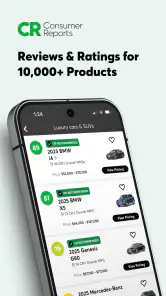
Picture this: you're in a store, eyeing that sleek new blender, but you’re unsure about its performance and reliability. The Consumer Reports app is like having a knowledgeable buddy right in your pocket, providing you with unbiased ratings and reviews on a plethora of products.
From electronics and home appliances to cars and insurance, this app covers a lot of ground. It's not just about ratings; it provides detailed information on product reliability and satisfaction, ensuring you know what you’re getting into before making a purchase.
Diving into the Features
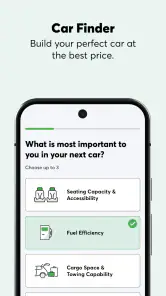
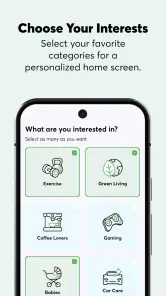
Now, let's talk about what makes this app tick. First off, the interface is super intuitive. You don't need a tech degree to navigate through the categories and find what you're looking for. The search functionality is robust, allowing you to filter products based on what matters most to you.
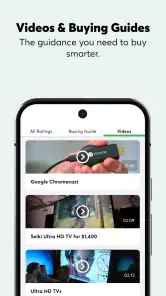
One standout feature is the buying guide section. It breaks down complex buying decisions into digestible pieces. So whether you're a novice or a seasoned pro, you'll find the insights invaluable. They cover everything from the basics to advanced features you might not have considered.
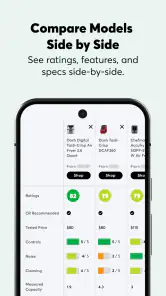
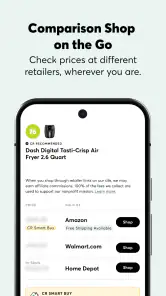
Another cool aspect is the comparison tool. You can line up products side by side to see how they stack up against each other in terms of features, pricing, and user satisfaction. It's like having a shopping assistant who’s always ready to give you the lowdown.
The User Experience
Using the app feels like flipping through a magazine that's been tailored just for you. The content is laid out clearly, with engaging visuals and easy-to-read text. It's designed not just to inform, but to engage you in making smarter consumer choices.
And let’s talk about the updates. The app is regularly refreshed with the latest products and reviews, so you’re always in the loop about new trends and releases. No more outdated info leading you astray!
Why Download Consumer Reports?
Now, you might be wondering, "Do I really need this app?" If you're someone who values your hard-earned money and wants to make purchases that last, then absolutely yes! The app empowers you with the knowledge to avoid buyer's remorse.
Plus, it’s not just about avoiding the bad buys. It’s about discovering the hidden gems that you might have overlooked. Those products that punch above their weight and offer exceptional value.
The app also supports your quest for quality by encouraging sustainable and ethical buying choices. You can feel good about your purchases knowing they're backed by thorough research and testing.
Final Thoughts
In a world cluttered with choices, Consumer Reports helps cut through the noise. The app isn't just about ratings and numbers; it's about providing you with the confidence to make decisions that align with your values and needs.
So, the next time you're caught in a shopping dilemma, remember you’ve got a trusty sidekick ready to help. Go ahead and give it a whirl; your future purchases will surely thank you!
Where it fits—and where I’d skip it
I’d recommend trying it if I were planning a considered purchase and wanted a more organized starting point than browsing scattered reviews. It can be especially helpful when I’m comparing several candidates and need to keep the same criteria in view. On the other hand, someone who mainly wants the cheapest current offer, local stock, or fast opinions from owners may be better served by retailer search and customer-review pages. Those sources answer different questions, and I wouldn’t expect one app to replace them all.
One useful habit is to decide my must-haves before opening a comparison: for example, capacity, size, or a feature I genuinely use. That keeps a long feature list from persuading me to pay for extras I won’t notice later. I’d then use the guide and product comparisons to identify trade-offs, not just to chase the highest score. The best choice for my circumstances may not be the top-rated one if it costs more or lacks a feature I specifically need.
Making a careful choice about access and personal information
Because this is a shopping app, I would pay attention to the choices presented during setup and whenever I’m asked to sign in, enable a permission, or make a purchase. I wouldn’t grant an optional permission unless I understood why it was needed for something I wanted to do. Likewise, I’d review any account and privacy options shown in the app rather than assume that a particular setting exists or is enabled by default. That is a sensible way to keep control without making unsupported assumptions about how the app handles information.
For a one-off lookup, I’d first see how far I can get without creating extra commitments, then decide whether an account or paid item is worthwhile for the research I actually plan to do. If I share a device or use payment details on it, I’d be deliberate about staying signed in and checking purchase prompts before confirming anything. These are small steps, but they make the difference between browsing casually and using a shopping resource with care.
Make comparisons useful for your own household
One way I’d get more from a product comparison is to separate requirements into “must have” and “nice to have” before looking at scores. For a vacuum, that might mean treating weight and storage space as non-negotiable while viewing extra modes as optional. The exercise is simple, but it prevents an attractive feature list from distracting me from the practical limits of my home. It also gives me a focused reason to revisit a guide: I can look for the trade-offs that affect my priorities instead of reading every detail equally.
I’d also keep a short note of the exact model name and configuration while moving between the app and retailer pages. Similar product names can conceal differences in size or included features, and a comparison is only useful if I’m looking at the same versions in both places. If I’m shopping with someone else, sharing that shortlist is more productive than sending a single high score without context; it lets us discuss whether the evaluation matches the way we’ll actually use the item.
Questions I’d settle before relying on a recommendation
A common practical question is whether I can use the app for a quick lookup without committing to ongoing research. I’d approach that by opening the exact product or guide I need and checking what is accessible before I build my plan around it. Since some items involve in-app purchases, the important distinction is not simply whether the app costs nothing to install, but whether the particular information I want is available on terms I’m comfortable with.
I’d also ask whether the app can settle a current-price question. I wouldn’t use a product evaluation as a substitute for checking live retailer offers, availability, delivery terms, or the precise model being sold. If I need immediate stock information, a seller’s own page is the more direct tool; if I need help understanding product trade-offs, this app is a more natural place to start. Keeping those jobs separate saves time and reduces the chance that I mistake a strong evaluation for a complete buying answer.
Another worthwhile question is how much weight to give a rating when it conflicts with personal needs. My answer is to treat it as a prompt to investigate, not a command. A product that performs well overall might still be a poor fit because of its dimensions, cost, controls, or a feature I rely on. I’d read the reasoning available around the evaluation, then decide whether the same strengths matter to me and whether the drawbacks would bother me in everyday use.
My cautious verdict
Consumer Reports is most appealing to me when the purchase deserves a proper comparison and I want evaluations and buying guidance together. It is free to install, but the in-app purchase range means I’d check access at the point I need a particular resource. The app’s 3.7 average suggests users have mixed experiences, so I’d treat it as a useful research aid rather than assume it will work perfectly for everyone.
My advice is to bring a shortlist, a budget, and a few personal priorities, then use the app to sharpen the questions you ask before buying. If the information helps me understand meaningful trade-offs, it has done its job—even if I ultimately choose a product found through another source. For quick price hunting or casual opinions, I’d look elsewhere first; for a consequential purchase where careful comparison can prevent an expensive mistake, I’d keep this app in my research mix.
Consumer Reports Frequently Asked Questions
What does the Consumer Reports app offer shoppers before they make a purchase?
Consumer Reports is a shopping app that gives users access to trusted ratings, reviews, and advice. It can help shoppers research a product and compare options before deciding what to buy. The app is free to download, while access to some content may require a subscription or an in-app purchase.
What is Consumer Reports and how does it work?
Consumer Reports is a non-profit organization that provides unbiased product testing and ratings. The app offers users access to reviews, ratings, and comparisons of various products and services. By entering product names, users can view detailed reports to make informed purchasing decisions. The app is designed to help consumers choose the best products for their needs.
Is Consumer Reports free to use?
While the Consumer Reports app is free to download, access to full content typically requires a subscription. Users can explore some features for free, but a subscription unlocks comprehensive reviews, ratings, and buying guides. This subscription model supports the organization’s mission of providing unbiased and thorough product evaluations.
How frequently is the information on Consumer Reports updated?
Consumer Reports regularly updates its information to reflect the latest product tests and consumer feedback. The team continually tests new products and services to ensure that users have access to current and relevant data. Subscribers can rely on timely updates that help them make informed decisions based on the latest findings.
Can I trust the reviews and ratings on Consumer Reports?
Yes, Consumer Reports is renowned for its unbiased and thorough testing methods. The organization does not accept advertising, which ensures that reviews and ratings are objective and free from commercial influence. The app’s content is based on scientific testing and user feedback, making it a reliable resource for consumers.
Pros
- Comprehensive product reviews.
- Unbiased expert opinions.
- Wide range of categories covered.
- User-friendly interface.
- Regularly updated content.
Cons
- Subscription required for full access.
- Limited free content available.
- Some reviews may lack depth.
- Occasional outdated information.
- No personalized recommendations.
- Category
- Shopping
- Version
- 5.10.1-785











