

Chairgun Elite Ballistic Tool
- 38.00
- 3.5
- Installs
- 50.00K
- Price
- Free

Screenshots
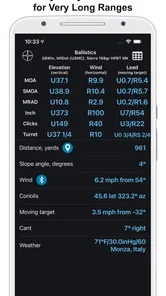
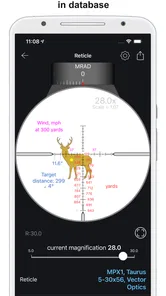
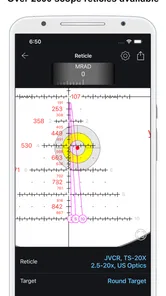
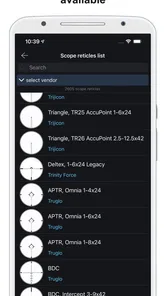
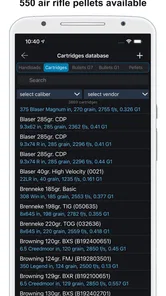
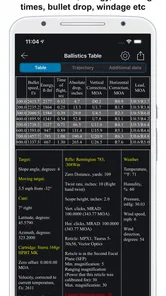
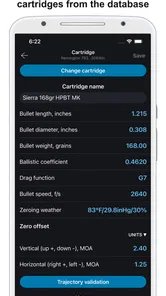
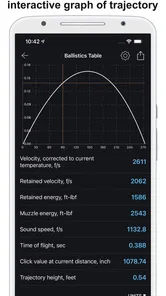
Analysis by Reviewed
If you are new to external ballistics, Chairgun Elite Ballistic Tool can look intimidating at first. I found it much easier to understand once I stopped treating it like a general sports app and started viewing it as a calculation workspace for shooting data. It belongs to the Sports category, is free to install, and is developed by JetLab, LLC. The store presents it as a leading ballistics calculator, while the short description identifies it as Chairgun Elite.
My first impression was that this is aimed at people who want more than a simple range estimate. It is for shooters who are willing to enter technical information, check the result, and use that result to make a more informed decision in the field. That makes it potentially useful, but it also means the quality of the output depends heavily on the quality of the input. A calculator cannot rescue an incorrect projectile, velocity, sight height, or environmental value.
Getting from installation to a useful first calculation
I start with one carefully chosen setup rather than trying to fill in every possible detail at once. Gathering the rifle, optic, and ammunition information first makes it easier to spot guesses before they shape a calculation; next, I’ll explain which inputs deserve the closest attention and how to check a result against something familiar.
What to expect before opening it
Chairgun Elite is not the kind of sports app I would recommend to someone looking for training plans, live scores, or a casual shooting game. Its purpose is much narrower and more technical: helping users work with ballistic calculations. The app has a 3.5 average from around 500 ratings and has passed 50 thousand installs, so it has attracted a real user base without having the broad appeal of a mainstream fitness or sports title.
The age rating is Everyone, which describes its store classification rather than the level of knowledge needed to use it. A beginner can open the app, but a beginner should expect to learn a few terms along the way. I would keep the specifications of the rifle, optic, ammunition, and intended shooting setup nearby before starting. Entering values from memory is one of the quickest ways to produce a result that looks precise but is not useful.
The app is free, with optional in-app purchases ranging from $1.49 to $24.99 per item. I appreciate being able to begin without paying, especially because a new user needs time to decide whether a dedicated ballistic calculator fits their routine. At the same time, I would not assume that every advanced capability is available at no cost. It is sensible to explore the basic workflow first and only consider an optional purchase when you understand what you actually need.
Setting up the first profile without guessing
My advice is to treat setup as a small data-checking exercise rather than a form to rush through. Start with the projectile or ammunition information you genuinely use. If you are unsure about a value, pause and find it from the packaging, manufacturer documentation, or your own measured notes instead of choosing a convenient number. The calculated result may be displayed neatly, but neat presentation does not make an assumption accurate.
More From Our News Desk

 Gmail
GmailGmail in a Busy Inbox: Who Benefits Most?
From first account to crowded workday, Gmail earns its place through dependable search and flexible sorting—but its best fit depends on how much inbox maintenance you can tolerate.

 Prime Video
Switching to Prime Video: What Changes in Your Viewing Routine
Prime Video can make a compelling second home for streaming, but switching means learning a different catalog, rental layer, and route from browsing to playback.

 Universal TV Remote Control
Universal TV Remote Control Works Best as a Reliable Backup
A phone remote earns its place through quick setup and reliable habits. Here is how to get more from Universal TV Remote Control—and where its limits show.

 Weather - By Xiaomi
Weather by Xiaomi Review: Clear at a Glance, Less Clear Up Close
Xiaomi’s weather app makes everyday forecasts quick to scan, but its calm surface can leave useful details and recovery paths harder to find than they should be.

 X
XX Under Pressure: Can It Recover When Posting Goes Wrong?
A resilience-focused review of X, examining setup, mistaken posts, interruptions, weak connections, and the gaps that matter when recovery needs to be dependable.

 Clash of Clans
Clash of Clans Is Won Between the Battles
Its raids are quick; its community is a long-term project of coordination, teaching, rivalry, and shared responsibility—with all the friction that entails.
Latest News



The same principle applies to the rifle and optic details. Sight height is especially easy to overlook because it is not always an obvious number from a quick glance at the equipment. A small error there can affect the relationship between the line of sight and the projectile path. I would measure or verify it carefully, record the value once, and then use that same reference whenever you compare calculations.
Velocity deserves similar care. A figure printed on a box can be a useful starting point, but it may not represent what your particular setup produces. If you have chronograph notes, use a realistic average rather than an optimistic single reading. If you do not have measured data yet, label the result mentally as an estimate. That distinction is important when deciding whether a correction is worth making in the real world.
Environmental entries can also create confusion for first-time users. Temperature, pressure, humidity, and altitude are not decorative details in a ballistic model, but they should be entered consistently. If you compare two solutions, change one meaningful variable at a time. Otherwise, you may see a different answer without knowing which input caused it.
The first meaningful success
For me, the first successful action is not simply opening a calculation screen. It is creating a believable setup, running the calculation, and then checking whether the result makes practical sense. I would begin with a familiar zero and a distance you already understand. This gives you a reference point instead of asking the app to predict an unfamiliar situation immediately.
Once the calculation is produced, compare it with what you have observed at the range. Do not expect a perfect match on the first attempt. Differences can come from velocity variation, ammunition consistency, sight alignment, environmental conditions, or an input that was copied incorrectly. The useful question is not “Does the app agree with me instantly?” but “Which assumption should I verify next?”
A helpful workflow is to write down the original inputs before changing anything. Then adjust only one value, such as velocity or sight height, and run the calculation again. This turns the app into a learning tool. You begin to see which variables have a noticeable effect and which ones matter less for your particular distance and setup.
Another practical tip is to use the calculator before a range session, not only during one. At home, you can review the setup calmly, spot missing information, and decide what you want to test. At the range, you can compare the prediction with actual observations. That separation reduces the temptation to change several settings at once after seeing an unexpected result.
Why the numbers should be treated as a model
Ballistic software is powerful because it models a physical situation that is difficult to calculate by hand. It is still a model. The result depends on the assumptions you provide and on how closely those assumptions match reality. I would never use a displayed correction as a substitute for safe judgment, a stable shooting position, or a proper understanding of the range conditions.
This is also why a highly detailed output can be misleading to a new user. More decimal places do not necessarily mean more real-world accuracy. If the velocity is only a rough estimate, a very exact-looking answer may give false confidence. I prefer to focus on repeatable inputs and on whether the prediction is directionally useful.
Common points of confusion
The biggest beginner mistake is confusing a zero with a complete ballistic profile. A zero gives the model a reference relationship between the sight line and the projectile path. It does not automatically make every other input correct. If the ammunition changes, the velocity changes, or the optic position changes, the old result may no longer describe the current setup.
Another common problem is mixing units. A user may enter distance in one system and interpret the resulting correction in another, or copy a value from equipment documentation without checking how the app expects it. I recommend deciding on a consistent unit system before entering anything. If a result looks wildly different from your experience, unit confusion should be one of the first things you investigate.
It is also easy to mistake a theoretical trajectory for a guarantee of impact. A calculator can show what should happen under its assumptions; it cannot account perfectly for every movement, variation, or imperfection in a real shooting session. Use the result as a reference for verification rather than as permission to ignore what you observe safely at the range.
New users may also wonder whether they need every available input before they can begin. I would not delay learning forever, but I would separate a rough introductory calculation from a field-ready one. Begin with the information you know confidently, mark uncertain values in your notes, and improve the profile as you collect better measurements. That approach is more useful than filling every field with guesses simply to make the setup look complete.
A realistic everyday workflow
Imagine preparing for a weekend range visit with one familiar rifle and one ammunition choice. The evening before, I would open the app, review the saved setup, and check whether the velocity and sight-height notes still match the equipment. I would then calculate the expected trajectory for the distances I plan to test and write down the assumptions behind the result.
At the range, I would confirm the zero first rather than immediately chasing a distant prediction. If the starting point is wrong, every later comparison becomes harder to interpret. After confirming the reference, I would test one distance, compare the observed result with the calculation, and record the difference. Back at home, I could adjust the relevant input or investigate the equipment instead of making several untracked changes in the field.
This workflow shows where Chairgun Elite is stronger than a quick web search. A search engine may explain what a ballistic coefficient means, and a basic calculator may produce a single answer quickly. A dedicated app is more useful when you repeatedly work with the same setup and want to compare scenarios in an organized way. The trade-off is that it asks more from you before it becomes helpful.
How it compares with simpler alternatives
A basic online calculator is often better for a one-time question. If you only want a rough explanation of bullet drop or you are learning the vocabulary, a simpler tool can feel less demanding. It may let you enter a few values and get an answer without requiring you to understand a larger workflow.
A spreadsheet can be better for users who want complete control over their own formulas and records. It is flexible, but it also requires more work to build and maintain. Chairgun Elite sits between those options: more focused than a generic spreadsheet, but more involved than a quick calculator. I see that as its main appeal for a dedicated shooter who wants a repeatable mobile tool.
It is not automatically the best choice for everyone. A casual user who shoots rarely may find the setup effort disproportionate to the benefit. Someone who already has a trusted ballistic system may not gain enough from changing tools. On the other hand, a beginner who wants to understand how inputs affect a result can benefit from using this app slowly, with real notes and realistic expectations.
Useful habits that make the app more reliable
One habit I strongly recommend is keeping separate profiles or notes for genuinely different equipment combinations rather than overwriting one setup. Even when two rifles use similar ammunition, their optic height, velocity, and zero can differ. Mixing those values is more dangerous to your conclusions than a small calculation error because it can make an old result appear relevant to a new setup.
A second habit is to preserve the original baseline. Before experimenting with environmental conditions or alternate velocities, duplicate the information in your notes or record the starting values. That gives you a stable comparison point. Without it, you may improve one scenario while losing track of what the original setup represented.
A third is to validate the app at a short, controlled distance before trusting it for a more demanding scenario. This is not about proving the software right or wrong in one session. It is about discovering whether your inputs, equipment, and interpretation are aligned. If they are not, the validation step reveals the problem while the consequences are still easy to manage.
I would also avoid changing a parameter merely because it makes the predicted result match one unexpected shot. A single observation may reflect shooter movement, inconsistent ammunition, or a temporary condition. Look for a repeatable pattern before revising the profile. That small discipline prevents the calculator from becoming a way to explain every outlier.
Version, support expectations, and value
The current version is 4.9.0, and the app requires Android 6.0 or later. That makes compatibility worth checking before installation, particularly if you are using an older device dedicated to range work. I would also keep the phone interface in mind: a calculator used outdoors needs careful reading, and a small screen can make technical entries feel slower than they would at a desk.
JetLab, LLC has positioned this as a specialized sports utility rather than a broad social or entertainment product. The average rating suggests a mixed experience across its user base, which makes sense for an app where expectations vary so much. A knowledgeable shooter may value the depth, while a newcomer expecting a simple “enter distance, get answer” tool may find the learning curve frustrating.
The free starting price is a real advantage because it lets you test the workflow with your own equipment. The optional purchases are worth considering only after you have identified a specific need. I would not pay simply because a feature sounds advanced; first establish whether it improves a task you actually perform. That approach keeps the app’s cost proportional to its usefulness.
Who should use it, and who should skip it
I would recommend Chairgun Elite to shooters who enjoy working with equipment details, regularly compare ballistic scenarios, or want a mobile reference for a consistent setup. It is especially suitable for someone prepared to verify velocity, sight height, and environmental assumptions instead of treating the first output as final.
I would suggest skipping it if you want a casual sports experience, a coaching program, a shooting log with minimal setup, or a single uncomplicated estimate. It may also be the wrong fit if you are unwilling to validate calculations against safe, observed results. The app rewards careful users; it does not remove the need for careful users.
For a first-time user, the best next step is modest: install it, create one realistic setup, and run a familiar calculation. Do not begin by trying to model every possible condition. Check the inputs, compare the result with something you already know, and keep notes about what changes when you adjust one variable. That is where the app starts to feel less like a wall of numbers and more like a practical tool.
After that first success, you can decide whether the deeper workflow suits you. In my experience, the real value of Chairgun Elite is not a single impressive calculation, but a repeatable way to connect equipment data with range observations. It is free to try, specialized enough to reward serious use, and demanding enough that casual users may prefer a simpler alternative. If you approach it patiently and treat every result as a model to verify, it can become a useful part of a careful ballistic routine.
My final recommendation is therefore conditional but positive. I would recommend Chairgun Elite Ballistic Tool to a first-time user who wants to learn and is willing to enter honest data step by step. I would not recommend relying on it blindly or installing it merely because a ballistic calculator sounds convenient. Used with measured information, controlled testing, and sensible judgment, it offers a focused mobile workspace for turning technical shooting details into something you can understand and check.
Chairgun Elite Ballistic Tool Frequently Asked Questions
Who develops Chairgun Elite Ballistic Tool, and what should I know before downloading it?
Chairgun Elite Ballistic Tool is a sports app developed by JetLab, LLC. It is free to download, with optional in-app purchases, and its content rating is Everyone. The app is described as “Chairgun Elite,” with the summary “№1 Ballistics calculator.” If you are considering the paid options, check the purchase details shown in your app store before proceeding.
What is Chairgun Elite Ballistic Tool used for?
Chairgun Elite Ballistic Tool is designed for shooters who want to calculate and understand projectile trajectories, particularly for air rifles and other ballistic applications. It can help estimate bullet or pellet drop, velocity, energy, wind drift, and aiming corrections by using information such as caliber, projectile weight, muzzle velocity, scope height, and environmental conditions. It is mainly an analysis and planning tool, not a substitute for safe range testing.
Is Chairgun Elite suitable for beginners?
The application can be useful for beginners, but it has a technical interface and requires a basic understanding of ballistic terms. New users may need time to learn concepts such as ballistic coefficient, zero distance, click values, trajectory curves, and wind effects. The results become more meaningful when accurate equipment data is entered. Beginners should start with the default settings, read the explanations carefully, and verify calculations at a safe, controlled range.
What information do I need to enter for accurate calculations?
For useful results, you generally need reliable details about your rifle, scope, and projectile. Important inputs may include caliber, projectile weight, ballistic coefficient, muzzle velocity, scope height, sight adjustment value, and the distance at which the rifle is zeroed. Temperature, altitude, pressure, humidity, and wind can also affect the calculation. If these values are estimated or incorrect, the displayed trajectory and holdover recommendations may be noticeably inaccurate.
Can Chairgun Elite replace real-world shooting tests or a chronograph?
No. Chairgun Elite should be treated as a ballistic calculator and reference tool rather than a replacement for practical testing. A chronograph can provide more dependable velocity data, while shooting at different distances confirms whether the predicted trajectory matches your specific rifle, ammunition, scope, and conditions. Users should compare the app’s calculations with verified range results and make adjustments carefully. Always follow local laws and safe firearm or airgun handling practices.
Pros
- Accurate trajectory calculations support a wide range of shooting scenarios.
- Supports multiple projectile and sight configurations for detailed setup.
- Useful for comparing ballistic solutions before heading to the range.
- Compact tool that can replace several manual ballistic calculations.
- Helpful for experienced shooters fine-tuning equipment and ammunition.
Cons
- The interface feels dated and may take time for new users to understand.
- Requires accurate rifle
- scope
- and ammunition data for reliable results.
- Advanced terminology can be confusing for casual or beginner shooters.
- Some features may depend on device compatibility or older platform support.
- It is primarily a calculation tool
- not a substitute for practical range testing.





