

CDFW License
- 65.00
- 4.0
- Installs
- 50.00K
- Price
- Free
Screenshots
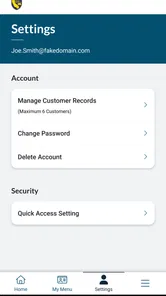
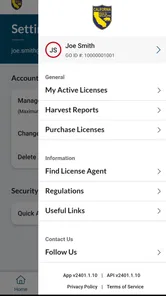
Analysis by Reviewed
Applying for a California fishing or hunting license is the kind of task I usually want to finish quickly, without searching through unrelated pages or carrying another paper form around. CDFW License is built for that narrow purpose: it is a sports app from RA Outdoors, LLC d/b/a Aspira that connects the license application process with a mobile device. I found its focused approach more useful than a broad outdoor app when my only goal was handling California Department of Fish and Wildlife licensing.
The app is free, available to everyone, and has passed the point where it feels like an untested newcomer. Its average rating is 4.0 from around a hundred ratings, while more than fifty written reviews give a little extra context about how people experience it. With over 50 thousand installs, it has also reached a practical audience rather than remaining a niche experiment. That does not make every interaction perfect, but it gives me more confidence than an app with no visible user history.
What CDFW License is really useful for
The most important thing to understand is that this is not a general fishing companion, wildlife identification tool, trip planner, or social network. The store summary describes it as a California Department of Fish and Wildlife license application, and that narrow role is exactly how I would judge it. Its value comes from putting a state-specific administrative task on a phone, not from adding entertainment or outdoor advice.
That focus is helpful if you already know what license or related authorization you need and want to deal with the application while planning a trip. Instead of waiting until the last minute to find a desktop computer, I can approach the task from the same device I use for maps, messages, and my calendar. The best use case is a prepared applicant who wants a direct route through licensing rather than a large collection of unrelated features.
I would be more cautious if you are still deciding what activity is legally appropriate for your situation. A license application tool is not a substitute for reading the current rules that govern a particular trip, species, season, location, or special requirement. The app can be convenient for completing an administrative step, but I would still treat official regulations and local guidance as essential parts of preparation.
A realistic trip-planning scenario
Imagine I am arranging a weekend fishing trip and realize that my license paperwork is not ready. With CDFW License, I can start the application process before leaving home instead of adding a stop at a license retailer or postponing the task. I would keep the confirmation or resulting documentation available on the phone, then check the relevant regulations separately before heading out.
That workflow reveals both the strength and the boundary of the app. It reduces friction around the application itself, but it does not remove my responsibility to verify that I selected the correct authorization or understood the rules for my destination. I see it as one part of a responsible preparation checklist, not the checklist itself.
More From Our News Desk

 Gmail
GmailGmail in a Busy Inbox: Who Benefits Most?
From first account to crowded workday, Gmail earns its place through dependable search and flexible sorting—but its best fit depends on how much inbox maintenance you can tolerate.

 Prime Video
Switching to Prime Video: What Changes in Your Viewing Routine
Prime Video can make a compelling second home for streaming, but switching means learning a different catalog, rental layer, and route from browsing to playback.

 Universal TV Remote Control
Universal TV Remote Control Works Best as a Reliable Backup
A phone remote earns its place through quick setup and reliable habits. Here is how to get more from Universal TV Remote Control—and where its limits show.

 Weather - By Xiaomi
Weather by Xiaomi Review: Clear at a Glance, Less Clear Up Close
Xiaomi’s weather app makes everyday forecasts quick to scan, but its calm surface can leave useful details and recovery paths harder to find than they should be.

 X
XX Under Pressure: Can It Recover When Posting Goes Wrong?
A resilience-focused review of X, examining setup, mistaken posts, interruptions, weak connections, and the gaps that matter when recovery needs to be dependable.

 Clash of Clans
Clash of Clans Is Won Between the Battles
Its raids are quick; its community is a long-term project of coordination, teaching, rivalry, and shared responsibility—with all the friction that entails.
Latest News



Trust begins with the app’s narrow purpose
I generally trust a specialized government-licensing companion more readily than an app that mixes licensing with aggressive promotions, social feeds, or unrelated data collection. Here, the identity of the developer is visible as RA Outdoors, LLC d/b/a Aspira, and the product purpose is plainly tied to California Department of Fish and Wildlife licensing. That clarity matters because I can tell what job the app is supposed to perform before I hand it sensitive application details.
Still, a recognizable purpose is not the same as a guarantee about every data practice. License applications naturally involve information that deserves care, so I would read the privacy notices, permission prompts, and account screens presented on my device before proceeding. I would also make sure I am using the official app-store entry and not a similarly named imitation. Those are simple checks, but they are especially worthwhile when an app is involved in a government-related transaction.
The public rating gives me a balanced signal rather than a reason to stop thinking. A 4.0 average suggests that many people find the app serviceable, while the written reviews can help reveal recurring points of friction. I would not use the score alone to decide whether to trust an application process. For me, the more meaningful questions are whether the app clearly identifies what it is requesting, lets me review information before submission, and gives understandable feedback when something needs attention.
Controls I would check before entering details
My first step would be to inspect the sign-in and application flow before filling everything out. I want to know whether the app explains why an account is needed, whether existing users can manage their details, and whether the review screen makes the final submission feel deliberate rather than accidental. If a screen asks for information that seems unrelated to licensing, I would pause and look for an explanation instead of automatically accepting.
I would also pay attention to device permissions. A licensing app should prompt me in a way that makes each requested permission understandable. I would grant only what is necessary for the task and revisit those choices later through the phone’s settings. The important point is not to assume that an app’s category tells me everything about its access; I prefer to judge each permission at the moment it appears.
Another useful habit is to keep the operating system current enough for the app’s stated compatibility. CDFW License supports Android versions from 8.0 onward, so it is designed for a broad range of devices. That broad compatibility is convenient for people who do not own a recent phone, but I would still avoid completing a time-sensitive application on a device with an unreliable connection, nearly full storage, or an outdated security setup.
Where sensitive moments happen
The most sensitive point is not opening the app; it is the moment I enter personal information and move toward submission. That is when I would slow down, verify spelling, review dates and selections, and make sure I am on the intended account. A small data-entry error can create more trouble than the few minutes saved by rushing through the screens.
I would treat payment and confirmation steps with the same care. Before tapping a final button, I would look for a clear summary of what I am applying for and save any confirmation in a place I can find later. I would not rely only on memory or assume that a completed-looking screen is enough. A screenshot, confirmation message, or other official record can make the difference when preparing for a trip.
Connectivity is another practical concern. Mobile applications are convenient, but a weak signal at a campsite, trailhead, or rural road can turn a simple task into a frustrating one. My advice is to complete the application while I have a stable connection and then check what documentation is available offline. I would never wait until standing at the water’s edge to discover that an important step requires a live connection.
For the same reason, I would not uninstall the app immediately after applying if I still need to access records or account information. I would first confirm that I have retained the necessary documentation through an appropriate official method. This is a small workflow improvement, but it prevents the common mistake of treating submission and record-keeping as the same thing.
User agency matters more than a polished screen
What I want from CDFW License is control: the ability to understand each stage, correct mistakes before submission, and decide when information is shared. A clean interface is welcome, but it is less important than clear labels and an obvious path back when I need to edit something. Administrative apps should help me make an informed choice rather than push me through a sequence I do not understand.
I would also look for account-management options that let me review or update my own information. If I change phones, forget a password, or notice an outdated detail, the recovery process becomes part of the app’s real quality. This is one reason I would test the basic navigation before starting a time-sensitive application. Discovering an account problem early is much better than discovering it after making travel plans.
Notifications deserve a similar check. I prefer to decide whether reminders are useful rather than allowing every alert by default. A licensing tool may be valuable without becoming noisy, and controlling notifications helps keep administrative messages visible instead of burying them among unrelated alerts. I would adjust those settings at the system level if the app gives me limited choices inside the application.
There is also a clear trade-off between convenience and concentration. A phone-based application lets me work from almost anywhere, but the small screen makes it easier to overlook a line of text or tap the wrong option. I would complete the process at a desk, with my identification and trip details nearby, rather than while walking, driving, or multitasking. The app improves access; it does not make careful reading unnecessary.
How it compares with the usual alternatives
The traditional alternative is visiting a license retailer or handling the process through a browser on a computer. A retailer can be useful when I want a person to help clarify the basic process, especially if I am unfamiliar with California licensing. A desktop browser can be more comfortable for reviewing long forms and typing, particularly for users who dislike small mobile keyboards.
CDFW License is more appealing when speed, portability, and a dedicated workflow matter. I can begin from my phone without opening a general browser and searching through several pages. That convenience is strongest for repeat applicants who already understand their needs. For a first-time applicant facing an unusual situation, a larger screen or human assistance may be the safer choice.
I would not compare it with fishing forecast apps or outdoor navigation tools because they solve different problems. Those apps may help decide where and when to go, while this one addresses the paperwork connected with the activity. Using both can make sense, but neither replaces the other. Keeping that distinction clear prevents me from expecting maps, regulations, weather, or catch information from a product designed around licensing.
The app’s current version is 2607.3.3, which tells me that the software is being maintained through identifiable releases rather than sitting unchanged. I still treat updates thoughtfully: I read the change notes when available, install updates before an important trip rather than during one, and recheck privacy and permission choices if the interface changes. An update can improve reliability, but it can also alter where controls are located.
Who should use it, and who should skip it
I would recommend CDFW License to California residents and visitors who want a mobile route for handling a Department of Fish and Wildlife license application and are comfortable reviewing their own information carefully. It is particularly suitable for someone who already knows the relevant activity and wants to complete the administrative part without making a separate trip to a retailer.
I would steer a person toward another option if they need detailed guidance before choosing a license, have a complicated eligibility question, or prefer face-to-face help. A retailer, official support channel, or full browser experience may be better for those situations. I would also avoid relying on the app alone when a phone has poor connectivity or when I cannot preserve access to the resulting documentation.
Families and groups should remember that convenience for one person does not automatically simplify every applicant’s records. I would keep each person’s information organized and review every application separately rather than assuming that one completed process covers everyone. That extra care is less exciting than tapping through quickly, but it is exactly the kind of detail that prevents confusion later.
My cautious verdict after using the app
CDFW License is best understood as a focused administrative tool, not a complete outdoor companion. I like that its purpose is easy to identify, that it is free to install, and that its mobile format can remove an unnecessary obstacle from trip preparation. The sizable install base and balanced user rating make it worth considering, but they do not replace my own checks around permissions, account access, and confirmation records.
My strongest recommendation is to use it early, on a stable connection, with enough time to review every entry. Read the permission prompts, keep control of notifications, save the official result, and consult current rules separately. Those habits make the app more dependable because they address the parts a licensing interface cannot solve for me.
In the end, I would choose it when I want a direct California licensing workflow on my phone and already understand what I am applying for. I would choose a browser, retailer, or official assistance when the situation is unclear or unusually complicated. Used within that boundary, the app feels practical and appropriately specialized: useful for reducing paperwork friction, but deserving of the same careful attention I would give any service handling personal application details.
CDFW License Frequently Asked Questions
What devices can run CDFW License?
CDFW License is a mobile app for managing California Department of Fish and Wildlife licensing services. It requires Android 8.0 or later, so check your device’s operating system before downloading. The app is free to install and is intended for a general audience. If your device meets the minimum requirement, you can try the app and see whether its licensing features fit your needs.
Who develops CDFW License, and what is it designed for?
CDFW License is developed by RA Outdoors, LLC d/b/a Aspira, and its purpose is reflected in its description as a California Department of Fish and Wildlife License Application. It is a sports-focused app for people who want to access licensing services on a mobile device. Before relying on it for a particular activity, check that the license or document you need is supported.
What is the CDFW License app used for?
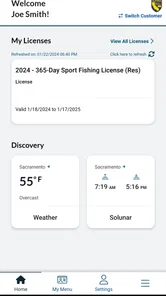
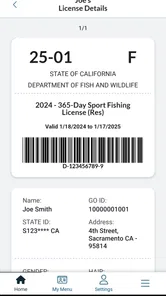
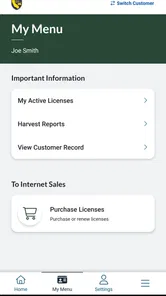
CDFW License is designed to help users access and manage California Department of Fish and Wildlife licensing services from a mobile device. Depending on the available features, you may be able to purchase or display hunting and fishing licenses, review permits, and keep important license information available while outdoors. It is especially useful for California residents and visitors who need quick access to their documents.
Can I use CDFW License as proof of my fishing or hunting license?
The app may provide a digital version of eligible California fishing, hunting, or other wildlife-related licenses, but users should confirm which documents are officially supported before relying on it in the field. Some activities may still require additional tags, validations, stamps, or physical documents. Make sure your license information is fully loaded and follow current CDFW rules and enforcement requirements.
Do I need an internet connection to access my license?
An internet connection may be required when signing in, purchasing a license, synchronizing account information, or downloading newly issued documents. After the information has been saved, some license details may remain available offline, although this can depend on the app version and document type. It is best to open the app before leaving home and confirm that your required licenses are visible.
Pros
- Official source for California fishing and wildlife regulations
- Helps verify license requirements before heading outdoors
- Useful for checking current seasons
- limits
- and restrictions
- Supports responsible fishing and wildlife conservation
- Relevant information is available for California-specific activities
Cons
- Only useful for activities covered by California regulations
- Rules can be difficult for beginners to interpret
- License information may change and require regular checking
- Does not replace carrying required physical or digital credentials
- Limited value for users outside California





