CARFAX - Shop New & Used Cars
- 7.37K
- 4.5
- Installs
- 5.00M
- Price
- Free

Screenshots
Analysis by Reviewed
When I’m looking for a car, I want to compare the actual candidates in front of me, not just scroll through attractive photos. CARFAX - Shop New & Used Cars is a free auto-shopping app from CARFAX, Inc., and I find it most useful as a place to narrow a search and inspect the available history information before contacting a seller. It has a 4.5 average from around 25,000 ratings, with over 5 million installs. Those figures suggest a well-used service, though they don’t tell me whether any particular listing is right for me.
Build a shortlist before you visit
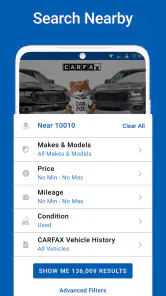
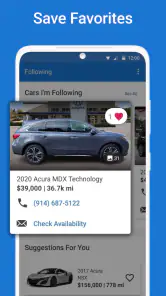
My practical starting point is to decide what I actually need, then use the search and filters to make the list manageable. A budget ceiling, a few acceptable models, a reasonable mileage range, and a rough year preference are more useful than searching for a perfect car with no compromises. I’d save the strongest candidates outside the browsing session too, noting the asking price, mileage, and questions I want answered. That simple habit makes it easier to compare vehicles fairly instead of letting the newest listing dominate my attention.
A realistic use case is a weekday search for a dependable second car: I can set broad criteria during a break, scan options nearby, and revisit the most promising ones later when I have time to read more carefully. Price alerts are useful for keeping an eye on changes without checking every listing repeatedly. I would treat an alert as a reason to review the car, not as proof that it is a bargain; the vehicle’s condition, history, location, and the seller’s answers still matter.
Discovering Your Dream Ride
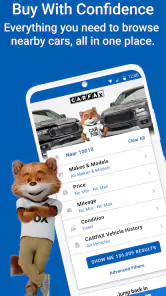
First off, let’s talk about the interface. When you fire up the app, you’re greeted with a clean and user-friendly layout. It’s like having a personal car dealership right in your pocket. Whether you're on the hunt for a brand-new model or a trusty used vehicle, CARFAX - Shop New & Used Cars has got you covered. The search functionality is absolutely stellar. You can filter by make, model, year, price range, and even mileage. Trust me, it feels like magic finding the exact car you’ve been dreaming of!
The Power of Information
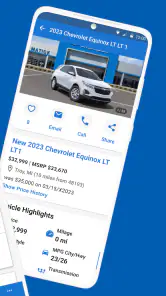
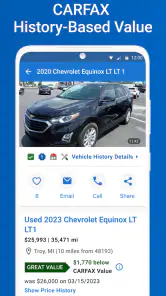
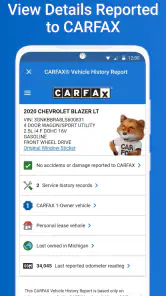
What sets this app apart is the incredible amount of information it provides. Each car listing comes with a detailed history report, which is like having a detective's insight into the vehicle’s past. Ever wondered if a car has been in an accident or how many owners it's had? CARFAX has your back with all those juicy details. It’s like they say, knowledge is power, and here, it might just save you a ton of money and headaches.
I’d use that history as a screening tool, not a final verdict. A report can help me decide which questions to ask and which cars deserve a closer look, but it can’t replace an independent inspection or a test drive. If I’m comparing two similar listings, I’d check each report for differences that could change the decision, then ask the seller to clarify anything important before travelling. That’s a more useful workflow than treating a clean-looking history as a guarantee of mechanical condition.
Another feature I love is the ability to see reviews and ratings from other users. It’s like having a conversation with fellow car enthusiasts who’ve been there, done that. This community feel adds a layer of trust and helps you make more informed decisions.
Settings and habits that save time
I’d check the app’s available alert settings early and keep them focused on a realistic search. Too many loosely defined matches can turn notifications into noise; a smaller set of criteria makes a price change or fresh candidate easier to notice. I also find it helpful to search by practical alternatives rather than one exact model. If a preferred trim is scarce, widening the model or year range can reveal comparable options, while keeping the budget and mileage limits steady protects the shortlist from drifting.
For a repeatable routine, I’d review new matches at a set time rather than opening the app whenever a notification arrives. I would first remove listings that miss a non-negotiable requirement, then compare the remaining cars on the same points: price, mileage, location, history questions, and whether the seller has provided enough detail to justify a visit. Keeping that order helps separate a genuinely promising candidate from one that simply has polished photos or a tempting price.
A useful trade-off is how wide to make the search area. Expanding it can uncover more alternatives, but distance changes the cost of checking a car: a long drive is a poor bet if the listing leaves basic questions unanswered. I’d contact the seller before travelling and confirm that the car is still available, then decide whether the trip is worthwhile. For nearby listings, I can be more flexible; for distant ones, I want stronger reasons to spend the time.
How it fits beside other car-shopping tools
Compared with general classified listings, this app’s distinctive value is the connection between shopping and vehicle-history information. A broad marketplace may offer more kinds of local listings or make direct seller browsing feel simpler, while a manufacturer’s site is often better for checking specifications on new models. I’d use those sources alongside CARFAX when useful: the app helps me screen candidates, and other sources can fill in details or widen the search. It is not a substitute for checking the car in person.
That difference matters most when I’m comparing used vehicles with similar asking prices. I’d rather have a history view beside the listing than rely only on a seller’s short description, but I wouldn’t assume that one app contains every car I might consider. If the local selection feels thin, a general marketplace can broaden the hunt; if I’m already focused on a new model, the manufacturer’s information can answer specification questions more directly. I see CARFAX as a useful part of the search, not the only window onto the market.
Contacting a seller without rushing
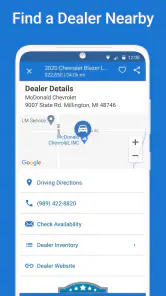
When you’ve finally found "the one," the app makes it super easy to get in touch with the dealer or seller. No more fumbling around with phone numbers or emails. Just a few taps and you’re on your way to setting up a test drive. The app also provides financing options, which is a nice touch if you’re looking to explore different payment plans.
Before making contact, I’d prepare a short list of questions about availability, the vehicle’s present condition, and anything in its history that needs explaining. If the answers sound good, arranging a test drive is a sensible next step; if they are vague, I wouldn’t let a convenient contact button talk me into a rushed visit. Financing information can help start a conversation, but I’d compare the full terms independently rather than judging an offer by a payment estimate alone.
One practical way to use the contact step is to ask questions that could save a wasted trip: whether the seller can confirm the listing details, whether there is anything notable about the car’s current condition, and whether the points raised by the history report have a clear explanation. I’d keep the conversation focused and write down the answers. If something changes between the listing and the seller’s explanation, I’d pause and resolve that mismatch before arranging a visit.
Where the app’s help ends
There are limits to who will get the most from it. Someone who already knows the exact car they want and prefers to negotiate directly may find a dedicated dealer or manufacturer channel more efficient. Likewise, shoppers who need a full mechanical assessment, local market valuation, or a broader selection from every possible seller will need other resources. The app is strongest when I’m still comparing possibilities and want history details close to the listings.
There is also a judgement call in how much confidence to place in a report. A history can reveal useful context, but it doesn’t let me hear an engine, inspect the tires, see how the car drives, or judge the quality of a repair. Nor would I treat community reviews as a substitute for checking the specific vehicle: other shoppers’ experiences can help me understand the service, but the condition of the car I’m considering is its own question. A pre-purchase inspection and a test drive remain important steps when I’m serious about buying.
For a shopper who needs a vehicle immediately, the app may be less useful if the best candidate is far away or requires a slow back-and-forth to resolve basic concerns. In that situation, I’d prioritize an available car I can inspect promptly and use other local sources to widen the options. The same goes for buyers who want to see every possible private listing: a history-centered shopping tool can be convenient, but it should not become a reason to stop looking elsewhere.
Now, I won’t say it’s perfect. There are times when the app can be a bit slow, especially if you’re in an area with dodgy internet connection. But hey, that’s a small price to pay for the convenience it offers.
When the connection is unreliable, I’d avoid leaving important comparison work until the moment I’m standing outside a car or trying to coordinate a visit. I prefer to review the listing and note my questions beforehand, then use the seller conversation to confirm anything that could affect the decision. That simple bit of preparation makes the process less dependent on being able to browse smoothly at exactly the right time.
Who I’d recommend it to
The app suits first-time buyers who want a structured way to compare used cars, as well as experienced shoppers who already know how to verify a vehicle and want a quicker discovery step. It is free, rated for Everyone, and its current version is 6.36.1; it has been available since June 29, 2012, and requires iOS 11 or later. My overall advice is to use it to create and refine a shortlist, then verify the details with the seller and an in-person inspection. That balance lets its history-focused strengths help without asking an app to make the buying decision for you.
I’d especially recommend it to someone who is early in a search and still weighing several makes or models. In that phase, filters and history details can turn a vague idea into a manageable set of cars worth investigating. An experienced buyer can also benefit, but mainly as a discovery and comparison aid rather than as a replacement for their own checks. If I had already selected a specific vehicle through another channel, I’d use whichever source gives me the clearest route to inspect and negotiate it.
Before relying on alerts, I’d make sure the search is specific enough to be useful but not so narrow that it excludes reasonable alternatives. I’d also keep a separate note of the candidates I’m seriously considering, because a shortlist should preserve my own reasoning rather than just the order listings appear in. That makes it easier to return to a car later and remember why it made the cut, what still needs checking, and what would cause me to rule it out.
My bottom line is that CARFAX is most valuable when I use it with a buyer’s discipline: search broadly enough to compare, use the history to form better questions, and verify the answers outside the app before committing. It makes the research stage more organized, but it can’t tell me whether a particular car feels right on the road or suits my budget after all the details are considered. Used that way, it is a practical companion for shopping rather than a shortcut around the work of buying carefully.
CARFAX - Shop New & Used Cars Frequently Asked Questions
Is CARFAX free to download, and what might cost extra?
CARFAX - Shop New & Used Cars is free to download, so you can install it and explore its vehicle-shopping features without paying for the app itself. Some services may involve additional costs, depending on what you choose to access. Before purchasing a report or other optional service, check the details presented in the app so you understand what is included.
Can I use CARFAX to compare vehicles before contacting a seller?
Yes. The app lets you browse new and used cars near you, look at vehicle-history details, and follow listings with price alerts. These features can help you compare options and decide which vehicles deserve a closer look before reaching out to a seller. Treat the app as a shopping aid, then confirm important details directly during the buying process.
Does CARFAX work on tablets as well as phones?
CARFAX is a mobile app for Android and iOS, and it is intended for use on a compatible device running one of those operating systems. The iOS requirement is version 11 or later. Whether you use a phone or another compatible device, the app’s main purpose is to help you explore car listings, vehicle-history details, and price alerts.
Is CARFAX available for both Android and iOS, and what devices can run it?
CARFAX - Shop New & Used Cars is a mobile app in the Auto & Vehicles category, developed by CARFAX, Inc. It is available for Android and iOS users, so shoppers can use a compatible phone to browse cars and receive price alerts. On iOS, the app requires version 11 or later. Its age rating is Everyone, making it suitable for a broad audience.
What can I do with CARFAX price alerts while shopping for a vehicle?
The app offers price alerts alongside vehicle-history details and car listings near you. Alerts can help shoppers keep track of cars they are considering and notice price changes without repeatedly checking each listing. They are most useful when paired with a careful review of the vehicle’s details and an independent inspection, so an alert can guide your attention without making the buying decision for you.
Pros
- Comprehensive vehicle history reports.
- User-friendly interface for easy navigation.
- Accurate accident and repair data.
- Wide database of used car listings.
- Trusted by dealerships and buyers alike.
Cons
- Subscription required for full access.
- Limited free information available.
- Occasional data inaccuracies.
- Not all vehicles are listed.
- High cost for premium services.

- Category
- Auto & Vehicles
- Version
- 6.36.1


