Cameo - Personal celeb videos
- 3.90K
- 4.8
- Installs
- 1.00M
- Price
- Free

Screenshots
Analysis by Reviewed
I’d treat Cameo as a special-occasion shopping app rather than something I’d open every day. Its appeal is the chance to request a personal video from a public figure, but the experience depends on choosing someone who fits the occasion and being comfortable with the cost and wait involved. For a fan gift or a playful surprise, that can be memorable; for a quick message that needs to arrive at a precise moment, I’d keep a backup plan.
Browse with a purpose, not just curiosity
The easiest way to lose time is to scroll through names without deciding what you want the video to do. Before browsing, I’d settle on the recipient, the occasion, and the tone: sincere, funny, or deliberately over-the-top. That makes it easier to compare profiles and avoid choosing a familiar face who may not actually suit the person receiving the gift.
I’d also think beyond celebrity fame. A niche personality the recipient genuinely follows can make a more personal surprise than someone better known but less relevant. The app’s shopping angle matters here: you are selecting a paid, individual experience, not simply watching a clip, so the fit between the person and the request is the main value.
Make the request easy to deliver
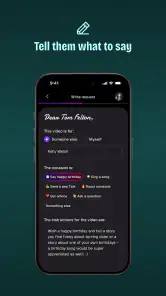
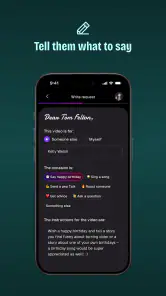
When writing a prompt, I’d include only the details that help the speaker get the message right: the recipient’s name, the occasion, and one or two specific references they will recognize. A short, clear request is easier to follow than a long script full of inside jokes. If a name has an unusual pronunciation, a simple phonetic hint can prevent an awkward moment.
I’d avoid putting private or sensitive information into a request. The best prompts give enough context to sound personal without turning the video into a list of instructions. It is also worth deciding whether the message should feel like a surprise before sharing the finished video; a gift loses some impact if the recipient sees the planning too early.
Timing, cost, and expectations
This is not my first choice for a last-minute greeting. A personalized recording involves another person fulfilling a request, so I would order with breathing room and avoid promising a specific delivery moment unless the app clearly gives that option during the request. For a birthday that cannot be missed, I’d prepare a card or a separate message as a fallback rather than letting the whole surprise depend on one video.
The app is free to download, but a personalized request is a purchase, and prices can vary widely between personalities. I’d decide on a firm budget before browsing; an exciting profile can make it easy to spend more than planned. Cameo’s in-app purchases range from under a dollar to several thousand dollars per item, so checking the actual price on the profile before committing is essential. The app is best for people who see the video as a one-off gift or fan experience, not those looking for a low-cost way to send ordinary greetings.
More From Our News Desk

Clash of Clans Is Won Between the Battles

Android Auto Makes the Case for Quieter Car Software

MobiOffice: Transforming Mobile Productivity with Seamless Integration

EA SPORTS FC™ Mobile Soccer: Redefining Mobile Sports Gaming

How Microsoft OneDrive Became a Mobile Productivity Giant

How Google Translate Breaks Language Barriers Effortlessly
Who will enjoy it most
I can see Cameo working especially well for a group gift. Friends or family can agree on one recipient and occasion, share the cost, and write a concise prompt together. That can make a personalized message from a favorite comedian, athlete, actor, or other public figure feel more meaningful than a generic store-bought present. It also gives the group a shared reveal to look forward to.
For example, if a friend is celebrating a birthday and constantly quotes a particular performer, I’d check whether that person is available, make sure the request is within the group’s budget, and include one recognizable reference rather than trying to script every line. I’d still keep the plan flexible: the point is the personal gesture, not getting a perfectly staged performance on demand.
On the other hand, I’d skip it if the recipient dislikes public figures, would find a video awkward, or values practical gifts more than novelty. I’d also choose a direct call, a handwritten note, or a conventional gift when the message needs a genuine back-and-forth conversation. A recorded shout-out can feel personal, but it is not the same as knowing someone or speaking with them live.
Compared with browsing social media for free clips, Cameo is built around requesting a message for a particular person rather than hoping to find a relevant public post. Compared with a standard online gift shop, its product is the interaction and the surprise, not an item that can be returned or used. That distinction is useful when deciding whether the price feels worthwhile: you are paying for a personalized moment, not a guaranteed change in the relationship.
As a shopping app, Cameo is developed by Cameo - Personalized Shoutouts. It is free to install, carries a Teen age rating, and is available in version 254.0.0. It has a 4.8 average from around 20,000 ratings and has passed one million installs. Those figures suggest broad interest, but I’d still judge a particular request by the profile, the price, and whether the recipient will appreciate that kind of surprise.
A practical way to plan a gift
For a birthday that is a few weeks away, I’d first ask a mutual friend to confirm that the recipient would enjoy a celebrity greeting. Then I’d shortlist a couple of relevant personalities rather than falling in love with the first familiar name, compare their displayed prices, and agree on one concise prompt with anyone contributing. This workflow keeps the decision about the recipient, not the excitement of browsing.
I’d also decide in advance how the video will be revealed. If the group plans to play it at a gathering, I’d check the playback setup beforehand and keep a written or spoken greeting ready in case the video is not available at the moment. That small backup protects the celebration without taking away from the surprise if everything goes as hoped.
Ever wondered what it would be like to get a personalized message from your favorite celebrity? That's the magic Cameo brings right to your fingertips. This app lets you connect with stars in a way that feels personal, exciting, and just a little bit surreal. Let me break down what using Cameo is really like, and why you might find yourself recommending it to everyone you know.
What’s the Buzz About?
Cameo is where you can get a personalized video shout-out from a celebrity. Whether it's for a birthday, anniversary, or just to brighten someone's day, this app makes it happen. The app boasts a wide array of stars—from actors and musicians to athletes and influencers. It's like a digital red carpet laid out just for you.
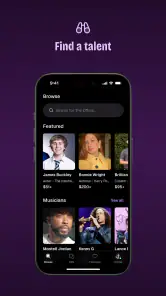
When you first open the app, you might get a bit starstruck. There are so many famous faces ready to make your acquaintance. The interface is sleek and user-friendly, making it easy to browse through different categories or search for a specific celebrity. And trust me, you’ll be doing a lot of browsing.
How It Works
So, how does it all work? Simple. You choose a celebrity, tell them what you want them to say, and wait for the magic to happen. The process is straightforward, and the app guides you through each step with ease. It's like having your own personal assistant guiding you through Hollywood.
The app offers a variety of categories to choose from. Are you into sports? There are athletes galore. Prefer reality TV stars? They've got those, too. It feels like there's someone for everyone, which is part of what makes Cameo so appealing.
User Experience
I found the user experience to be pretty smooth. The app doesn't bombard you with ads, which is a huge plus. Navigating from one celebrity profile to another is seamless, and the video requests are easy to customize. You can even include details to make the message more personal, which is a nice touch.
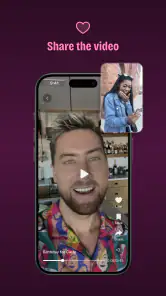
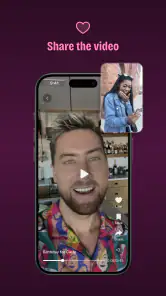
Once you’ve made your request, you’ll get a notification when the video is ready. Waiting can be the hardest part, but it’s worth it. Watching your favorite celeb call out your name or deliver your message is a thrill that’s hard to describe. It’s like opening a gift you didn’t know you needed.
What Makes It Stand Out?
One of the standout features of Cameo is the sheer diversity of celebrities available. It’s not just A-listers. You’ll find niche personalities and rising stars, too. This diversity not only broadens the appeal but also makes it more likely you’ll find someone who resonates with you.
Another highlight is the app's community feel. Users can leave reviews and share their experiences, which adds a layer of trust and excitement. You can see how others have enjoyed their Cameo experience, which might inspire you to get creative with your requests.
Choosing between a video and a regular gift
A personalized clip is strongest when the recipient already has a connection to the person speaking. If you are unsure, I’d ask a discreet question about their favorite performers before spending anything. For someone who enjoys practical presents, a conventional gift may land better; for a fan who collects memorable moments, a video can feel unusually tailored.
It also helps to be realistic about what “personal” means here. The message is made for the request, but it is still a recorded greeting rather than a private relationship or a live conversation. I’d frame it as a fun, thoughtful experience and avoid promising that the celebrity will mention every detail or deliver a particular emotional reaction.
Final Thoughts
At the end of the day, Cameo offers a unique way to connect with celebrities. It’s a fun, interactive experience that brings a slice of stardom directly to your screen. Whether you’re gifting a video to a friend or indulging yourself, the app delivers on its promise of personal, memorable interactions.
If you haven’t tried it yet, I’d say it’s worth a shot. After all, who wouldn’t want a little slice of celebrity magic in their lives?
Performance and device fit
In terms of speed, I’d expect the browsing and request-writing parts to feel lighter than playing or editing video, since the central task is exploring profiles and arranging a personalized recording. The finished video is the part most likely to depend on a steady connection and a device that can comfortably play media. I wouldn’t judge the whole experience by a brief pause while a video loads; browsing and watching place different demands on a phone.
For heavier use, such as comparing many profiles, reading reviews, and then watching several recordings, I’d keep an eye on battery and data use just as I would with any video-centered shopping experience. If I’m on a limited mobile connection, I’d save the viewing for Wi-Fi where practical. That is a sensible habit, not a claim that Cameo uses an unusual amount of data.
Reliability and recovery
The notification when a video is ready is useful because it means I don’t have to keep reopening the app to check. I would still save the key occasion details somewhere outside the app before placing an order, especially for a group gift: recipient name, pronunciation, and the agreed message. That makes it easier to recover the plan if I get interrupted while browsing or need to coordinate with friends.
My practical reliability test would be whether I can return to the chosen profile, review the request details, and understand the status before relying on the video for an event. I’d build in time and avoid making a time-sensitive promise based on an expected notification. If a request is central to a celebration, a simple backup greeting keeps a late or missed surprise from becoming the whole story.
Version and compatibility
The current version is 254.0.0, and the stated minimum operating-system requirement is 8.1. That makes the app a possibility for some older devices, but compatibility alone does not guarantee a consistently smooth experience: available storage, connection quality, and the phone’s ability to handle video playback still matter. I’d update the operating system and app where possible before relying on it for an important occasion.
The overall verdict is that Cameo’s performance matters less as raw speed than as a clear path from browsing to a well-chosen request and then to a video worth sharing. I’d recommend it when the recipient will value a personal celebrity message and the timing can stay flexible. If you need instant delivery, a conversation, or a predictable low-cost purchase, a direct message or ordinary gift is the more dependable fit.
Cameo - Personal celeb videos Frequently Asked Questions
Do I need an account to browse Cameo or place a request?
Cameo is built around browsing celebrity profiles and requesting personalized videos, so an account may be needed to manage an order and receive its finished video. Before starting a purchase, review the profile and request details carefully. Signing in also helps keep the request associated with you, rather than leaving important order information only on your device.
What can I use a Cameo video for after I receive it?
Cameo videos are intended for personal use, such as sharing with friends or posting on social media. If you want to use a video in advertising, promotional material, or another commercial setting, additional permission may be required. Consider how you plan to use the recording before placing an order, and check Cameo’s terms for the applicable rules.
Can I choose any celebrity, and will every request be completed?
You can browse the celebrities available on Cameo and select a profile that suits your request, but a submitted order is not a guarantee that the celebrity will complete it. Their availability and schedules can affect whether a request is fulfilled. If a star cannot complete a request, you will be notified and refunded, so check the profile and order details before submitting.
Is Cameo free to download, and what might I pay for inside the app?
Cameo is free to download, while personalized videos are purchased through the app. The amount depends on the celebrity and the request, so check the price shown on a celebrity’s profile before placing an order. In-app purchases range from $0.49 to $9,999.99 per item, making it especially important to review the details and total cost before confirming.
Is Cameo suitable for younger users?
Cameo is rated Teen, so it may be appropriate for some teenage users, but families should consider the nature of the service and the content they may encounter. The app connects users with celebrities and lets them request personalized videos, which can involve purchases. Parents or guardians may want to discuss spending and review the app together before a younger user downloads it.
Pros
- Unique personalized video messages.
- Wide range of celebrities available.
- Easy-to-use interface and navigation.
- Great for special occasions and gifts.
- Regular updates with new features.
Cons
- High prices for popular celebrities.
- No free content available.
- Limited interaction with celebrities.
- Some videos may have delays.
- Quality varies between celebrities.

- Category
- Shopping
- Version
- 254.0.0











